Plaky: Integração com Clockify
Com a integração entre Clockify e Plaky, você pode monitorar o tempo gasto em seus quadros, itens e subitens do Plaky e ter esse tempo registrado como projetos e tarefas do Clockify sem precisar alternar entre os aplicativos.
Se você tiver pelo menos um espaço de trabalho ativo em ambos os aplicativos dentro da mesma organização CAKE.com, essa integração será ativada automaticamente.
Como funciona #
Com a integração Clockify-Plaky, você pode controlar o tempo gasto em seus projetos e tarefas diretamente dos quadros, itens e subitens do Plaky. Ao conectar um quadro do Plaky a um projeto do Clockify, você cria um vínculo direto entre seus itens/subitens do Plaky e as tarefas do Clockify.
Conecte o projeto Clockify à placa Plaky #
Para controlar o tempo gasto em seus itens e subitens do Plaky, você, como proprietário do quadro, precisa ter acesso a pelo menos um espaço de trabalho do Clockify na mesma organização CAKE.com e conectá-lo ao seu quadro do Plaky.
Criar um quadro no Plaky #
Se você já possui uma placa, pule para Conectar ao Clockify.
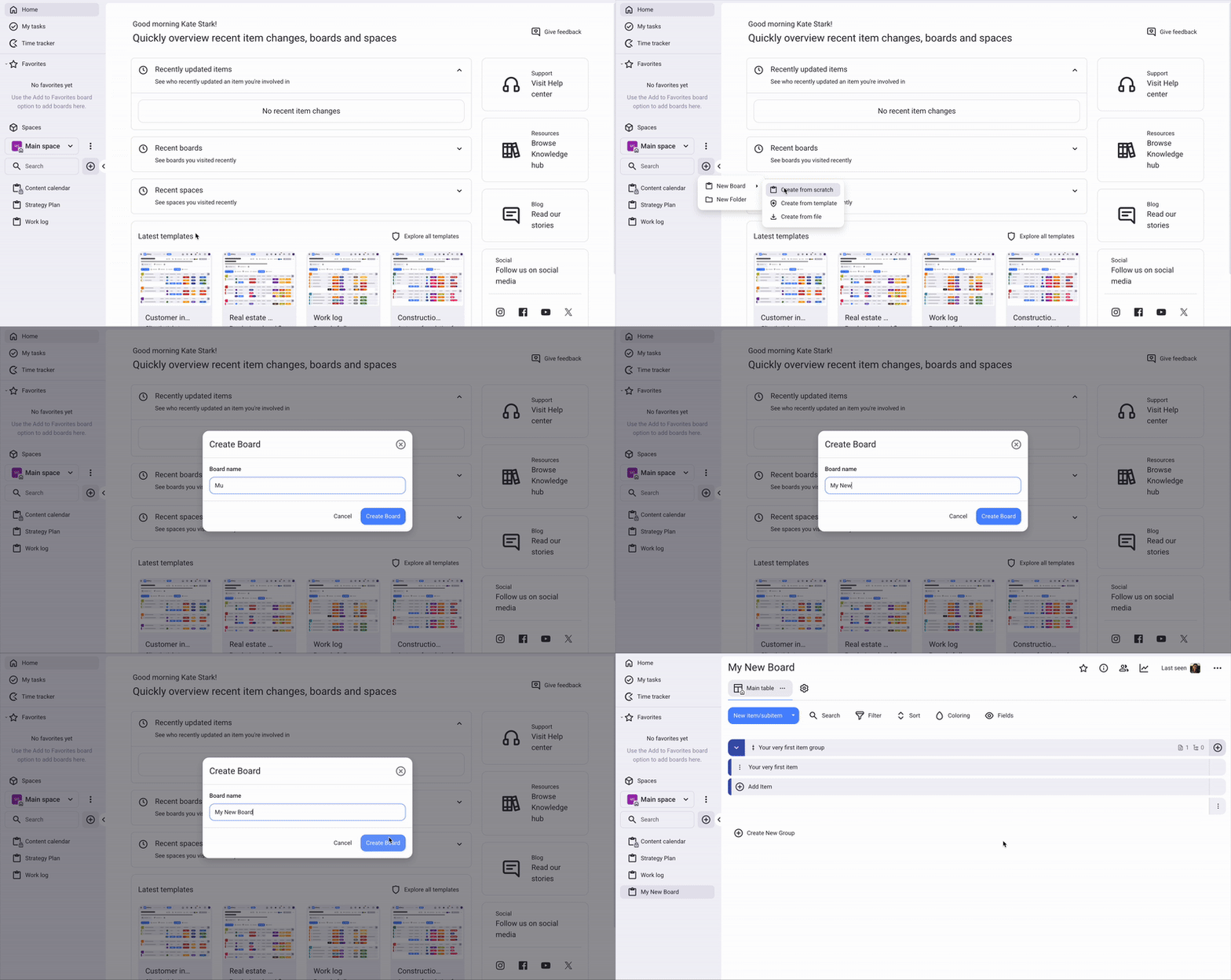
Para criar um quadro:
- Clique em + no menu à esquerda
- Selecione Novo Quadro
- Escolha Criar do zero, arquivo ou modelo
- Dê um nome ao seu quadro e clique em Criar Quadro
Conectar-se ao Clockify #
Para conectar sua placa Plaky ao Clockify:
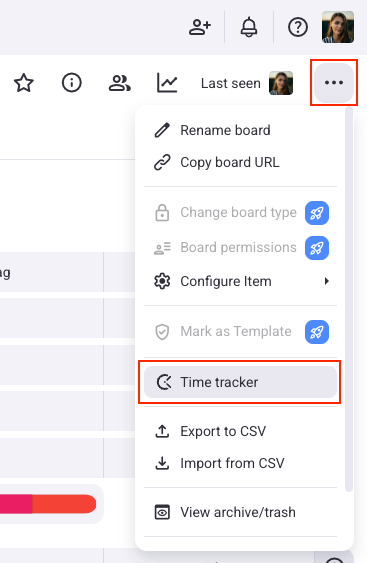
- Acesse as Configurações do seu quadro Plaky e clique em rastreador de tempo
- Nas configurações, você verá uma lista dos projetos do Clockify aos quais você tem acesso
- Escolha aquele que você deseja conectar à sua placa
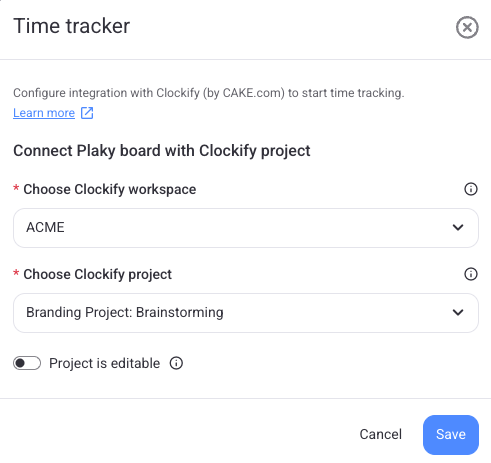
Uma placa Plaky só pode ser conectada a um projeto Clockify.
Após conectar o quadro Plaky ao projeto Clockify, haverá uma conexão direta entre seus itens/subitens do Plaky e as tarefas do Clockify, e todo o tempo monitorado neste quadro será registrado no projeto Clockify conectado.
Após conectar seu quadro, você também pode optar por bloqueá-lo para outros membros. Isso os impede de editar o quadro selecionado.
Se você não tiver acesso ao espaço de trabalho do Clockify em sua organização CAKE.com, poderá criar um diretamente nas configurações de integração do Plaky.
Registre o tempo decorrido desde o item #
Depois que a placa Plaky estiver conectada ao projeto Clockify, o proprietário da placa poderá configurar as definições de integração diretamente na barra lateral do item, na aba rastreador de tempo.
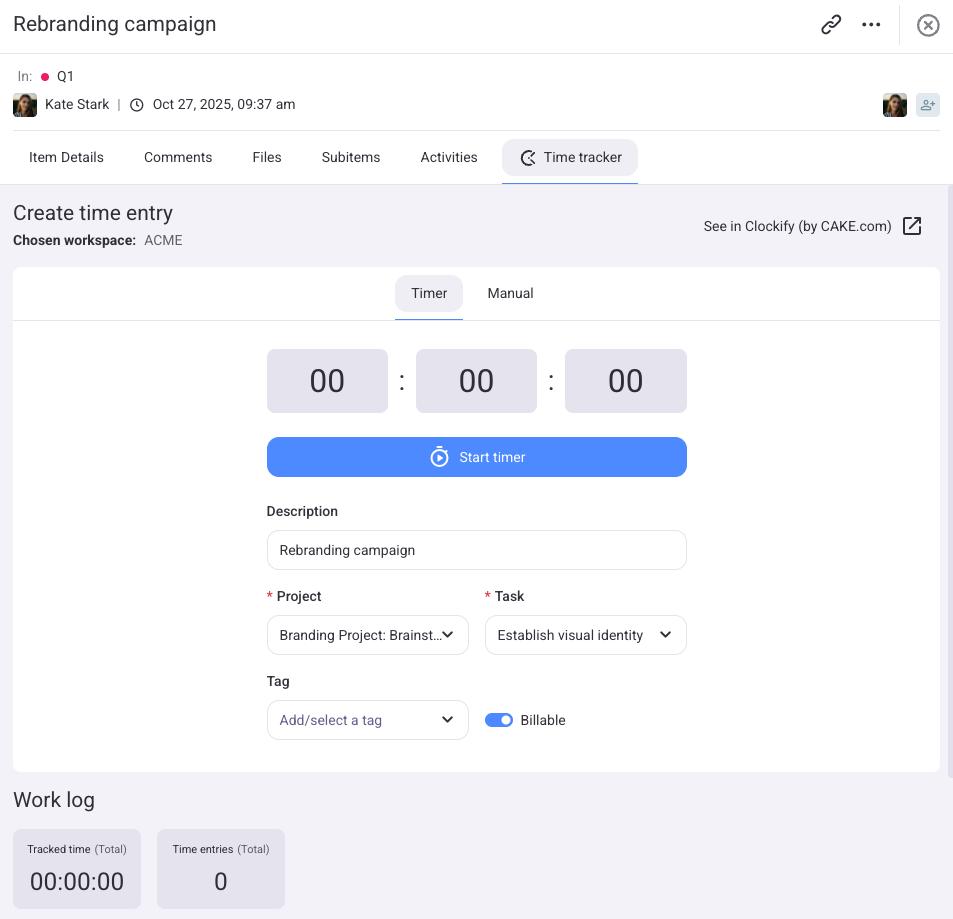
Usuários com acesso ao projeto Clockify conectado verão uma aba de rastreador de tempo com configurações predefinidas, incluindo projeto Clockify, tarefa e faturamento.
Usuários sem acesso serão notificados de que o rastreador de tempo não é possível e devem entrar em contato com um administrador.
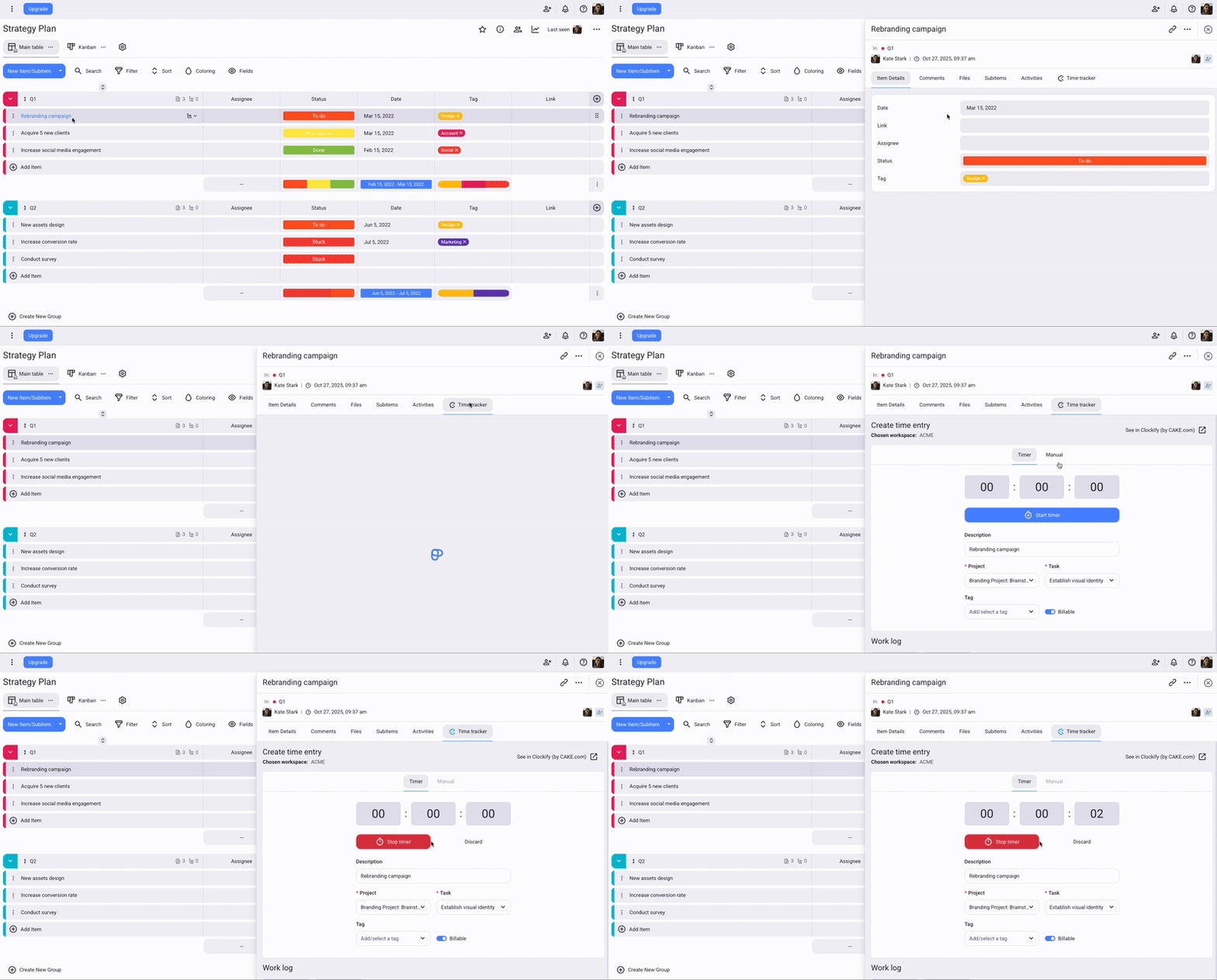
Acompanhe o tempo através do rastreador de tempo #
Ao clicar em Iniciar cronômetro no Plaky, um cronômetro também é iniciado no Clockify. Quaisquer alterações feitas (por exemplo, atualizar a descrição ou a tarefa) serão sincronizadas automaticamente entre os dois aplicativos.
Para usar o rastreador de tempo:
- Acesse seu quadro e abra um item/subitem
- Selecione a aba Cronômetro
- Insira os detalhes do projeto, da tarefa e outras informações necessárias.
- Clique em Iniciar cronômetro para começar a cronometrar o tempo.
- Pare o cronômetro quando terminar
Registre o tempo no modo Manual #
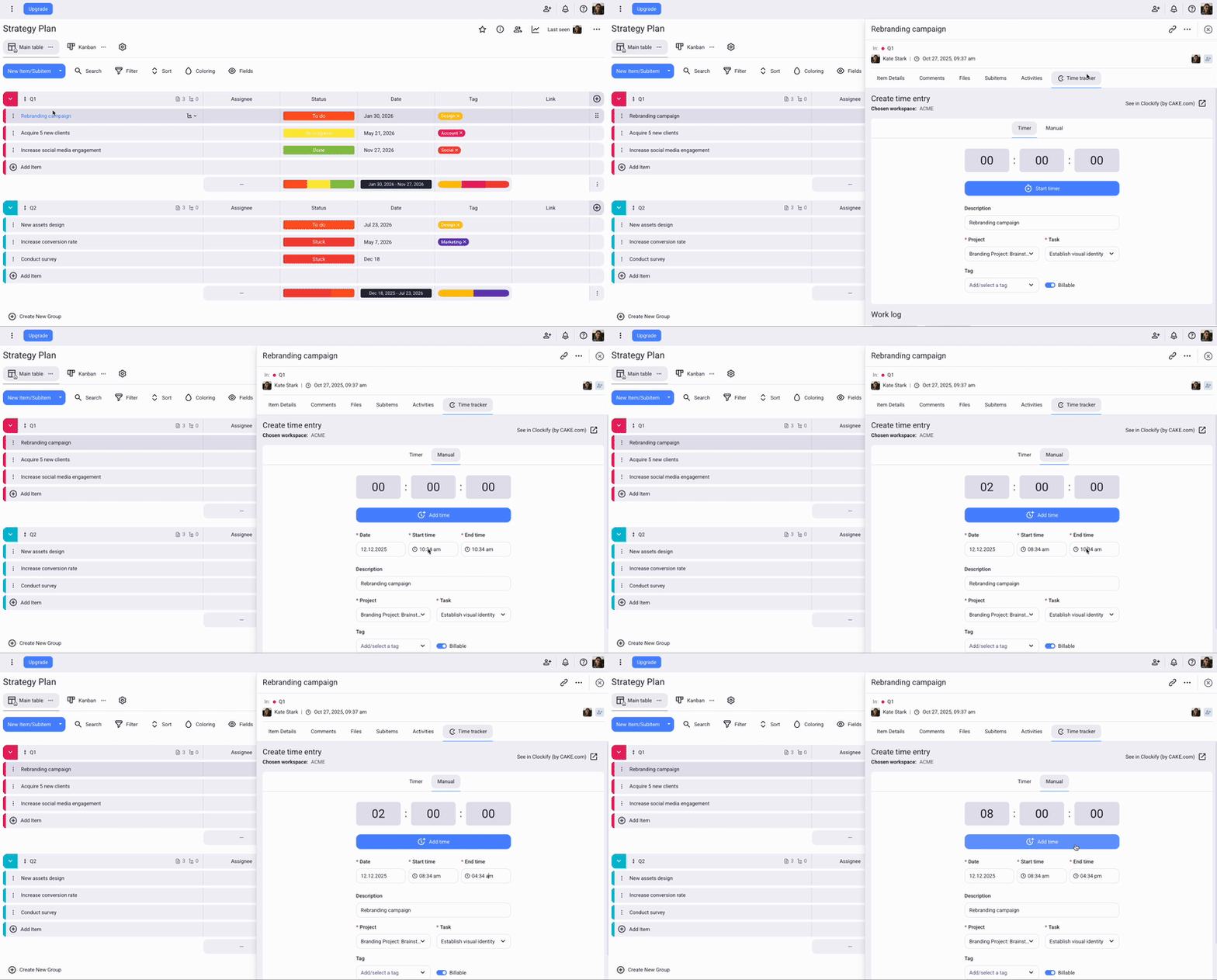
O modo manual permite que você insira a hora de início e de término do seu registro de tempo.
Para adicionar tempo manualmente:
- Acesse seu quadro e abra um item/subitem
- Selecione a guia Rastreador de tempo> Manual. Você verá um formulário com detalhes predefinidos, que poderá ajustar conforme necessário
- Insira a data, a hora de início, a hora de término, o projeto, a tarefa e outros detalhes necessários
- Clique em Adicionar tempo para concluir a ação.
Para adicionar e editar o tempo manualmente, a opção "Forçar temporizador" precisa ser desativada nas configurações do Espaço de Trabalho.
Use o Plaky para gerenciar seus projetos #
Plaky é uma ferramenta gratuita de gerenciamento de projetos que ajuda você com seus projetos, equipes e tarefas.
Gerencie projetos e tarefas
Crie e gerencie projetos e tarefas usando Quadros e Itens ilimitados. Divida tarefas maiores em componentes menores com Subitens.
Colabore com sua equipe
Trabalhe com membros da equipe em Espaços de Trabalho e Espaços compartilhados. Você pode convidar membros para Quadros específicos e compartilhar Itens com eles.
Organize seu trabalho
Adicione vários quadros e organize itens em grupos. Personalize seus quadros tornando-os públicos ou privados e definindo permissões específicas para outros usuários.

Para obter mais informações sobre a integração, consulte este artigo da Central de Ajuda do Plaky.
Se você quiser saber mais sobre o Plaky, acesse o site do Plaky e cadastre-se gratuitamente.