Plaky: Integración con Clockify
Con la integración Clockify-Plaky, puedes seguir el tiempo para tus tableros, elementos y subelementos en Plaky y tener ese tiempo registrado como proyectos y tareas de Clockify, sin tener que cambiar de aplicación.
Si tienes al menos un espacio de trabajo activo en ambas aplicaciones dentro de la misma organización de CAKE.com, esta integración se activa automáticamente.
Cómo funciona #
Con la integración Clockify-Plaky, puedes seguir el tiempo de tus proyectos y tareas directamente desde los tableros, elementos y subelementos de Plaky. Al conectar un tablero Plaky con un proyecto Clockify, creas un vínculo directo entre tus elementos/subelementos de Plaky y tareas de Clockify.
Conectar un proyecto Clockify con un tablero Plaky #
Para seguir el tiempo en tus elementos y subelementos Plaky, tú, como propietario del tablero, debes tener acceso al menos a un espacio de trabajo de Clockify en la misma organización de CAKE.com y conectarlo a tu tablero Plaky.
Create Plaky board #
Si ya tienes un tablero, pasa a Conectar a Clockify.
Para crear un tablero Plaky:
- Haz clic en + en el menú a la izquierda
- Selecciona Nuevo tablero (New board)
- Selecciona Crear desde cero, archivo o plantilla (Create from scratch, file or template)
- Nombra tu tablero y haz clic en Crear tablero (Create Board)
Conectar con Clockify #
Para conectar tu tablero Plaky con Clockify:
- Ve a la Configuración del tablero Plaky (Plaky board settings) y haz clic en Seguimiento del tiempo
- En la configuración, verás una lista de los proyectos de Clockify a los que tienes acceso
- Selecciona el que quieres conectar con tu tablero
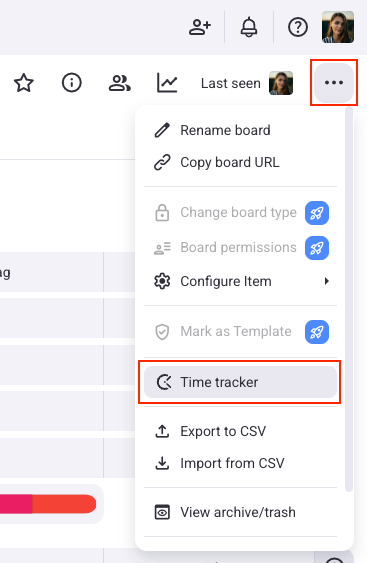
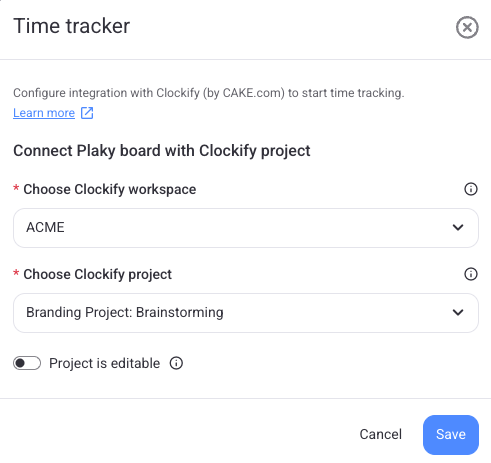
Un tablero Plaky puede conectarse con solo un proyecto Clockify.
Una vez que conectes el tablero Plaky al proyecto Clockify, existe un vínculo directo entre tus elementos/subelementos Plaky y las tareas Clockify, y todo el tiempo registrado en este tablero se registrará en el proyecto Clockify conectado.
Después de conectar tu tablero, puedes elegir bloquearlo para los demás miembros del tablero. Esto les impide editar el tablero seleccionado.
Si no tienes acceso a un espacio de trabajo Clockify en tu organización de CAKE.com, puedes crear uno directamente en la configuración de la integración Plaky.
Sigue el tiempo a partir de un elemento #
Una vez conectado el tablero Plaky con el proyecto Clockify, el propietario del tablero puede configurar los ajustes de la integración directamente en la barra lateral del elemento, en la pestaña Seguimiento del tiempo (Time tracking).
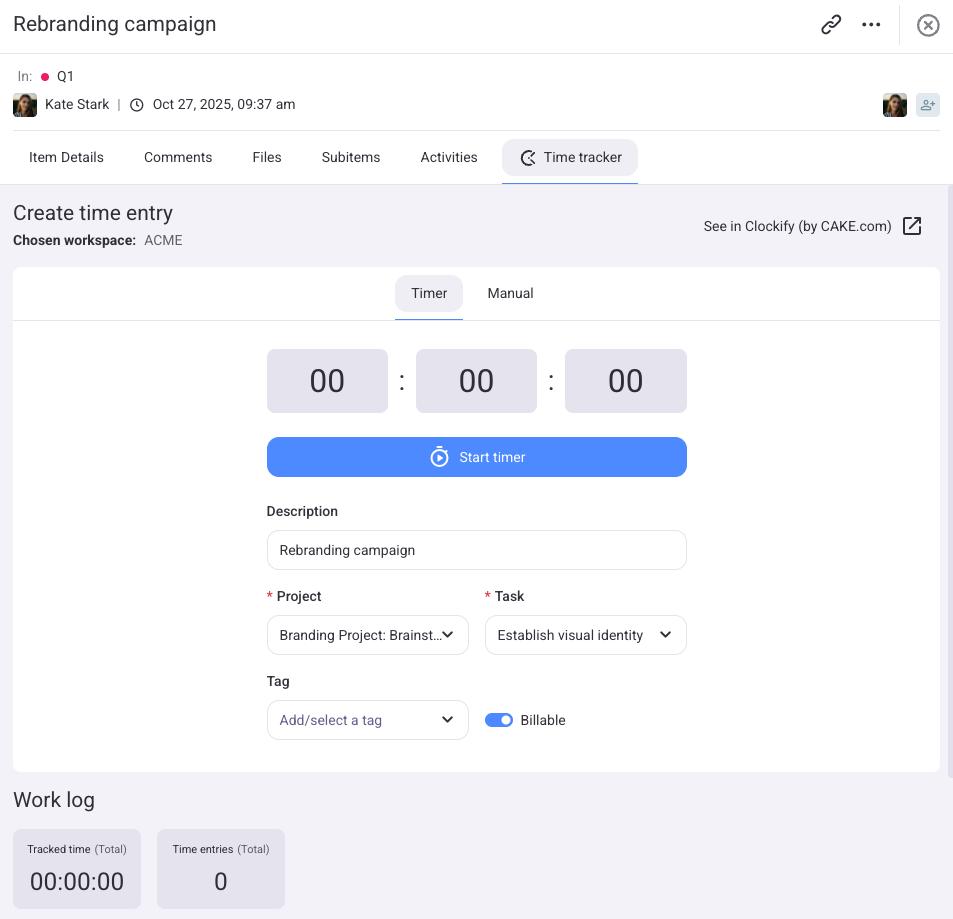
Los usuarios con acceso al proyecto Clockify conectado verán la pestaña de Seguimiento del tiempo (Time tracking) con la configuración predeterminada, incluso el proyecto, tarea y facturabilidad de Clockify.
Los usuarios sin acceso recibirán notificaciones que el seguimiento del tiempo no es posible y que deben ponerse en contacto con un administrador.
Sigue el tiempo con el Rastreador #
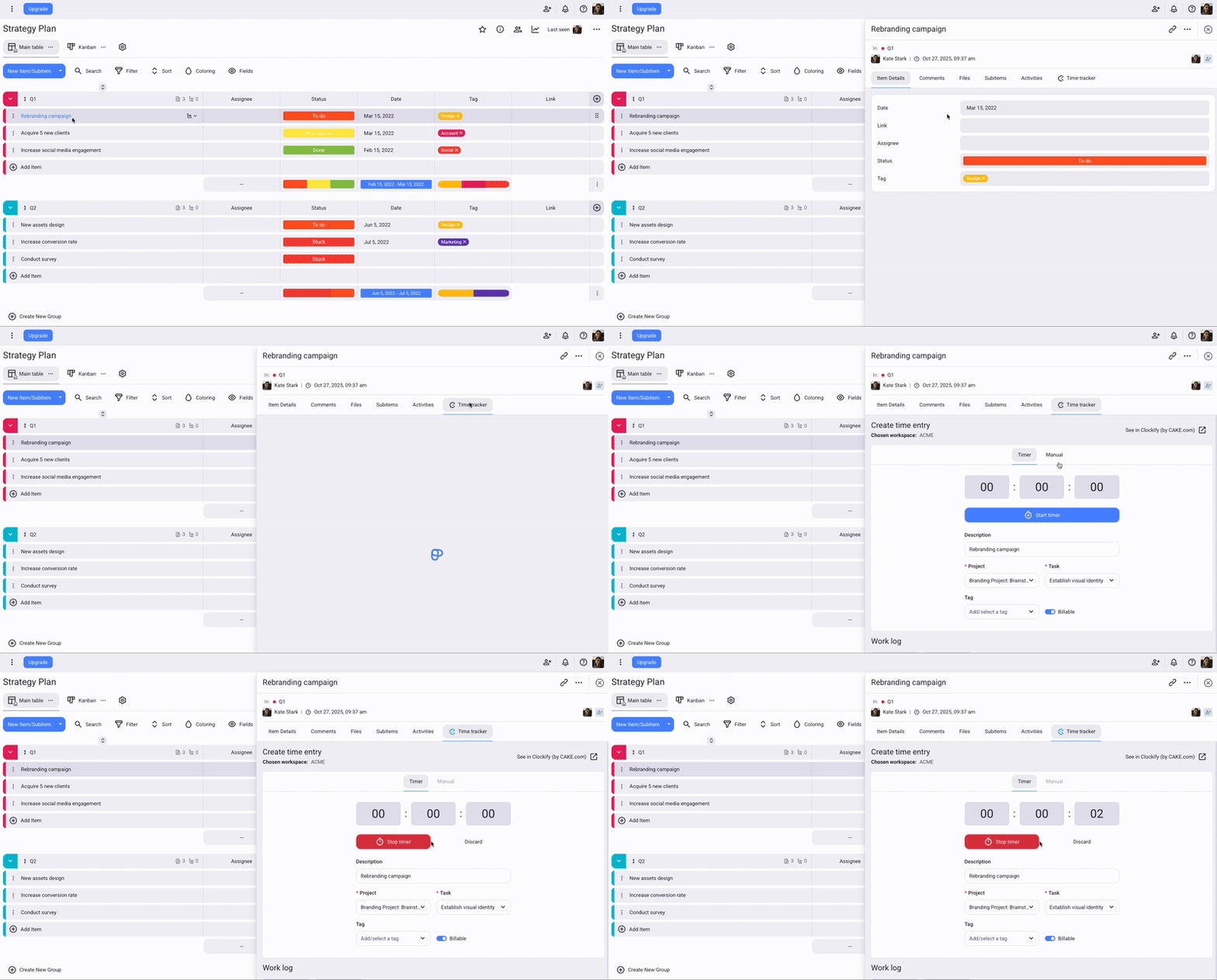
Cuando haces clic en Iniciar temporizador (Start timer) en Plaky, también se inicia un temporizador en Clockify. Cualquier cambio que realices (por ejemplo, actualizar la descripción o la tarea) se sincronizará automáticamente entre ambas aplicaciones.
Para utilizar el controlador de tiempo:
- Ve a tu tablero y abre un elemento/subelemento
- Selecciona Controlador de tiempo (Time Tracker) > pestaña Temporizador (Timer)
- Introduce el proyecto, la tarea y otros detalles necesarios
- Haz clic en Iniciar temporizador (Start timer) para comenzar a controlar el tiempo
- Detén el temporizador cuando hayas terminado
Sigue el tiempo en modo manual #
El modo manual te deja introducir las horas de inicio y finalización para tu entrada de tiempo.
Para añadir tiempo manualmente:
- Ve a tu tablero y abre un elemento/subelemento
- Selecciona Controlador de tiempo > pestaña Manual
Verás un formulario con detalles predeterminados, que puedes cambiar. - Introduce la fecha, las horas de inicio y finalización, el proyecto, la tarea y otros detalles necesarios
- Haz clic en Añadir tiempo(Add time) para terminar la acción
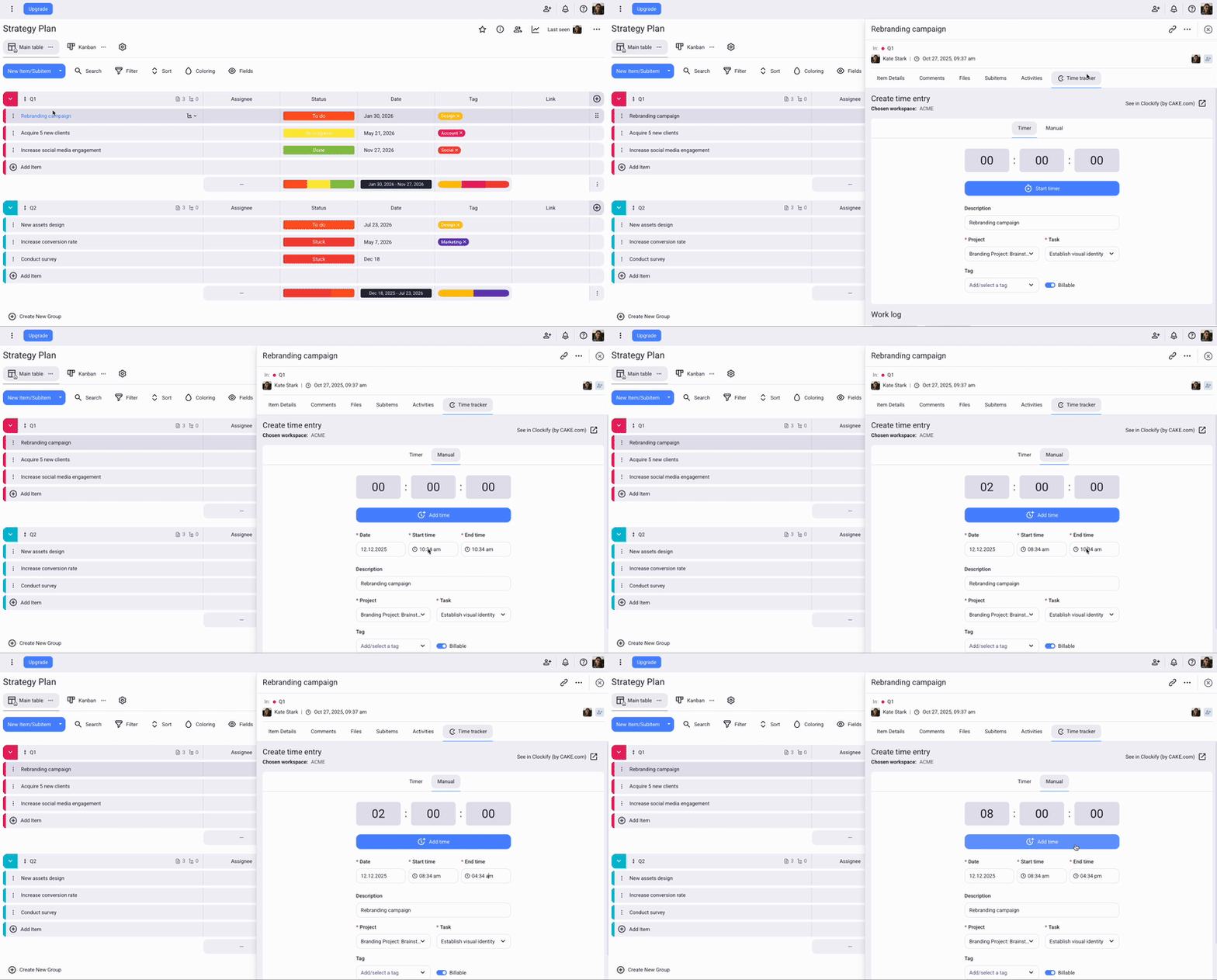
Para añadir y editar el tiempo manualmente, la opción de Temporizador forzado debe ser desactivada en la Configuración del espacio de trabajo.
Usa Plaky para gestionar tus proyectos #
Plaky es una herramienta gratuita para la gestión de proyectos que te ayuda con tus proyectos, equipos y tareas.
Gestiona proyectos y tareas
Crea y gestiona proyectos y tareas usando tableros y elementos ilimitados. Divide tareas más grandes en componentes más pequeños con subelementos.
Colabora con tu equipo
Trabaja con los miembros del equipo en espacios de trabajo y espacios compartidos. Puedes invitar miembros a tableros específicos y compartir elementos con ellos.
Organiza tu trabajo
Añade múltiples tableros y organizar elementos en grupos. Personaliza tus tableros haciéndolos privados o públicos, y estableciendo permisos específicos para otros usuarios.

Para obtener más información sobre la integración, echa un vistazo a este artículo del Centro de ayuda de Plaky.
Si te gustaría saber más sobre Plaky, consulta el sitio web de Plaky y regístrate gratuitamente.