Aprovisionamiento de usuarios SCIM
El aprovisionamiento de usuarios SCIM te permite gestionar y sincronizar automáticamente los miembros y grupos en Clockify a través de tu proveedor de identidad (IdP). Así, el acceso del usuario está actualizado en todo el espacio de trabajo Clockify.
Entre sus ventajas se incluyen:
- Eficiencia para equipos grandes: Añade automáticamente cientos de usuarios a la vez sin necesidad de invitaciones manuales.
- Seguridad mejorada: Garantiza que los usuarios pierdan el acceso a Clockify inmediatamente al ser dados de baja del sistema de tu empresa.
- Gestión centralizada: Sincroniza usuarios y grupos para mantener la estructura de tu espacio de trabajo coherente.
Habilitar SCIM #
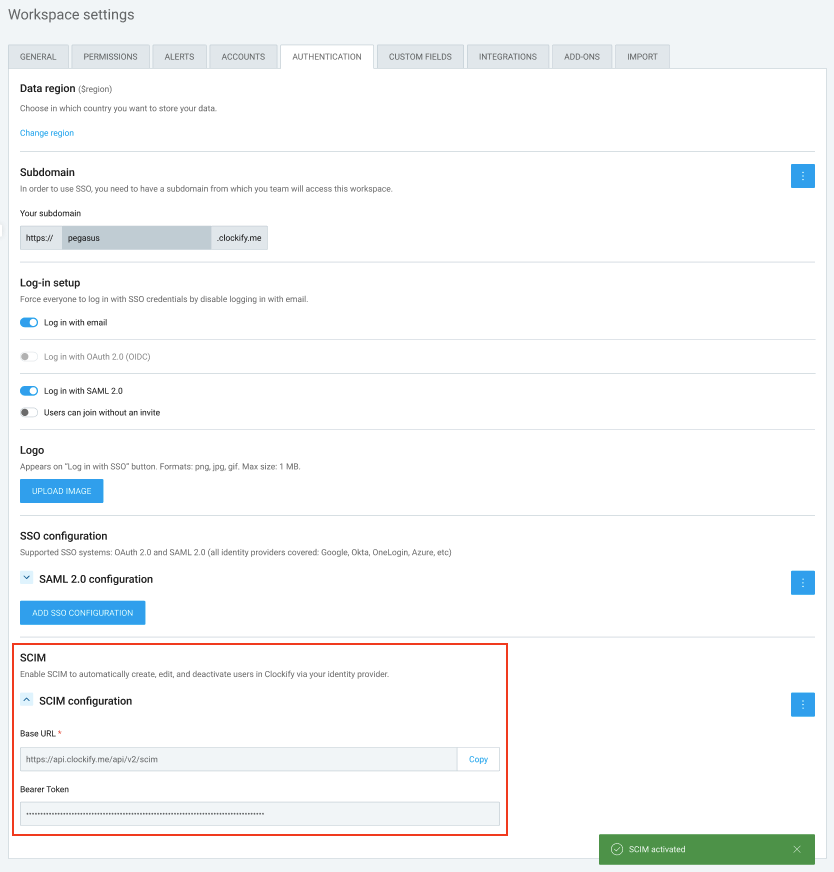
Para iniciar la integración, el Propietario debe generar las credenciales necesarias en Clockify para vincularlas con el proveedor de identidad (IdP).
- Ve a la Configuración de tu espacio de trabajo.
- Encuentra la sección SCIM.
- Habilita la opción SCIM para generar tu único:
- URL base
- Token de portador
- Copia estos valores y pégalos en tu proveedor de identidad (por ejemplo, Okta, Microsoft Entra ID, Google Workspace o JumpCloud) al crear la aplicación SCIM.
Una vez conectado SCIM, Clockify gestionará automáticamente las siguientes acciones en función de los cambios en tu IdP:
Para usuarios: #
- Los usuarios se crean en Clockify en cuanto se añaden al IdP.
- Los cambios en el nombre o correo electrónico de un usuario en el IdP se actualizan automáticamente en Clockify.
- Cuando un usuario se activa o desactiva en el IdP, su estado en Clockify se actualiza al instante.
- La zona horaria predeterminada se toma inicialmente del IdP. Sin embargo, si un usuario cambia manualmente su zona horaria en Clockify (por ejemplo, durante un viaje), Clockify conserva la información de referencia para esa configuración y no la sobrescribirá.
Para grupos: #
- Los grupos de Clockify existentes se eliminan una vez habilitado SCIM.
- Los grupos se crean o eliminan en Clockify según la configuración de tu IdP.
- Los usuarios se añaden o eliminan automáticamente de los grupos de Clockify cuando cambia su pertenencia a un grupo en el IdP.
- Los nombres de los grupos siempre coincidirán con la convención de nomenclatura utilizada en tu IdP.
Para usuarios empresariales, Clockify ofrece la posibilidad de integrarse con otras aplicaciones mediante SCIM v2.
SCIM es compatible con las siguientes aplicaciones:
Conéctate a Jumpcloud
Esta acción requiere una cuenta de administrador de Google.
Paso 1: Crea una app en Jumpcloud #
Para crear la app:
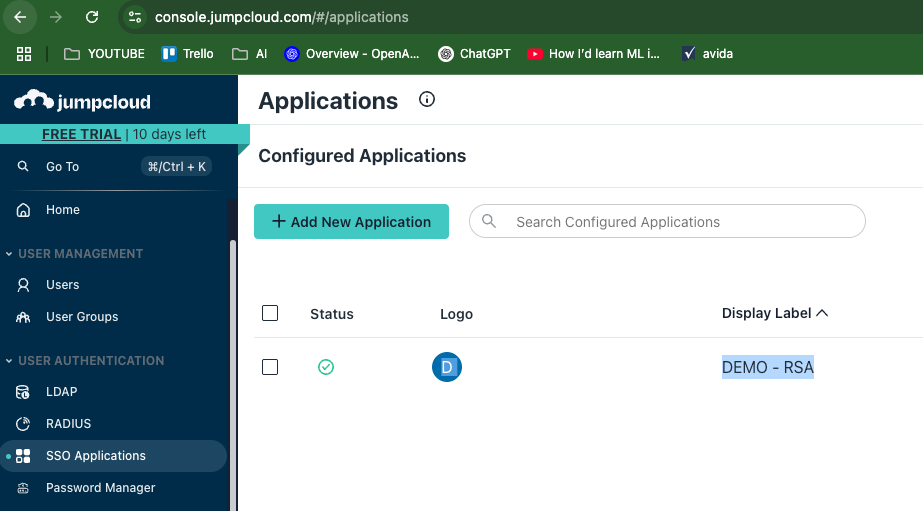
- Inicia sesión en tu panel de control de Jumpcloud
- Encuentra Aplicaciones SSO (SSO Applications) (en Autenticación de usuario (User Authentication))
- Haz clic en Añadir nueva aplicación (Add New Application)
4. Selecciona Aplicación personalizada (Custom Application)
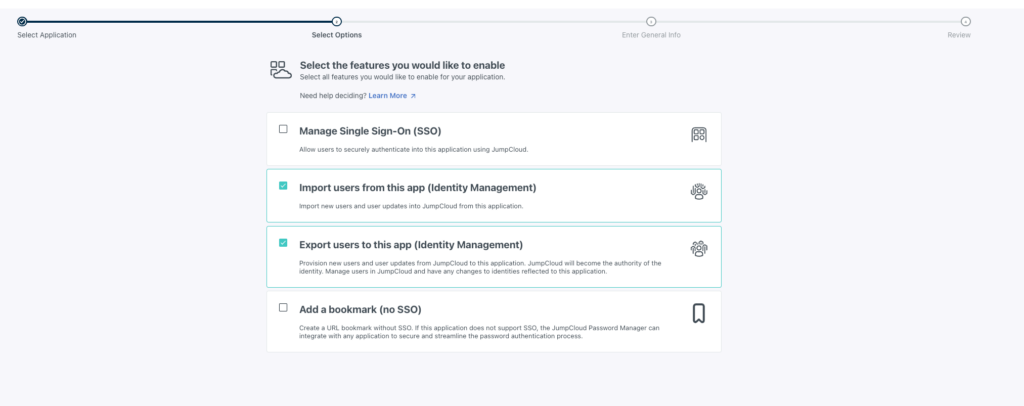
5. Marca las siguientes casillas:
- Importar usuarios de esta aplicación (Gestión de identidades)
- Exportar usuarios a esta aplicación (Gestión de identidades)
6. Haz clic en Siguiente (Next)
7. Introduce un nombre para tu aplicación
8. Haz clic en Guardar aplicación (Save application)
Paso 2: Habilita SCIM en Clockify
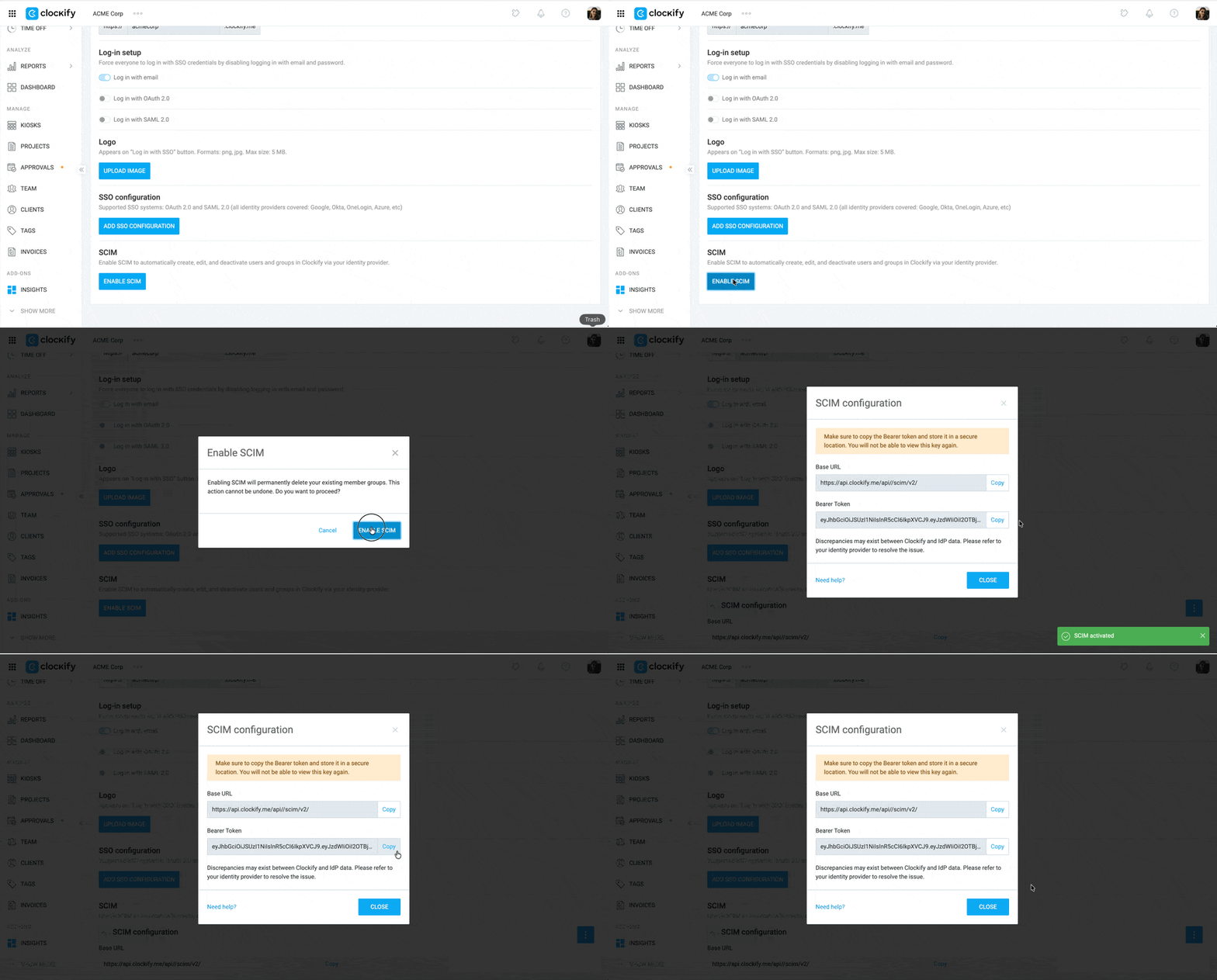
- Inicia sesión en Clockify
- Haz clic en el ícono de tres puntos al lado del nombre de tu espacio de trabajo
- Selecciona Configuración del espacio de trabajo
- Haz clic en la pestaña Autenticación
- Haz clic en Habilitar SCIM
- Copia la URL base y el Token de portador
Paso 3: Finalizar la conexión #
En Jumpcloud:
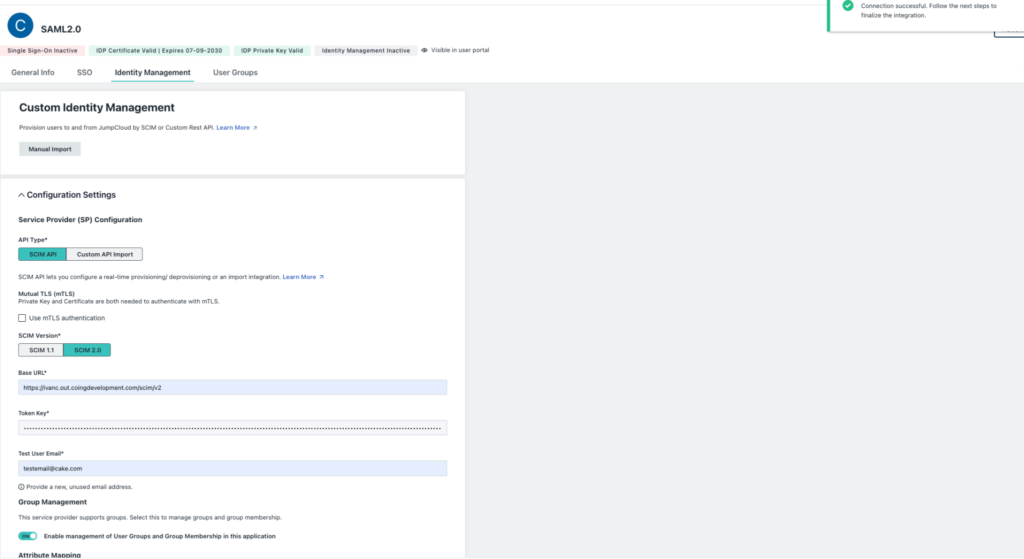
- Ve a la pestaña Gestión de identidades (Identity Management)
- Pega la URL base (Base URL) y el Token de portador (Bearer Token) en sus respectivos campos
- Haz clic en Probar conexión (Test Connection). Aparecerá una ventana emergente para confirmar que la conexión se ha realizado correctamente.
- Haz clic en Activar (Activate)
Conéctate a Okta
Esta acción requiere una cuenta de administrador de Okta.
Paso 1: Crear una app en Okta #
Para añadir el aprovisionamiento SCIM en Okta:
- Inicia sesión en tu cuenta de Okta
- Haz clic en Aplicaciones (Applications) en el menú lateral
- Haz clic en Aplicaciones (Applications)
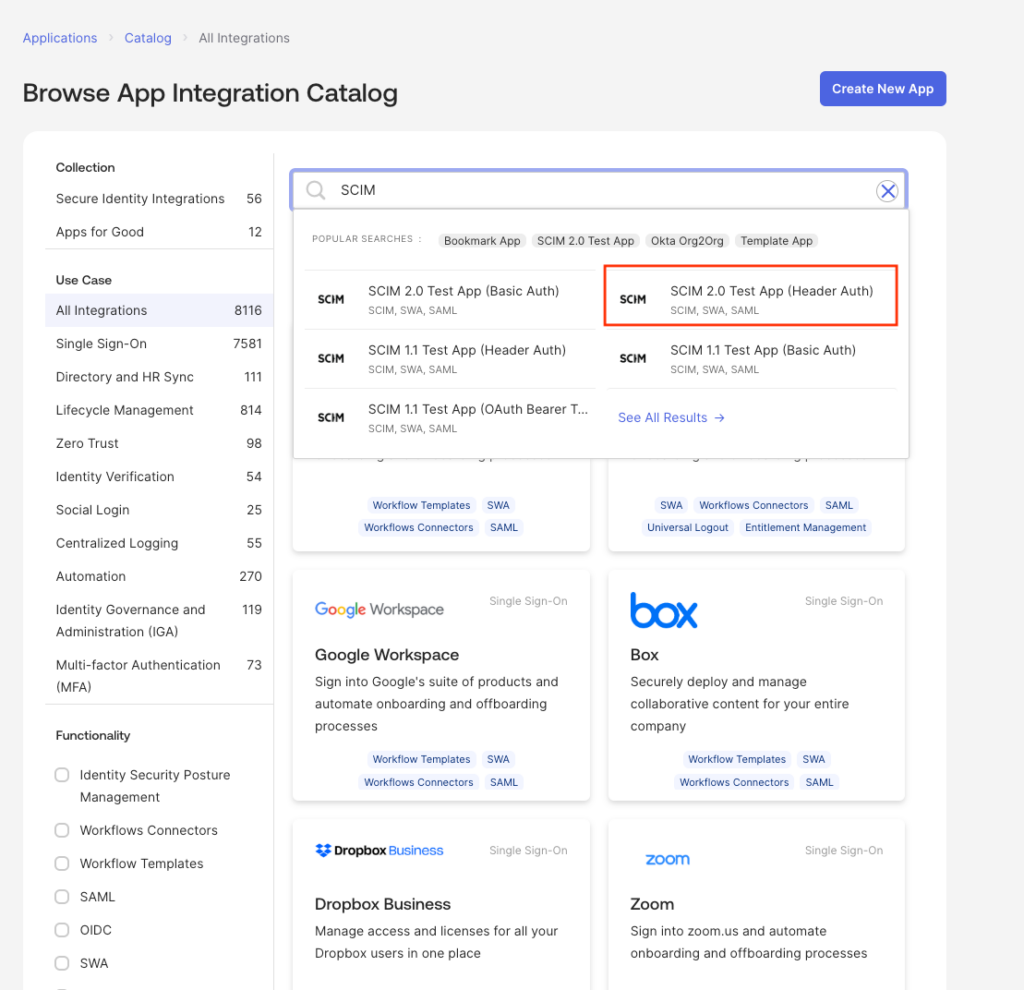
- Selecciona el botón Explorar catálogo de apps (Browse app catalog)
- Busca SCIM en el campo de búsqueda
- Selecciona SCIM 2.0 Test App (Header Auth) en los resultados de la búsqueda
7. Haz clic en Añadir integración (Add Integration)
8. Haz clic en Siguiente (Next) (deja los detalles como están)
9. Haz clic en Hecho (Done)
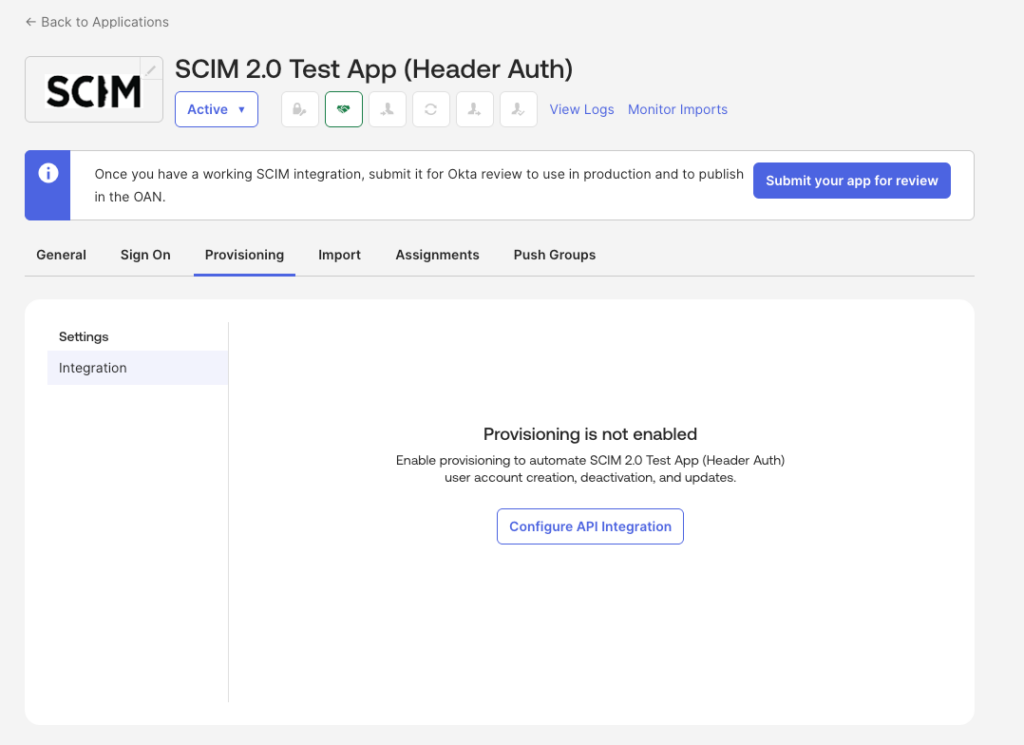
10. Ve a la pestaña Aprovisionamiento (Provisioning)
11. Haz clic en Configurar integración de API (Configure API Integration)
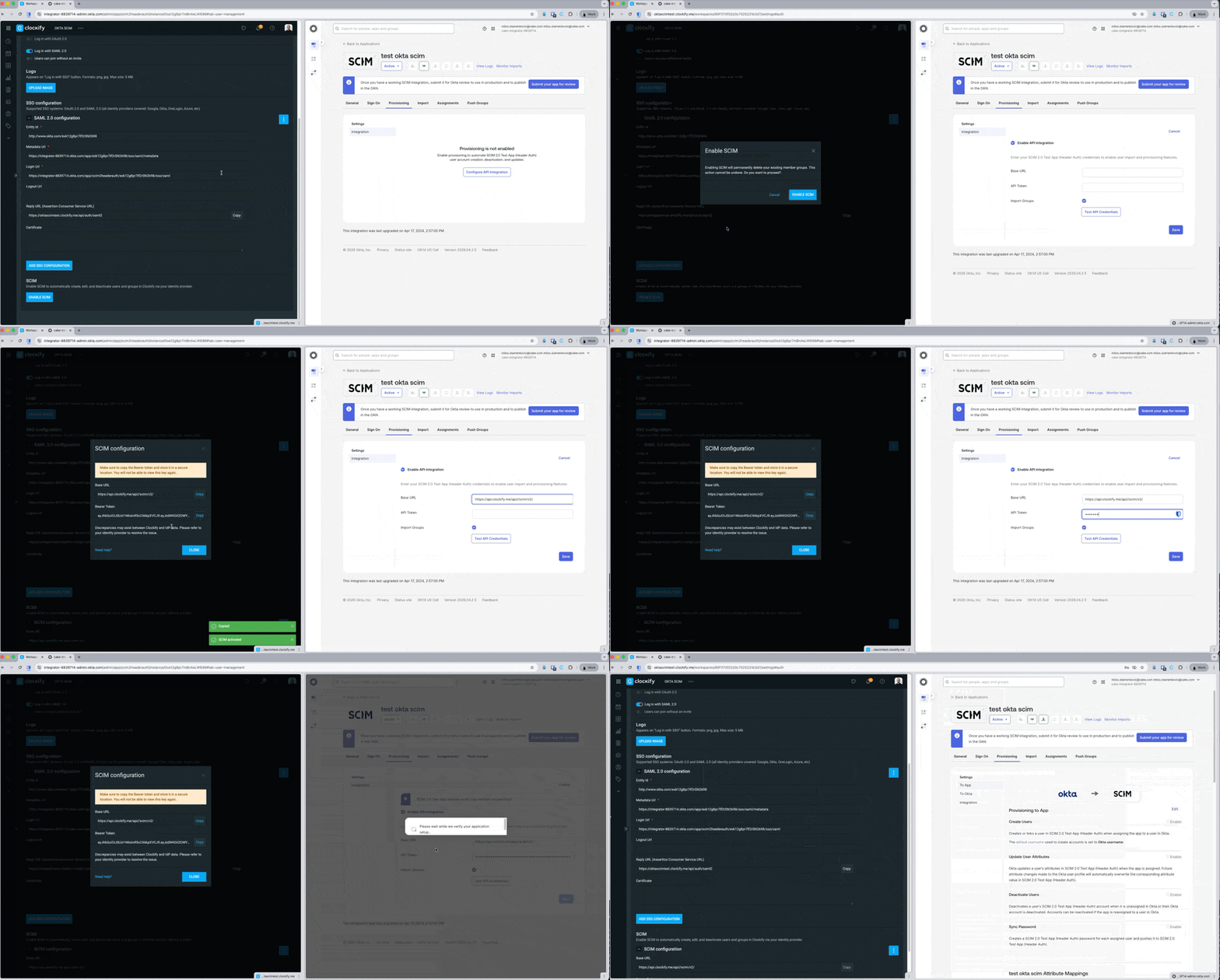
12. Marca la casilla Habilitar integración de API (Enable API Integration)
13. Introduce la URL base (Base URL) y el Token de portador (Bearer Token) (Obténlo de Clockify)
14. Haz clic en Probar credenciales de API (Test API Credentials)
15. Haz clic en Guardar (Save)
Paso 2: Editar la configuración de usuario #
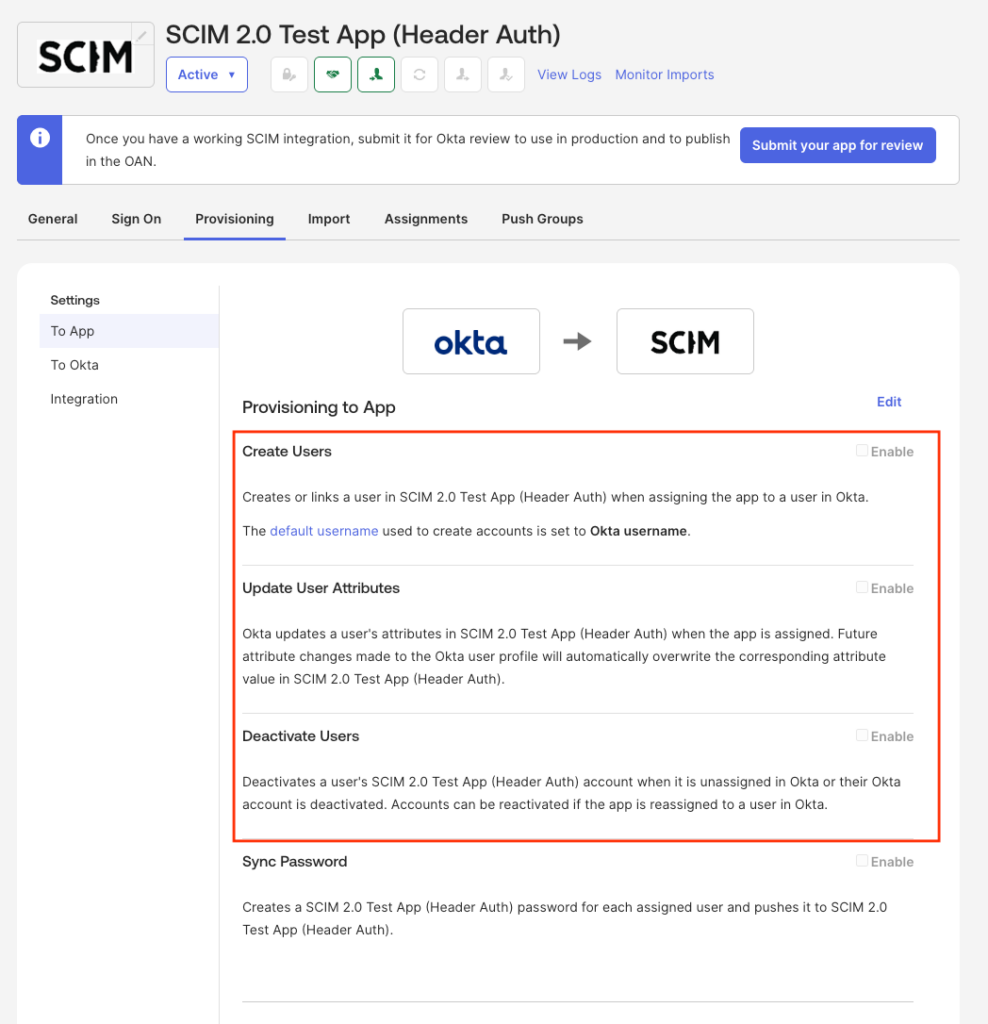
- Ve a la pestaña Aprovisionamiento (Provisioning)
- Haz clic en A la aplicación (To App) en el menú lateral
- Marca/activa las siguientes opciones:
- Crear usuarios
- Actualizar atributos de usuario
- Desactivar usuarios
Crear usuario #
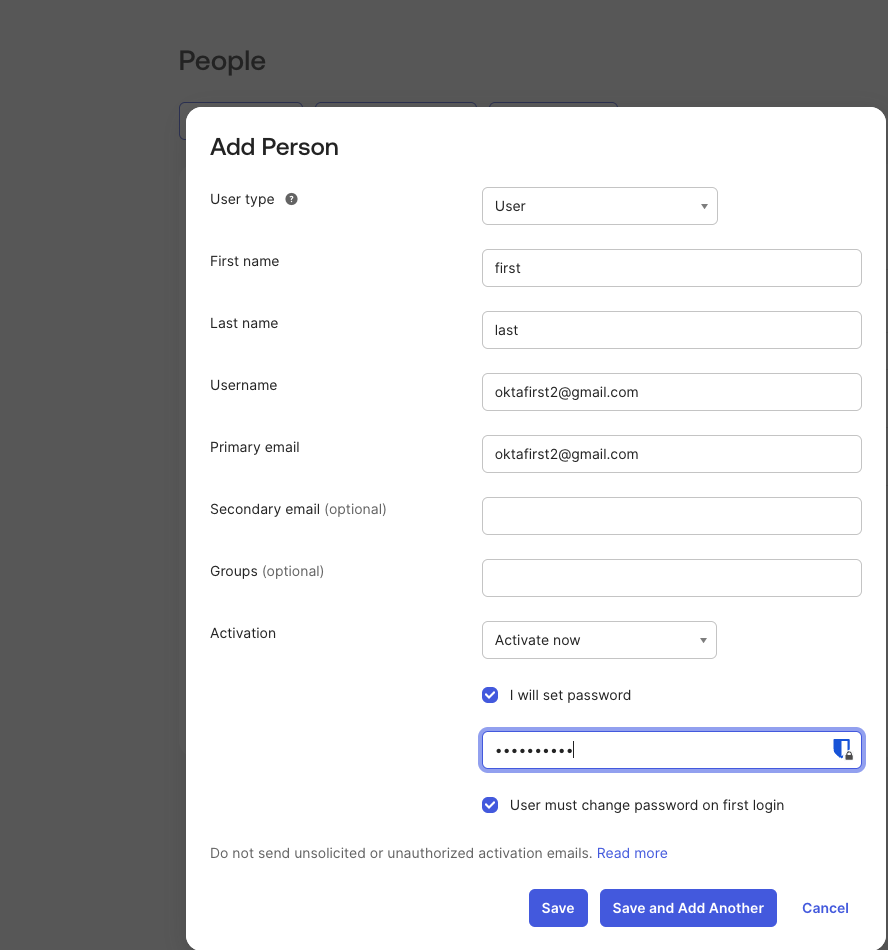
Para crear un usuario:
- Ve a Directorio > Personas (Directory > People)
- Haz clic en Añadir persona (Add Person)
- Introduce la información requerida
- Haz clic en Guardar (Save) o Guardar y Añadir otro (Save and Add another)
Crear grupo #
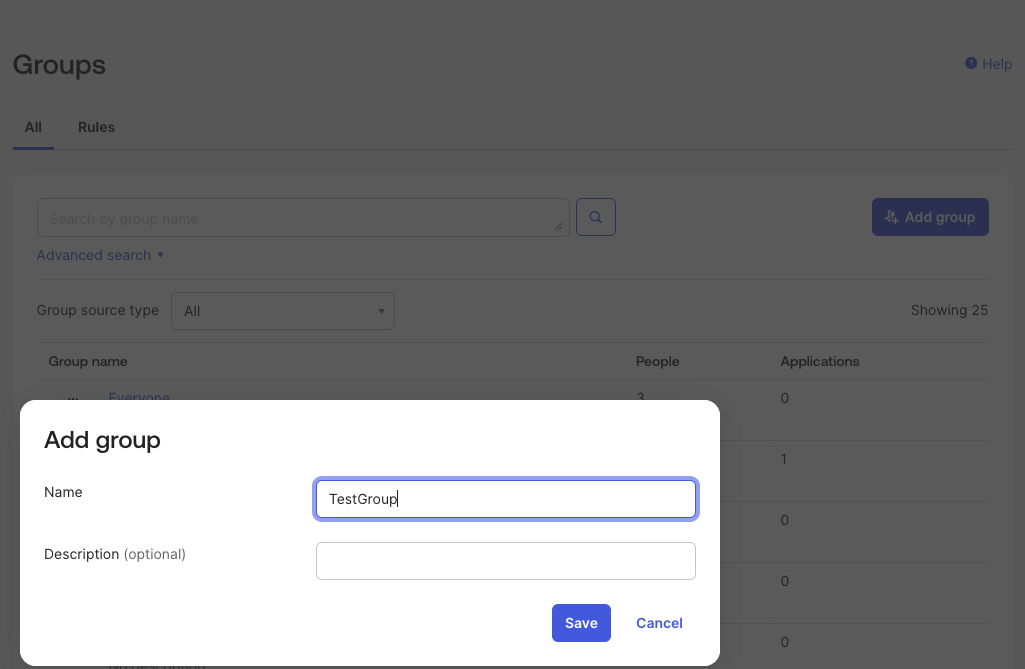
Para crear un grupo:
- Ve a Directorio > Grupos (Directory > Groups)
- Haz clic en Añadir grupo (Add Group)
- Introduce el nombre del grupo y una descripción (opcional)
- Haz clic en Guardar
Asignar usuarios a un grupo
- Ve a tu panel de Okta y busca la lista de Grupos
- Selecciona el grupo que ya has creado
- Haz clic en el botón Asignar personas (Assign people)
- Selecciona los usuarios que quieres añadir a este grupo
Sincronizar grupos
Asignar un grupo solo sincroniza a las personas que lo componen. Para sincronizar el grupo completo, debes usar la función Sincronizar grupos.
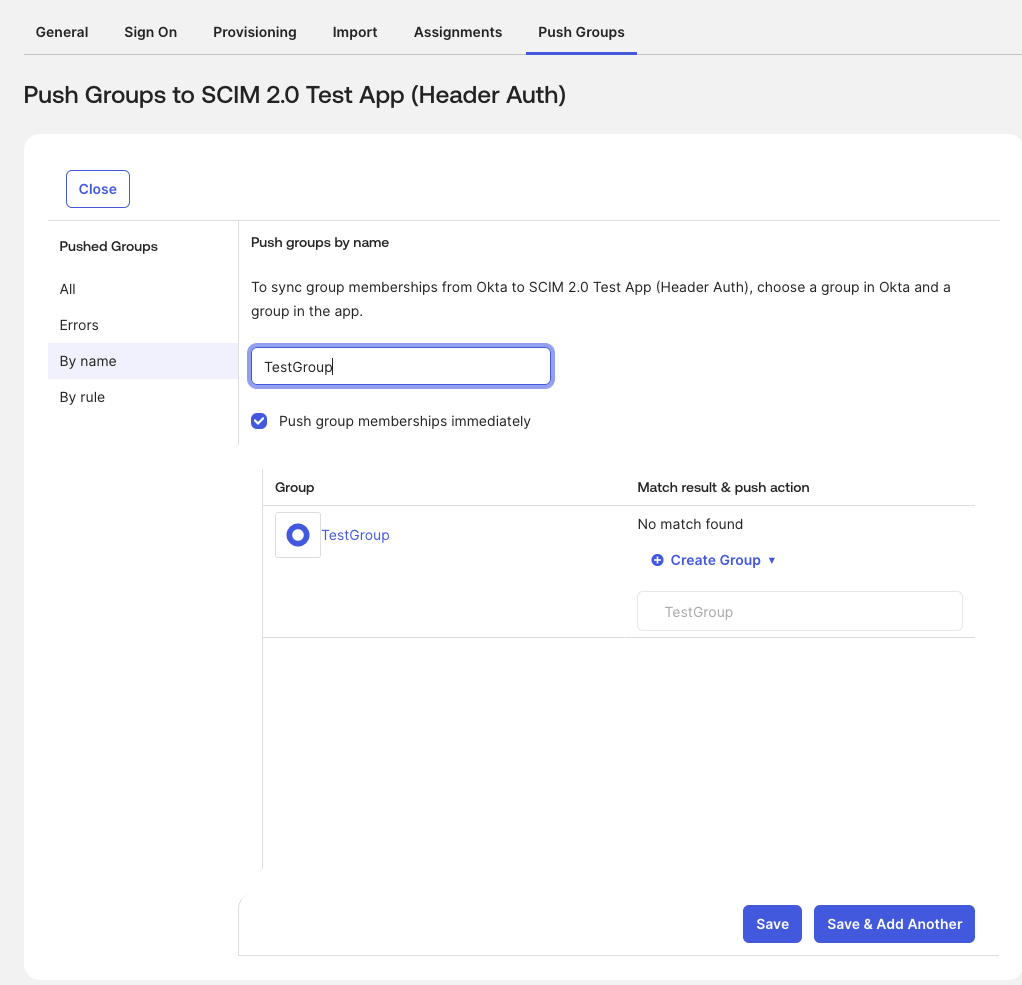
Para sincronizar grupos:
- Ve a la pestaña Sincronizar grupos (Push Groups)
- Selecciona el grupo
- Marca la casilla para Sincronizar miembros del grupo inmediatamente (Push group members immediately)
- Haz clic en Guardar
Conéctate a Microsoft Entra
Paso 1: Crea la aplicación personalizada en ID de Entra #
Para conectarte a Microsoft Entra:
- Inicia sesión en el centro de administración de Microsoft Entra
- Ve a Aplicaciones > Aplicaciones empresariales (Applications > Enterprise Applications)
- Haz clic en Nueva aplicación (New application)
- Selecciona Crear tu propia aplicación (Create your own application)
- Añade un nombre a tu aplicación
- Selecciona Integrar cualquier otra aplicación que no encuentres en la galería (Fuera de la galería) (Integrate any other application you don’t find in the gallery (Non-gallery))
- Haz clic en Crear
Paso 2: Obtén tus credenciales SCIM de Clockify #
Paso 3: Configura el aprovisionamiento en ID de Entra #
Vuelve al centro de administración de Microsoft Entra.
- Abre la aplicación que acabas de crear
- Haz clic en la pestaña Aprovisionamiento (Provisioning) del menú de la izquierda
- Haz clic en Nueva configuración (New Configuration) (o Editar aprovisionamiento)
- Establece el modo de aprovisionamiento en Automático (Automatic)
- En la sección Credenciales de administrador (Admin Credentials) introduce la siguiente información:
- URL del inquilino (Tenant URL): Pega la URL SCIM de Clockify (tendrá un formato similar a: URL de Clockify + /scim/v2 ).
- Token secreto (Secret Token): Escribe la palabra Bearer, añada un espacio y, a continuación, pega tu token de la API de Clockify (por ejemplo, Bearer abc123def456).
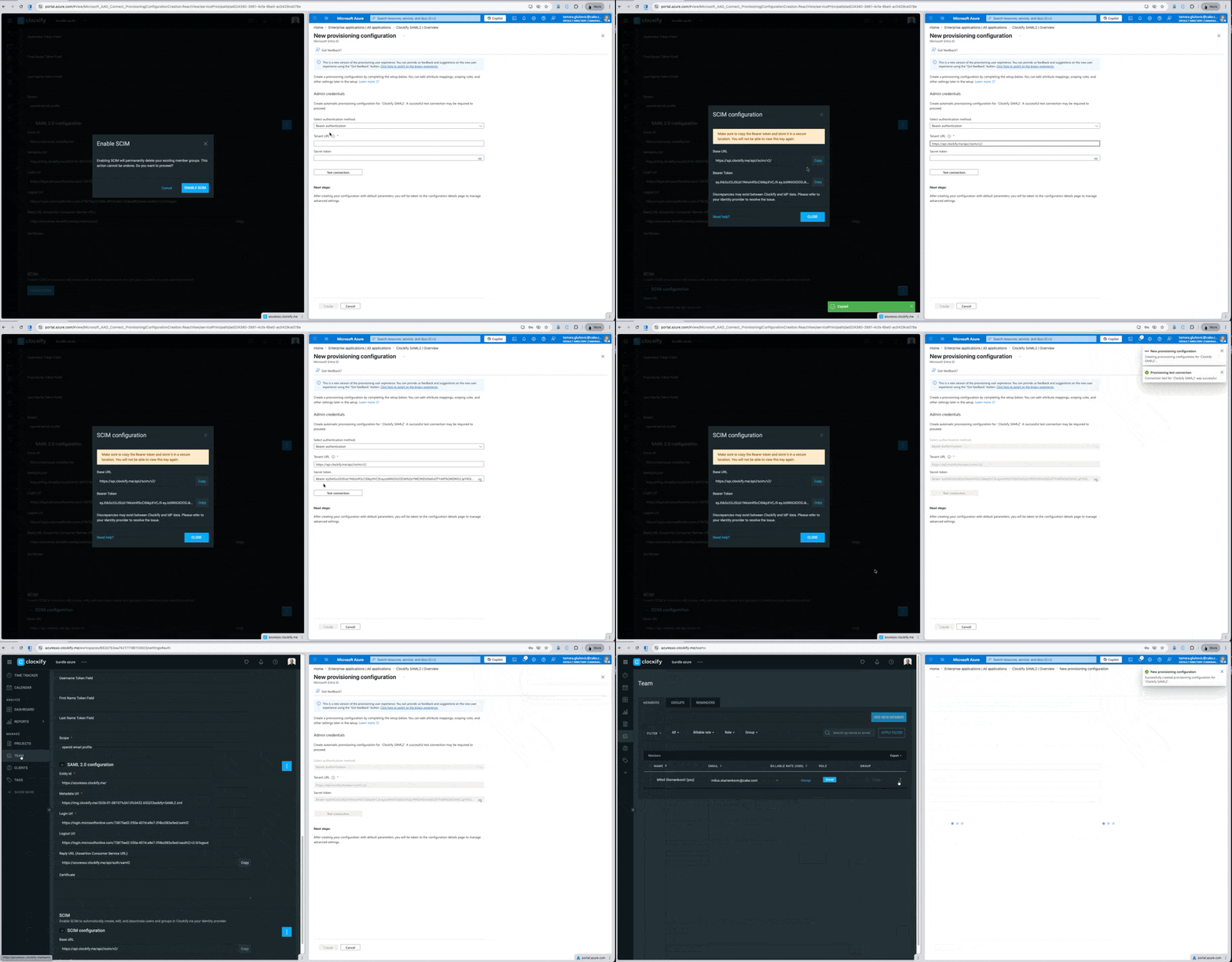
6. Haz clic en Probar conexión (Test Connection)
7. Haz clic en Guardar (Save) o Crear (Create)
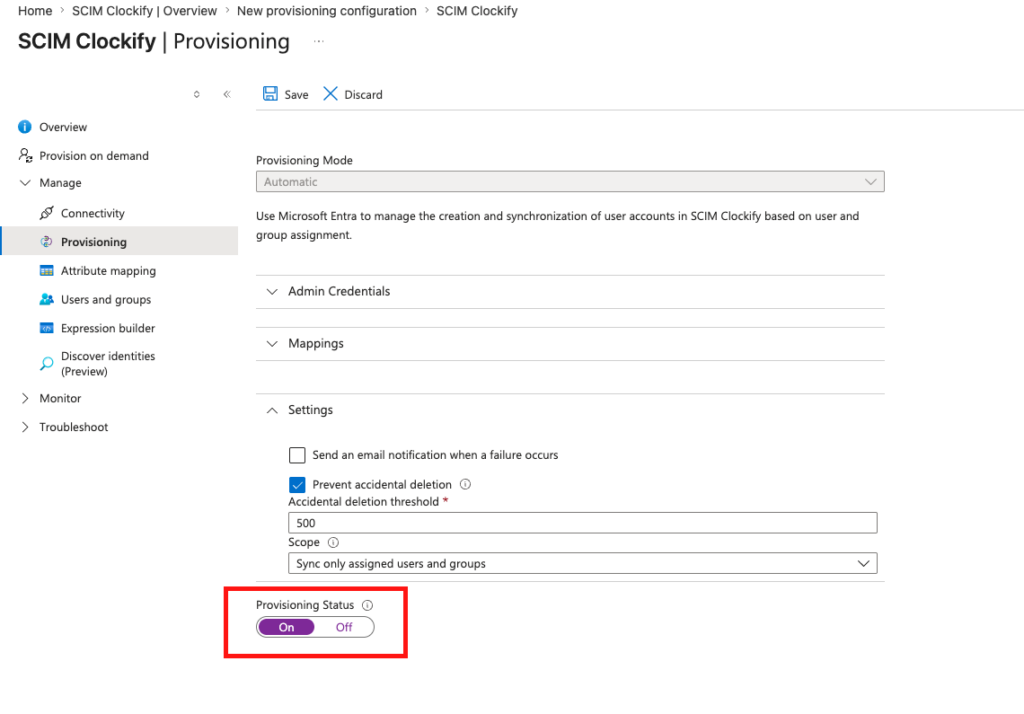
Paso 4: Habilitar el aprovisionamiento #
Para activar la automatización, debes habilitar la integración.
- Ve a la pestaña Aprovisionamiento (Provisioning)
- Activa el Estado de Aprovisionamiento (Provisioning Status)
- Haz clic en Guardar
Crea usuarios y grupos #
Una vez que la aplicación de aprovisionamiento esté configurada y activada, puedes comenzar a asignar quién tendrá acceso a Clockify.
Asignar usuarios y grupos a la aplicación Clockify #
- Ve a Aplicaciones > Aplicaciones empresariales (Applications > Enterprise Applications) y selecciona tu aplicación Clockify
- Haz clic en Usuarios y grupos (Users and groups) en el menú de la izquierda
- Haz clic en Añadir usuario/grupo (Add user/group) para asignar personas a la aplicación
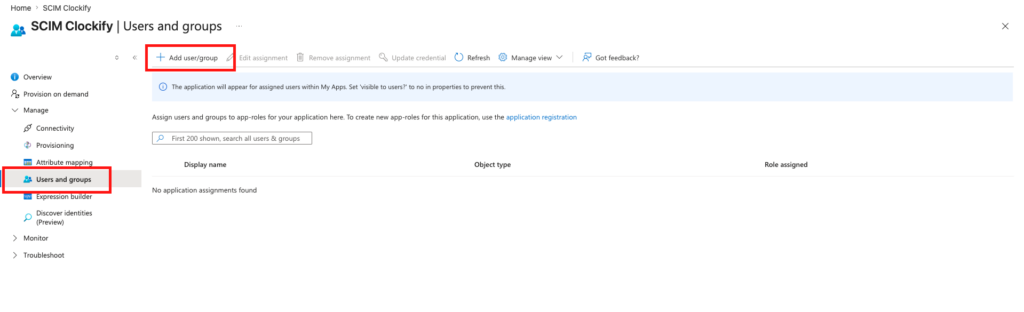
El paquete Basic de Microsoft Entra solo permite asignar y configurar usuarios individuales. Para asignar y configurar grupos, necesitas una licencia Entra ID P1 or P2.
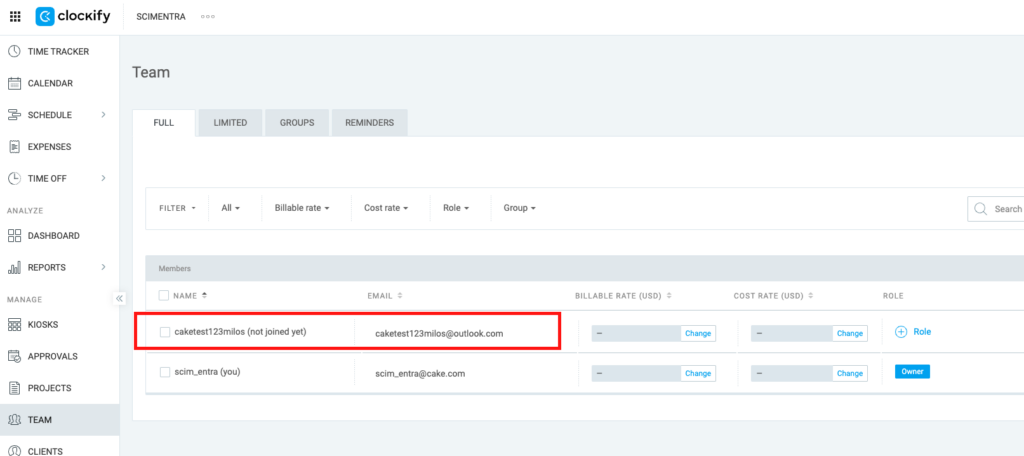
Verifica si se añadieron usuarios en Clockify
- Ve a la página de Equipo en Clockify
- Verifica si se añadieron usuarios correctamente
Notas importantes sobre la sincronización
- Sincronización automática: Microsoft Entra ID sincroniza automáticamente los cambios con Clockify cada 40 minutos.
- Sincronización instantánea: Si necesitas realizar una actualización urgente y no puedes esperar 40 minutos, puedes enviar los cambios de inmediato haciendo clic en Aprovisionar bajo demanda que se encuentra en el menú de la izquierda de tu aplicación de aprovisionamiento.
Preguntas frecuentes #
¿Puedo configurar mis grupos en Clockify antes de activar SCIM? #
No, no es posible precargar grupos. Sin embargo, existe una solución sencilla para minimizar las interrupciones:
- Exporta tus listas de grupos actuales directamente desde Clockify
- Sube esa lista a tu proveedor de identidad (IdP)
- Activa SCIM
Una vez conectado, tu proveedor de identidad sincronizará automáticamente esos grupos con Clockify.
¿Qué cambios habrá para nuestro equipo una vez activado SCIM? #
Ya que tu proveedor de identidad se convierte en el centro de control principal, muchas funciones de administración de Clockify estarán bloqueadas, como agregar y eliminar usuarios, revocar invitaciones, cambiar roles de usuario o administrar grupos.
Cambios para los usuarios regulares:
- No podrás cambiar tu nombre en Clockify
- No podrás abandonar un espacio de trabajo por tu cuenta
- La función que permite a los usuarios unirse automáticamente a un espacio de trabajo dejará de funcionar
Cambios para administradores y propietarios de espacios de trabajo:
- Ya no es posible añadir, actualizar ni eliminar usuarios directamente en Clockify. Tampoco se pueden revocar invitaciones ni convertir usuarios con permisos limitados en usuarios regulares desde el panel de control de Clockify
- No se pueden crear, eliminar ni actualizar grupos en Clockify
- Todas estas tareas deben gestionarse ahora directamente en tu proveedor de identidad
¿Se actualizarán los nombres de usuario inmediatamente para que coincidan con nuestro sistema? #
No de inmediato. Los nombres en Clockify se actualizarán para que coincidan con tu sistema en cuanto tu proveedor de identidad envíe la primera actualización de sincronización (solicitud de aprovisionamiento) para esos usuarios específicos.
¿Cómo vincula el sistema a nuestros usuarios con sus cuentas de Clockify? #
Tú decides. Puedes elegir el dato principal de coincidencia, como la dirección de correo electrónico o el nombre de usuario, directamente en la configuración de tu proveedor de identidad. Clockify seguirá la regla que establezcas.
¿Clockify importará por error todo el directorio de mi empresa? #
No. Clockify no busca activamente en el directorio de tu empresa. Solo crea y actualiza los usuarios específicos que le indique tu proveedor de identidad. Siempre que selecciones la opción "Sincronizar solo usuarios y grupos asignados" en tu sistema (como Microsoft Entra), Clockify solo procesará a esas personas.
¿Cuál es el orden correcto para gestionar las solicitudes del RGPD (como anonimizar a un usuario antes de que se vaya)? #
Puedes seguir un proceso sencillo: Desactivar ➔ Anonimizar ➔ Eliminar. Ten en cuenta que debes realizar los cambios para anonimizar su nombre o correo electrónico mientras el usuario aún esté asignado a la aplicación Clockify en tu proveedor de identidad. Si lo eliminas o desasignas de la aplicación primero, la conexión se interrumpe y Clockify nunca recibirá la instrucción para ocultar sus datos.
¿Podemos pausar la sincronización o controlar manualmente cuándo se envían las actualizaciones? #
Sí. Clockify no impone un calendario de sincronización específico. Puedes usar las funciones "Pausar/Iniciar" o "Aprovisionar bajo demanda" en tu proveedor de identidad para enviar las actualizaciones manualmente en lugar de esperar la sincronización automática predeterminada.
¿Podemos usar nuestras listas de distribución de correo electrónico para crear grupos en Clockify? #
Sí, si tu sistema lo permite. Clockify depende completamente de la información que envía tu proveedor de identidad. Si tu sistema le permite seleccionar una lista de distribución y asignarla a la aplicación Clockify, Clockify la aceptará y la tratará como un grupo estándar.
¿Qué sucede con nuestros grupos existentes cuando se inicia SCIM? #
Ya que SCIM elimina tus grupos antiguos de Clockify y los reemplaza con los grupos de tu proveedor de identidad, Clockify trata estos grupos sincronizados como entidades completamente nuevas. Esto significa que los "ID de grupo" ocultos que se usan en segundo plano cambiarán.