SCIM-Benutzer-Provisionierung
Mit der SCIM-Benutzer-Provisionierung kannst du Mitglieder und Gruppen in Clockify automatisch über deinen Identity Provider (IdP) verwalten und synchronisieren. So bleibt der Benutzerzugriff im gesamten Clockify-Arbeitsbereich stets auf dem neuesten Stand.
Die Vorteile umfassen:
- Effizienz für große Teams: Füge automatisch hunderte Nutzer gleichzeitig hinzu, ohne manuelle Einladungen zu versenden.
- Erhöhte Sicherheit: Stelle sicher, dass Nutzer sofort den Zugriff auf Clockify verlieren, sobald sie im System deines Unternehmens deprovisioniert werden.
- Zentrale Verwaltung: Synchronisiere sowohl Nutzer als auch Gruppen, um die Struktur deines Arbeitsbereichs konsistent zu halten.
SCIM aktivieren #
Um mit der Integration zu beginnen, muss ein Besitzer die erforderlichen Anmeldedaten in Clockify generieren, um die Verknüpfung mit dem IdP (Identity Provider) herzustellen.
- Navigiere zu Arbeitsbereichseinstellungen
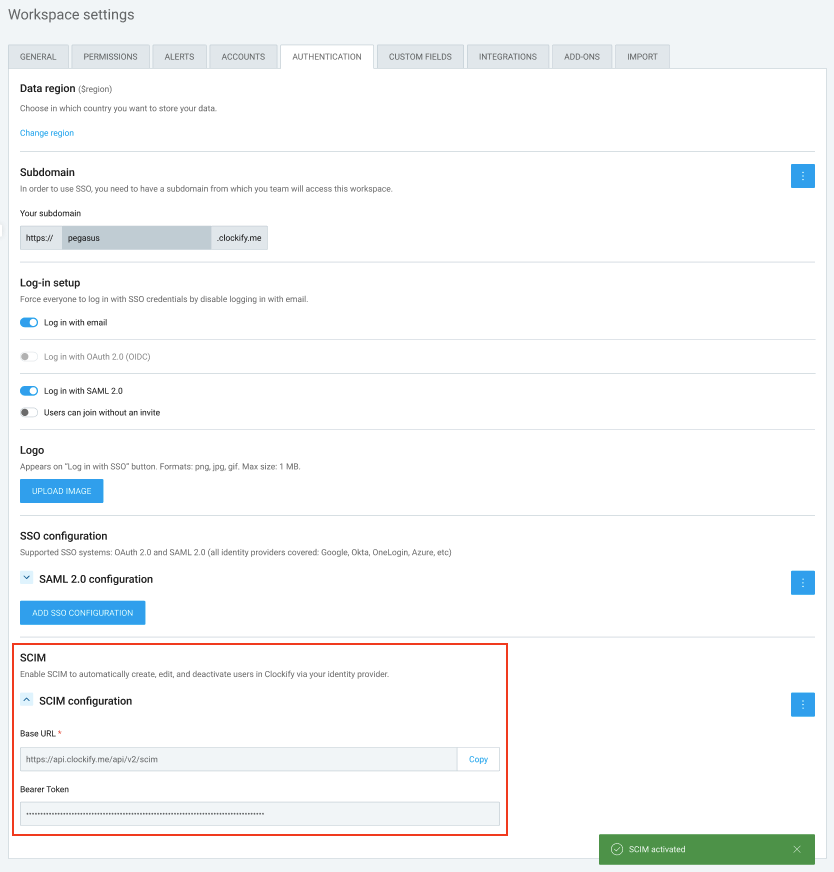
- Suche den Bereich, um SCIM zu erstellen
- Aktiviere die SCIM-Option, um deine eindeutigen Daten zu generieren:
- Base-URL
- Bearer-Token
- Kopiere diese Werte und füge sie in deinen Identity Provider (z. B. Okta, Microsoft Entra ID, Google Workspace oder JumpCloud) ein, wenn du dort die SCIM-Anwendung erstellst
Sobald SCIM verbunden ist, verarbeitet Clockify die folgenden Aktionen automatisch basierend auf den Änderungen in deinem IdP:
Für Nutzer: #
- Nutzer werden in Clockify erstellt, sobald sie zum IdP hinzugefügt werden.
- Änderungen am Namen oder der E-Mail-Adresse eines Nutzers im IdP werden automatisch in Clockify aktualisiert.
- Wenn ein Nutzer im IdP aktiviert oder deaktiviert wird, aktualisiert sich sein Status in Clockify sofort.
- Die Standard-Zeitzone wird initial aus dem IdP übernommen. Sollte ein Nutzer seine Zeitzone jedoch manuell in Clockify ändern (z. B. auf Reisen), bleibt Clockify die primäre Quelle für diese Einstellung und wird nicht überschrieben.
Für Gruppen: #
- Bestehende Clockify-Gruppen werden gelöscht, sobald SCIM aktiviert wird.
- Gruppen werden basierend auf deinem IdP-Setup in Clockify erstellt oder gelöscht.
- Nutzer werden automatisch zu Clockify-Gruppen hinzugefügt oder daraus entfernt, wenn sich ihre Gruppenmitgliedschaft im IdP ändert.
- Gruppennamen entsprechen immer der im IdP verwendeten Namenskonvention.
Für Enterprise-Nutzer bietet Clockify die Möglichkeit, über SCIM v2 eine Integration mit anderen Anwendungen herzustellen.
SCIM wird für die Verwendung mit den folgenden Anwendungen unterstützt:
Mit Jumpcloud verbinden
Diese Aktion erfordert ein Google-Administratorkonto.
Schritt 1: App in Jumpcloud erstellen #
So erstellst du die Anwendung:
- Melde dich in deinem Jumpcloud-Dashboard an
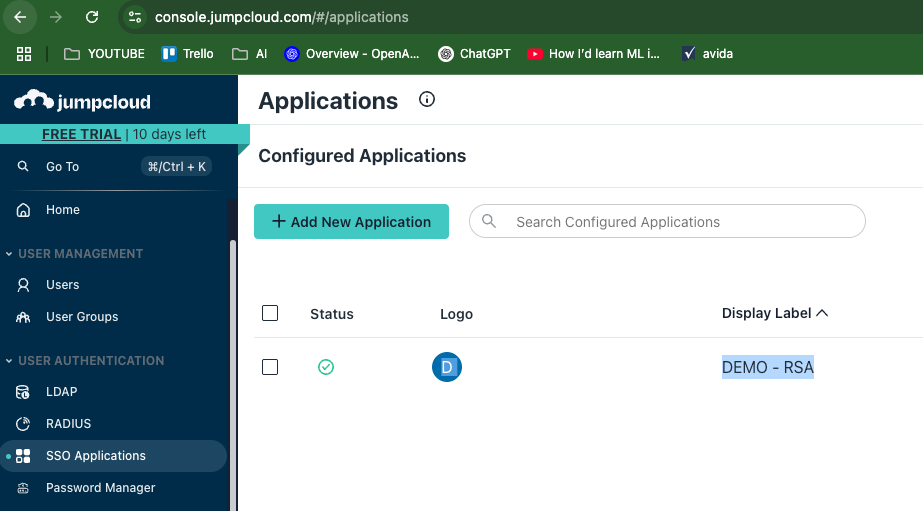
- Gehe zu SSO Applications (unter User Authentication)
- Klicke auf Add New Application
4. Wähle Custom Application
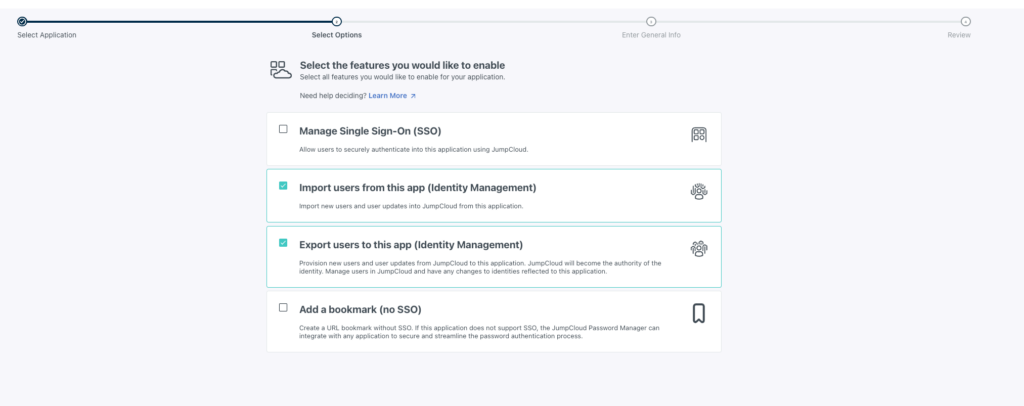
5. Aktiviere die folgenden Kontrollkästchen:
- Nutzer aus dieser App importieren (Identitätsverwaltung)
- Nutzer in diese App exportieren (Identitätsverwaltung)
6. Klicke auf Next
7. Gib einen Namen für deine Anwendung ein
8. Klicke auf Save application
Schritt 2: SCIM in Clockify aktivieren
- Melde dich bei Clockify an
- Klicke auf das Drei-Punkte-Symbol neben deinem Arbeitsbereichsnamen
- Wähle Arbeitsbereichseinstellungen aus
- Klicke auf den Tab Authentifizierung
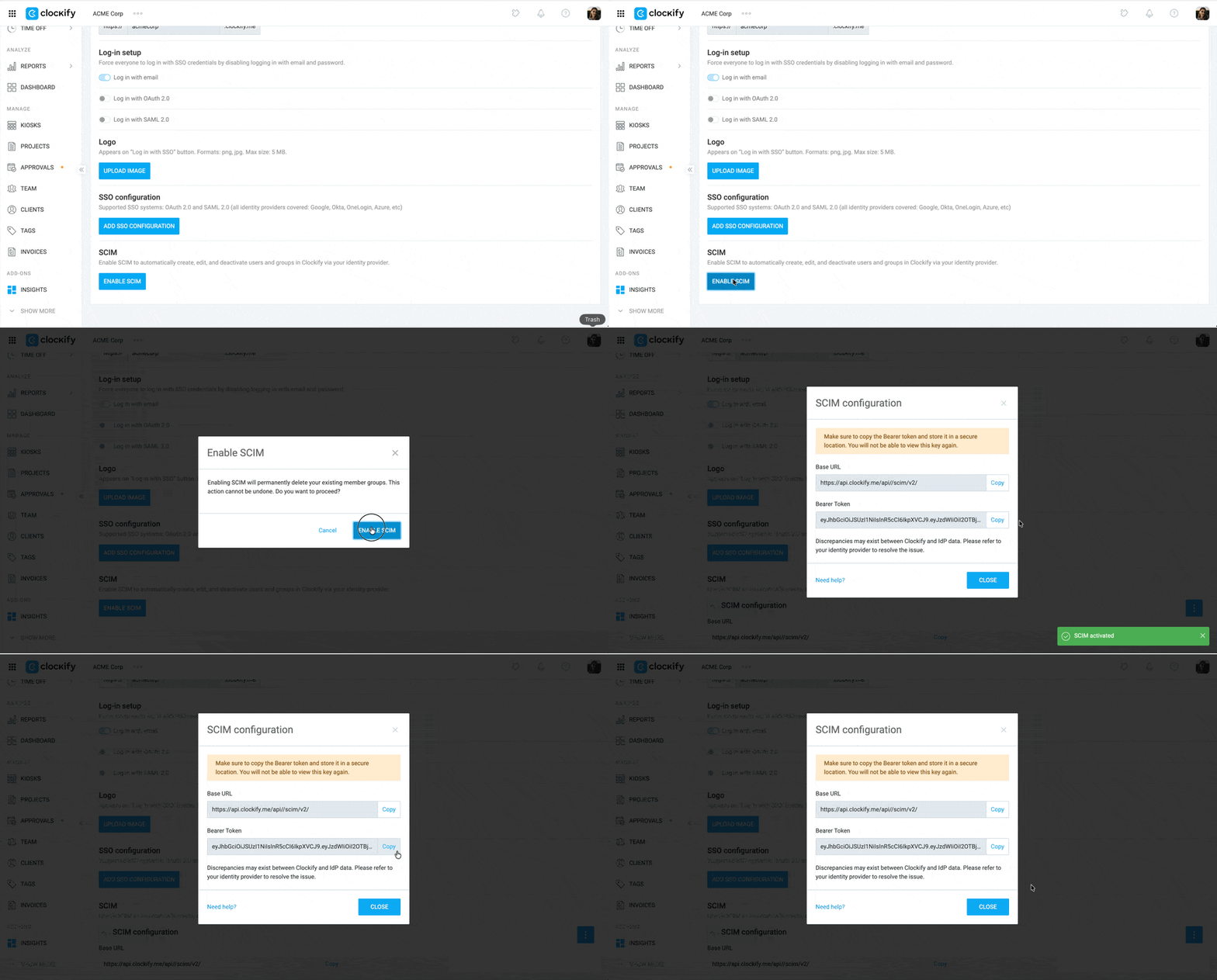
- Klicke auf SCIM aktivieren
- Kopiere die Basis-URL und das Bearer-Token
Schritt 3: Verbindung abschließen #
In Jumpcloud:
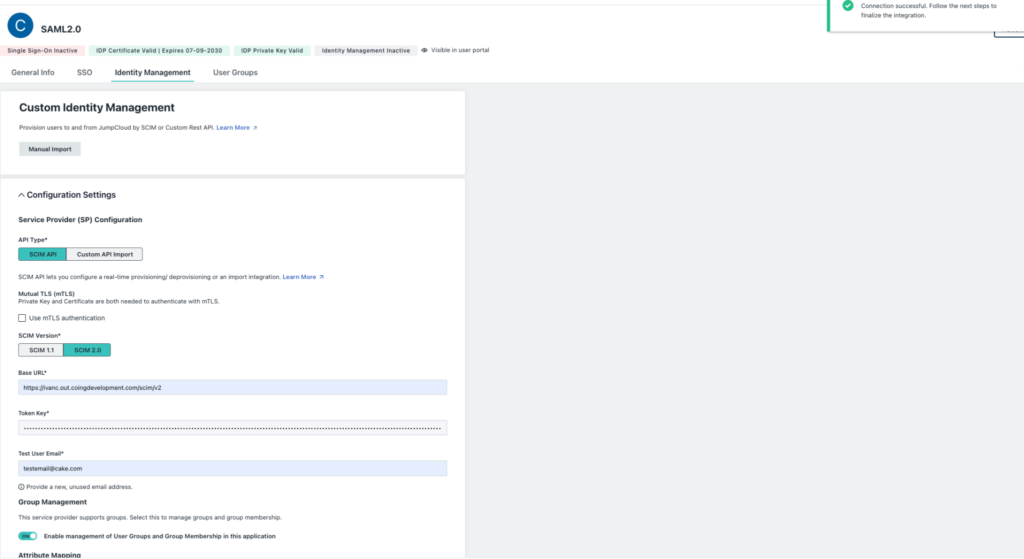
- Gehe zum Tab Identity Management
- Füge die BaseURL und das Bearer Token in die entsprechenden Felder ein
- Klicke auf Test Connection. Ein Pop-up-Fenster erscheint, um zu bestätigen, dass die Verbindung erfolgreich war
- Klicke auf Activate
Mit Okta verbinden
Diese Aktion erfordert ein Okta-Administratorkonto.
Schritt 1: App in Okta erstellen #
So fügst du SCIM-Provisionierung in Okta hinzu:
- Melde dich in deinem Okta-Konto an
- Klicke im Seitenleistenmenü auf Applications
- Klicke auf Applications
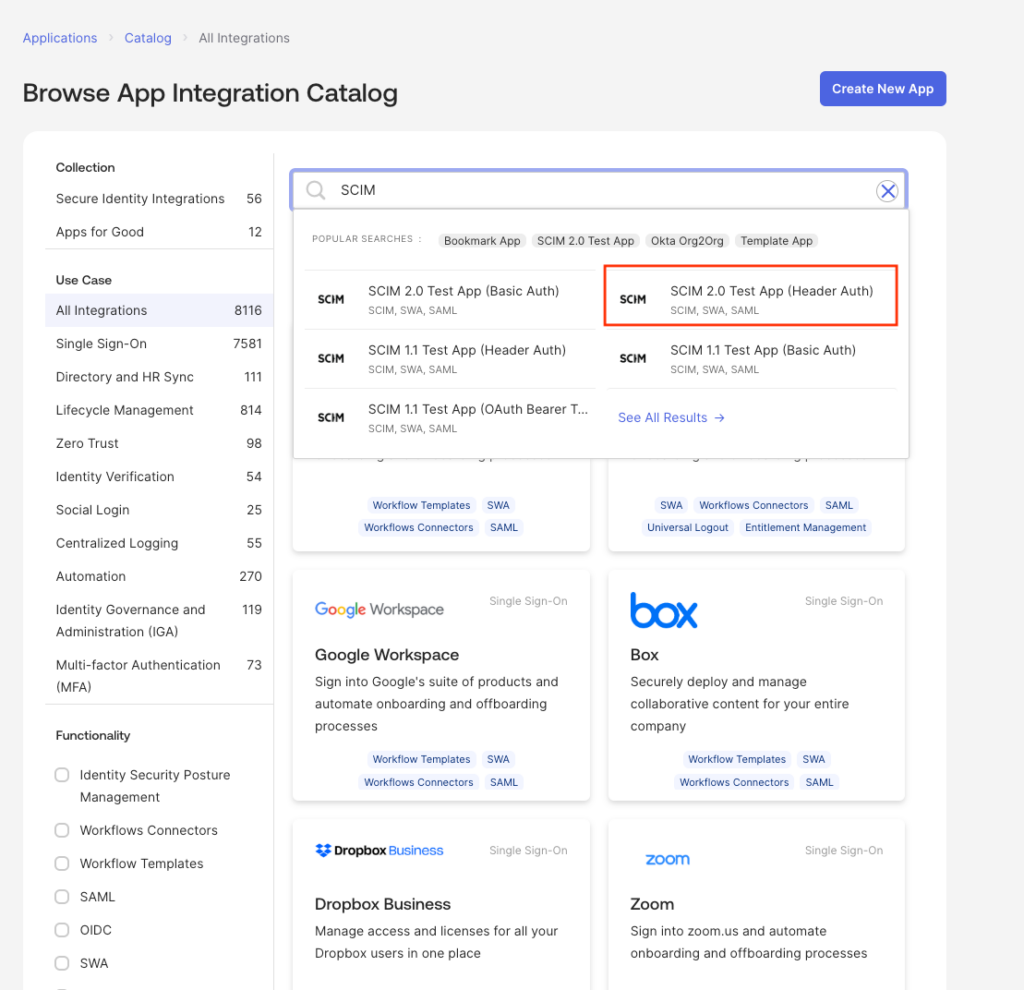
- Wähle die Schaltfläche Browse app catalog
- Suche im Suchfeld nach SCIM
- Wähle SCIM 2.0 Test App (Header Auth) aus den Suchergebnissen aus
7. Klicke auf Add Integration
8. Klicke auf Next (belasse die Details so, wie sie sind)
9. Klicke auf Done
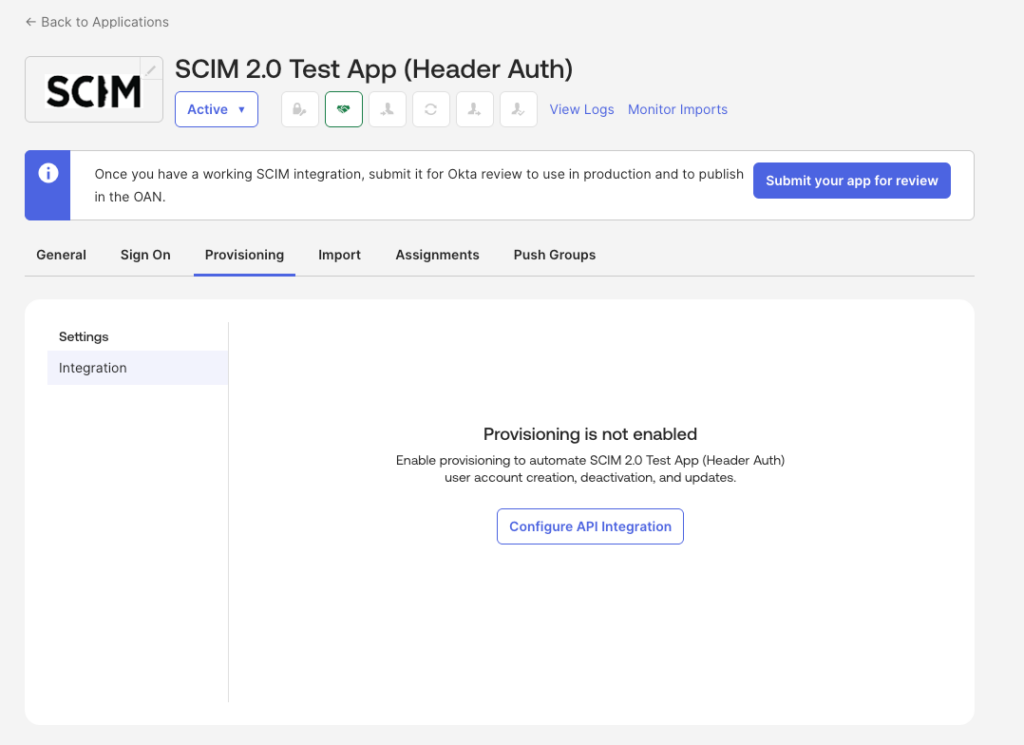
10. Gehe zum Tab Provisioning
11. Klicke auf Configure API Integration
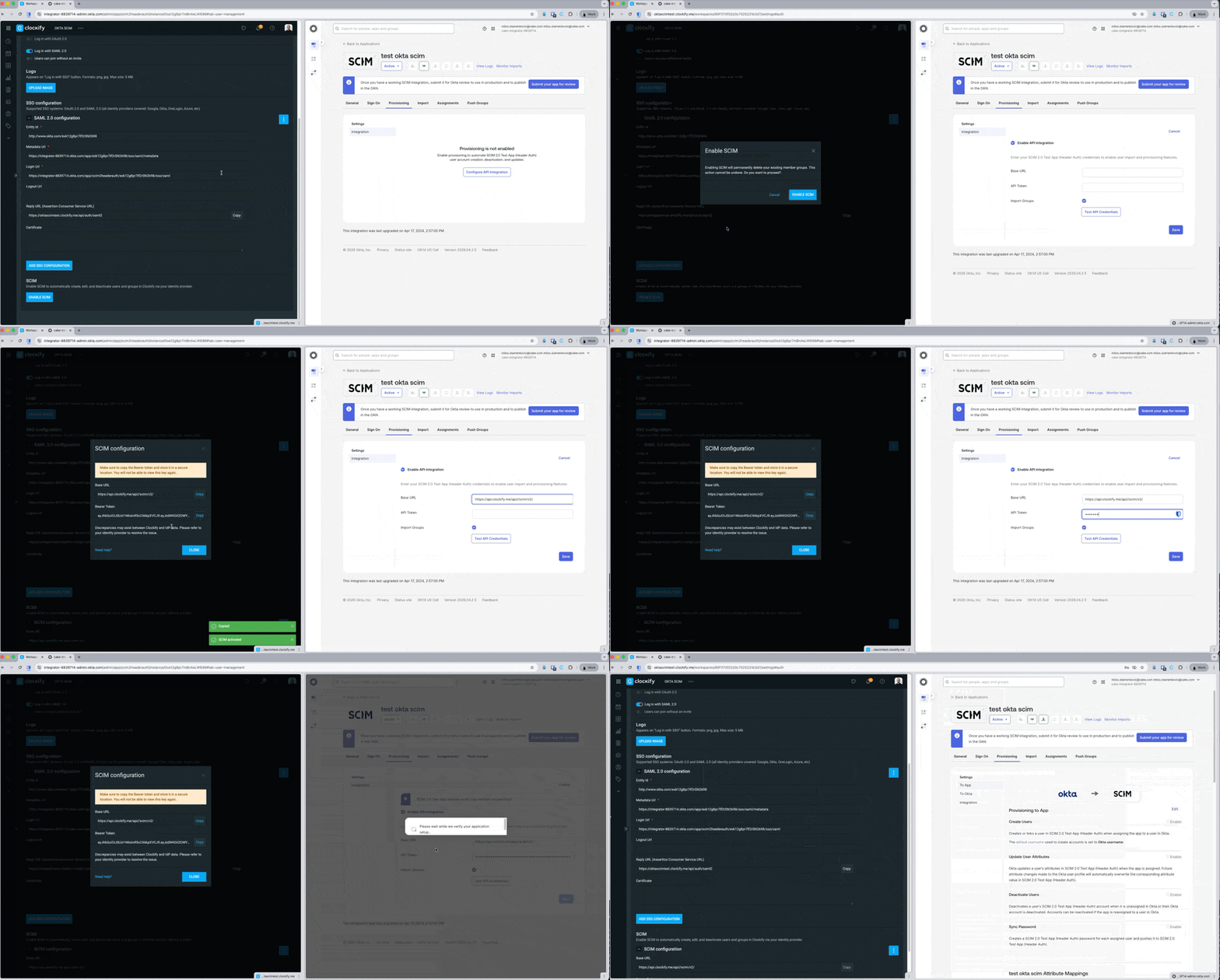
12. Aktiviere das Kontrollkästchen für Enable API Integration
13. Gib die Base URL und das Bearer Token ein (Diese erhältst du von Clockify)
14. Klicke auf Test API Credentials
15. Klicke auf Save
Schritt 2: Benutzerkonfiguration bearbeiten #
- Gehe zum Tab Provisioning
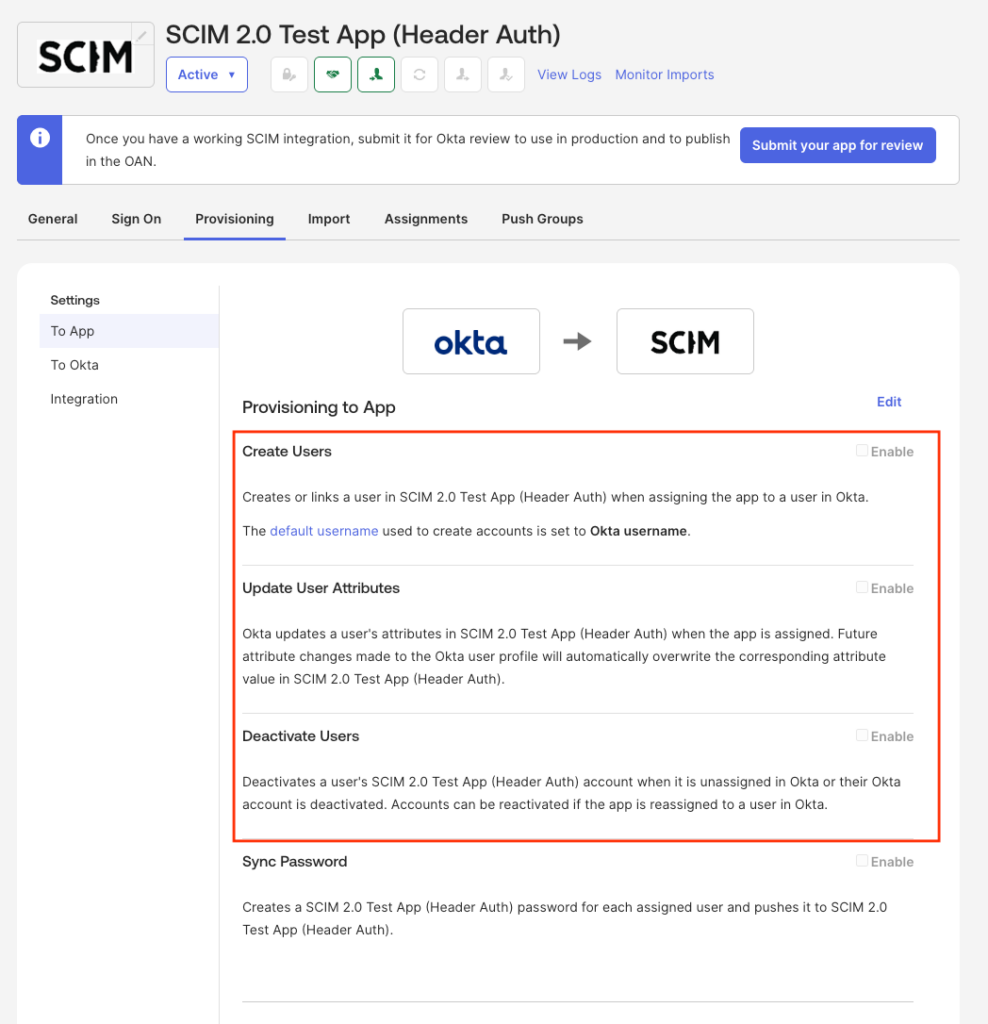
- Klicke im Seitenleistenmenü auf To App
- Aktiviere/Ermögliche Folgendes:
- Create Users (Benutzer erstellen)
- Update User Attributes (Benutzerattribute aktualisieren)
- Deactivate Users (Benutzer deaktivieren)
Benutzer erstellen #
Um einen Benutzer zu erstellen:
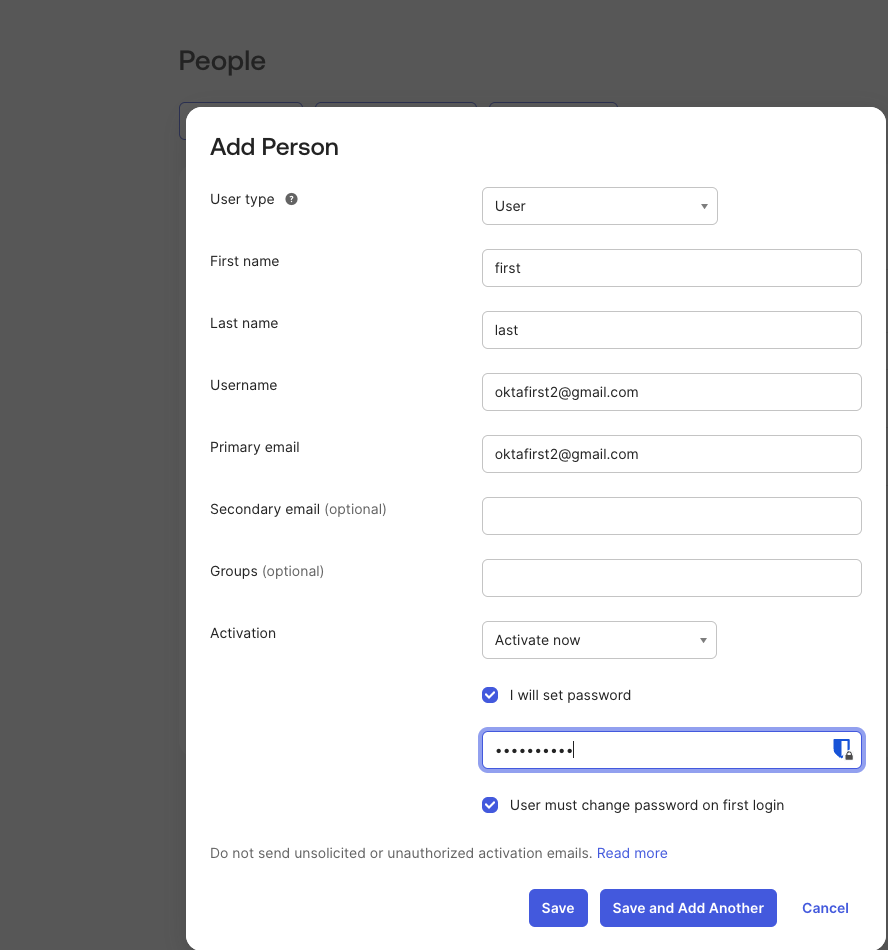
- Gehe zu Directory > People
- Klicke auf Add Person
- Gib die erforderlichen Informationen ein
- Klicke auf Save oder auf Save and Add another
Gruppen erstellen #
Um eine Gruppe zu erstellen:
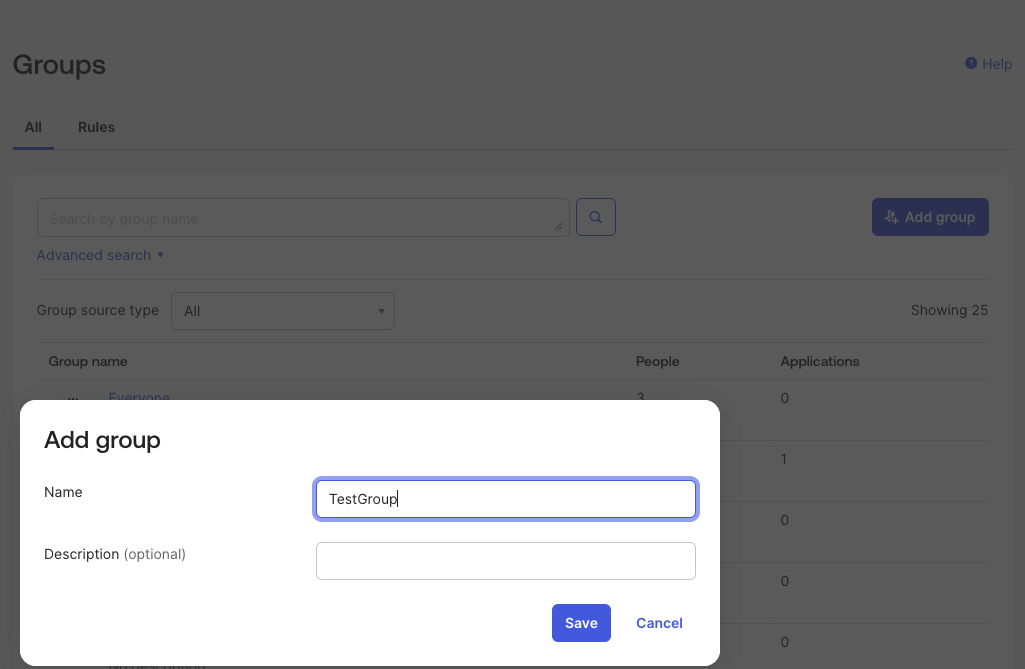
- Gehe zu Directory > Groups
- Klicke auf Add Group
- Gib den Gruppennamen und eine Beschreibung ein (optional)
- Klicke auf Speichern
Benutzer der Gruppe zuweisen
- Navigiere zu deinem Okta-Dashboard und suche deine Liste der Gruppen
- Wähle die Gruppe aus, die du bereits erstellt hast
- Klicke auf die Schaltfläche Assign people
- Wähle die Benutzer aus, die du dieser Gruppe hinzufügen möchtest
Gruppen übertragen
Das Zuweisen einer Gruppe synchronisiert nur die darin enthaltenen Personen. Um die Gruppe selbst zu synchronisieren, musst du die Funktion „Push Groups“ verwenden.
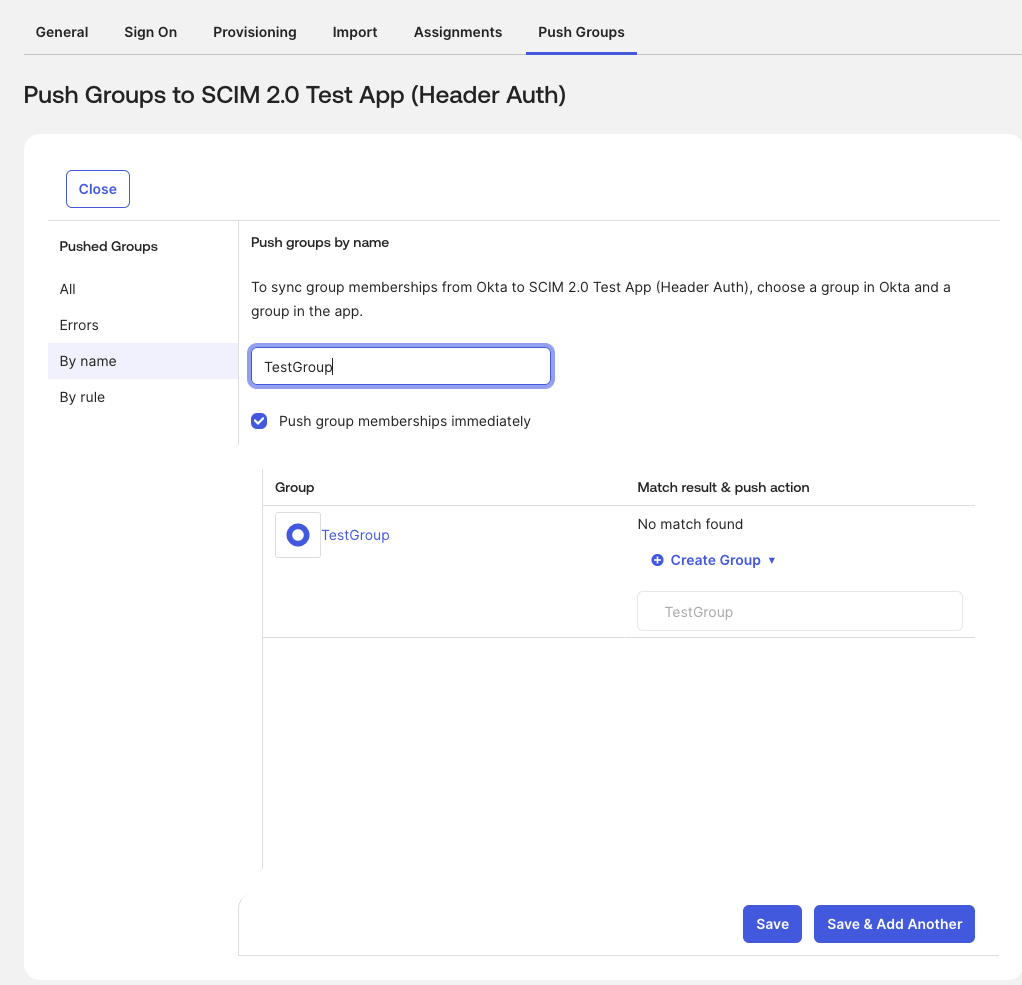
Um Gruppen übertragen:
- Gehe zum Tab Push Groups
- Wähle die Gruppe
- Aktiviere das Kontrollkästchen für Push group members immediately
- Klicke auf Speichern
Mit Microsoft Entra verbinden
Schritt 1: Benutzerdefinierte Anwendung in Entra ID erstellen #
Um Microsoft Entra zu verbinden:
- Melde dich im Microsoft Entra Admin Center an
- Gehe zu Applications > Enterprise Applications
- Klicke auf New application
- Wähle Create your own application
- Gib einen Namen für deine Anwendung ein
- Wähle Integrate any other application you don’t find in the gallery (Non-gallery)
- Klicke auf Erstellen
Schritt 2: SCIM-Zugangsdaten von Clockify abrufen #
Schritt 3: Provisionierung in Entra ID konfigurieren #
Gehe zurück zum Microsoft Entra Admin Center:
- Öffne deine neu erstellte Anwendung
- Klicke im linken Menü auf den Reiter Provisioning
- Klicke auf New Configuration (oder Edit Provisioning)
- Stelle den Bereitstellungsmodus auf Automatic ein
- Gib unter dem Abschnitt Admin Credentials die folgenden Details ein:
- Tenant URL: Füge deine Clockify SCIM-URL ein (sie sieht aus wie deine Clockify URL + /scim/v2).
- Secret Token: Gib das Wort Bearer ein, füge ein einzelnes Leerzeichen hinzu und füge dann deinen Clockify-API-Token ein (e.g., Bearer abc123def456).
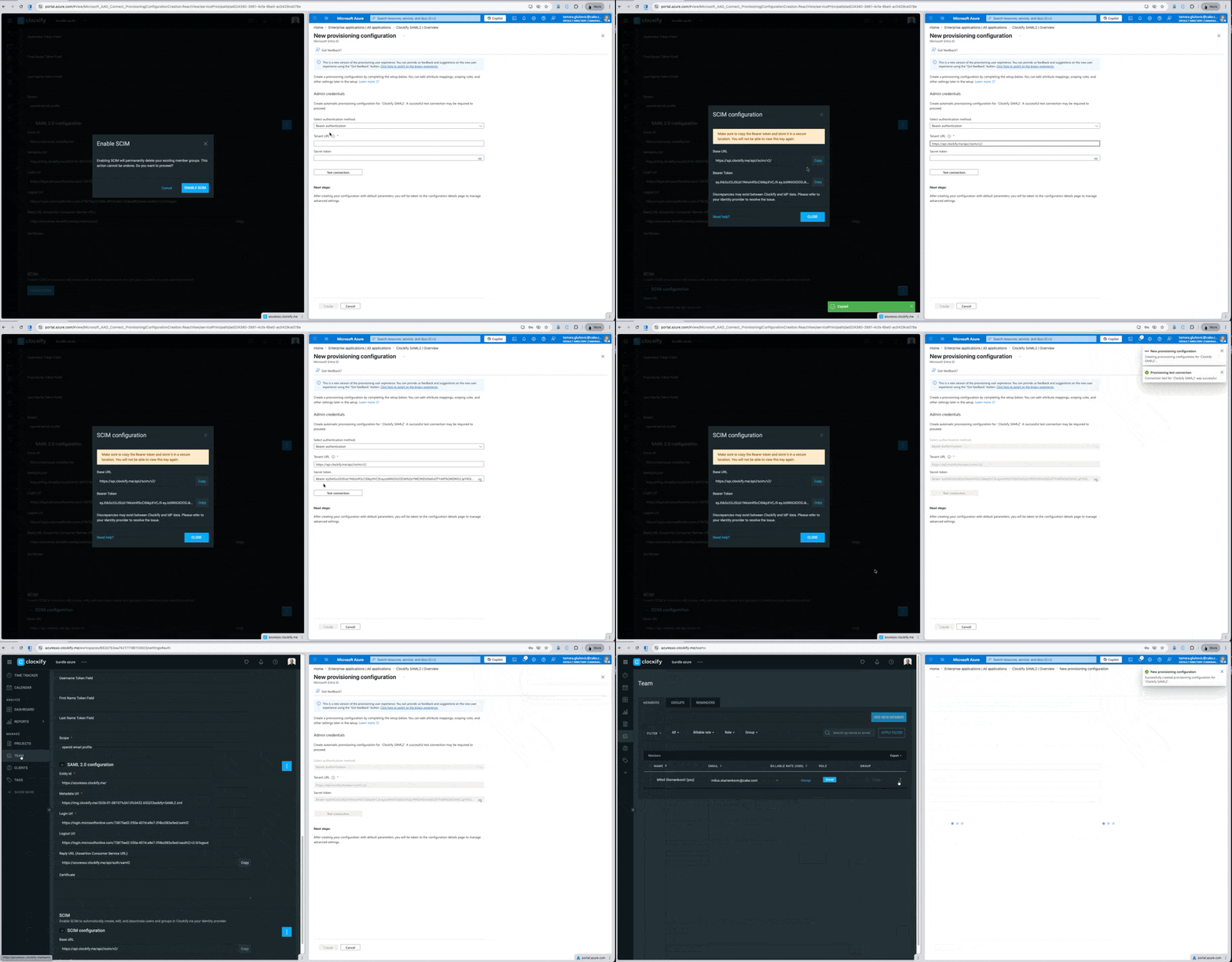
6. Klicke auf Test Connection
7. Klicke auf Save oder Create
Schritt 4: Provisionierung aktivieren #
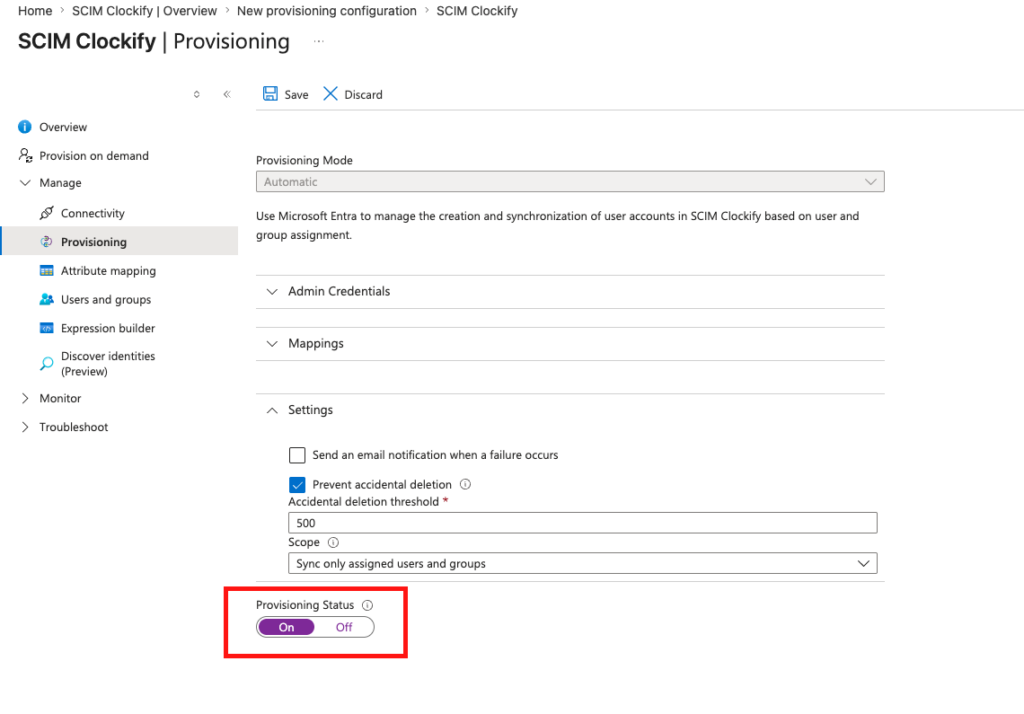
Um die Automatisierung einzuschalten, musst du die Integration aktivieren.
- Gehe zum Tab Provisioning
- Stelle den Provisioning Status auf On
- Klicke auf Speichern
Benutzer und Gruppen erstellen #
Sobald deine Provisioning-App eingerichtet und eingeschaltet ist, kannst du festlegen, wer Zugriff auf Clockify erhält.
Benutzer und Gruppen der Clockify-App zuweisen #
- Gehe zu Applications > Enterprise Applications und wähle deine Clockify-App aus
- Klicke im linken Menü auf Users und groups
- Klicke auf Add user/group, um der App Personen zuzuweisen
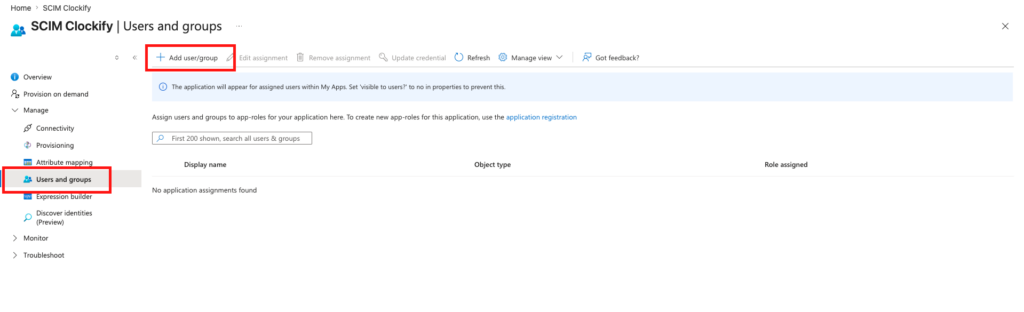
Das Microsoft Entra Basic-Paket erlaubt es nur, einzelne Benutzer zuzuweisen und zu provisionieren. Du benötigst eine Entra ID P1 oder P2-Lizenz, um Gruppen zuzuweisen und zu provisionieren.
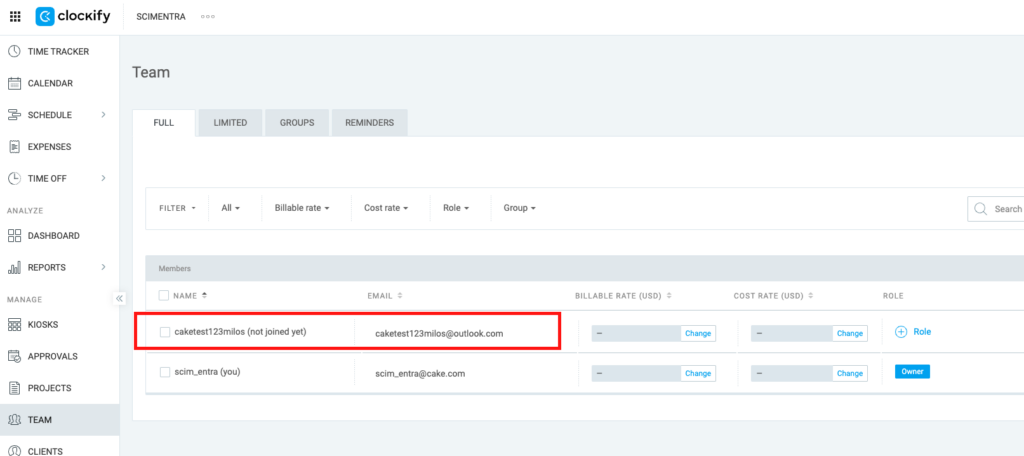
Clockify auf hinzugefügte Benutzer prüfen
- Gehe in Clockify auf die Seite Team
- Überprüfe, ob der oder die Benutzer erfolgreich hinzugefügt wurden
Wichtige Hinweise zur Synchronisierung
- Automatische Synchronisierung: Microsoft Entra ID synchronisiert Änderungen automatisch in einem festen Intervall von alle 40 Minuten mit Clockify.
- Sofortige Synchronisierung: Wenn du eine dringende Aktualisierung vornimmst und keine 40 Minuten warten kannst, kannst du Änderungen sofort übertragen, indem du im linken Menü deiner Provisioning-App auf Bereitstellung auf Anfrage klickst.
Häufig gestellte Fragen #
Kann ich meine Gruppen in Clockify einrichten, bevor ich SCIM aktiviere? #
Nein, du kannst Gruppen nicht vorab laden. Es gibt jedoch einen einfachen Workaround, um Unterbrechungen zu minimieren:
- Exportiere deine aktuellen Gruppenlisten direkt aus Clockify
- Lade diese Liste bei deinem Identity Provider (IdP) hoch
- Aktiviere SCIM
Sobald die Verbindung steht, synchronisiert dein Identity Provider diese Gruppen automatisch wieder zurück nach Clockify.
Was ändert sich für unser Team, sobald SCIM aktiviert ist? #
Da dein Identity Provider die Rolle des zentralen Steuerungszentrums übernimmt, werden viele Verwaltungsfunktionen innerhalb von Clockify gesperrt. Dazu gehören das Hinzufügen und Löschen von Nutzern, das Widerrufen von Einladungen, das Ändern von Nutzerrollen oder das Verwalten von Gruppen.
Änderungen für reguläre Nutzer:
- Du kannst deinen eigenen Namen in Clockify nicht mehr ändern.
- Du kannst einen Arbeitsbereich nicht mehr eigenständig verlassen.
- Die Funktion, mit der Nutzer einem Arbeitsbereich automatisch beitreten können, wird deaktiviert.
Änderungen für Admins und Arbeitsbereichs-Besitzer:
- Du kannst Nutzer nicht mehr direkt in Clockify hinzufügen, aktualisieren oder löschen. Auch das Widerrufen von Einladungen oder das Ändern von „eingeschränkten“ zu „regulären“ Nutzern ist über das Clockify-Dashboard nicht mehr möglich.
- Du kannst in Clockify keine Gruppen mehr erstellen, löschen oder aktualisieren.
- All diese Aufgaben müssen nun direkt in deinem Identity Provider erledigt werden.
Werden Nutzernamen sofort aktualisiert, um mit unserem System übereinzustimmen? #
Nicht sofort. Die Namen in Clockify werden angepasst, sobald dein Identity Provider das erste Synchronisierungs-Update (Provisioning Request) für diese spezifischen Nutzer sendet.
Wie ordnet das System unsere Nutzer ihren Clockify-Konten zu? #
Das entscheidest du. Du kannst das primäre Abgleichmerkmal – wie die E-Mail-Adresse oder den Benutzernamen – direkt in den Einstellungen deines Identity Providers festlegen. Clockify folgt genau der Regel, die du dort definierst.
Wird Clockify versehentlich mein gesamtes Unternehmensverzeichnis importieren? #
Nein. Clockify durchsucht dein Unternehmensverzeichnis nicht aktiv. Es erstellt und aktualisiert nur die Nutzer, die dein Identity Provider explizit vorgibt. Solange du die Einstellung Nur zugewiesene Nutzer und Gruppen synchronisieren in deinem System (z. B. Microsoft Entra) wählst, verarbeitet Clockify nur diese Personen.
Was ist die richtige Reihenfolge für DSGVO-Anfragen (z. B. um Nutzer zu anonymisieren, bevor sie das Unternehmen verlassen)? #
Du kannst einem einfachen Prozess folgen: Deaktivieren ➔ Anonymisieren ➔ Entfernen. Beachte dabei: Die Anonymisierung von Name oder E-Mail muss erfolgen, während der Nutzer noch aktiv der Clockify-App in deinem Identity Provider zugewiesen ist. Wenn du den Nutzer zuerst aus der App entfernst, bricht die Verbindung ab und Clockify erhält niemals die Anweisung, die Daten zu verbergen.
Können wir die Synchronisierung pausieren oder manuell steuern? #
Ja. Clockify erzwingt keinen festen Zeitplan für die Synchronisierung. Du kannst Funktionen wie „Pause/Start“ oder „Provision on Demand“ in deinem Identity Provider nutzen, um Updates manuell zu übertragen, anstatt auf die automatische Synchronisierung zu warten.
Können wir unsere E-Mail-Verteilerlisten nutzen, um Gruppen in Clockify zu erstellen? #
Ja, sofern dein System dies zulässt. Clockify verlässt sich vollständig auf die Daten, die dein IdP sendet. Wenn dein System es erlaubt, eine Verteilerliste auszuwählen und der Clockify-App zuzuweisen, akzeptiert Clockify diese und behandelt sie wie eine Standardgruppe.
Was passiert im Hintergrund mit unseren bestehenden Gruppen, wenn SCIM startet? #
Da SCIM deine alten Clockify-Gruppen löscht und durch die Gruppen deines Identity Providers ersetzt, behandelt Clockify diese synchronisierten Gruppen als völlig neue Einheiten. Das bedeutet, dass sich die internen „Gruppen-IDs“ im Hintergrund ändern werden.