Plaky: Clockify integration
Grâce à l’intégration de Clockify avec Plaky, vous pouvez suivre le temps passé sur vos tableaux, éléments et sous-éléments, et enregistrer ce temps dans les projets et tâches Clockify sans avoir à passer d’une appli à l’autre.
Si vous disposez d’au moins un espace de travail actif dans les deux applis au sein de la même organisation CAKE.com, cette intégration est automatiquement activée.
Comment cela fonctionne #
L’intégration de Clockify avec Plaky permet de suivre le temps passé sur vos projets et tâches directement dans Plaky (tableaux, éléments et sous-éléments). Relier un tableau Plaky à un projet Clockify crée un lien direct entre vos éléments/sous-éléments Plaky et vos tâches Clockify.
Connecter le projet Clockify au tableau Plaky #
Pour suivre le temps passé sur vos éléments et sous-éléments Plaky, vous devez, en tant que propriétaire du tableau, avoir accès à au moins un espace de travail Clockify dans la même organisation CAKE.com et le connecter à votre tableau Plaky.
Créer un tableau Plaky #
Si vous disposez déjà d’un tableau, passez à la section Connecter à Clockify.
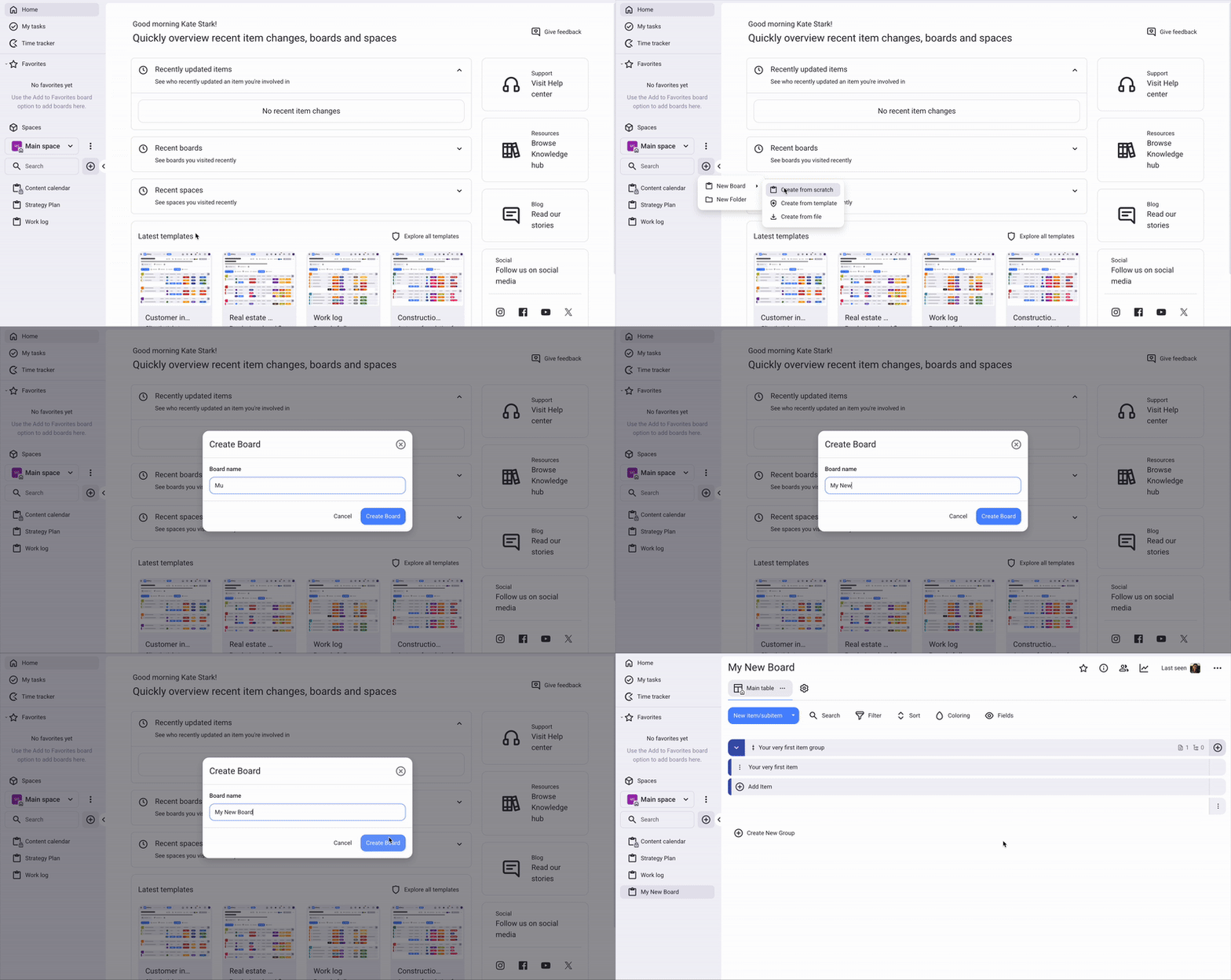
Pour créer un tableau Plaky :
- Cliquez sur + dans le menu de gauche
- Sélectionnez Nouveau tableau
- Choisissez Créer à partir de zéro, d’un fichier ou d’un modèle
- Nommez votre tableau et cliquez sur Créer un tableau
Connecter à Clockify #
Pour connecter votre tableau Plaky à Clockify :
- Accédez aux paramètres de votre tableau Plaky et cliquez sur Suivi du temps
- Dans les paramètres, vous verrez une liste des projets Clockify auxquels vous avez accès
- Choisissez celui que vous souhaitez connecter à votre tableau
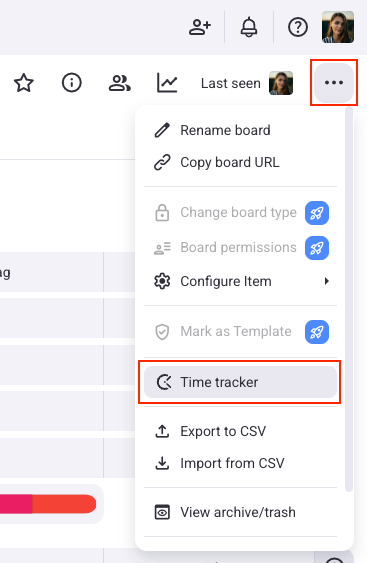
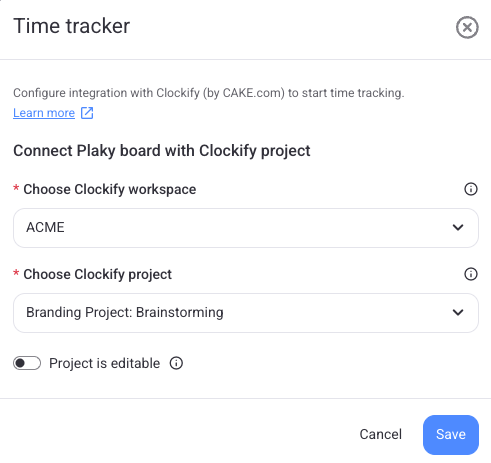
Un tableau Plaky ne peut être connecté qu’à un seul projet Clockify.
Une fois que vous avez connecté le tableau Plaky au projet Clockify, il existe un lien direct entre vos éléments/sous-éléments Plaky et les tâches Clockify, et tout le temps suivi sur ce tableau sera enregistré dans le projet Clockify connecté.
Après avoir connecté votre tableau, vous pouvez également choisir de le verrouiller pour les autres membres du tableau. Cela les empêche de modifier le tableau sélectionné.
Si vous n’avez pas accès à l’espace de travail Clockify dans votre organisation CAKE.com, vous pouvez en créer un directement à partir des paramètres d’intégration Plaky.
Suivre le temps passé sur un élément #
Une fois que le tableau Plaky est connecté au projet Clockify, le propriétaire du tableau peut configurer les paramètres d’intégration directement depuis la barre latérale des éléments, dans l’onglet Suivi du temps.
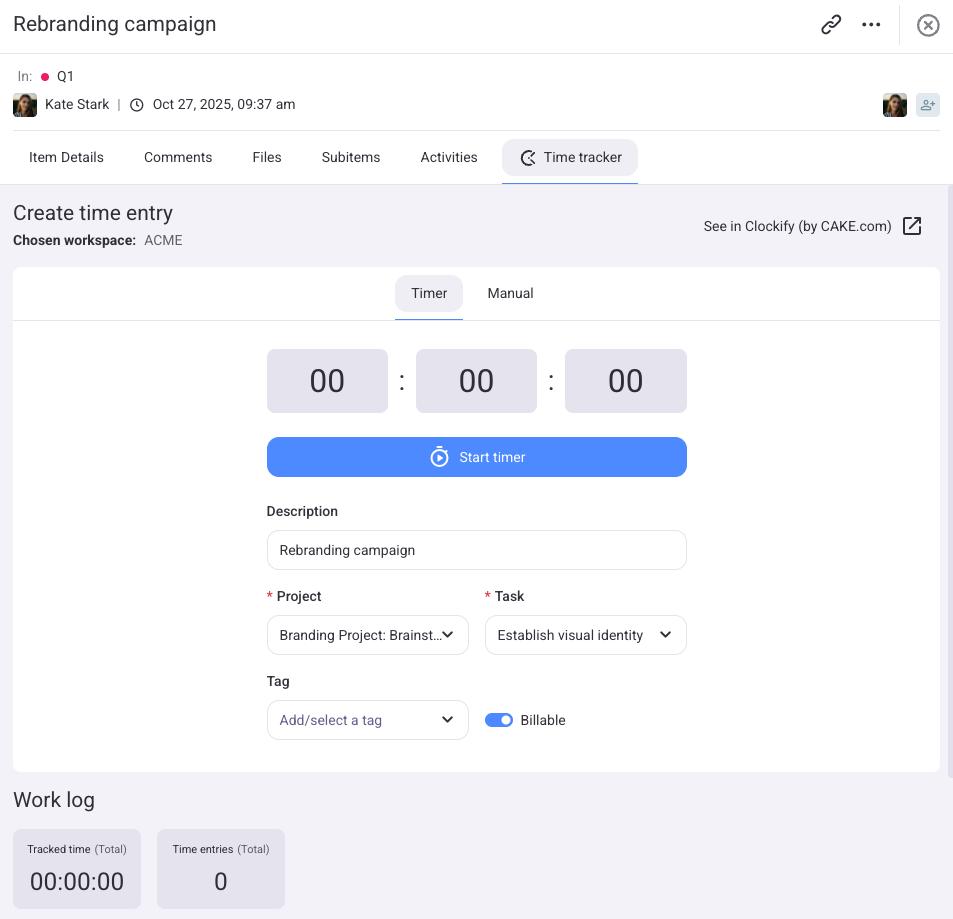
Les utilisateurs ayant accès au projet Clockify connecté verront un onglet Suivi du temps avec des paramètres prédéfinis, notamment le projet Clockify, la tâche et la facturabilité.
Les utilisateurs n’ayant pas accès seront informés que le suivi du temps n’est pas possible et devront contacter un administrateur.
Suivre le temps via le suivi du temps #
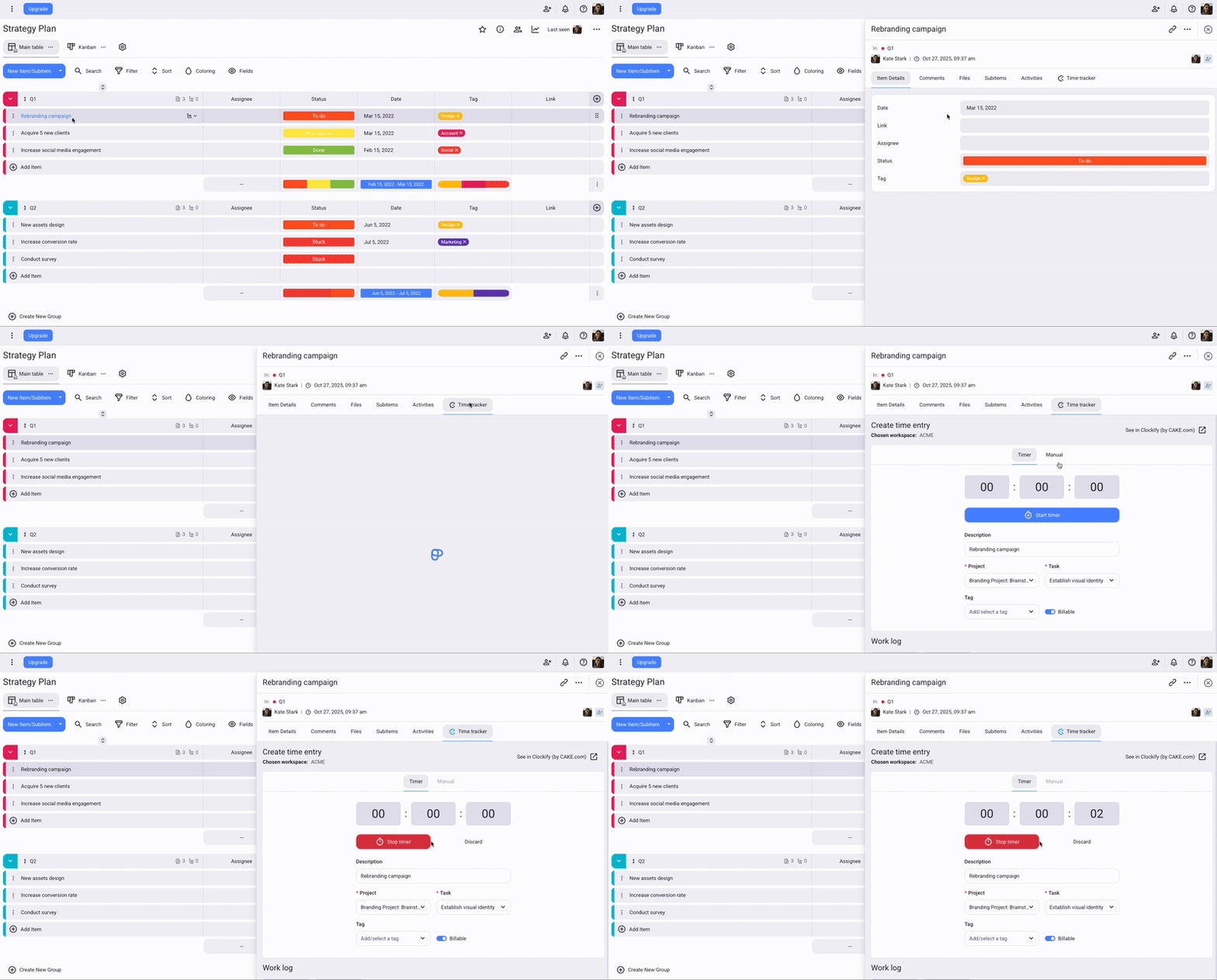
Lorsque vous cliquez sur Démarrer le minuteur dans Plaky, un minuteur démarre également dans Clockify. Toute modification que vous apportez (p. ex. mise à jour de la description ou de la tâche) sera automatiquement synchronisée entre les deux applis.
Pour utiliser le suivi du temps :
- Accédez à votre tableau et ouvrez un élément/sous-élément
- Sélectionnez Suivi du temps > onglet Minuteur
- Saisissez le projet, la tâche et les autres détails nécessaires
- Cliquez sur Démarrer le minuteur pour commencer le suivi du temps
- Cliquez sur Arrêter le minuteur lorsque vous avez terminé
Suivre le temps en mode manuel #
Le mode manuel vous permet de saisir l’heure de début et l’heure de fin de votre saisie de temps.
Pour ajouter du temps manuellement :
- Accédez à votre tableau et ouvrez un élément/sous-élément
- Sélectionnez Suivi du temps > onglet Manuel
Un formulaire contenant des informations prédéfinies s’affiche. Vous pouvez les modifier selon vos besoins - Saisissez la date, l’heure de début, l’heure de fin, le projet, la tâche et les autres informations nécessaires
- Cliquez sur Ajouter du temps pour terminer l’action
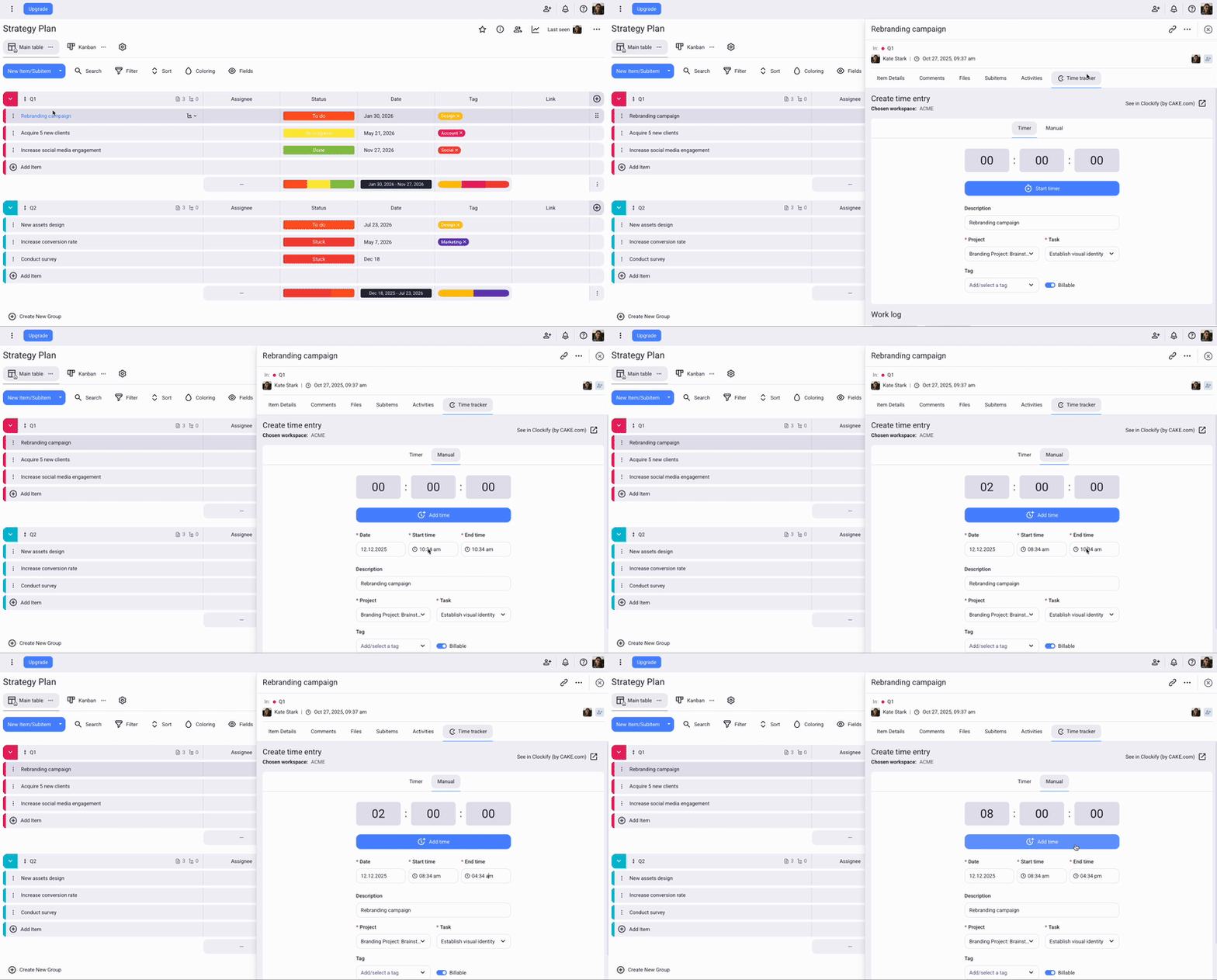
Pour ajouter et modifier manuellement la durée, l’option Forcer le minuteur doit être désactivée dans les paramètres de l’espace de travail.
Utiliser Plaky pour gérer ses projets #
Plaky est un outil gratuit de gestion de projet qui vous aide à gérer vos projets, vos équipes et vos tâches.
Gérez les projets et les tâches
Créez et gérez des projets et des tâches à l’aide d’un nombre illimité de tableaux et d’éléments. Décomposez les tâches volumineuses en éléments plus petits à l’aide de sous-éléments.
Collaborez avec votre équipe
Travaillez avec les membres de votre équipe dans des espaces de travail et des espaces partagés. Vous pouvez inviter des membres à rejoindre des tableaux spécifiques et partager des éléments avec eux.
Organisez votre travail
Ajoutez plusieurs tableaux et organisez les éléments en groupes. Personnalisez vos tableaux en les rendant publics ou privés, et en définissant des autorisations spécifiques pour les autres utilisateurs.

Pour plus d’informations sur l’intégration, consultez cet article du centre d’aide Plaky.
Si vous souhaitez en savoir plus sur Plaky, consultez le site Web de Plaky et inscrivez-vous gratuitement.