Atualizações no plano gratuito do Clockify
O que está mudando? #
Teste gratuito automático #
Todo espaço de trabalho recém-criado iniciará automaticamente com um Teste gratuito completo. Este teste ativa todas as funcionalidades pagas, incluindo valores faturáveis, estimativas de projeto e relatórios avançados, permitindo que você explore todo o potencial do Clockify desde o primeiro dia.
Quando o período de teste terminar, seu espaço de trabalho passará automaticamente para o plano gratuito do Clockify, a menos que você escolha atualizar para um plano pago.
Embora não existam restrições no número de usuários que você pode convidar durante o período de teste gratuito, esteja ciente de que, após o término do teste, o plano gratuito manterá apenas os 4 primeiros convidados + o proprietário ativos, e todos os demais usuários serão automaticamente desativados.
Para contas mais antigas que não foram migradas para o novo plano gratuito, a ativação do período de teste pode estar disponível apenas manualmente. Se você nunca utilizou um período de teste antes, pode ativá-lo clicando no botão Atualizar e depois em Iniciar teste gratuito. Se você já utilizou um teste anteriormente, mas gostaria de experimentar novamente as funcionalidades pagas, poderá enviar uma solicitação para nossa equipe de vendas.
Limites do espaço de trabalho #
Os seguintes limites se aplicam aos espaços de trabalho no plano gratuito:
- Limite de usuários: 5 usuários ativos (incluindo o proprietário e membros ativos).
- API e Webhooks: 30 solicitações de API por hora e até 3 webhooks ativos por espaço de trabalho.
Saiba mais sobre as limitações de API e Webhooks.
Relatórios e exportações #
Os relatórios no plano gratuito possuem as seguintes limitações:
- Filtro de intervalo de datas para relatórios e painéis: 1 mês (31 dias) por vez.
No Plano Gratuito, a geração de relatórios é limitada a um intervalo máximo de 31 dias por relatório. Isso significa que você pode extrair dados para:- Uma janela contínua: os 31 dias anteriores, começando a partir de hoje.
- Um período específico: qualquer período personalizado, desde que as datas de início e fim não estejam separadas por mais de 31 dias (por exemplo: o mês inteiro de janeiro ou o mês inteiro de fevereiro). Para visualizar dados com mais de 31 dias ou gerar relatórios de vários meses, considere atualizar seu plano.
- Exportações de relatórios em CSV e Excel estão disponíveis apenas nos planos pagos (exportações em PDF continuam disponível no plano gratuito).
- Relatórios compartilhados estão disponíveis apenas nos planos pagos.
Gerenciamento de projetos e equipe #
As mudanças nas funcionalidades de gerenciamento de projetos e equipe incluem:
- Privacidade do projeto: Todos os projetos no plano gratuito são Públicos (visíveis para todos os membros do espaço de trabalho).
- Permissões de criação: Cada membro do espaço de trabalho pode criar clientes, projetos, tarefas e etiquetas. No plano gratuito, não é possível limitar essas permissões.
- Permissões de edição: Os usuários podem editar apenas seus próprios registros de tempo (a permissão “Quem pode editar o tempo de outras pessoas” está definida como “Ninguém”).
O que você pode fazer #
Se você está atualmente no plano gratuito ou finalizando seu período de teste gratuito, aqui estão algumas medidas que pode tomar para gerenciar sua conta:
- Revise o tamanho da sua equipe: Certifique-se de que seu espaço de trabalho tenha 5 ou menos membros ativos, ou faça upgrade para um plano pago para incluir toda a sua equipe. Você pode usar a função Desativação em massa para desativar rapidamente vários usuários do seu espaço de trabalho.
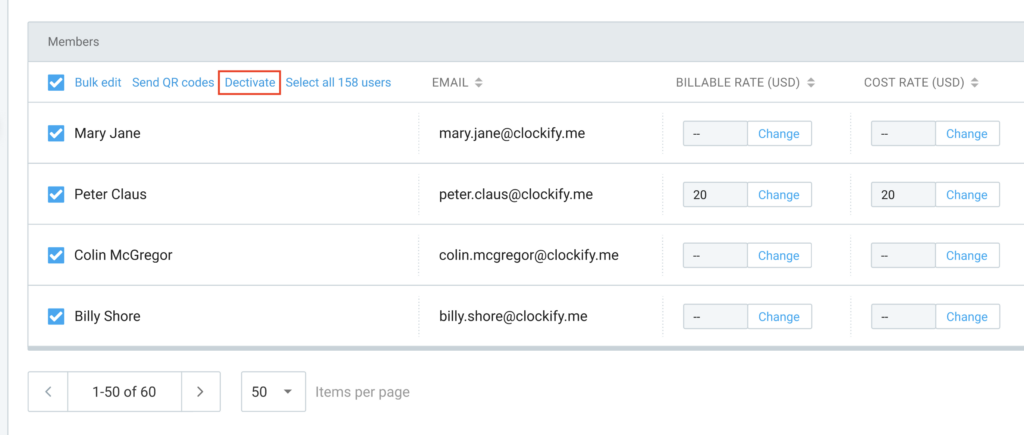
- Baixe seus dados anuais. Proprietários do espaço de trabalho podem usar a opção Exportar dados nas configurações para exportar todas as entradas de tempo do ano atual como arquivo CSV ,para conformidade legal ou arquivamento.
- Otimize seus webhooks. Verifique a aba Webhooks para garantir que seus 3 webhooks mais importantes estejam ativos.
- Explore os planos pagos. Desbloqueie recursos como Quiosque, valores faturáveis, gerenciamento de folgas e muitas outras funcionalidades para gerenciar o tempo da sua equipe e emitir cobrança pelo seu trabalho.
Perguntas frequentes #
Posso continuar exportando meus dados para Excel ou CSV no plano gratuito, ou agora está limitado a PDF?
Não. As exportações para Excel e CSV são recursos pagos. No plano gratuito, as exportações de relatórios ficam limitadas a PDF.
O plano Basic incluirá exportações em Excel e CSV?
Sim. Ao atualizar para o plano Basic (ou qualquer plano superior), você recupera acesso completo às exportações de relatórios em Excel e CSV.
Se eu desativar usuários extras e ficar com apenas 5 membros ativos, posso continuar no plano gratuito?
Sim. Se você reduzir seu espaço de trabalho para 5 membros ativos ou menos, desativando as contas extras, poderá continuar no plano gratuito e usar recursos principais disponíveis, como controle de tempo, projetos etc.
O que significa, na prática, a restrição de "valor faturável" para a minha conta?
Você não poderá mais definir valores por hora nem atribuir valores monetários aos projetos.
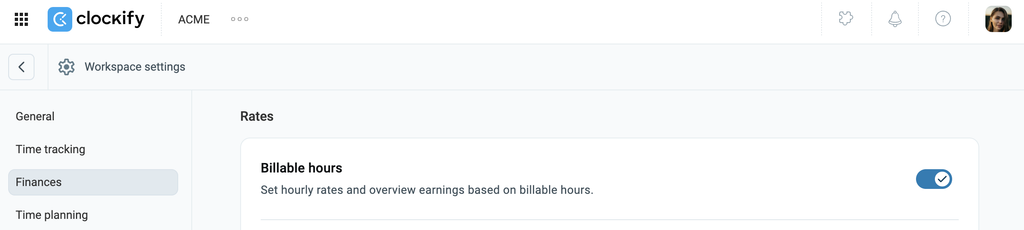
Here’s what your Workspace settings (Finances page) would look like during the trial when Billable rates are enabled:
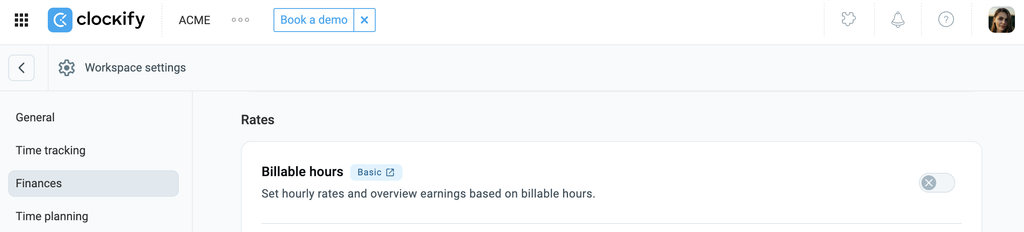
Veja como ficará quando o período de teste terminar e você permanecer no plano gratuito:
Ainda poderei marcar horas como faturáveis/não faturáveis e definir valores de projeto no plano gratuito?
Não. A capacidade de marcar registros de tempo como faturáveis/não faturáveis e atribuir valores financeiros aos projetos faz parte dos planos pagos.
Veja como um registro de tempo aparece quando as taxas faturáveis estão ativadas:

Quando o período de teste terminar e você permanecer no plano gratuito, o ícone de Faturamento não aparecerá mais nos registros de tempo:

De qual plano pago preciso para ver valores faturáveis e os valores totais ganhos?
Você precisará do plano Basic (ou superior) para reativar valores faturáveis por hora, alternar o status de faturamento e calcular os valores totais ganhos.
Quando os valores faturáveis estiverem ativados, você poderá acessar Relatórios > Detalhado para filtrar entradas de tempo faturáveis e visualizar os valores totais:
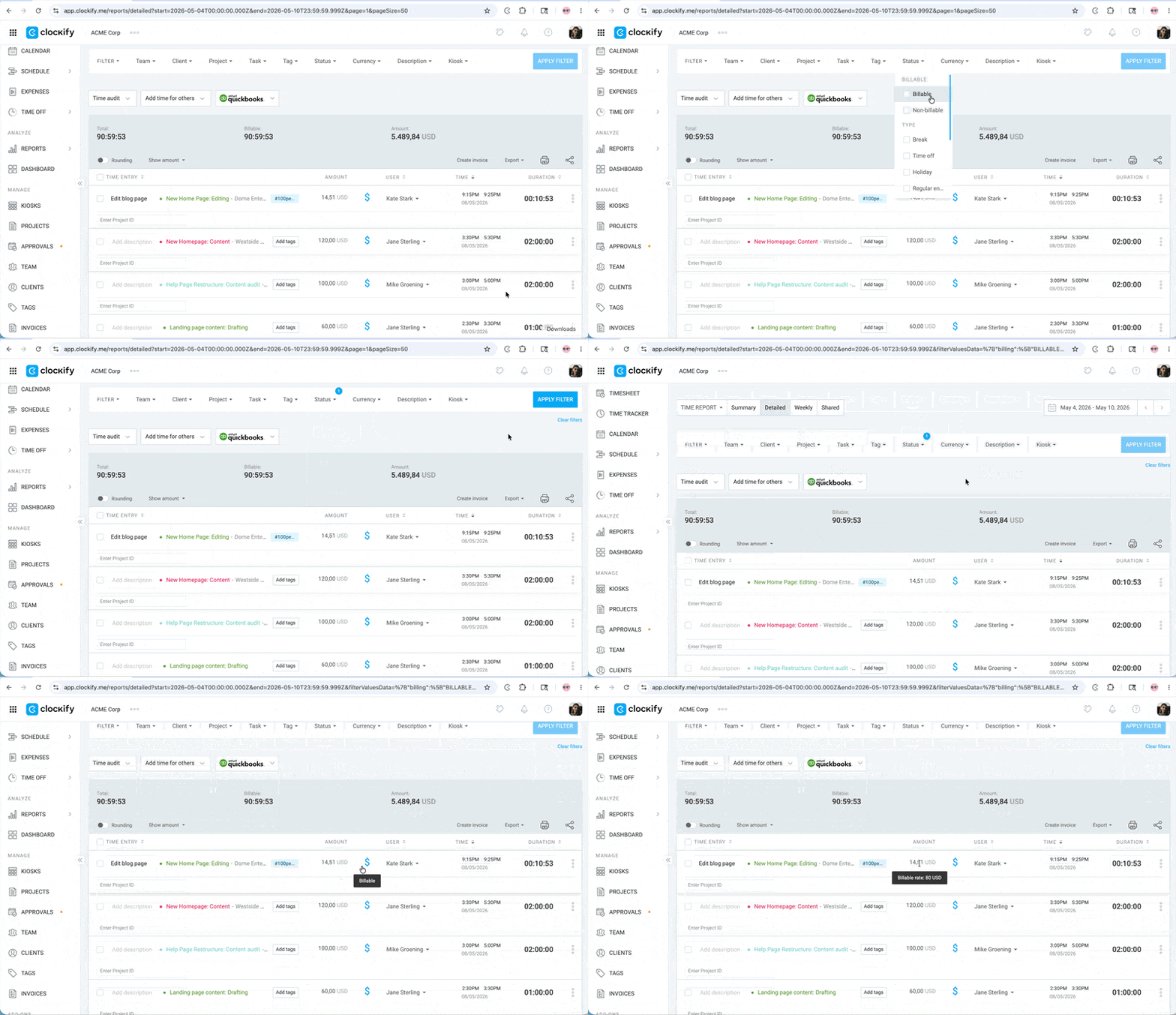
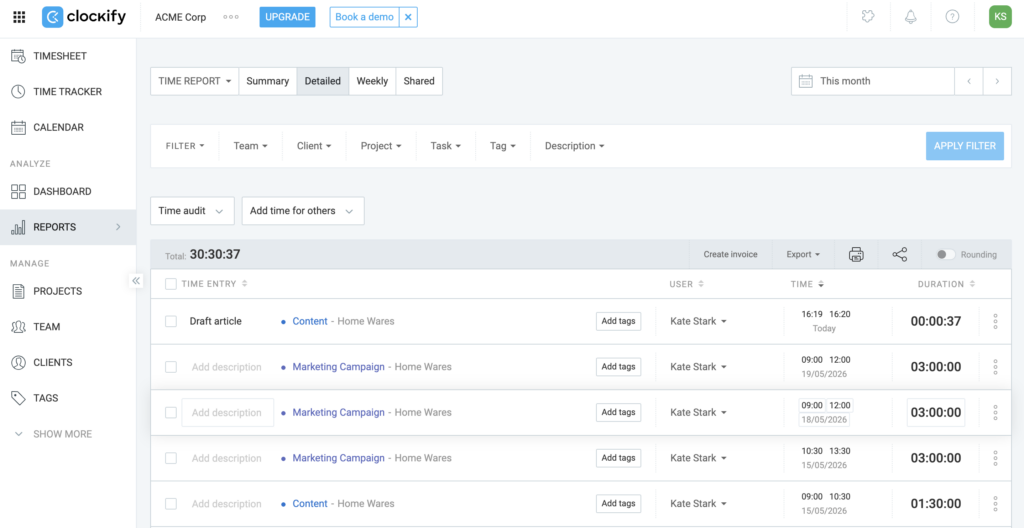
Sem valores faturáveis, você verá apenas os registros de tempo no Relatório detalhado:
O plano gratuito está restringindo as pesquisas de relatórios a um intervalo de apenas 1 mês?
Sim. O filtro de intervalo de datas dos relatórios no plano gratuito agora está limitado a no máximo 1 mês (31 dias) por consulta.
Ainda poderei gerar relatórios de um ano inteiro ou intervalos personalizados?
Não em uma única consulta. No plano gratuito, você precisará gerar e exportar relatórios manualmente, mês a mês. Para gerar um único relatório cobrindo um ano inteiro ou um intervalo personalizado maior, será necessário atualizar para um plano pago.
O plano Basic cobre tudo o que está sendo removido do plano gratuito?
Sim. O plano Basic cobre todas as funcionalidades limitadas no plano gratuito, incluindo exportações CSV/Excel, valores faturáveis e filtros avançados de relatórios.
Se eu for um usuário individual e só precisar de funções básicas de controle de tempo e exportação em PDF, posso continuar usando Clockify gratuitamente?
Sim, absolutamente. Se você só precisa registrar tempo, organizá-las por projeto e gerar resumos em PDF, o plano gratuito continua totalmente funcional e gratuito.
Se eu escolher um plano pago, só pago se tiver mais de 5 assentos?
Não. Ao mudar para um plano pago, o limite do plano gratuito deixa de se aplicar, e cada usuário precisa de um assento pago. Por exemplo, se você já tiver 5 usuários e quer adicionar mais 1 pessoa ao fazer o upgrade, precisará adquirir um total de 6 assentos pagos.