

O controle de tempo mostra onde as horas foram gastas, mas não informa se um projeto gerou lucro. Essa é a diferença entre os planos Gratuito e Pro do Clockify.
Este artigo explica o que o plano Pro inclui, quando sua equipe realmente precisa dele e como ele se compara aos outros planos do Clockify.
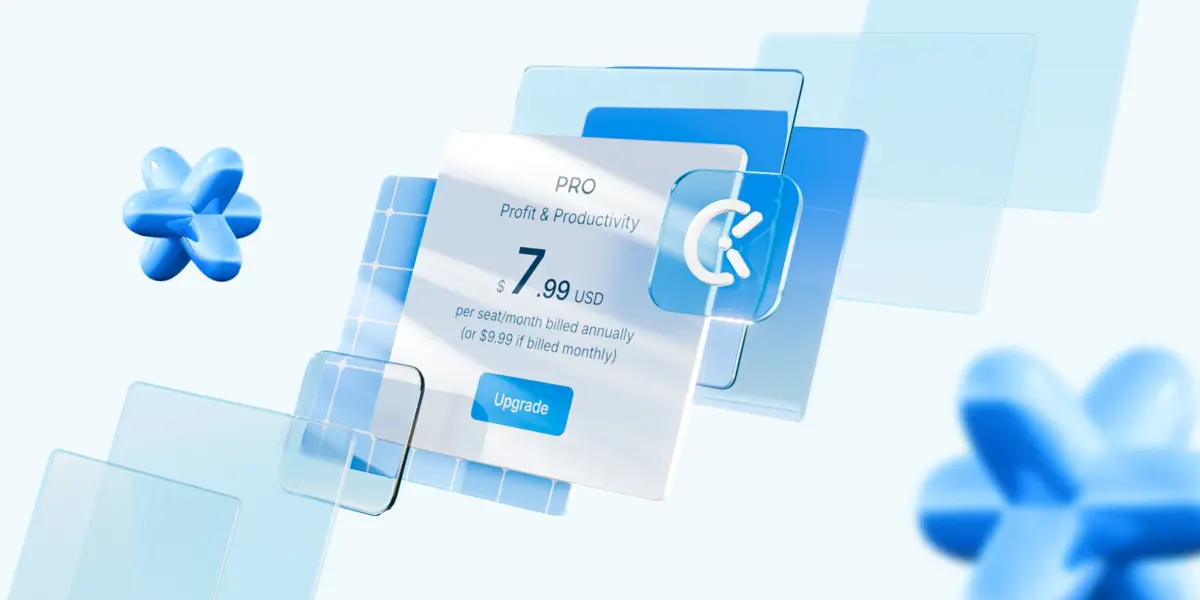
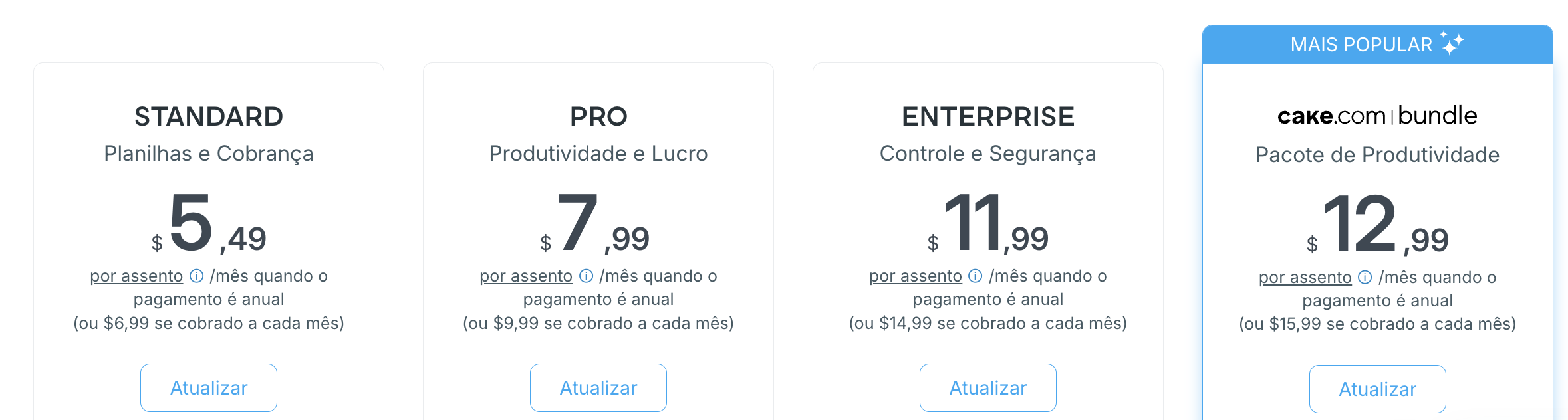
- O plano Pro do Clockify custa US$7,99 por usuário/mês, com cobrança anual, ou US$9,99 com cobrança mensal.
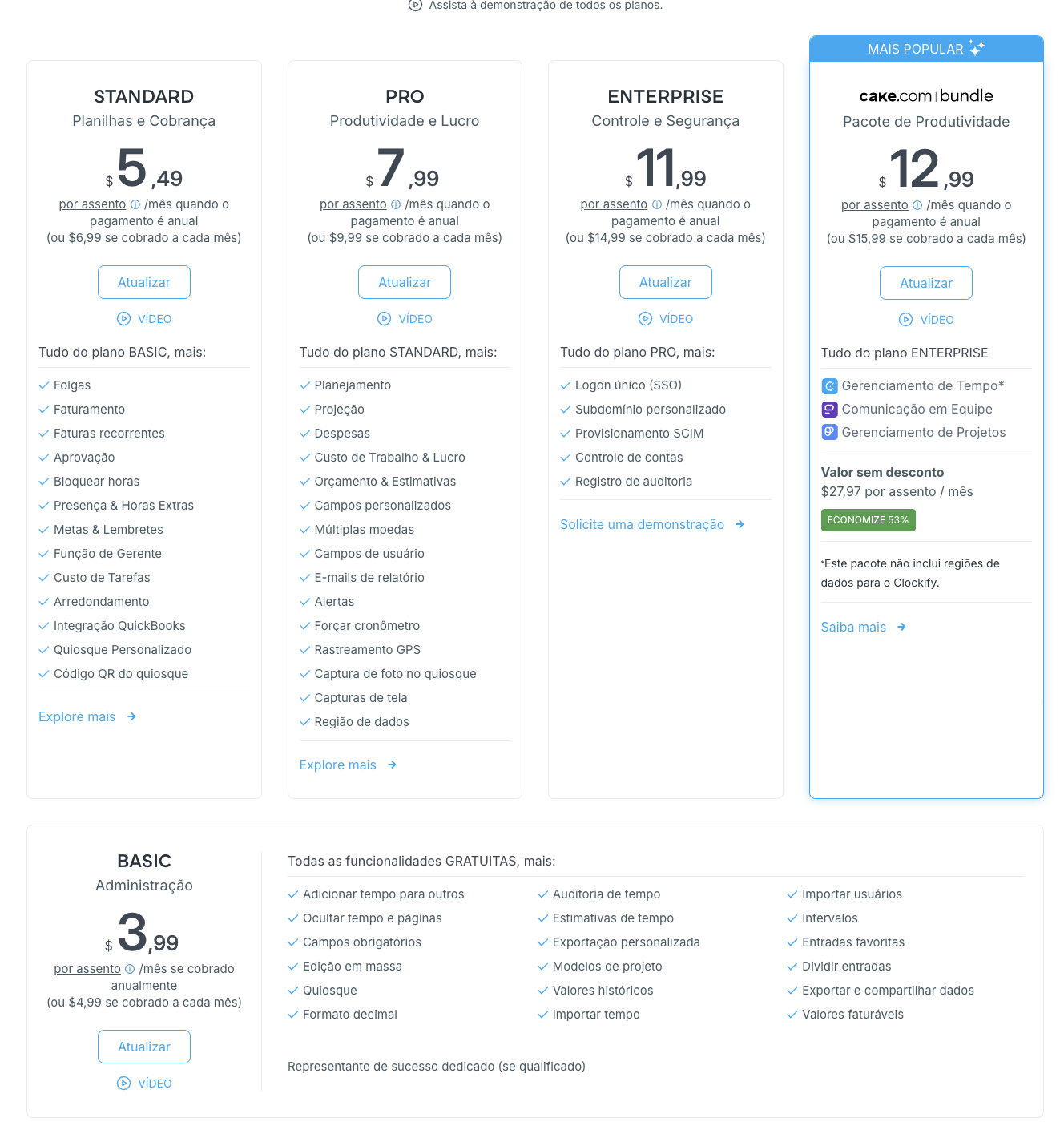
- O plano Pro inclui: Planejamento, Projeção, Orçamentos, Controle de custos de mão de obra, Despesas, Rastreamento por GPS, Capturas de tela, Capturas de fotos e Campos personalizados, além de todas as funcionalidades do plano Standard.
- O plano Clockify Pro foi desenvolvido para equipes que gerenciam a lucratividade dos projetos, não apenas as horas registradas.
- Os motivos mais comuns para atualizar para o plano Pro do Clockify são: não saber quais projetos são lucrativos, não ter como planejar quem trabalha em quê, projetos que ultrapassam o orçamento sem aviso prévio e relatórios manuais que não acompanham o crescimento da equipe.
- Uma avaliação gratuita de 7 dias de todos os recursos do plano Pro do Clockify está disponível, sem necessidade de cartão de crédito.
O que é o plano Pro do Clockify?
O plano Pro do Clockify é uma modalidade de assinatura paga que adiciona recursos de lucratividade de projetos, planejamento de recursos e controle de custos à plataforma de controle de tempo do Clockify.
O plano Pro está acima dos planos Gratuito, Basic e Standard, e abaixo do plano Enterprise. Cada nível inclui todos os recursos do plano inferior. Portanto, o plano Pro do Clockify inclui todos os recursos dos planos Basic e Standard, além de um conjunto próprio de ferramentas desenvolvidas para equipes que gerenciam orçamentos, custos e alocação de pessoal.
O que está incluído no plano Pro do Clockify
Todas as funcionalidades do plano Pro do Clockify incluem todos os recursos do plano Standard (Folgas, Faturamento, Aprovações, Controle de presença, Integração com o QuickBooks, etc.), além de:
| Funcionalidade | Utilidade |
|---|---|
| Planejamento | Planeje atribuições de projetos e turnos em uma linha do tempo para visualizar quem está ocupado e quem está disponível. |
| Projeção | Faça projeções do andamento dos projetos com base no trabalho rastreado e agendado. |
| Custo da mão de obra e lucro | Defina taxas de custo de mão de obra por usuário ou projeto e compare os custos com o que você cobra dos clientes. |
| Orçamento e estimativas | Defina um orçamento de tempo ou dinheiro por projeto e acompanhe o status em relação a ele. |
| Alertas | Receba notificações por e-mail quando um projeto estiver próximo do limite do orçamento. |
| Despesas | Registre valores fixos, como adiantamentos, reembolsos ou quilometragem, e adicione-os às faturas. |
| Múltiplas moedas | Atribua uma moeda por cliente para que os relatórios e faturas mostrem o valor correto. |
| Campos personalizados | Adicione dados personalizados às entradas de tempo para geração de relatórios ou exportação. |
| Campos do usuário | Adicione dados personalizados aos perfis de usuário, como ID do funcionário, localização ou departamento. |
| Relatórios por e-mail | Agende o envio de um relatório por e-mail diariamente, semanalmente ou mensalmente. |
| Forçar cronômetro | Restrinja entradas e edições manuais de tempo, exigindo o uso do cronômetro para o rastreamento. |
| Rastreamento por GPS | Rastreie a localização da equipe enquanto estiverem com o ponto registrado em um local de trabalho. |
| Capturas de tela | Capture uma imagem da atividade da área de trabalho a cada 5 minutos. |
| Região de dados | Escolha onde os dados do seu espaço de trabalho serão hospedados. |
| Captura de fotos (Quiosque) | Capture a foto do usuário sempre que ele fizer login via quiosque. |
O plano Pro do Clockify custa US$ 7,99 por usuário/mês, com cobrança anual, ou US$ 9,99 por usuário/mês, com cobrança mensal. Um teste gratuito de 7 dias está disponível, sem a necessidade de cartão de crédito.
Experimente as funcionalidades do Clockify Pro GRATUITAMENTE
Quando cada plano do Clockify faz sentido
Veja como o plano Pro do Clockify se compara aos outros planos.
| Plano | Melhor para | A partir de USD |
|---|---|---|
| Free | Usuários individuais e equipes de até 5 membros registrando horas | $0 |
| Basic | Equipes que precisam de edição em massa, taxas faturáveis e controles administrativos | $3,99/usuário/mês (anual) |
| Standard | Equipes que faturam clientes e precisam de faturamento, aprovações e controle de folgas | $5,49/usuário/mês (anual) |
| Pro | Equipes que gerenciam orçamentos de projetos, alocação de pessoal e lucratividade | $7,99/usuário/mês (anual) |
| Enterprise | Organizações que precisam de SSO, registros de auditoria e controle total das contas | $11,99/usuário/mês (anual) |
Se sua equipe já usa o plano Standard, mas continua criando planilhas de controle de orçamento ou planos de alocação de pessoal fora do Clockify, esse é o sinal de que está na hora de migrar para o plano Pro.
O Clockify também faz parte do pacote CAKE.com, que oferece 3 ferramentas de produtividade no nível Enterprise (Clockify, Pumble e Plaky) por um preço bastante reduzido de US$12,99.

Por que o plano gratuito do Clockify deixa de ser suficiente?
Com o plano gratuito do Clockify, você tem rastreamento de tempo, projetos e clientes ilimitados. Para usuários individuais ou equipes muito pequenas, isso geralmente é suficiente.
As limitações aparecem quando uma equipe cresce e começa a gerenciar o trabalho de clientes em maior escala, especialmente em agências, empresas de consultoria, empresas de TI e desenvolvimento e equipes remotas.
Problemas que o plano Pro do Clockify resolve
Os quatro problemas a seguir tendem a surgir juntos e pioram à medida que a equipe cresce.
#1: Falta de visibilidade sobre a lucratividade dos projetos
Sem dados sobre custos de mão de obra, um gerente não consegue responder a perguntas básicas:
- Este projeto é lucrativo?
- O projeto está ultrapassando seu orçamento original?
- A equipe está gastando mais tempo nele do que o previsto no contrato do cliente?
O resultado é que a lucratividade é calculada posteriormente, geralmente em uma planilha separada, usando números extraídos manualmente de relatórios de horas. Quando os números são inseridos, o projeto geralmente já está concluído.
#2: Sem planejamento de recursos
Sem uma visão compartilhada de quem está trabalhando em quê, os gerentes não conseguem ver se alguém está com a agenda lotada em dois projetos na mesma semana, ou se um membro da equipe ainda tem capacidade de disponibilidade.
O planejamento acaba acontecendo mentalmente por alguém, em um documento ou em uma planilha separada, desconectado dos dados de tempo em si. Isso se torna um risco real à medida que a equipe cresce e passa de um pequeno grupo de pessoas. A sobrecarga passa despercebida até que os prazos sejam perdidos ou alguém fique esgotado.
#3: Falta de controle orçamentário em tempo real
Sem um sistema que monitore o orçamento em tempo real, os projetos podem ultrapassar os custos planejados antes que alguém perceba. Isso é especialmente relevante em dois cenários comuns:
- Projetos com orçamento total fixo;
- Contratos com clientes com um limite de horas faturáveis.
Em ambos os casos, uma vez ultrapassado o limite, a equipe está realizando trabalho não remunerado ou a agência precisa ter uma conversa desconfortável com o cliente sobre o escopo do projeto.
Um orçamento que só é revisado no final de um projeto, em vez de ser acompanhado à medida que é gasto, detecta o problema tarde demais para corrigi-lo.
💡 DICA PROFISSIONAL DO CLOCKIFY
Aprenda a melhor forma de controlar o tempo e as despesas dos seus projetos para obter mais informações leia:
#4: Falta de relatórios avançados e automação
Com o aumento do número de funcionários, a criação manual de relatórios torna-se lenta e propensa a erros.
As equipes precisam de relatórios que sejam gerados e enviados automaticamente, além de maneiras de marcar as entradas de tempo com dados específicos da empresa (ex.: ID do cliente, departamento ou tipo de projeto). Esses dados podem então ser filtrados, exportados e compartilhados sem trabalho manual adicional.
O plano Pro do Clockify foi desenvolvido para resolver esses quatro problemas diretamente.
Clockify Pro: Do controle de tempo à gestão do tempo
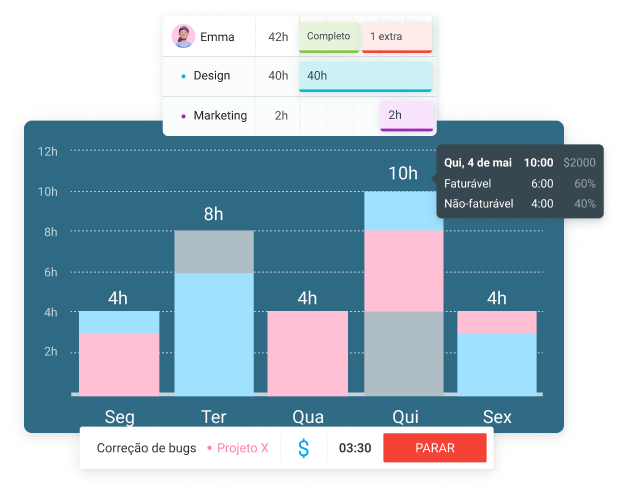
Embora o plano Gratuito ajude uma equipe a registrar o tempo, o plano Pro do Clockify ajuda a equipe a gerenciar o que esse tempo representa para a empresa.
Os recursos do plano Pro podem ajudar uma equipe a passar do simples registro de tempo para o gerenciamento ativo da produtividade e da lucratividade dos projetos. Especificamente, o plano Pro do Clockify oferece às equipes as ferramentas para:
- Planejar projetos — Atribua tarefas e turnos em um cronograma antes do início do trabalho.
- Otimizar recursos — Visualize a capacidade da equipe rapidamente, para que o trabalho seja distribuído com base em quem está realmente disponível.
- Analisar custos — Compare os custos da mão de obra com as taxas faturáveis em cada projeto e verifique a lucratividade em um relatório.
- Aumentar a produtividade — Use orçamentos, alertas e projeções para identificar problemas enquanto ainda há tempo para resolvê-los.
O plano gratuito do Clockify é útil para pequenas equipes que precisam controlar o tempo de trabalho. O plano Pro é o próximo passo natural dentro dos planos pagos, quando uma equipe:
- Gerencia vários projetos simultaneamente
- Necessita de melhor planejamento de recursos
- Precisa acompanhar orçamentos e lucratividade
- Necessita de relatórios automatizados
O plano Pro também foi desenvolvido para equipes que precisam de uma gestão mais estruturada em toda a organização, e não apenas de registros de tempo individuais.
Veja como usar melhor o plano Pro do Clockify aqui → Funcionalidades do plano Pro
Quem pode se beneficiar do plano Clockify Pro?
O plano Pro do Clockify resolve diferentes problemas dependendo do tipo de equipe que o utiliza. Veja como ele pode funcionar em 3 casos comuns.
Agências digitais
As agências faturam vários clientes ao mesmo tempo, com orçamentos e valores por hora diferentes. Sem o controle de custos de mão de obra, uma agência não consegue saber se um projeto é lucrativo até que o orçamento já tenha sido ultrapassado
Com o plano Pro do Clockify, a agência define um custo de mão de obra por funcionário e um valor faturável por cliente. O Clockify então mostra a margem de cada projeto em um relatório, em vez de exigir um cálculo manual em planilha posteriormente.
Os alertas de orçamento também sinalizam um projeto se aproximando do limite antes que ele seja ultrapassado, dando aos gerentes de contas tempo para avisar o cliente sobre o aumento do escopo.
As agências geralmente precisam controlar não apenas seus muitos clientes, mas também seus muitos funcionários. Graças ao Clockify, a agência de mídia Brainlabs consegue acompanhar com sucesso mais de 1.000 funcionários.

“O Clockify tornou muito mais fácil para nós termos uma visão de como melhor atender nossos clientes.”
Equipes de startups
As equipes de startups operam com equipes enxutas e frequentemente realocam pessoas entre projetos. O agendamento mostra quem está alocado a cada tarefa ao longo da semana, permitindo que o fundador ou líder da equipe visualize a disponibilidade rapidamente, em vez de ter que perguntar a cada pessoa.
A projeção adiciona uma segunda camada de proteção — ela estima se um projeto cumprirá o prazo com base no trabalho já rastreado e agendado, o que é importante quando uma equipe pequena não consegue absorver um atraso no lançamento.
Quando você tem uma equipe e um negócio em crescimento para administrar, pode se tornar bastante desafiador manter o controle do seu horário de trabalho. Com o Clockify, a Whiteboard Games substituiu as semanas de trabalho de 60 horas por mais flexibilidade.

“Clockify é uma escolha óbvia. Você consegue gerenciar grandes equipes em tempo real sem qualquer dificuldade.”
💡 DICA PROFISSIONAL DO CLOCKIFY
O Clockify ajuda equipes de startups a acompanhar seu tempo usando o Cronômetro, Planilhas de horas ou Calendário. Saiba mais sobre como organizar seu trabalho aqui:
Empresas de consultoria
Os consultores cobram por hora, frequentemente em vários contratos ativos com clientes, com diferentes valores e moedas. Múltiplas moedas e valores personalizados para cada cliente mantêm a precisão da faturação sem a necessidade de conversões manuais.
Os campos personalizados permitem que uma empresa marque as entradas de tempo com dados adicionais, como o tipo de projeto, que são então exportados para faturamento de clientes ou relatórios internos.
Por falar em relatórios, uma empresa de consultoria de TI, a Spainlink Development Solutions S.L., economiza €15.000 por ano graças aos relatórios do Clockify.

“O Clockify nos economizou € 1.300 por mês em tempo de coordenação e tarefas administrativas que, de outra forma, gastaríamos rastreando o andamento dos projetos.”
Para ver mais depoimentos de equipes que realizaram ótimos trabalhos com o Clockify, confira nossos depoimentos de clientes.
Como atualizar para o plano Pro do Clockify
Fazer o upgrade para o plano Pro do Clockify leva apenas alguns minutos e pode ser feito diretamente do seu espaço de trabalho:
- Acesse a página Upgrade no seu espaço de trabalho do Clockify;
- Selecione o plano Pro;
- Escolha o faturamento anual ou mensal;
- Insira os dados de pagamento ou inicie o teste gratuito de 7 dias;
- Confirme o upgrade.
Cada usuário ativo ou convidado em um plano pago precisa de um assento pago. A desativação de um usuário libera um assento para outra pessoa.
Perguntas frequentes sobre o plano Pro do Clockify
Aqui estão respostas rápidas para as perguntas mais frequentes das equipes antes de fazer o upgrade.
Quanto custa o plano Pro do Clockify?
O plano Pro do Clockify custa US$7,99 por usuário por mês, com cobrança anual, ou US$9,99 por usuário por mês, com cobrança mensal.
O que o plano Pro do Clockify inclui que o Standard não inclui?
O plano Pro do Clockify adiciona planejamento, projeção, controle de custos e lucros da mão de obra, orçamentos e estimativas, despesas, suporte a múltiplas moedas, campos personalizados e de usuário, relatórios por e-mail, alertas, opção de forçar cronômetro, rastreamento por GPS, captura de fotos no quiosque, capturas de tela e seleção da região dos dados.
Posso experimentar o plano Pro do Clockify antes de pagar?
Sim, você pode experimentar o plano Pro do Clockify antes de pagar. O Clockify oferece um teste gratuito de 7 dias com todos os recursos do plano Pro, sem necessidade de cartão de crédito. Se você entrar em contato com o suporte após esses 7 dias, poderá solicitar uma extensão do período de teste.
Experimente os recursos do Clockify Pro GRATUITAMENTE
O plano Pro do Clockify inclui faturamento?
Sim, o plano Pro do Clockify inclui o recurso de Faturamento. O faturamento está disponível no plano Standard, e o plano Pro inclui todos os recursos do Standard, além de suas próprias ferramentas.
O que acontece se eu cancelar o plano Pro do Clockify?
Mesmo se você cancelar o plano Pro do Clockify, você manterá todos os seus dados. O cancelamento remove apenas o acesso aos recursos Pro, e sua conta retorna ao plano gratuito ao final do ciclo de faturamento atual.
O plano Pro do Clockify P é o mesmo que o pacote CAKE.com?
Não, o plano Pro do Clockify não é o mesmo que o pacote CAKE.com. O pacote CAKE.com inclui a versão Enterprise de 3 ferramentas: Clockify para controle de tempo, Pumble para comunicação em equipe e Plaky para gerenciamento de projetos. O plano Pro do Clockify é um plano independente do Clockify, um nível abaixo do Enterprise.
Cadastre-se hoje mesmo na CAKE.com
Como avaliamos esta publicação: Nossos redatores e editores monitoram as publicações e as atualizam quando novas informações são disponibilizadas para mantê-las atualizadas e relevantes.