Module complémentaire Insights
L’extension Insights présente les données de votre espace de travail sous forme de tableau de bord personnalisable, vous permettant ainsi de suivre d’un seul coup d’œil les indicateurs clés tels que l’avancement des projets, la situation financière et l’activité de l’équipe.
La carte Congés nécessite l’abonnement Standard, tandis que la carte Dépenses nécessite l’abonnement Pro.
Installer le module complémentaire Insights #
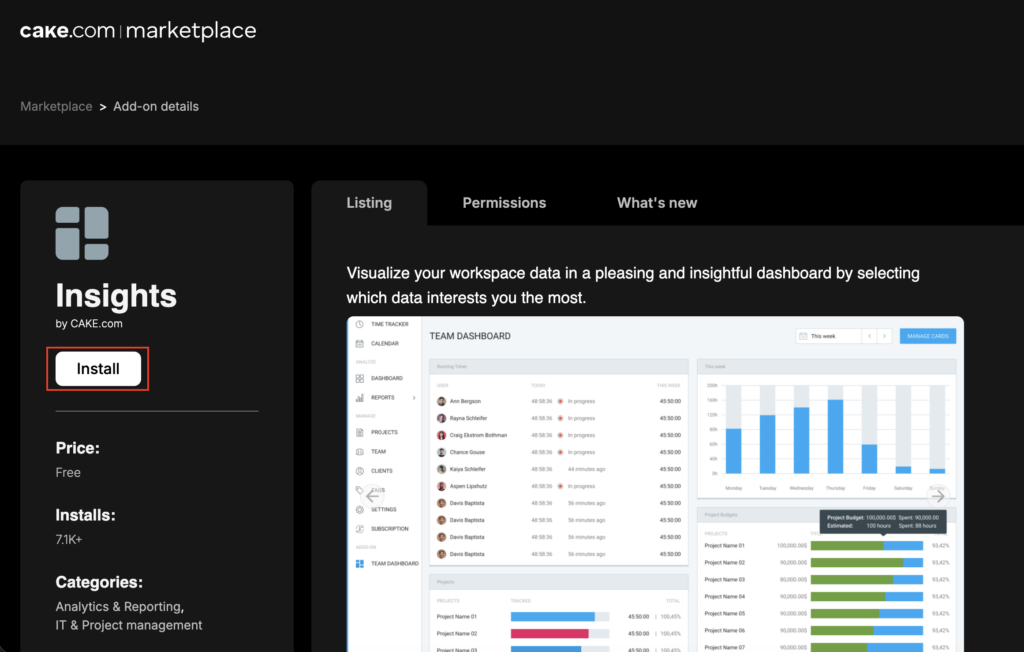
Pour commencer à utiliser le tableau de bord, vous devez d’abord installer l’extension depuis le Marketplace.
- Rendez-vous sur https://marketplace.cake.com/
- Connectez-vous avec vos identifiants Clockify
- Recherchez Insights dans la barre de recherche
- Cliquez sur Installer sur la page de l’extension
- Sélectionnez l’espace de travail dans lequel vous souhaitez installer l’extension
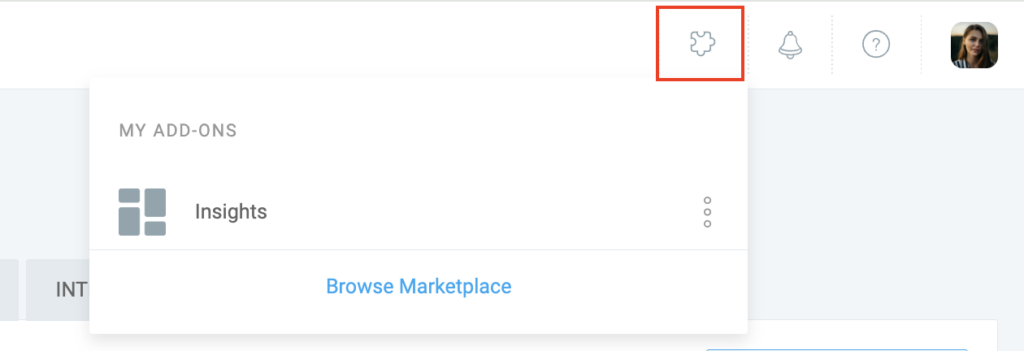
Accédez à la Marketplace directement depuis Clockify en cliquant sur l’icône en forme de puzzle située dans le coin supérieur droit, puis en sélectionnant Parcourir la Marketplace.
Configurer le tableau de bord #
Une fois l’appli installée, vous pouvez choisir les fiches de données à afficher en fonction de vos besoins. Vous pouvez sélectionner jusqu’à 4 fiches à afficher simultanément.
- Accédez à votre espace de travail Clockify
- Cliquez sur Insights dans la barre latérale
- Utilisez le calendrier situé en haut à droite du tableau de bord pour sélectionner la période souhaitée
- Cliquez sur Choisir les cartes pour ouvrir le menu déroulant
- Cochez les cases situées à côté des cartes que vous souhaitez afficher (p. ex. Factures impayées, Projets)
Fiches de données disponibles #
Les fiches de données suivantes sont disponibles pour une utilisation avec le module complémentaire Insights, ainsi que les abonnements auxquels elles correspondent.
| Nom de la fiche | Description | Abonnement requis |
| Membres | Répertorie les personnes présentes dans l’espace de travail et leur statut d'activité (qui n’enregistre pas son temps) | Offres gratuites et payantes |
| Projets | Affiche le nombre de personnes travaillant sur les projets, le nombre total d’heures enregistrées et l’état d’avancement | Offres gratuites et payantes |
| Factures impayées | Répertorie les factures impayées avec leur statut (Non envoyée, Envoyée, Partiellement payée, En retard) | Abonnement Standard et supérieurs |
| Finances | Affiche le temps total enregistré, y compris la quantité, le coût et le bénéfice | Abonnement Pro et supérieurs |
| Demandes de congés | Répertorie les demandes de congé en attente, avec des informations sur le membre, la politique et la période | Abonnement Standard et supérieurs |
| Feuilles de temps à approuver | Répertorie les feuilles de temps et les notes de frais en attente de validation | Abonnement Standard et supérieurs |
| Dépenses | Affiche un diagramme circulaire présentant la répartition des dépenses par catégorie | Abonnement Pro et supérieurs |
FAQ #
Qui peut consulter le tableau de bord Insights ?
Le tableau de bord Insights est réservé aux propriétaires et aux administrateurs de l’espace de travail. Les utilisateurs standards et les chefs d’équipe n’ont pas accès à cette extension.
Pourquoi les cartes « Congés » ou « Dépenses » ne s’affichent-elles pas ?
Ces cartes nécessitent des formules d’abonnement spécifiques. Vous devez disposer de la formule Standard ou d’une formule supérieure pour consulter les données relatives aux congés, et de la formule Pro ou d’une formule supérieure pour consulter les données relatives aux dépenses. Si vous disposez d’une formule inférieure, ces cartes seront verrouillées ou indisponibles.