Miembros limitados
Limited members are users that don’t have an email and can only clock in and out via a kiosk. Because they do not have full account access, limited members only see the kiosk interface to clock in and out, and cannot access the main workspace to view reports or edit timesheets.
If your Free trial expires or you downgrade to the Free plan, all active limited members and the corresponding tab will be deactivated. You won’t be able to add new limited members to the workspace unless you re-subscribe to a Basic plan or higher.
Full members and limited members serve different purposes depending on your tracking needs.
- Full members have an email address, can log into Clockify on their own, and can track time using the web, desktop, and mobile apps.
- Limited members rely strictly on the kiosk, which make them ideal for staff without work emails.
Miembro completo vs. limitado #
| Miembro completo | Miembro limitado |
| Has name and email address | Has only a name |
| Can log in and use Clockify web, mobile, and desktop apps | Can only use the kiosk |
| Can switch tasks and projects, and record locations | Limited by the kiosk setup |
| Ocupa un puesto completo (desde 3,99 $/puesto) | Ocupa un puesto limitado (de 0,79 $ /puesto) |
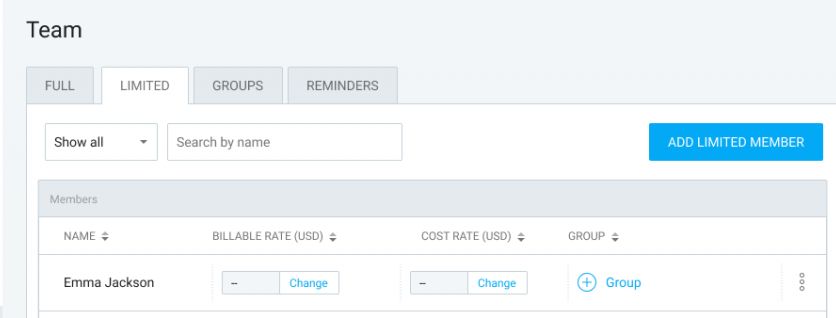
Añadir miembro limitado #
To add limited members, make sure you have kiosk enabled in Workspace settings and that you have an available limited seat for each active limited member you add to your workspace.
- Ve a la página Equipo
- Open the Limited tab
- Click Add limited member
- Enter the Employee name
- Haz clic en Añadir
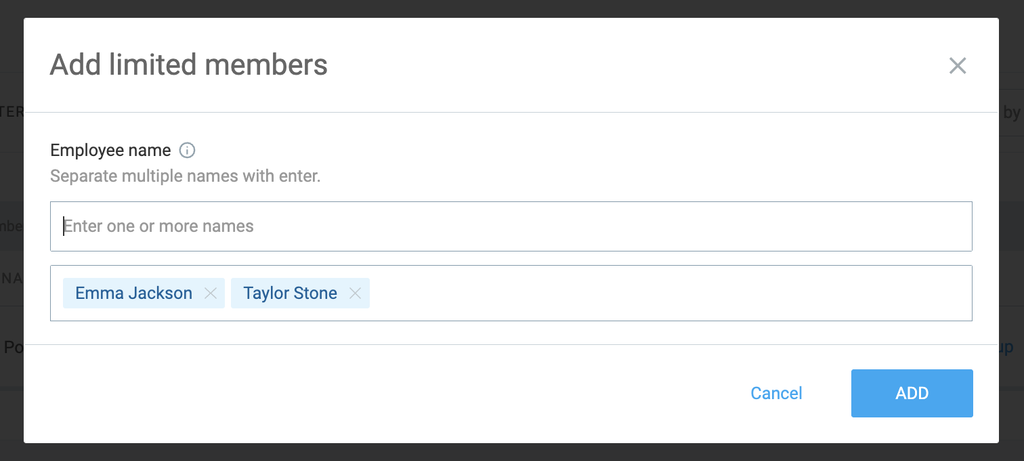
Pay for limited members #
If you’re on a paid plan, limited members are charged separately from full users and require one limited seat each. You can buy limited seats directly on your Subscription page, or at the exact moment when adding the member on the Team page.
If you downgrade to the Free plan, your active limited members will be deactivated until you subscribe to a paid plan again.
Manage limited members #
Admins can manage limited member profiles across all paid plans. From the Team page, you can:
- Editar su perfil
- Editar su PIN de quiosco
- Desactivar su cuenta
If you deactivate a limited user, their limited seat frees up immediately, and you can assign it to a different limited user.
Use limited members in your workspace #
| Acción | Administrador | Gerente de equipo |
| Assign to kiosks | Sí | No |
| Add to groups | Sí | No |
| Give assignments and add to Schedule | Sí | No |
| Enviar el tiempo para aprobación | Sí | No |
| Create expenses on their behalf | Sí | No |
| Request time off on their behalf | Sí | No |
| View activity in Team Dashboard | Sí | Sí |
| View, filter, and export time in Reports | Sí | Sí |
| Categorize time (add or change project and task) | Sí | Sí |
| Add and edit time in Timesheet, Calendar, and Detailed Report | Sí | Sí |
You can group limited members together on the Team page to assign them to projects or filter their hours in Reports page more quickly.
Convert limited members to full members #
Limited members can only clock in via kiosk you set up. They can’t access Clockify using the mobile or web app.
If you want someone to log in personally, track time using the mobile or web app, manage members, and run reports, they need to be a full member.
Para convertir un miembro limitado a un miembro completo:
- Ve a la página Equipo
- Open the three dots menu next to the member’s profile
- Selecciona Añadir correo electrónico en el menú desplegable
- Enter the member’s email address
- Haz clic en Añadir
Converting a limited member requires an available full seat. Once the conversion is complete, the limited seat becomes available, and the new full member will receive an email invitation to confirm and access Clockify.
Preguntas frecuentes #
Can I convert a limited member using an email address that already exists in Clockify?
No, if an account with that email address already exists, you will need to use a different email address to convert the limited member into a full member.
Do limited members need their own email address to clock in?
No, limited members only require a name. Depending on your kiosk authentication settings, they can clock in by simply selecting their name on the shared kiosk or by using a personal PIN or QR code provided by an admin.
Can limited members track time on the mobile or desktop app?
No, limited members can only track time through a kiosk. To use the web, mobile, or desktop apps independently, you need to convert them into a full member.