Audit de temps
2 min de lecture
Qui peut utiliser cette fonctionnalité ?
Workspace admins and members
All paid plans
Time audit helps you and your team identify and fix incomplete or inaccurate time entries.
Audits can be conducted by admins and workspace members:
- Admin can find and fix all the incomplete or inaccurate entries across the entire workspace with one click
- Team members with access to the Reports page can find and fix their own incomplete or inaccurate entries with one click
Conseil
You can use the Audit log feature to track and analyze any changes made to time entries, such as who changed start time or deleted an entry.
Quand utiliser l'audit de temps #
- When you’re in the middle of work and start a timer right away, then add the project or categorize the entry at a later time.
- When you need to clean up timesheets before invoicing clients and find entries that your team forgot to categorize.
- When you accidentally log entries that are too short or too long (e.g. under 1 minute or longer than 8 hours) so you can delete them.
Comment utiliser l'audit de temps #
Pour utiliser l'audit de temps :
- Go to Reports > Detailed report
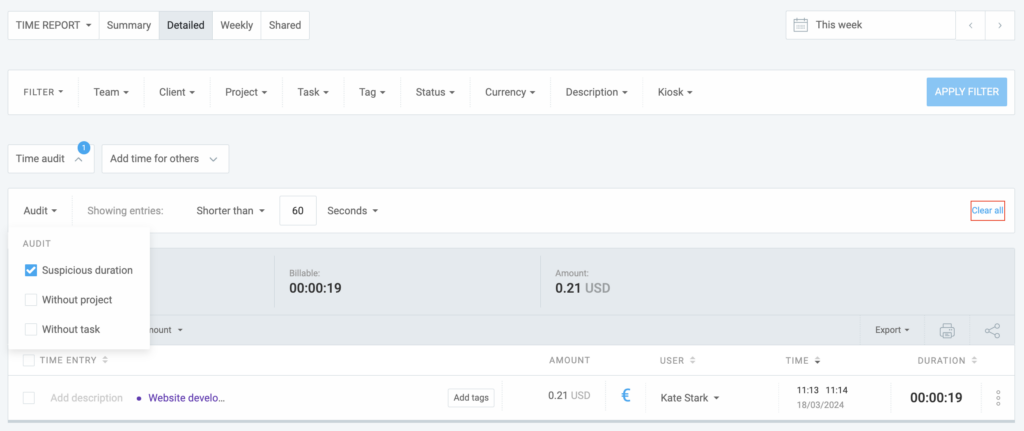
- Click the Time Audit dropdown to display the audit bar
- Select one or more categories from the Audit dropdown (e.g. without project or task, suspicious duration)
- Optional: Use the filters bar on top of the page (Team, Project, Client, etc.) to narrow down the results
- Edit time entries in the table (e.g. add project/task, adjust duration) or use the checkboxes to bulk edit
For example, when you select Suspicious duration, you can define the duration that makes an entry suspicious (e.g. shorter than 60 seconds). To clear the selected audit filter, click Clear all.
Cet article vous a-t-il été utile ?
Thank you! If you’d like a member of our support team to respond to you, please drop us a note at support@clockify.me