Gérer les applis et appareils agents
La page Applis d’agent permet aux administrateurs d’attribuer et de suivre l’appli installée sur les appareils des membres de l’équipe au sein de l’espace de travail pour la fonctionnalité Surveillance d’activité.
Attribuer une appli d’agent #
Pour attribuer des applis d’agent aux membres :
- Accédez à Surveillance
- Cliquez sur Applis d’agent sous la section Gérer
- Sélectionnez le membre de l’équipe dans la liste déroulante de la colonne Membre
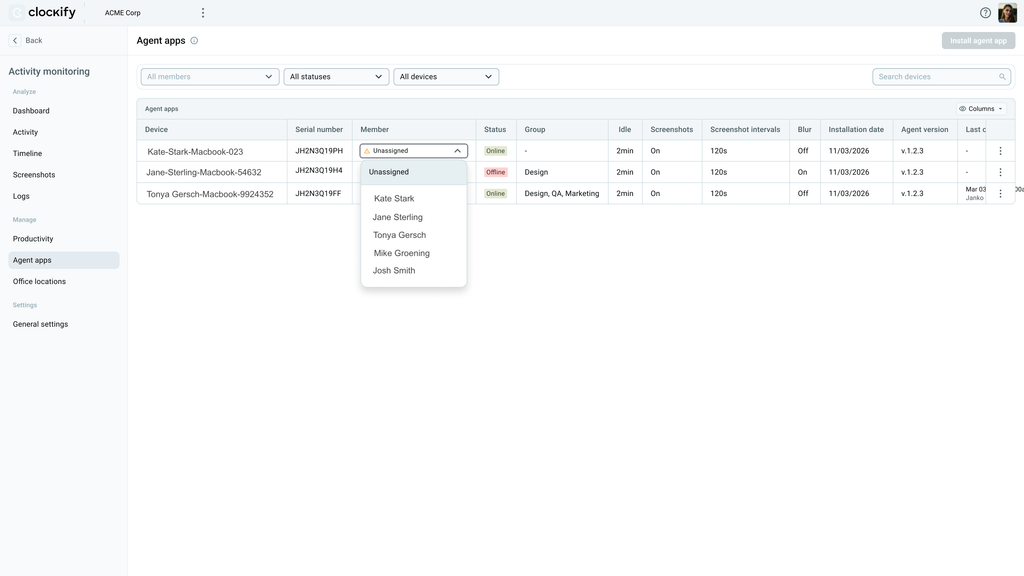
Data collected for assigned agents remains in the system for 90 days and can be viewed on the Logs page. These activity logs cannot be deleted manually.
Reassign agent #
Mistakenly assigned agents can be reassigned to the correct team member.
To do this:
1. Go to Monitoring > Agent apps
2. Go to the row of the incorrectly assigned agent
3. Click the drop down list in the Member column
4. Select the correct team member
Supprimer une appli d’agent #
Si un employé remplace son ordinateur portable ou quitte l’entreprise, vous pouvez supprimer l’agent enregistré sur son appareil. L’agent est retiré de la page, mais les données historiques restent conservées dans l’espace de travail.
Pour supprimer une appli d’agent :
- Accédez à Surveillance
- Cliquez sur Applis d’agent sous la section Gérer
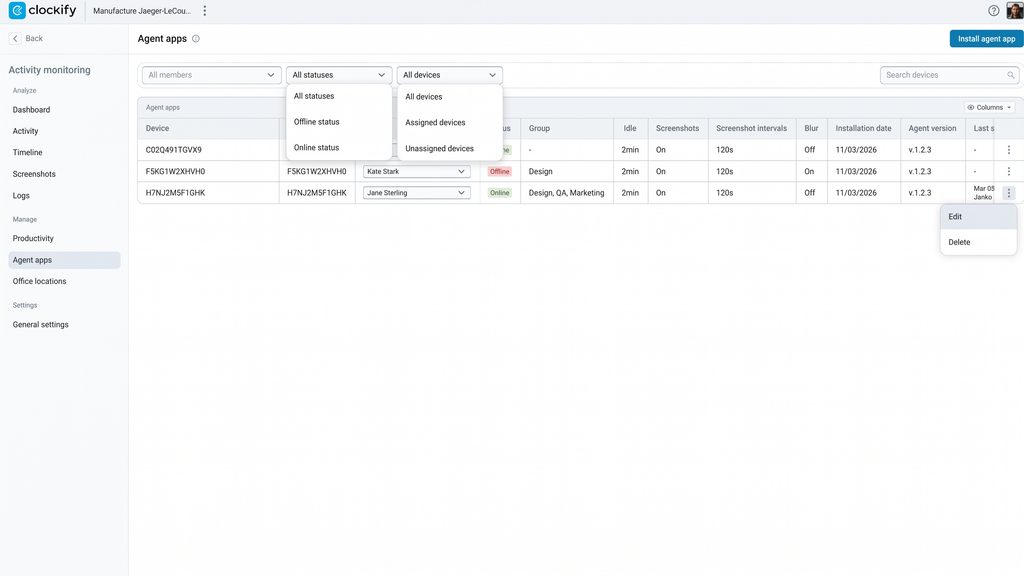
- Cliquez sur les trois points à la fin de la ligne du membre
- Sélectionnez Supprimer
Modifier les paramètres de l’appli d’agent #
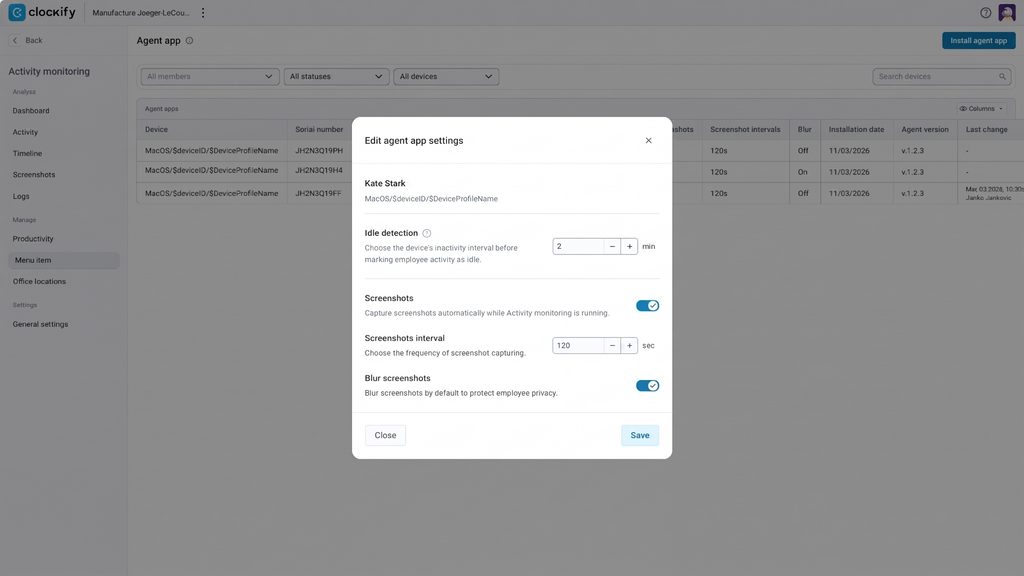
Les paramètres de l’appli d’agent suivent les configurations de suivi définies pour l’espace de travail, mais vous avez également la possibilité de modifier ces paramètres par appareil.
Pour modifier les paramètres de l’agent attribué à un membre :
- Accédez à Surveillance
- Cliquez sur Applis d’agent sous la section Gérer
- Cliquez sur les trois points à côté du membre de l’équipe
- Sélectionnez Modifier
- Modifiez les paramètres souhaités
- Cliquez sur Enregistrer
FAQ #
Un même utilisateur Clockify peut-il se voir attribuer plusieurs appareils de suivi ?
Oui, un même utilisateur peut disposer de plusieurs appareils. Les données d’activité de chaque machine sont centralisées sur son profil unique, et une logique de chevauchement empêche le double comptage des heures en cas d’utilisation simultanée.
Qu’advient-il des données collectées lorsqu’un appareil est dans un état non attribué ?
La télémétrie collectée avant l’attribution d’un appareil reste dans les journaux système à des fins d’audit et ne sera pas liée rétroactivement au profil de l’utilisateur. Le suivi sur son profil débute dès l’attribution de l’appareil.
La suppression d’un agent d’appareil entraîne-t-elle la perte des données historiques de suivi ?
Non. La suppression d’un agent interrompt la synchronisation future, mais toutes les données historiques collectées restent conservées dans l’espace de travail.
What should I do if I accidentally assigned an agent to the wrong team member? Can I delete the activity logs that were captured while the agent was incorrectly assigned?
If a device was mistakenly assigned to the wrong team member, go to Monitoring > Agent apps. On the row of the incorrectly assigned device, click the dropdown list in the Member column, and select the correct person or team member to reassign it.
While activity logs in the Logs section cannot be deleted manually, they are automatically cleared for you after 90 days. You can delete screenshots manually instead (they are cleared after 60 days).