Updates am Dezimal-Dauerformat (Beta)
Clockify aktualisiert die Berechnungslogik des Dezimal-Dauerformats in der gesamten App, um eine höhere Genauigkeit in allen Berichten und Umsatzsummen zu erreichen.
Diese Änderung ist derzeit als Beta-Rollout für ausgewählte Benutzer verfügbar, die das Dezimal-Dauerformat in ihren Arbeitsbereichseinstellungen konfiguriert haben. Nach erfolgreicher Validierung wird die aktualisierte Logik für alle Arbeitsbereiche ausgerollt, die das Dezimalformat nutzen.
Was sich ändert #
Bisher hat der Dezimalmodus die Dauer einzelner Zeiteinträge automatisch gerundet, bevor Formeln für Gesamtdauer und Geldbeträge berechnet wurden. Dieses Vorab-Runden führte zu leichten Abweichungen in den Zusammenfassungs-, Detaillierten-, Wochen- und Anwesenheitsberichten sowie im Dashboard, in den Arbeitszeittabellen und bei den Erinnerungen.
So funktionierte die bisherige Berechnungslogik: Die exakt erfasste Zeit eines Eintrags wurde auf die nächste 1/100-Stunde (36-Sekunden-Block) umgerechnet und im Voraus gerundet, um maximal zwei Dezimalstellen bei der Umrechnung in Stunden zu garantieren.
Beispiel: 20 Minuten erfassen
- Exakt erfasste Zeit: 20 Minuten (0,3333… Stunden)
- Vorab gerundeter Wert: 0,33 Stunden
- Auswirkung auf Summen: Durch das Vorab-Runden auf die nächsten 0,01 Stunden wird der Eintrag auf 0,33 Stunden gesetzt (entspricht 19 Minuten und 48 Sekunden). Dieser Wert wurde für Berechnungen genutzt.
Mit der neuen Berechnungslogik behält Clockify die volle Dauer jedes Zeiteintrags in den Berechnungen bei, ohne vorab zu runden. Die App rundet erst ganz am Ende auf zwei Dezimalstellen, wenn Gesamtsummen auf dem Bildschirm angezeigt werden.
Beispiel: 20 Minuten erfassen (Neue Logik)
- Exakt erfasste Zeit: 20 Minuten (0,3333… Stunden)
- Angezeigte Summe: 0,33 Stunden
- Berechnungsweise: Da 20 Minuten genau 0,3333… Stunden entsprechen, setzt die Standardrundung (da die 3. Nachkommastelle kleiner als 5 ist) deinen angezeigten Wert auf 0,33 Stunden. Dabei bleibt die volle 20-minütige Dauer erhalten und wird ungerundet in allen Formeln verwendet.
Hier sind einige Beispiele für die aktualisierte Berechnungslogik:
Vorher und Nachher: Zeiterfassung
- Vorher: Wenn ein Benutzer drei Zeiteinträge von jeweils 20 Minuten erfasste, wurde jeder Eintrag auf 0,33 Stunden gerundet. Das ergab insgesamt 0,99 Stunden in der Arbeitszeittabelle.
- Zukunft: Formeln nutzen jetzt die volle Dauer jedes Eintrags für die Berechnung (20 Minuten = 0,3333… Stunden). Zusammengezählt ergeben die drei Einträge insgesamt 1,00 Stunde in der Arbeitszeittabelle.
Vorher und Nachher: Abrechenbare Beträge
Ein Teammitglied mit einem Stundensatz von 100 $ erfasst drei separate Zeiteinträge von jeweils 20 Minuten.
- Vorher: Jeder 20-Minuten-Eintrag wurde vor der Betragsberechnung auf 0,33 Stunden gerundet (0,33 x 100 $ = 33 $). Das führte zu einer Gesamtdauer von 0,99 Stunden und einem Rechnungsbetrag von 99,00 $.
- Zukunft: Formeln nutzen nun die exakte Gesamtdauer jedes Eintrags (20 min = 0,3333…Stunden). Zusammengerechnet ergeben die drei Einträge genau 1,00 Stunde und einen Rechnungsbetrag von 100,00 $.
Wie sich das auf historische Daten auswirkt #
Da Formeln nun exakte Dauern statt vorab gerundeter Dezimalwerte verwenden, passt die Anwendung dieser Logik auf bestehende Zeiteinträge die Anzeige vergangenheitsbezogener Summen leicht an.
Wenn du Zeitberichte (wie Zusammenfassungs-, Detaillierte oder Wochenberichte) oder Anwesenheitsberichte für einen vergangenen Zeitraum (z. B. Januar 2026) erneut aufrufst, bemerkst du möglicherweise eine Abweichung von etwa 0,01 pro Eintrag im Vergleich zu früheren Berichten.
Wenn du historische Aufzeichnungen für Betriebsprüfungen, Steuerprüfungen oder Rechnungsabgleiche nachweisen musst, kannst du diesen offiziellen Hilfe-Artikel als Dokumentation verwenden. Er bestätigt, dass sich historische Summen aufgrund eines Plattform-Updates geändert haben und nicht durch manuelle Bearbeitungen.
Warum wir diese Änderung vornehmen #
Inkonsistente Rundungsregeln zwischen verschiedenen Seiten und Dauerformaten sorgen für Verwirrung und erschweren den Vergleich von Zahlen. Die Nutzung der vollen Dauer vereinheitlicht die Berechnungsregeln und liefert dir auf jeder Seite genaue, verlässliche Zahlen.
Was du tun musst #
Die neue Berechnungslogik wird automatisch angewendet und die alte Option ist standardmäßig deaktiviert.
Solltest du Abweichungen bei historischen Daten feststellen und Berichte benötigen, die mit früheren Abrechnungs- oder Steuerzeiträumen übereinstimmen, kannst du in den Arbeitsbereichseinstellungen zur vorherigen Berechnungslogik zurückkehren.
So stellst du die vorherige Berechnungslogik wieder her:
- Gehe zu Arbeitsbereichseinstellungen
- Suche im Tab Allgemein nach Dauerformat
- Aktiviere das Kontrollkästchen Dauer auf 2 Dezimalstellen runden
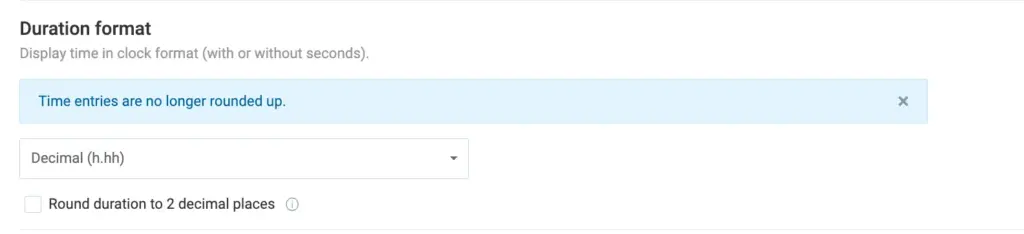
Wenn diese Option aktiviert ist, werden Dauern vor der Formelberechnung auf zwei Dezimalstellen gerundet (z. B. 0,33 statt 0,333333). Dies stellt das frühere Berechnungsverhalten über alle Berichte und Seiten hinweg wieder her und bewahrt deine historischen Zahlen.
Wichtiger Hinweis zur Beta-Phase: Diese Beta-Phase hilft uns, die neuen Berechnungen zu testen und zu verfeinern, damit alles reibungslos und ohne Unstimmigkeiten funktioniert. Das Kontrollkästchen für die alte Berechnungslogik ist eine temporäre Option und wird in etwa einem Jahr entfernt, womit die neue Präzisionslogik zum Standard für alle Arbeitsbereiche im Dezimalformat wird.
Bitte teile dein Feedback und spezifische Anwendungsfälle mit unserem Support-Team, um uns bei einem reibungslosen Übergang zu unterstützen.