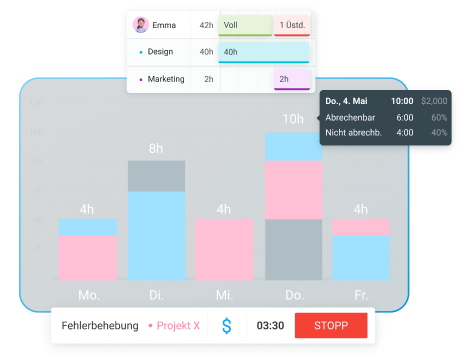
Als Startup müssen du und deine Mitarbeiter oft viele verschiedene Rollen gleichzeitig einnehmen, um den Laden am Laufen zu halten. Da kann es schnell passieren, dass ihr bei der Sprintplanung, bei wichtigen Entscheidungen oder beim Reporting für Investoren ins Straucheln geratet.
Wenn du jedoch die Zeiterfassungs-App Clockify in deinem Team einführst, kannst du die Arbeit deines Startups endlich erfolgreich strukturieren. In diesem Artikel erklären wir dir:
- Was Projektzeiterfassung für Startups eigentlich bedeutet,
- Warum Startup-Teams oft mit der Transparenz ihrer Arbeitszeiten kämpfen und
- Wie du deine Startup-Projekte mit Clockify optimal organisierst.
- Als Software für die Projektzeiterfassung ermöglicht Clockify es Startup-Teams, ihre Zeit per Timer, Arbeitszeittabellen oder Kalender zu erfassen.
- Um die Arbeit deines Startups in Clockify zu strukturieren, fügst du Projekte und Kunden hinzu, erfasst die Zeit und erstellst Berichte. So verstehst du besser, wie sich die Zeit deines Teams auf die verschiedenen Bereiche verteilt.
- Als Inhaber eines Kleinunternehmens solltest du nach Zeiterfassungstools Ausschau halten, die Berichtsoptionen bieten, eine kostenlose Testversion haben und einfach zu bedienen sind.
- Unsere Branchenexperten empfehlen Startup-Teams, die Zeit zunächst nach Konten/Kunden zu erfassen und anschließend Details hinzuzufügen – wie beispielsweise die spezifischen Teams, die für diese Kunden tätig waren.
Was ist Projektzeiterfassung (und warum sie für Startups so wichtig ist)
Die Projektzeiterfassung ist ein wesentlicher Bestandteil deines Startup-Workflows – du nutzt einen Time-Tracker, um alle Aufgaben zu erfassen, an denen deine Teams innerhalb eines Projekts arbeiten. Das umfasst auch die Zeiterfassung für alle verschiedenen Arten von Startup-Initiativen:
- Entwicklung,
- Betrieb und Organisation sowie
- Marketing.
Hier sind einige Vorteile von Projektzeiterfassungs-Software für Startups:
- Minimiert das Risiko, Projektfristen zu verpassen,
- Sorgt für präzisere Zeiteinträge und
- Ermöglicht es dir, Berichte für deine Kunden zu erstellen.
Zeiterfassungs-Apps sind für die Anforderungen jedes Startups praktisch. Zum Beispiel, wenn du Zeiten und Projekte für ein Investoren-Update protokollieren musst oder wenn du planst, dein Team zu vergrößern.

Warum Startup-Teams mit der Zeittransparenz kämpfen
Shlomi Beer, Mitgründer eines Marketingunternehmens, erklärt, dass Startup-Teams oft Probleme mit der Zeittransparenz haben, weil sie versuchen, „zwei gegensätzliche Dinge miteinander zu vereinbaren: Geschwindigkeit und Autonomie auf der einen Seite sowie Struktur und Messbarkeit auf der anderen.“
Shlomi führt weiter aus, dass die meisten Teams die Zeiterfassung meiden, weil „es sich nach Kontrolle anfühlt“. Unser Experte fügt hinzu:

„Wenn es darum geht, Menschen zu überwachen, scheitert es. Wenn es aber darum geht, im Laufe der Zeit zu lernen und sich zu verbessern, Zeitfresser zu identifizieren, Fehleinschätzungen aufzudecken und zu sehen, was die Umsetzung bremst – dann wird Zeittransparenz wertvoll.“
Shlomi betont, dass das bloße Erfassen von Zeit ohne jeglichen Kontext fast nutzlos ist. Stattdessen legt sein Unternehmen Wert darauf, die erfasste Zeit mit der tatsächlichen Arbeit – also Aufgaben oder Tickets – zu verknüpfen. Genau das ist der Kern der Projektzeiterfassung.
💡 CLOCKIFY-PRO-TIPP
Du kannst die Arbeitszeit deiner Mitarbeiter erfassen, ohne sie zu überwachen. Erfahre in diesem Leitfaden, wie das funktioniert:
Wie du die Startup-Arbeit in Clockify organisierst
Für eine effiziente Zeiterfassung in deinem Startup nutzt du am besten Clockify by CAKE.com. Schauen wir uns die genauen Schritte an, mit denen du deine Startup-Arbeit mit unserem leistungsstarken Tool organisierst.
#1: Zeiterfassung mit Timer, Arbeitszeittabellen oder Kalender
Als Software für Projektzeiterfassung bietet Clockify verschiedene Erfassungsmethoden. So fühlt sich dein Team optimal unterstützt und bleibt bei der Verwaltung der Arbeitsstunden flexibel.
Timer — Klicke einfach auf den Start-Button, wenn du mit der Arbeit beginnst oder aufhörst. Du musst nur noch eine kurze Aufgabenbeschreibung und ein Projekt hinzufügen. Aber keine Sorge: Selbst wenn dir ein Fehler unterläuft, kannst du in Clockify alle Zeiterfassungsfelder später bearbeiten.
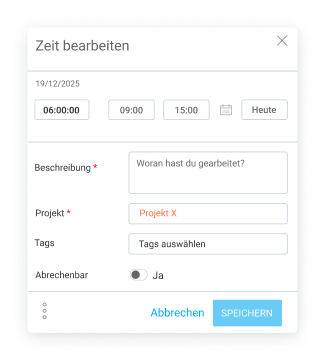
Manuelle Zeiterfassung – Klicke auf die Schaltfläche unter dem Timer, um zur manuellen Zeiterfassung zu wechseln. Genau wie beim Timer fügst du hier eine Aufgabenbeschreibung, das Projekt und die Dauer hinzu.

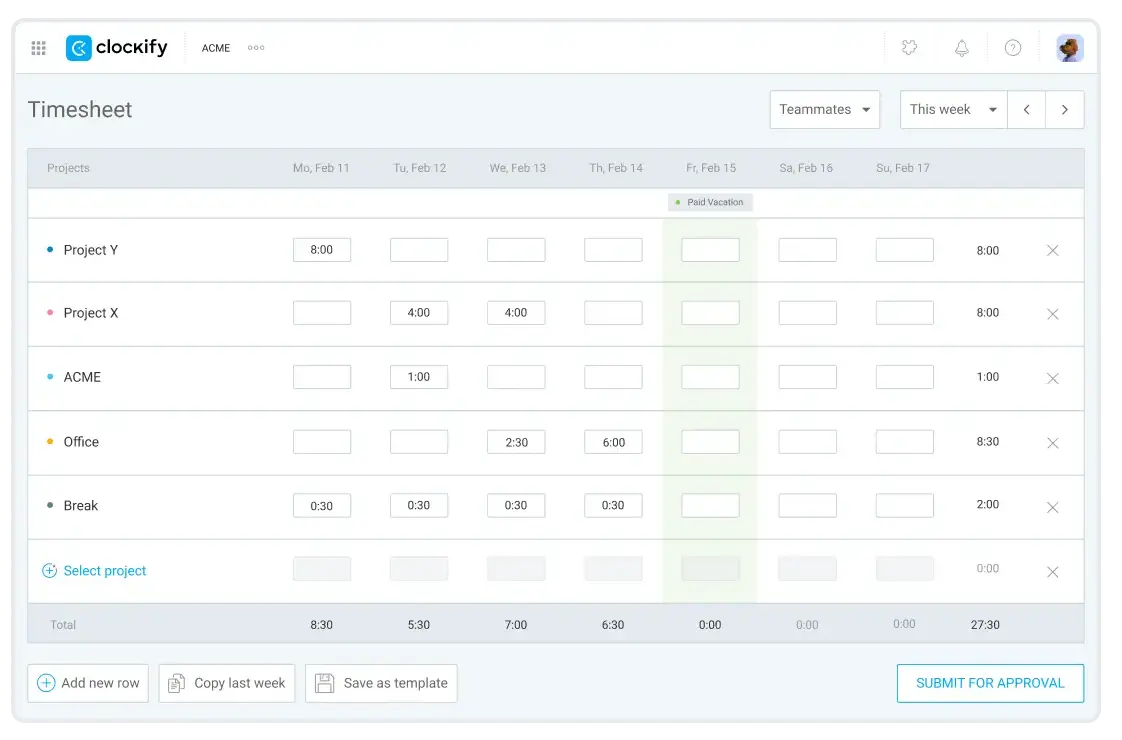
Arbeitszeittabellen – Die Clockify-Arbeitszeittabellen sind ideal, wenn du lieber alle Zeiteinträge auf einmal – zum Beispiel am Ende der Woche – hinzufügen möchtest. Trage dann einfach für jedes Projekt, an dem du in dieser Woche gearbeitet hast, eine Zeile mit der entsprechenden Dauer ein.
Arbeitszeittabellen KOSTENLOS testen
Wenn du an mehreren Projekten arbeitest, musst du diese nicht jeden Tag manuell hinzufügen. Erstelle stattdessen einfach eine Arbeitszeittabelle-Vorlage. Auf diese Weise hast du all deine Projekte und Aufgaben sofort griffbereit und musst nur noch die Zeit eintragen. (Denk daran, dass Vorlagen nur für dich selbst sichtbar sind.)
Kalender - Clockify-Kalender ist besonders praktisch für Gründer, Projektmanager und CTOs mit einem vollen Meeting-Kalender.
Du kannst deinen Clockify-Kalender mit deinem Google- oder Outlook-Konto verknüpfen und hast so alle deine Meetings an einem Ort. Noch besser: Du kannst die Zeit, die du in Meetings verbringst, direkt aus dem Kalender heraus erfassen.
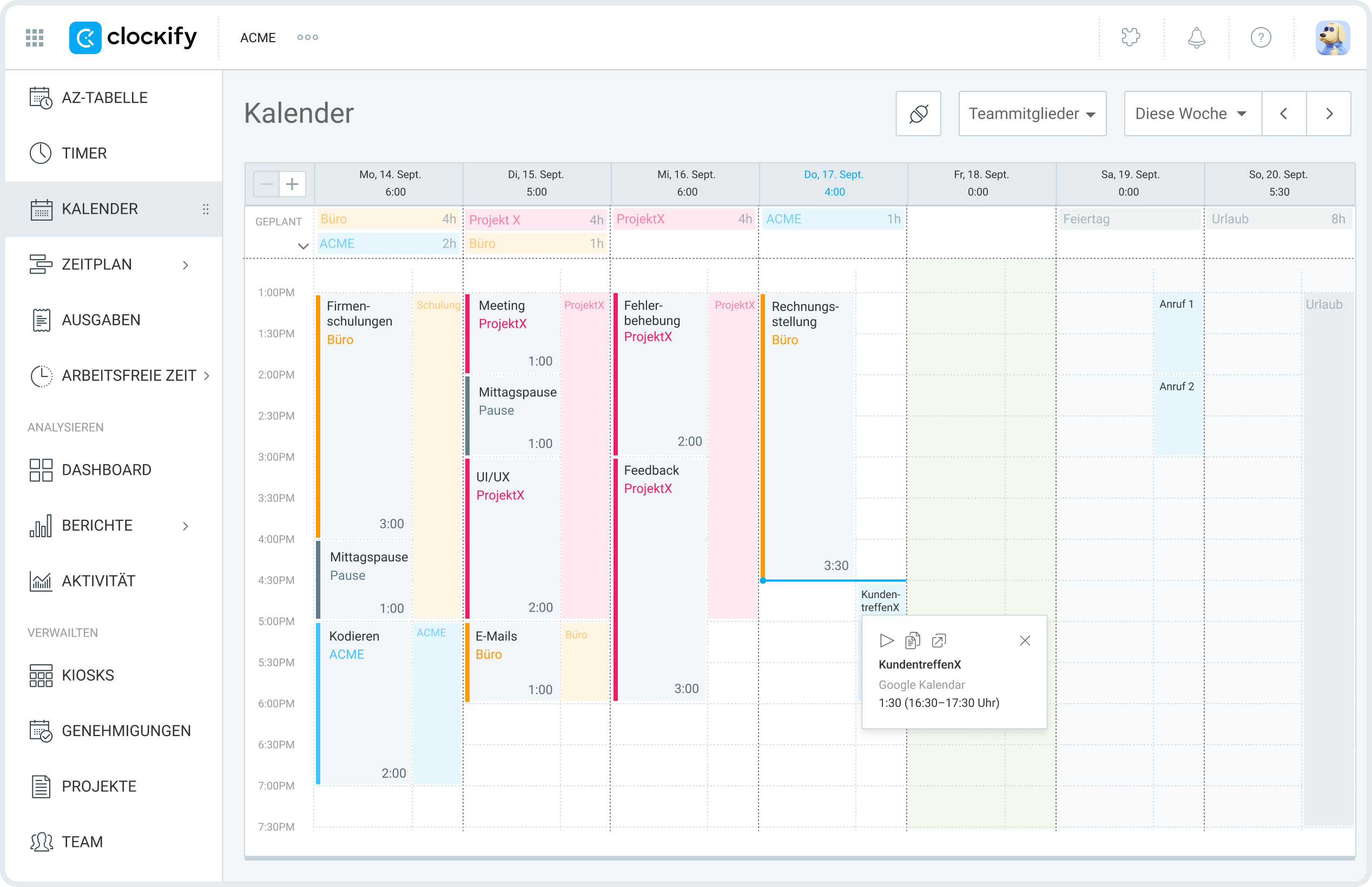
Und um neue Zeiteinträge im Kalender hinzuzufügen, ziehst du den gewünschten Zeitraum ganz einfach per Drag-and-Drop an die richtige Stelle.
Es gibt noch zwei weitere Methoden zur Zeiterfassung in Clockify: Kiosk und Auto-Tracker.
Egal für welche Zeiterfassungsmethode du dich bei deiner Startup-Arbeit entscheidest – du kannst dir sicher sein, dass Clockify alle Daten lückenlos synchronisiert. Wenn du deine Stunden beispielsweise mit dem Timer erfasst, hast du im Kalender trotzdem einen perfekten visuellen Überblick über deinen Tag oder deine Woche.
#2: Projekte und Kunden für präzisere Zeitdaten hinzufügen
Um den Workflow deines Startups noch detaillierter zu erfassen, solltest du in Clockify Projekte und Kunden hinzufügen. Sobald diese Daten hinterlegt sind, kannst du deine Kunden den jeweiligen Projekten zuweisen. Denk nur daran, dass du Kunden nicht direkt während der laufenden Zeiterfassung hinzufügen kannst – ihre entsprechenden Projekte hingegen schon.
Wenn du außerdem ein bestimmtes Teammitglied auswählen möchtest, um den Projektfortschritt und die gesamte erfasste Zeit im Auge zu behalten, kannst du ihm in Clockify die Rolle Projektmanager zuweisen. Das hilft dir dabei, die Arbeitslast im Unternehmen besser zu organisieren.
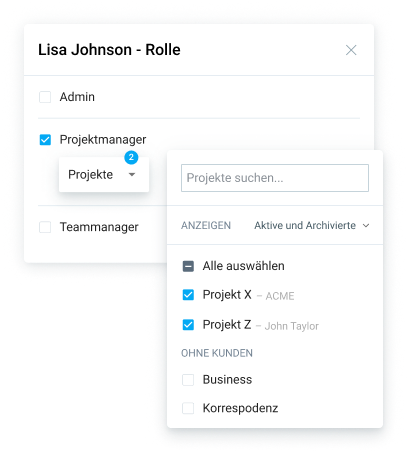
Projekte in Clockify können wie folgt eingestellt sein:
- Öffentlich – sodass alle Teammitglieder Zeit darauf erfassen können, oder
- Privat – nur Teammitglieder, die Zugriff auf diese Projekte haben, können Zeit darauf erfassen.
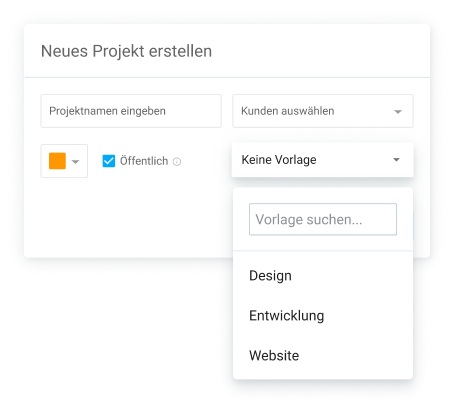
Projekte helfen Gründern und Produktmanagern zu verstehen, woran jedes Teammitglied arbeitet und wie viel Zeit für diese Projekte aufgewendet wird – und das alles an einem zentralen Ort.
Bonus-Tipp: Du kannst auch ein Tastaturkürzel nutzen, um schnell ein neues Projekt (ohne weitere Details) zu erstellen: Strg / ^ (Control) + Enter.
#3: Zeitdaten mit Berichten in Startup-Entscheidungen verwandeln
Wenn man in Startup-Teams von 5–30 Personen arbeitet, müssen du und deine Mitarbeiter oft viel Multitasking betreiben. Das ständige Wechseln zwischen Projekten und Aufgaben führt dazu, dass ihr keinen klaren Überblick darüber habt, wie die Arbeitslast im Unternehmen eigentlich verteilt ist.
Mit den Clockify-Berichten verstehst du endlich, wie sich die Zeit deines Teams auf die verschiedenen Bereiche verteilt. Der Zusammenfassungsbericht zeigt dir beispielsweise die erfassten Stunden, die du nach Abrechenbarkeit und Projekt gruppieren kannst.
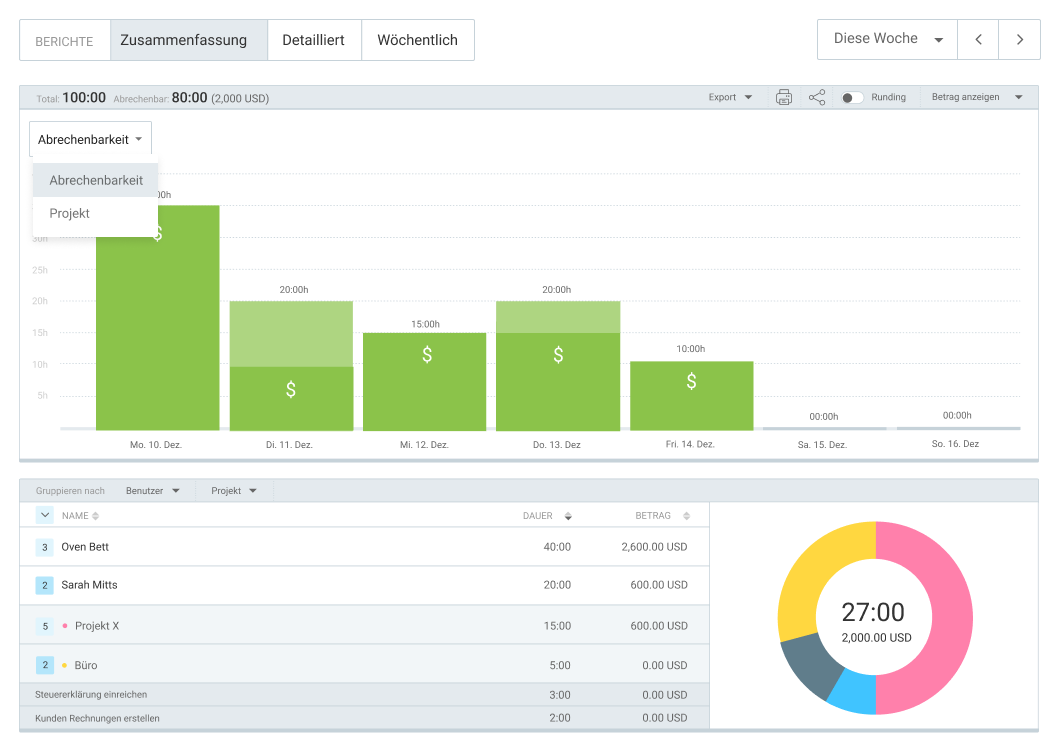
Wie du auf dem Screenshot oben sehen kannst, enthält der Zusammenfassungsbericht ein Kreisdiagramm. Dieser Bereich ist perfekt, wenn du sehen möchtest, wie gut die einzelnen Teams mit ihren Projekten vorankommen. Alles, was du tun musst, ist nach folgenden Kriterien zu filtern:
- Gruppe (spezifische Teams wie Entwicklung, Marketing, Operations) in der ersten Spalte und
- Benutzer (Teammitglieder aus Entwicklung, Marketing, Operations).
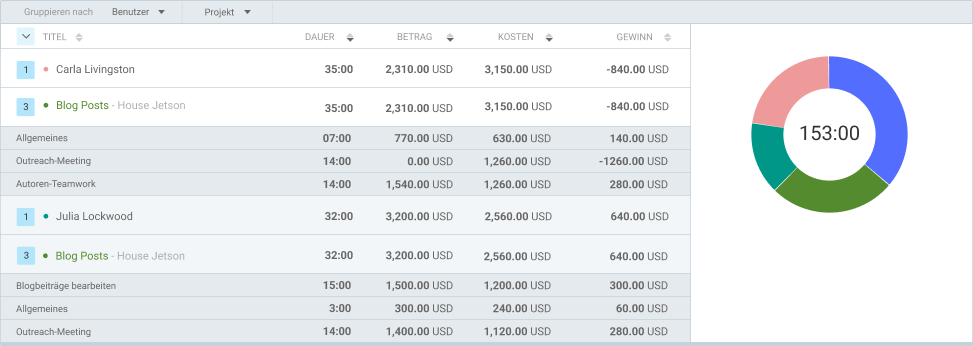
Clockify zeigt dir die gesamte erfasste Zeit direkt neben der jeweiligen Gruppe und dem Benutzer an. Der Betrag – also die erfassten Stunden multipliziert mit den abrechenbaren Sätzen – erscheint, sobald du abrechenbare Stunden für dein Team erfasst.
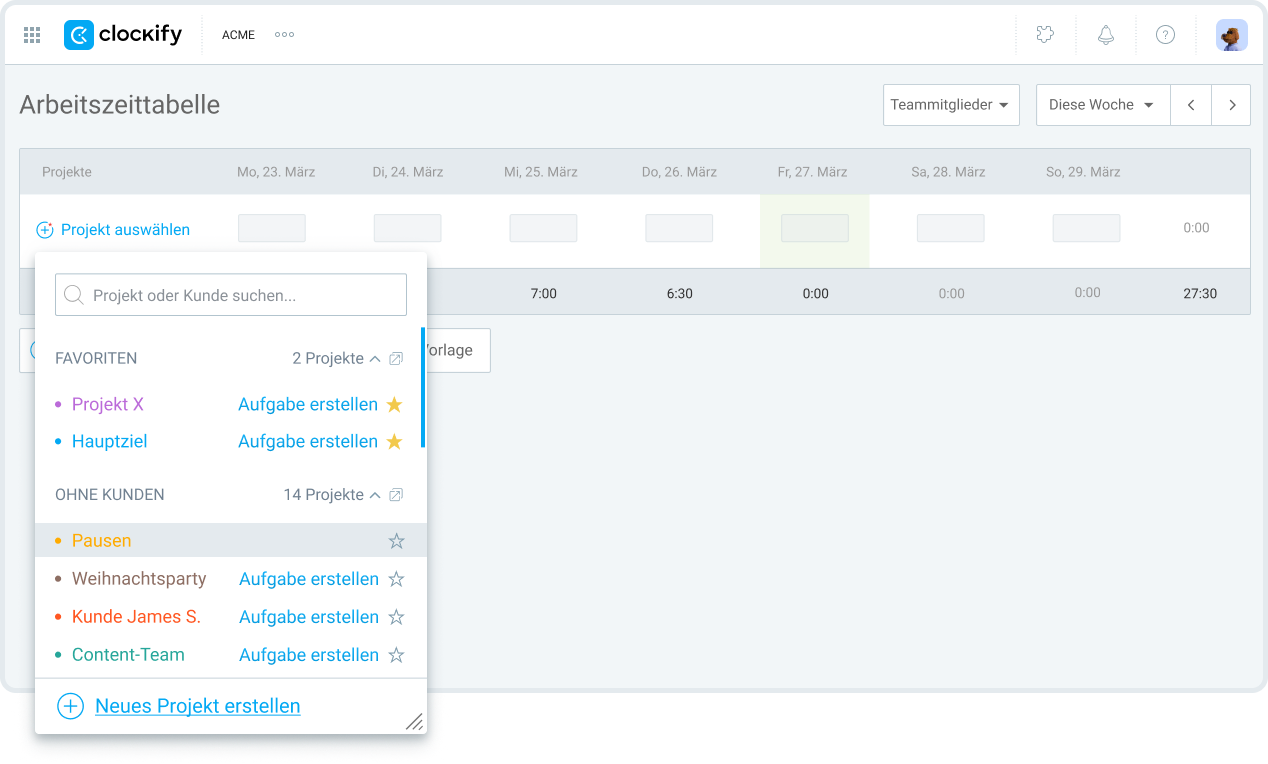
Wenn du bestimmte Projekte häufiger nutzt als andere, kannst du sie zudem als Favoriten markieren. Auf diese Weise bleiben sie in den Arbeitszeittabellen ganz oben in der Projektauswahl stehen.
Wenn du nach einer App zur Projektzeiterfassung für dein Startup suchst, solltest du auf Funktionen achten, die deine Einträge in datengestützte Entscheidungen verwandeln können. Für unseren Experten und Gründer einer Marketingagentur, Tom Bukevicius, sind Berichte besonders wertvoll für die Kundenkommunikation:

„Wir nutzen die Zeiterfassung nicht nur intern. Stattdessen verwandeln wir die Zeitdaten in einfache Zusammenfassungen, die den Kunden zeigen, wohin der Großteil unserer Arbeit fließt. Das hilft dabei, Vertrauen aufzubauen und Budgets für laufende Projekte zu rechtfertigen.“
Beispiel für einen Startup-Workflow mit Clockify
So erstellst du einen effizienten Startup-Workflow mit Clockify:
- Erstelle dein Projekt.
- Lege das Budget deines Projekts fest – entweder manuell oder aufgabenbasiert.
- Wähle deine Methodik, wie z. B. Scrum oder Agile. Wenn du dich für Scrum entscheidest, musst du deine Sprints definieren.
- Trage deine Sprints als Zeiteinträge im Clockify-Kalender ein. Da der Kalender die wöchentlichen Einträge anzeigt, kannst du ganz einfach Zeiteinträge für die gesamte Woche für eine bestimmte Sprint-Phase hinzufügen.
- Weise deinen Teammitgliedern Rollen zu. Mit Clockify kannst du bestimmten Teammitgliedern die Rolle „Projektmanager“ zuweisen. Diese Manager überwachen die Projektaufgaben, legen Schätzungen fest und verwalten die Projektzugriffe.
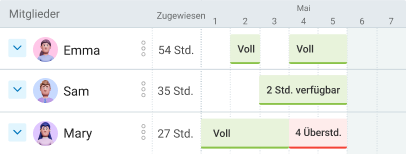
- Überprüfe regelmäßig deine Auslastung und den Zeitplan. Die Clockify-Funktion Zeitplan hilft dir dabei, Zeitpläne für deine Teammitglieder zu erstellen und zu veröffentlichen. Du kannst dort auch die Auslastung und die Teamkapazitäten einsehen – das ist der beste Weg, um sicherzustellen, dass die Arbeit fair verteilt ist und Überlastung im Team vermieden wird.
Wie erfasst ein Startup-Team die Zeit bei parallelen Initiativen?
James De Roche, Gründer eines RevOps-Unternehmens, erklärt, dass sie innerhalb der Firma einheitliche Regeln für die Zeiterfassung befolgen:

„Wir empfehlen einen einfachen Ansatz: Die Erfassung erfolgt nach Account/Kunde, dann nach Bereich (Marketing/Admin/etc.) mit spezifischen Details. So weiß die Führungsebene genau, wie viel Zeit Aktivitäten in Anspruch nehmen, und kann Ressourcen neu ausrichten. Dabei ist es wichtig, das ‚Warum‘ hinter der Zeiterfassung zu betonen.“
Als kleineres Unternehmen, das jeden Tag viele verschiedene Aufgaben auf dem Tisch hat, hebt James die Bedeutung der Zeiterfassung hervor:
„Zu sehen, wohin die Zeit fließt, und den Fokus neu auszurichten, zwingt einen dazu, besser zu priorisieren und Prozesse aufzubauen. Es ist schwer, die Daten zu ignorieren und ineffizient weiterzuarbeiten, wenn man einen Stundenzettel vor Augen hat.“
Auf der anderen Seite trennt Tom Bukevicius mit seinem Team „abrechenbare Denkprozesse von der reinen Umsetzungszeit“. Im Marketing ziehen sie ihren Wert aus Strategie und kreativem Denken – Dinge, die sich nicht so leicht stundenweise erfassen lassen. Deshalb loggt Toms Unternehmen die Zeit hier flexibler und orientiert sich an den Projektergebnissen. Für die Entwicklerteams ist die Erfassung hingegen viel strukturierter, da die Aufgaben dort klarer und leichter herunterzubrechen sind.
Skalieren mit Clockify: Optimiere deinen Startup-Workflow
Projektmanagement- und Zeiterfassungs-Apps wie Clockify von CAKE.com helfen dir, dein Unternehmen vom ersten Tag an zu skalieren – ohne dass du dir bei einem wachsenden Team Sorgen um explodierende Kosten machen musst.
Hier sind einige Vorteile von Clockify, unserem erschwinglichen und einfachen Tool:
- Integrationen — Clockify lässt sich in mehr als 100 Business-Apps integrieren, darunter Zapier, QuickBooks, GitLab und viele andere. Das ermöglicht es Gründern, CTOs und Produktmanagern, ihre internen Abläufe über mehrere Apps hinweg zu synchronisieren.
- Marketplace — Wenn du mehr Personalisierung wünschst, wie etwa Add-ons für HR, Finanzen oder Projektmanagement-Apps, kannst du dich jederzeit auf dem CAKE.com Marketplace umsehen. (Du kannst sogar deine eigenen, maßgeschneiderten Add-ons erstellen.)
- CAKE.com-Bundle — Neben der Zeiterfassung für kleine Unternehmen enthält unser Produktivitäts-Bundle auch Plaky für Projektmanagement und Pumble für die interne Unternehmenskommunikation. Auf diese Weise ermöglicht es dir die CAKE.com Suite, deinen projektbasierten Startup-Workflow zu optimieren, indem Kommunikation, Zeiterfassung und Projektmanagement nahtlos synchronisiert werden.
Und falls du einmal Hilfe brauchst: Die Clockify-Kundendienstmitarbeiter sind rund um die Uhr per E-Mail, Chat oder Telefon erreichbar – und das in allen Tarifen inklusive.

Häufig gestellte Fragen zur Projektzeiterfassung für Startups
Hier findest du Antworten auf einige der am häufigsten gestellten Fragen zur Projektzeiterfassung in Startups.
Was ist Projektzeiterfassung?
Die Projektzeiterfassung ist der Prozess, bei dem du und dein Team die Zeit aufzeichnen, die ihr für die Erledigung von Aufgaben innerhalb eines Projekts benötigt. Die Erfassung der für Projekte aufgewendeten Zeit hilft dir, einen klaren Überblick über die Arbeitslast des Teams und den Fortschritt des Projekts zu behalten.
Was ist die beste Methode, um ein Projekt im Auge zu behalten?
Um den Überblick über ein Projekt zu behalten, kannst du jede zuverlässige Projekt- und Aufgabenmanagement-App nutzen. Zu den wichtigsten Funktionen, die eine Projektmanagement-Software mitbringen sollte, gehören:
- Fortschrittsverfolgung,
- Organisation,
- Integration,
- Anpassbarkeit und weitere.
Ein solches Tool ist Plaky von CAKE.com – ein Aufgabenmanagement-Tool, das dir bei der Ressourcenplanung hilft und dafür sorgt, dass du den Projektzeitplan sowie das Budget immer im Blick hast.
Du kannst Plaky zudem mit Clockify integrieren und die Zeit für Aufgaben direkt in Plaky erfassen, ohne ständig zwischen den Apps hin- und herwechseln zu müssen. Ganz gleich, wo du Aktualisierungen vornimmst: Beide Apps synchronisieren die Änderungen automatisch.
Welcher Time-Tracker ist der beste für kleine Unternehmen?
Eine Zeiterfassungs-Software für kleine Unternehmen sollte folgende Kernfunktionen bieten:
- Zeiterfassung,
- Projekte und Kunden,
- Berichte und
- Integrationen.
Für maximalen Komfort sollten Time-Tracker mehr als eine Erfassungsmethode anbieten – wie etwa einen Timer, Stundenzettel, einen Kiosk, einen Kalender und einen Auto-Tracker.
Als Inhaber eines kleinen Unternehmens solltest du immer nach einem Zeiterfassungstool Ausschau halten, das einen kostenlosen Tarif und eine kostenlose Testphase anbietet, so wie Clockify von CAKE.com. Clockify erlaubt bis zu 5 Nutzer im kostenlosen Tarif und bietet leistungsstarke Berichte, die du als PDF exportieren kannst.
Bei der Auswahl eines Time-Trackers für ihre Teams steht für Kleinunternehmer jedoch nicht nur der Preis im Vordergrund. Unser Experte Tom Bukevicius betont, dass die Akzeptanz im Team der wichtigste Faktor ist:
„Wenn unser Team das Tool nicht wirklich konsequent nutzt, sind die Daten im Grunde wertlos. Deshalb bevorzugen wir Tools, die einfach zu bedienen sind, selbst wenn sie weniger Funktionen haben. Der Preis ist immer zweitrangig; uns ist viel wichtiger, dass sich das Tool ganz natürlich in die täglichen Gewohnheiten des Teams einfügt.“
So haben wir diesen Beitrag überprüft: Unsere Autoren und Redakteure überwachen die Beiträge und aktualisieren sie, wenn neue Informationen verfügbar werden, um sie aktuell und relevant zu halten.