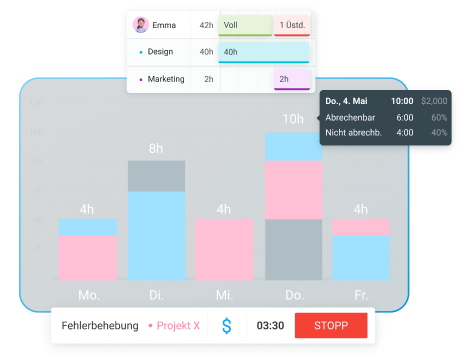
Don’t know how to accurately measure profitability and monitor it in real time? Use a single system like Clockify to manage time, budgets, and reporting.
Read on to find out what project profitability is, how it’s measured, and how to use Clockify to monitor project profitability in real time.
- Project profitability is the amount of money you earn for a project, after deducting all project-related costs.
- Gross profit is the amount of money you get after subtracting direct project costs from project revenue.
- Net profit is the amount of money you earn after subtracting all project costs, both direct and indirect, from project revenue.
- Clockify lets you track labor costs and other expenses, and calculates project profit for you.
What is project profitability?
Project profitability is the amount you earn as an agency owner for a specific project. It accounts for the money the project generated — but only after all project-related costs have been paid.
How to measure project profitability
To measure project profitability, you need to calculate profit. Let’s first distinguish between 2 types of profit — gross vs. net profit.
Gross profit is the amount of money left when you subtract the costs directly associated with producing a product or delivering a service.
For a product-based business, that would be the cost of goods and direct labor costs of production. A service-based company would count the direct labor costs for providing the service and all other direct costs, like buying special equipment required for that specific project only.
Revenue – Direct project costs = Gross profit
Net profit refers to the money left after subtracting all expenses — both direct and overhead costs.
Overhead costs are rent, utilities, and other expenses that are indirectly incurred while working on the project — they are costs of running the business.
Revenue – (Direct costs + Overhead costs) = Net profit
💡 CLOCKIFY-PRO-TIPP
Explore the differences between gross and net pay in more detail by reading this article:
To measure profitability, you need to calculate net profit. Then, you can determine the profit margin.
Profit margin is project profitability expressed as a percentage. Here’s the formula for calculating the profit margin:
(Project revenue − Project cost) / Project revenue × 100% = Profit margin (%)
Let’s say your project generated $130,000 in revenue, and all project-related costs added up to $105,000. This is how you’d calculate it:
($130,000 – $105,000) / $130,000 x 100% = 19.23%
So your profit margin would be 19.23%.
Project vs. client vs. team profitability
Project profitability focuses on the amount of money generated by a project after all the costs are deducted — but it isn’t the only profitability metric.
You can also take a look at client profitability and team profitability. Client profitability measures how much profit a specific client brings to the company. Team profitability calculates the profit generated by a specific team.

How to use Clockify by CAKE.com to monitor project profitability
Here’s how to track project profitability using Clockify in 7 steps — and improve your agency’s financial health overall.
#1: Create projects and tasks
To monitor project profitability accurately, first create your projects in Clockify. Open Projects and click Create project. Then name your project and optionally add the client.
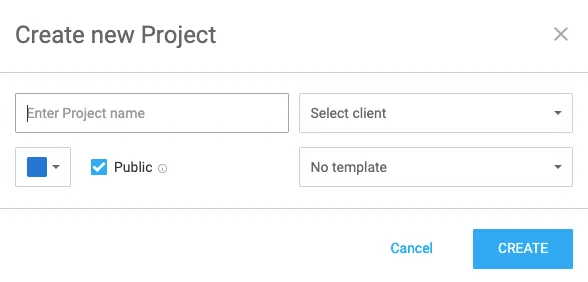
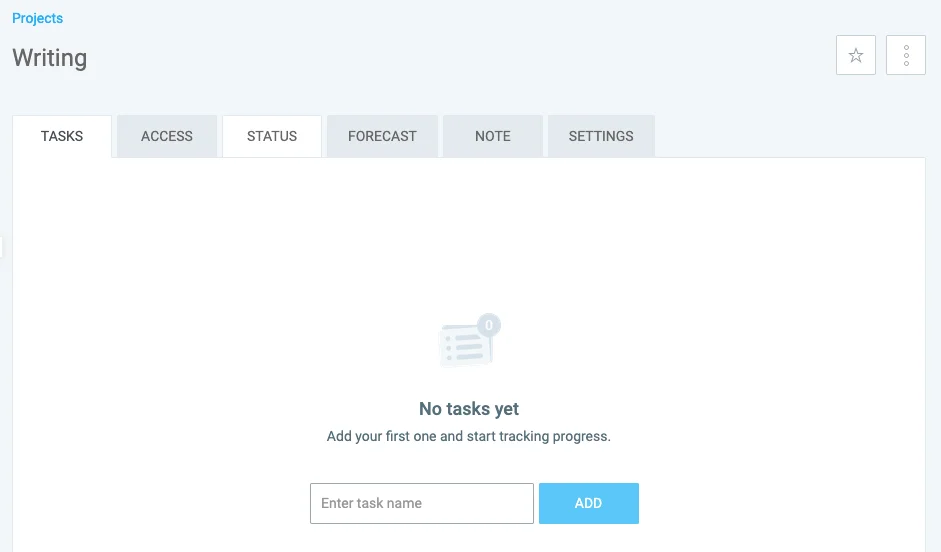
Each project likely consists of separate tasks, so add those under your projects. To add a task, head over to the Projects tab and click on the project this task is associated with. Then, name your task and click Add.
If you have many different projects in your Workspace, you can use the Favorite projects option.
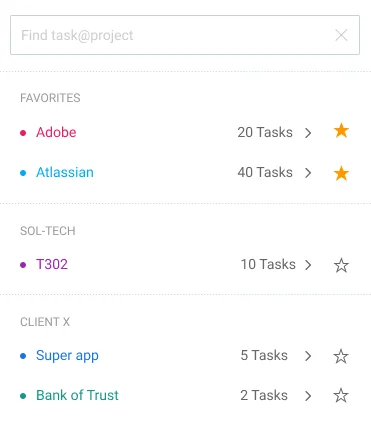
This option allows you to select the projects you work on most frequently. They will appear at the top of the list for quick access.
💡 CLOCKIFY-PRO-TIPP
To find out how to manage projects effectively in Clockify in greater detail, refer to this useful guide:
#2: Set project estimate
To evaluate how your initial estimates compare to actual progress, you can set project estimates in Clockify.
Clockify offers 2 types of project estimates:
- Time estimate
- Budget estimate
The Time estimate option allows you to set your prediction of how many hours it would take to complete your project.
The Budget estimate setting is for estimating the amount of money you think it would cost to complete the project.
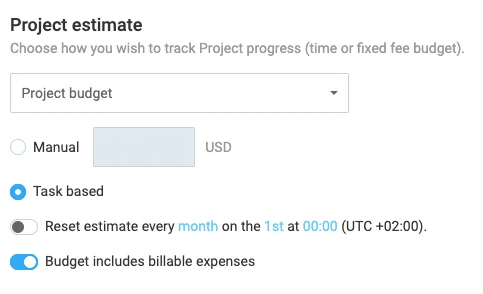
Budget estimates can be manual or task-based. The manual estimates option requires you to add a fixed amount for the entire project. The task-based option allows you to set budget estimates for each project individually.
To spot potential cost overruns ahead of time, use Clockify’s Forecasting feature.
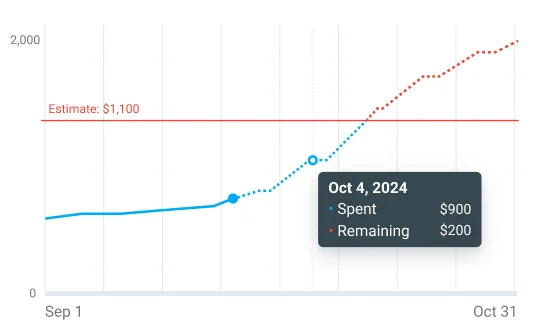
You can see the forecast for a specific project by clicking on the Projects tab and opening the project. Then, click on Forecast. Clockify will show you how much of the budget was already spent based on tracked work hours and expenses. It will also display the remaining budget and whether it’s expected to go over the estimate at the current pace.
Knowing whether you’re heading over budget allows you to decide how to proceed. For example, you may find that labor costs are high because some team members got stuck on one task. That way, you can make adjustments in your team so that team members who are better equipped to handle this task can step in.
💡 CLOCKIFY-PRO-TIPP
If you want to learn more about project forecasting, here’s an article that explains it in simple terms:
#3: Set cost and billable rates
For Clockify to calculate your profit, you need to set cost and billable rates. Cost rates are the hourly rates you pay your team. Billable rates are the rates you charge your clients.
In Clockify, rates can be:
- Workspace-based — one rate applies to the entire workspace.
- Member-based — different rates apply to different team members.
- Project-based — different rates apply to different projects.
- Task-based — different rates apply to different tasks.
- Project member-based — specific rate applies to a specific team member working on a specific project.
If you set multiple kinds of rates at the same time, the more specific rate overrides the less specific one. In the list above, rate types are ordered from the least specific to the most specific. For instance, if you set a workspace rate and a project-based rate, Clockify will use the project-based rate for all projects that have set rates.
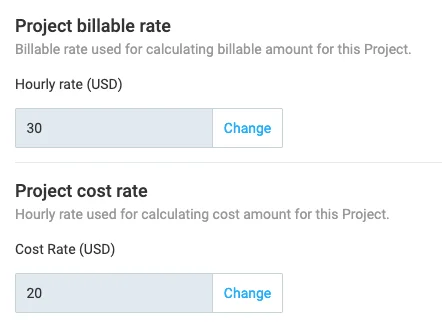
To monitor project profitability, you’re most likely going to use project-based rates the most. If you don’t set any rates, you won’t be able to generate profit reports and identify which projects are unprofitable.
Track billability and labor costs
#4: Mark projects as billable/non-billable
Clockify lets you track both billable and non-billable tasks. Billable time will count toward profit, while rates won’t apply to non-billable projects.
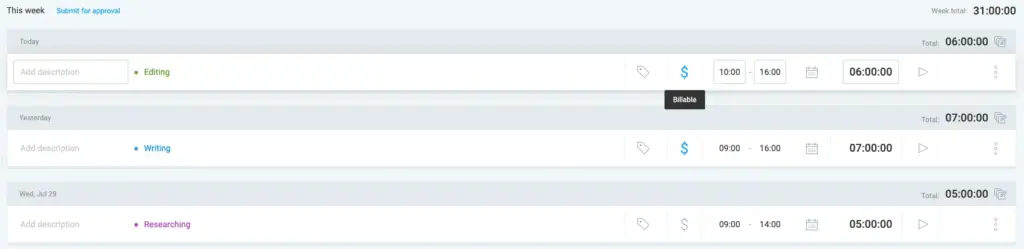
To set up billable hours, click on the dollar symbol. If the symbol is blue, your project is marked as billable. If the symbol is grey, your project is considered non-billable.
💡 CLOCKIFY-PRO-TIPP
Read more about the difference between billable and non-billable hours here:
#5: Track time on tasks
For accurate project profit monitoring in Clockify, your team needs to track time on each task. Based on its billable status and set rates, Clockify will calculate your costs and profit.
You can choose from multiple options for tracking time spent on tasks:
- Timer — to track hours in real time.
- Manual mode — to add individual entries manually.
- Timesheets — to fill in hours for the entire week.
- Calendar — to add time blocks within a calendar.
- Auto tracker — to track and time-stamp app/website visits automatically.
- Kiosk — to quickly clock in and out using a personal PIN or QR code.
If you need real-time data for project profitability tracking, then Timer is most suitable.
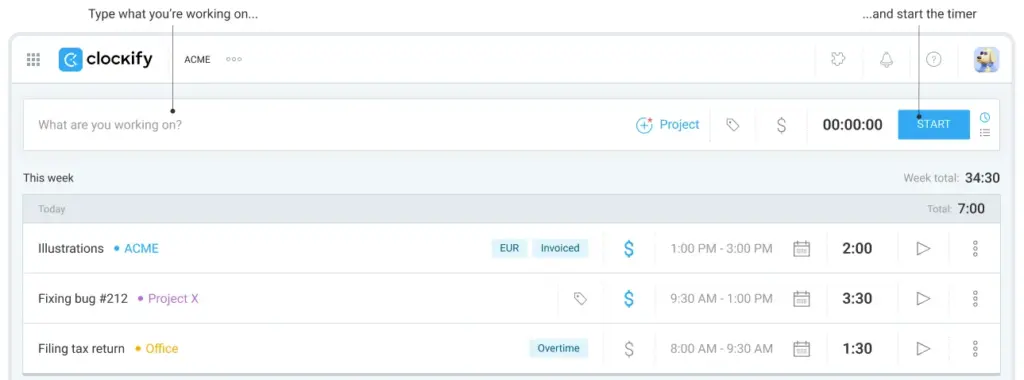
To use the Timer, your team needs to select the appropriate project and click Start. The timer will run until they click Stop.
As the Admin, you’ll be able to see all the hours users tracked. You can also manage permissions to control who sees what.
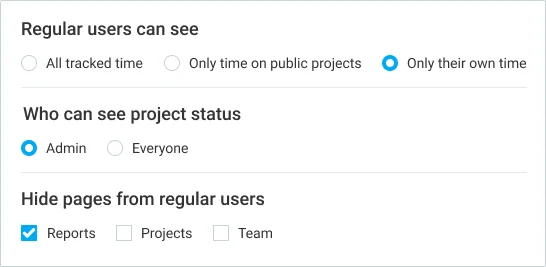
For example, you can hide tracked time from regular users, in which case they will see only their own hours. Project managers can see who tracked how much time on the project they manage, while Team managers see tracked data for the members of their team.

#6: Track expenses
You should also log all expenses in Clockify. Labor costs aren’t the only project-related costs.
The Expenses feature allows you to track different types of expenses by creating Expense categories.
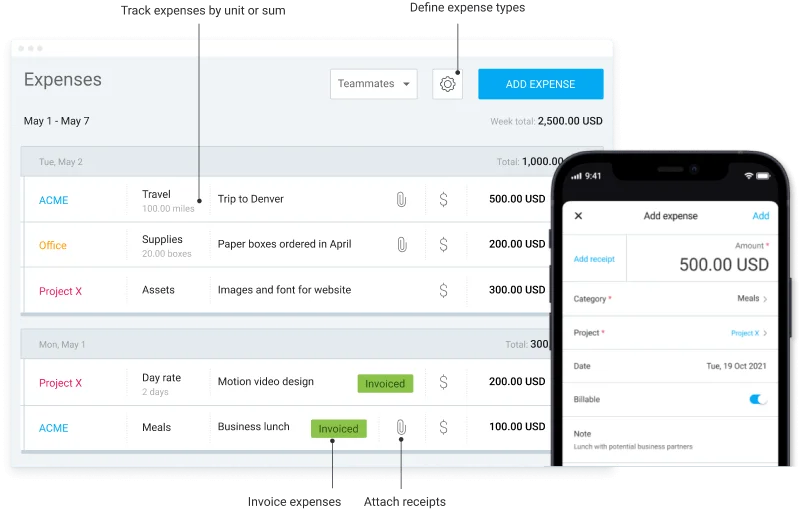
So, everything that needs to be bought for the project to be delivered can be logged as an expense in Clockify. This includes direct costs like specific software and indirect costs like rent and utilities.
Tracking all project expenses is essential for accurately calculating project profitability.
#7: Run project reports
Clockify presents all the profitability data in neatly arranged reports. To view profit for a specific project, open the Summary report and filter by project.
Then, select Show profit (and optionally Show amount and Show cost). If you select all 3 options, you’ll get a full breakdown of:
- Project duration
- Total amount the project earned
- Full cost of delivering the project
- Profit
This way, you can see what projects bring the most money, and which ones are draining your resources.
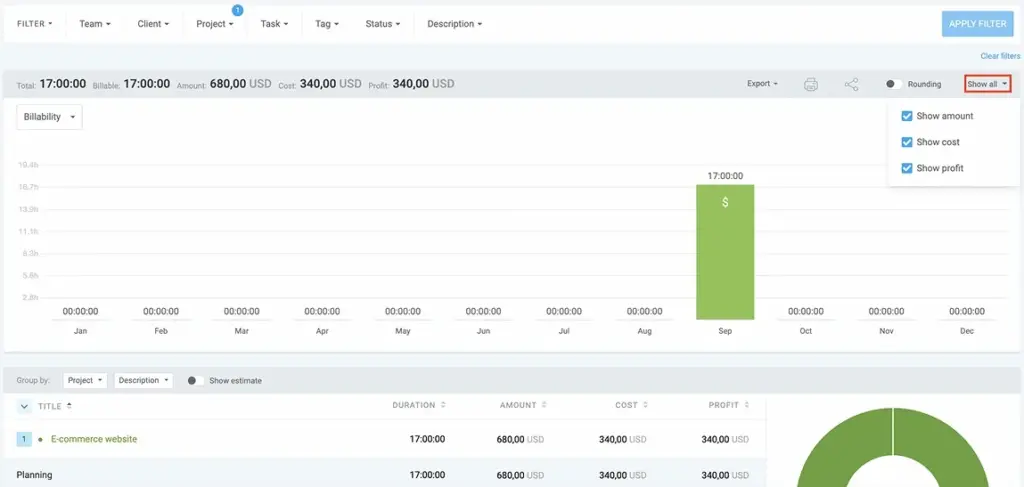
You can also analyze team profits and client profitability. In that case, simply filter by team or client instead of project. Reviewing profit in Clockify Reports helps you make data-driven decisions about project allocation and team assignments.
For example, you can identify teams that are struggling to generate the target profit. You may see that some team members are taking longer than expected to finish their tasks. In that case, you can distribute tasks differently so that each employee works on the tasks they are best at.
Track project profitability with the CAKE.com Bundle
Clockify is only one piece of the productivity suite. The CAKE.com Bundle gives you all 3 CAKE.com products, fully upgraded, 53% off.
The CAKE.com Bundle includes:
- Clockify — time and expense tracking tool
- Plaky — project management software
- Pumble — team communication app
Together, these 3 powerful tools help you manage teams effectively and stay on top of project profitability at all times.
First, use Clockify to generate profit reports. Second, use Plaky for project management to stay on top of all projects, as you can monitor their progress in more detail. Third, Pumble lets you easily communicate with your team if any issues arise while working on the project.
You can always try Clockify first and see if you want to upgrade to the Bundle.
So haben wir diesen Beitrag überprüft: Unsere Autoren und Redakteure überwachen die Beiträge und aktualisieren sie, wenn neue Informationen verfügbar werden, um sie aktuell und relevant zu halten.