
Billable hours keep the lights on. But your team’s schedule will always include time for internal tasks, which aren’t chargeable. So, finding the sweet spot between billable and admin work is critical.
We’ve prepared a full guide to billable vs. non-billable hours — complete with:
- Definitions,
- Industry examples, and
- Tracking tips.
What are billable hours and non-billable hours?
Billable hours (meaning direct client service time) are your team’s work hours that can be invoiced. Service professionals, like IT specialists and lawyers, use billable hours to ensure fair pay and accurate invoicing. Typical examples include phone calls with clients or sending them project updates.
Non-billable hours are the hours your team spends on office tasks that don’t raise money — like employee training or team meetings. However, they’re crucial for smooth business operation and growth. Non-billable time can drain your wallet if not managed properly.
Several industries rely on billable and non-billable hours for clean invoicing, such as:
- Law,
- IT,
- Marketing,
- Consulting,
- Public relations, etc.
Regardless of industry, you should always accrue enough billable hours to cover non-billables and make a profit.
See billable vs. non-billable hours at a glance in this comparison table:
| Billable hours | Non-billable hours | |
|---|---|---|
| Definition | Billable hours are spent on client-specific work and bring profits. | Non-billable hours are used for admin tasks and counted as overhead. |
| Who pays for it | Client | Business owner |
| Examples | – Holding project/case consultations with clients – Doing research for a specific project/case – Correcting your work based on client feedback – Creating project/case status reports for clients – Traveling to sites or suppliers on behalf of clients | – Reading a book for professional development – Pitching to potential clients – Upgrading your project management tool – Recruiting and onboarding new hires – Marketing your services on social media |
| Industry notes | Billable hours help you send clear, spot-on invoices. | Non-revenue activities support company success and growth. |
Billable hours vs. actual hours: Billable hours make up part of your work hours (or actual hours) that you can bill clients for. Actual hours represent total hours worked, billable or not. So, billable time is your main source of income, while actual hours show your full workload and productivity.
Next up, we’re sharing practical tips on how to decrease unbilled work.
💡 CLOCKIFY PRO TIP
To learn more about accurate billing and the best invoicing tools, read this:
How can you reduce non-billable hours?
You can cut non-billable time by following the 3 steps below.
#1: Cap non-billable hours
As president of a public relations firm, Ryan Arnold ensures that unbilled work stays within a set limit to maintain consistent workloads:

“This keeps internal work from expanding. I also treat a portion of non-billable time as structured pro bono, which we match intentionally rather than letting it accumulate informally.”
#2: Outsource non-critical tasks
Owner of a digital marketing agency, Jordan Stevens, says you should distinguish essential from non-essential tasks. Then, outsource the latter. He shares his approach in more detail:

“The things that only I can do are sales and strategy work. I will often hire someone to help with design work or website updates as those aren’t critical for me.”
#3: Automate repetitive work
Complete routine tasks faster with team management apps and ready-made spreadsheets. Owner of a web design agency, Leon Durski, uses software to identify good leads:

“We built a simple tool that checks if a potential client’s website is outdated, slow, or missing basic technical standards. That tells us in minutes whether this is a real opportunity or someone browsing.”
Overall, automation frees up room for billables by:
- Shifting focus to project-related tasks,
- Streamlining client invoices, and
- Reducing stress and burnout among employees.
Time trackers like Clockify by CAKE.com also log billable and non-billable hours for you.

Why should you track non-billable hours?
To balance your team’s schedule, you need to see exactly how their time is spent — billable or not. To get these insights, have your employees track time with apps like Clockify.
Let’s list the main reasons why logging non-billable hours is vital for you and your clients.
#1: Track non-billable hours to understand project and employee profitability
Tracking non-billable hours helps you pinpoint low-performing projects and employees. From there, you can make informed decisions to boost revenue.
Time analysis shows you employees with a high number of non-billables. Some workers may even be underbooked or overwhelmed with projects. You may also spot the most draining recurring tasks. Then, reorganize your staff’s workloads.
Additionally, you’ll learn which projects and clients require the lowest number of non-billable hours. For instance, employees log more non-billable time for a client who regularly delays their feedback on projects. That’s a costly client.
Based on tracking data, you can predict inefficiencies and prioritize high-paying clients/projects.
💡 CLOCKIFY PRO TIP
Speed up routine tasks with our interactive templates — free download in Excel, Word, and PDF:
#2: Track non-billable hours to boost long-term revenue
Use non-billable hours to boost your company’s revenue and service quality in the long run. To simplify, uncharged work can improve profitability in 2 ways:
- Review company performance — Organize short team meetings regularly. Discuss your brand strategy, plan future moves, and exchange ideas to improve results. Make sure to address internal issues.
- Support employee growth — Have your employees spend a few hours per week on skill development. More adept workers means faster output and happier clients.
Your time tracker will help you assign the optimal amount of time to the tasks above.
#3: Track non-billable hours to improve project planning
Seeing how previous projects were handled can help you plan more successful projects.
Let’s say your team spends more time on internal meetings than raw project work. You’ll need to shorten the meetings or up your service prices. Either way, your project plan must account for that kind of admin overhead.
Besides that, any redundant admin tasks should be cut from future plans. This frees up your employees to focus on project-specific activities.
With more realistic project plans, your clients’ trust will skyrocket.
How to track billable and non-billable hours
ExpressVPN reports that 85% of UK employers use monitoring tools to track staff activity. Time trackers are especially popular with both employers and workers — offering budget insights and preventing overwork.
Any time tracking tool should let you track billable and non-billable hours without guesswork. So, let’s walk you through the process step by step:
#1: Set up billable/non-billable project tags
Mark time entries as billable or not. To speed things up, you can:
- Duplicate time entries,
- Bulk-select entries to update them all at once, or
- Tag projects as billable so that any tracked time is automatically marked.

#2: Review reports
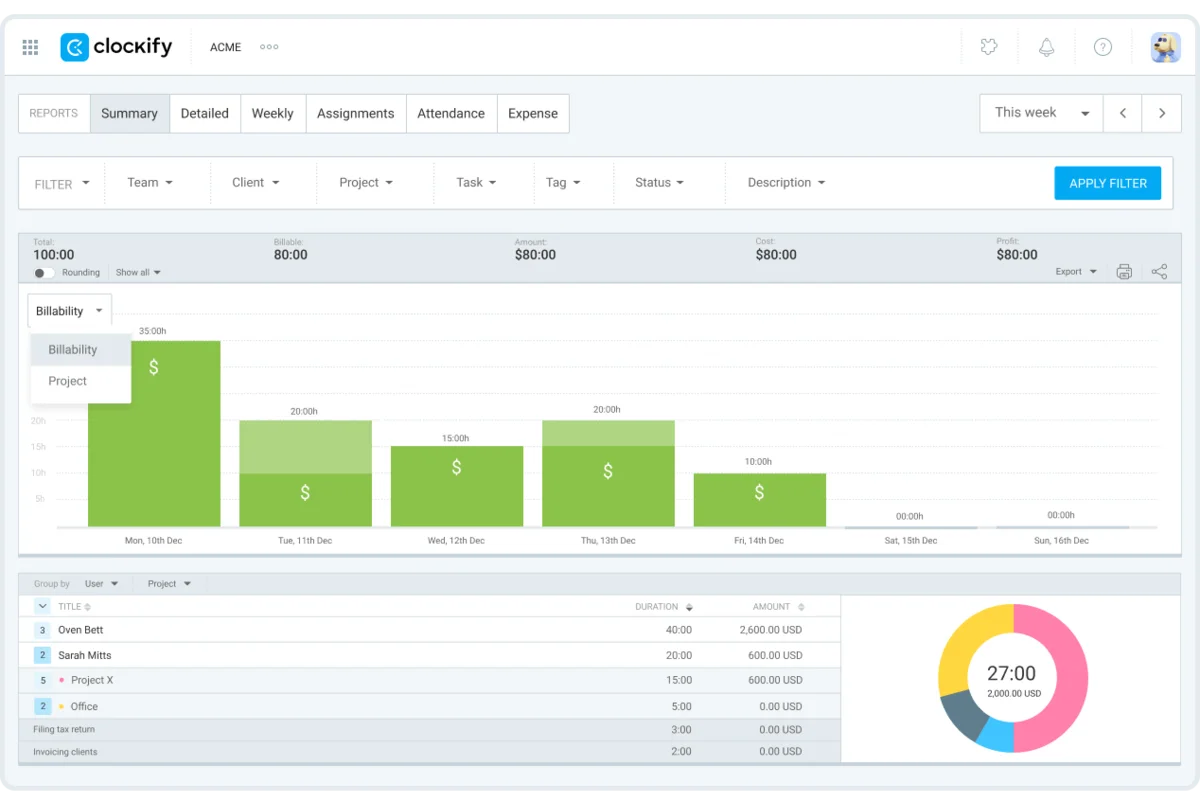
Sort your work by billability status to see costs and profits. Then, drill down that data by employee to compare high- and low-performers. Check your report for any duplicate time entries to make sure your billable amounts are right.
#3: Generate invoices
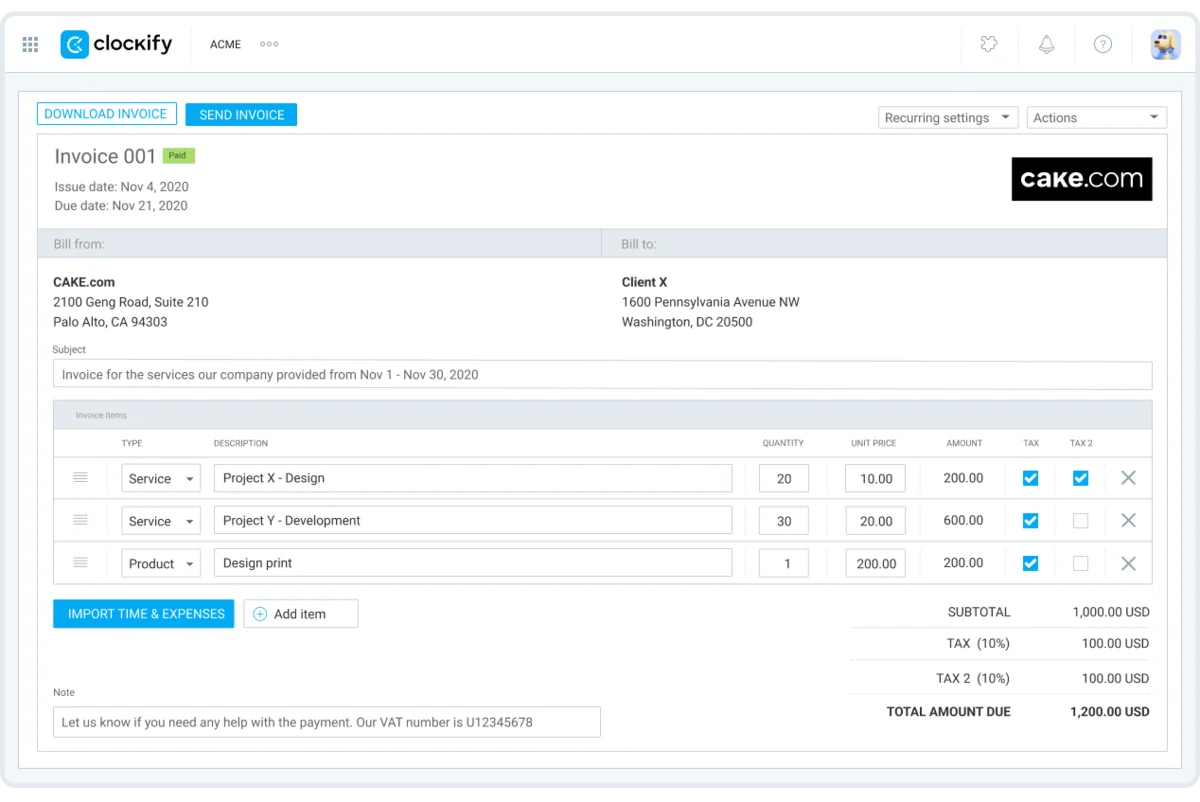
Import billable time entries in bulk to create invoices, which speeds up invoicing. Then forward them directly to clients’ emails. Your time tracker will send you a reminder for any overdue invoices.
When tracking time, industries like law tend to use relevant time intervals. Attorney at law Edward Hones explains:

“The 6-minute interval is ideal for billable meetings. 15-minute intervals work well for non-billable research hours. I avoid using anything longer than 30-minute intervals.”
How many billable hours is average?
Clockify’s time tracking data of 2,300 US firms shows that:
- 65.9% of work hours are billable, and
- 34.1% of work hours are non-billable.
Yet, the average number of billable hours varies per industry. To track profitability, all companies calculate their billable utilization rate — the percentage of time they can bill.
To get your utilization rate, use this formula:
(Total billable hours / Total actual hours) x 100 = Billable utilization rate
Here’s our billable hours chart, with quick insights into industry benchmarks:
| Industry | How many billable hours in a year |
|---|---|
| Law | 2,000–2,500 |
| Consulting | 1,664–2,080 |
| PR | 1,200–1,600 |
| Marketing | circa 1,248 |
| IT | circa 1,508 |
Now, let’s go over the average utilization rates per industry.
Utilization rate for legal professionals
Legal giants like Big Law require 2,000–2,500 billable hours per year. However, studies report starkly lower numbers.
Clio’s 2024 Legal Trends survey of 1,028 US legal professionals found that the average lawyer billable hours are less than 3 per 8-hour workday. That’s a billable utilization rate of 37%, or up to 720 hours billed per year.
Now, compare that to 2023, when the Thomson Reuters Institute measured lawyers’ profitability and found they averaged 115 hours a month. That’s 1,380 annual billable hours.
But, what percentage of hours should be billable? Attorney at law Edward Hones shares the realistic standards for small law firms:
“My personal aim is to get 4–6 billable hours per day. This is the maximum we can achieve alongside non-billable hours, without getting overworked.”
If you apply that to a 40-hour workweek, you would get a 50–75% billable utilization rate.

Utilization rate for consultants
Consultants usually aim for 32–40 billable hours a week (or 1,664–2,080 a year). The 2025 Professional Services Maturity Benchmark™ Report found that the billable utilization rate stands at 68.9% for consultants — below the ideal 75%. The study also listed major industry challenges, such as:
- Limited hiring (1.9%)
- Reliance on contractors (10.9%)
- On-time project delivery (73.4%)
The KPI metrics above point to profitability pressures, unstable demand, and flawed project planning.
So, what percentage of hours should you bill for? Partner at a consulting firm, Seth Waite, says they “average about 28–32 billable hours a week.” That means their average billable utilization rate is between 70% and 80% per 40-hour workweek.
Utilization rate for PR agencies
PR professionals go for 1,200–1,600 billable hours per year. So, teams on a 40-hour schedule reach a billable utilization rate of 57–77%. That’s drastically lower than the ideal 70–80% for professional services. Why is that?
Well, the 2024–2025 ICCO World PR Report covers the biggest concerns for PR agencies:
- Clients’ unwillingness to fund services (37%)
- Changing economic conditions (34%)
- Meeting profit/margin goals (26%)
Now, let’s look at the actual percentage of billable hours, based on a real-life example.
VP of Strategy & Operations at a PR agency, Sean Wille, says their “agency averages 125–135 billable hours per month for full-time team members and targets about 75–80% of billable time.”
Sean shows that reaching the ideal utilization rate is doable, but going past it invites risks:

“When that rate climbs too high, teams stay busy, but the business plateaus. There is less time for growth, less involvement in sales and professional development, and fewer opportunities to build culture.”
Utilization rate for marketing firms
In marketing, the average utilization rate is up to 60%, while the ideal is around 75%. So, based on a 40-hour workweek, marketing teams average 24 billable hours a week — or roughly 1,248 billable hours in a year.
That said, how many billable hours is realistic? Digital marketing strategist Jordan Stevens shares his thoughts on weekly billable goals:
“This depends on your role, but I shoot for 20/80. So, 4 full days of billable time and 1 day of non-billable time. This allows for time to innovate, learn and get any admin work done.”
Assuming Jordan works 8 hours a day, his weekly utilization rate amounts to 80%. So, you’re capable of achieving the optimal billable time, but the target will depend on your company role.
Utilization rate for IT companies
Typically, the utilization rate for IT services hovers around 72%. For full-time teams, that’s about 29 billable hours in a week or 1,508 billable hours in a year.
The 2026 KPMG Global Tech Report lists some of the biggest growth obstacles — identified by 2,500 tech executives:
- Tech debt (quick fixes that need reworking) — 63% of companies delay new initiatives due to the cost of solving tech debt.
- Talent shortages — 53% of companies lack the necessary skills to carry out modernization plans.
CEO of a GPS tracking SaaS business, Alex Sarellas, says that “anywhere between 20–40% of company hours is spent on non-billable hours.” In other words, his firm’s utilization rate ranges from 60% to 80%.
How does Alex manage to meet the industry standard? In his words, he cuts down on lost time by “assigning clear responsibilities and reducing the number of handoffs.”
💡 CLOCKIFY PRO TIP
Help your team ace time management with our practical resources:
Examples of billable and non-billable hours by industry
Here’s a list of real billable, non-billable, and grey-area tasks, broken down by industry.
| Industry | Billable tasks | Non-billable tasks | Grey-area tasks (tasks that could go either way) |
|---|---|---|---|
| Law | Attending court hearings | Mentoring interns at the law firm | Traveling to court |
| Consultancy | Drafting action plans for clients | Creating a template for client proposals | Holding initial consultations without a contract |
| PR | Pitching clients to media platforms | Giving a client presentation | Redoing press releases |
| Marketing | Setting up ad campaigns | Researching social media trends | Creating multiple versions of a banner add |
| IT | Testing client software | Attending cybersecurity courses | Fixing software bugs after launch |
Create powerful invoices and bill clients — with Clockify by CAKE.com
Every leader yearns for the right balance between admin and client work. Satisfy that craving with a simple yet impactful time tracker, like Clockify by CAKE.com.
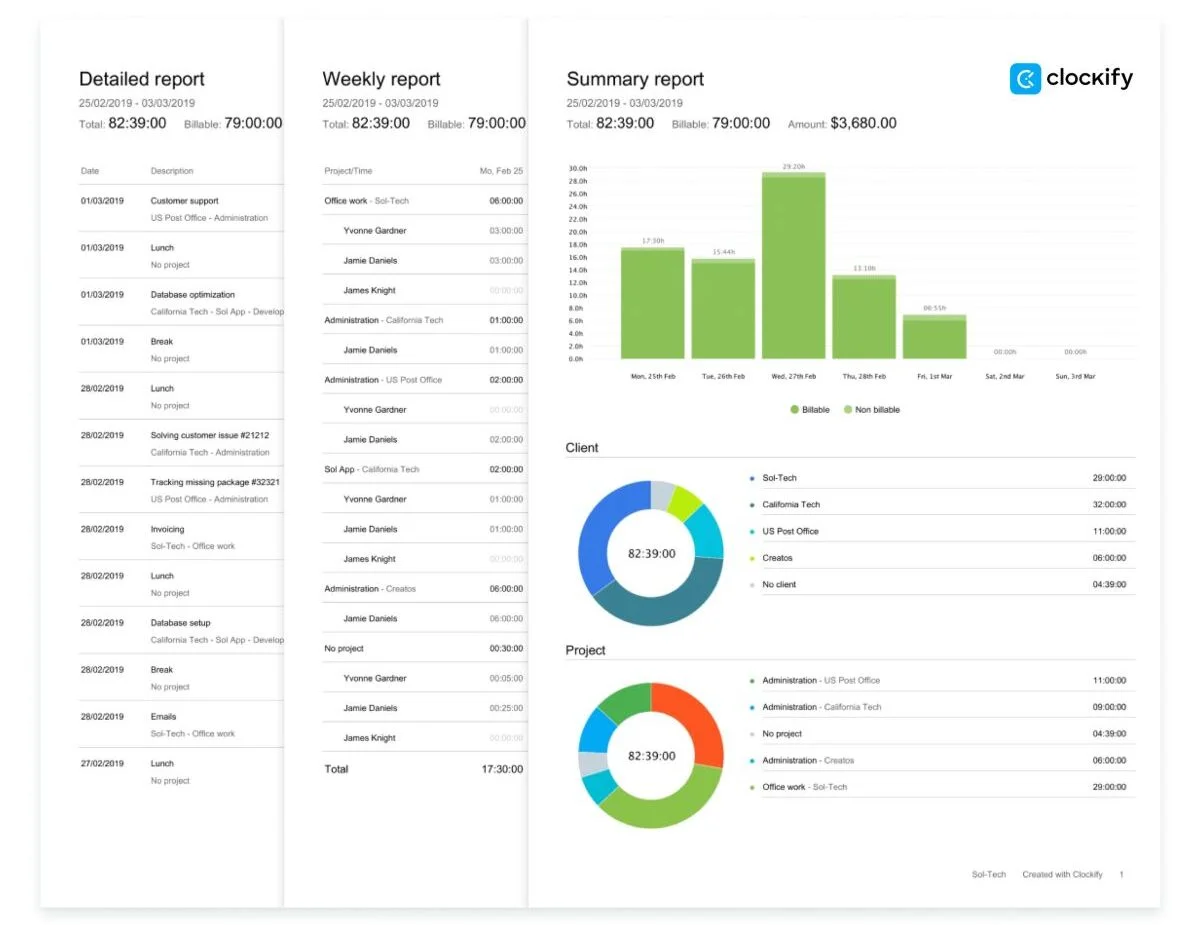
Just track your hours, mark billability, and send instant invoices — this way, you’ll classify work correctly and justify invoices to clients easily.
FAQ about billable hours and non-billable hours
This is where we answer all your burning questions. Learn more nitty-gritty details on billable and non-billable hours.
What is the difference between billable and non-billable hours?
The difference is that you can’t charge clients for non-billable time, as it doesn’t involve direct client work. But it’s crucial for maintaining high staff performance. Even your most profitable employees need space for skill development, process refinement, and mental sharpness.
To balance out billable and non-billable time, use reliable time trackers like Clockify.

Does non-billable mean you won’t get paid?
As an employee, you get paid for non-billable work since they’re part of your total work time. The Fair Labor Standards Act (FLSA) requires employers to compensate staff for all hours worked. The only exceptions include lectures, meetings, and training programs IF they meet the following criteria:
- They’re outside office hours,
- They’re optional,
- They’re not job-related, and
- They don’t overlap with any other work.
💡 CLOCKIFY PRO TIP
Find out more about time tracking compliance in our articles:
How many billable hours are realistic?
In general, a realistic goal for billable hours is between 1,700 and 2,000 hours per year. However, these numbers can differ depending on several factors, such as:
- Business field,
- Company role,
- Seniority level, etc.
Balancing workloads and preventing burnout also impacts how much paid work actually gets done.
What is a good billable hours rate?
A good billable hours target is around 65–75% for most professional services. It should raise your income while covering expenses.
Additionally, science predicts a jump in billable hours. In fact, Harvard Law School’s study on AI adoption at law firms found that AI speeds up routine work. This frees up lawyers to take on more client work and boost its quality.
Want to see your company’s profitability trends? Use a trusted billable hours tracker like Clockify.
Track billable time in Clockify
How we reviewed this post: Our writers & editors monitor the posts and update them when new information becomes available, to keep them fresh and relevant.