Free trial
You’ll be automatically entered into a 7-day free trial when signing up for a Clockify account.
Most paid features are available on the free trial.

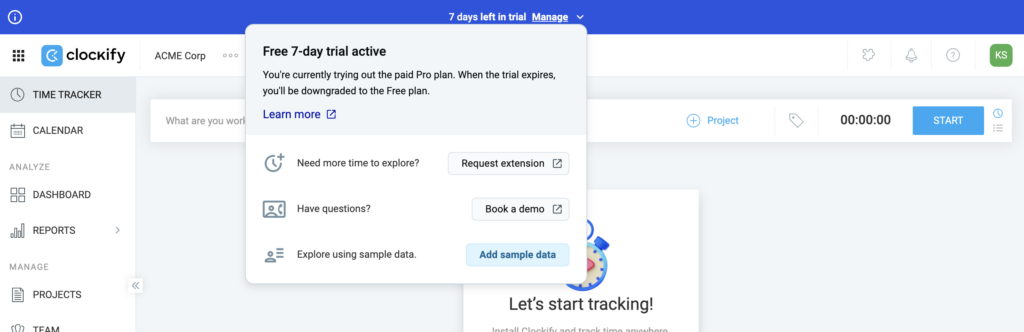
Add sample data #
When you activate Free trial, simply check the option to Add sample data to your workspace. This provides a pre-filled workspace with sample projects, clients, time entries and all other Clockify data.
To add sample data, follow these steps:
- Click Manage on the blue bar on the top of the page
- Click Add sample data
- Click Add sample data on the pop-up window to confirm the action
Remove sample data #
To remove sample data, follow these steps:
- Click on Manage on the blue bar on top of the page
- Click Remove sample data
- Click Remove sample data on the pop-up window to confirm the action
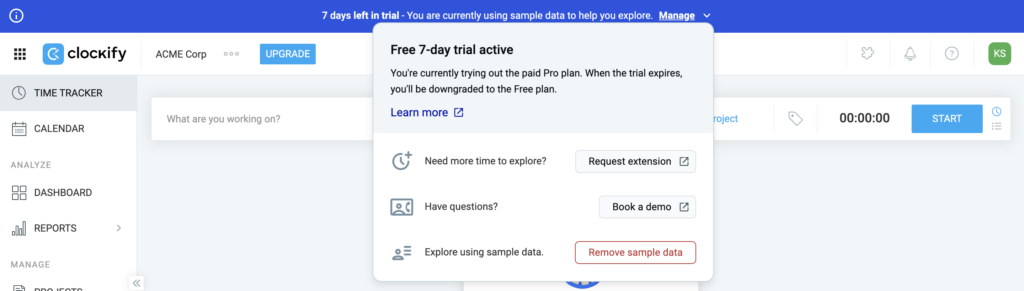
Sample data in the workspace is automatically removed as soon as the Free trial ends.
When trial ends #
When trial is active, you’ll have a countdown timer on the blue bar showing you how many days you have left.
When trial ends:
- You’ll be downgraded to the FREE version
- All paid features will be disabled (e.g. custom fields, expenses, time off)
- Data you created and imported will remain

After you upgrade your account, you’ll be able to resume the access to the paid features and the data you’ve used.
If you need more time to test paid features, contact us for the trial extension and we’d be glad to help.
If you need more time to test things, you can contact us for trial extension or a live demo.
FAQs #
How do I cancel my Clockify free trial? #
You don’t have to cancel your trial. If you don’t upgrade before your trial expires, you’ll be automatically downgraded to the Free plan.
What happens to my data when the free trial ends? #
All the time entries, projects, and clients you created or imported during the trial remain completely safe. When the trial expires, you are simply downgraded to the Free version and lose access to premium features (like custom fields, time-off tracking, and expenses) until you choose to subscribe.
Do I need to enter my credit card to start the trial? #
No, no payment information is required upfront. You are automatically enrolled in the 7-day free trial the moment you sign up for a new account.
Can I continue using the free plan after the trial expires? #
Yes, you can stay on the Free plan after the trial expires. Just take note that the Free plan has a limit of up to 5 users.