
Pay raises are a concrete way to acknowledge an employee’s daily efforts and overall contribution to your company.
Here’s everything you need to know about pay raises, including how to calculate a raise manually. Use our pay raise calculator (above) to quickly determine your employee’s new pay rate after an increase.
- A pay raise is an increase in an employee’s salary.
- Managers can calculate a pay raise as a percentage of an employee’s pay, use a flat-rate raise, or determine a raise within a pay grade.
- Common types of raises are merit raises, cost-of-living adjustments (COLA), and standardized increases.
- US employers are projecting an average total base-pay increase of 3.5% in 2026 (according to some sources).
- Creating an effective pay raise system involves revising your annual budget plan, defining pay-increase categories, and establishing clear rules for all employees.
What is a pay raise?
A pay raise (also known as “raise at work” or “pay bump”) is a permanent increase in an employee’s hourly wage or salary. It can happen for various reasons, such as strong performance, expanded job responsibilities, or the need to keep up with current industry standards.
💡 CLOCKIFY PRO TIP
Use our employee performance rating calculator to get precise, measurable data for performance reviews:
What is a pay raise calculator?
A pay raise calculator (or a salary raise calculator) is a tool that helps you determine an employee’s pay increase, as well as their new hourly, weekly, monthly, and annual pay. This tool enables quick calculations, allowing managers and small business owners to manage pay raises efficiently.
How to calculate a raise using our pay raise calculator
Our pay raise calculator has 4 sections. To determine your employee’s raise amount and their pay after the raise, provide the relevant information in sections 1–3.
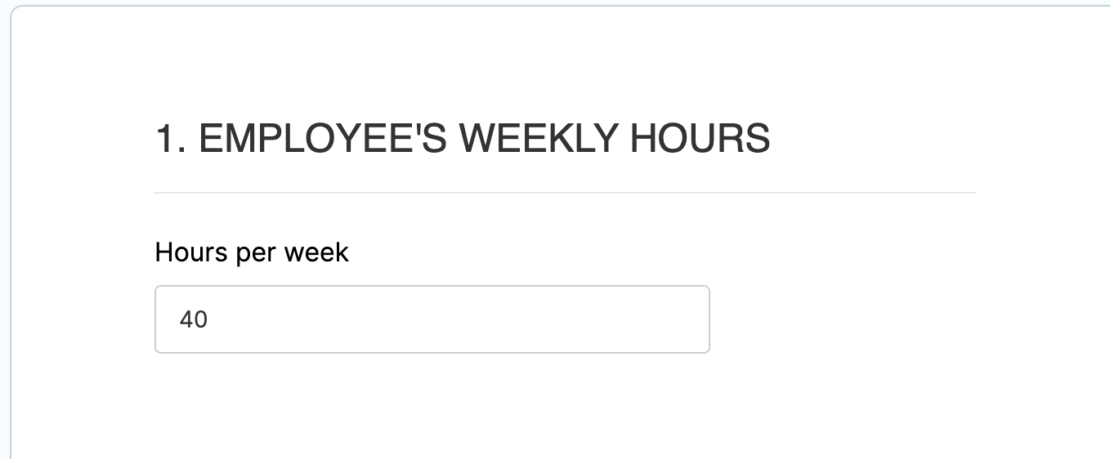
Section #1: Employee’s weekly hours
Enter your employee’s working hours per week (e.g., 40) in the Hours per week field. Then, move to the next section.
Section #2: Pay before raise
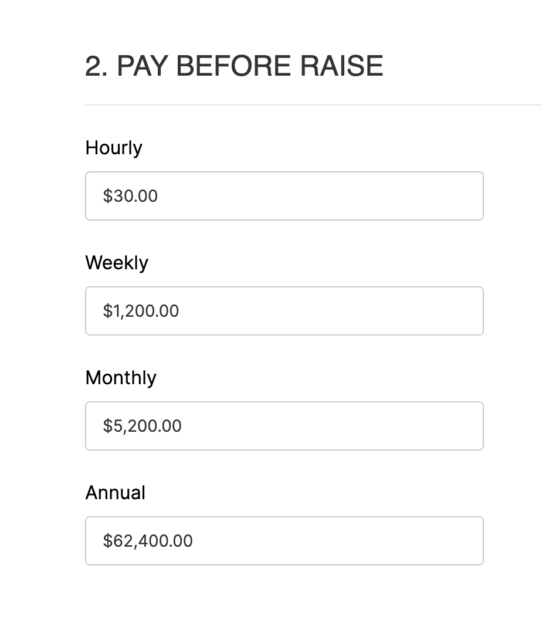
Enter the amount of money you pay your employee per hour, week, month, or year in the appropriate field. Once you provide this information (e.g., your employee’s hourly pay), our calculator will automatically calculate the other pay rates (in this case, weekly, monthly, and annual amounts you pay for your employee’s work).
Say you enter $30 in the Hourly field. In that case, your employee’s weekly ($1,200), monthly ($5,200), and annual ($62,400) rates of pay will appear in the corresponding fields.
Section #3: Raise
Enter the raise percentage (e.g., 5%) in the Percentage field. After you do so, the calculator will automatically calculate your employee’s raise per hour, week, month, and year. Their hourly ($1.50), weekly ($60), monthly ($260), and annual ($3,120) raise amounts will appear in the appropriate fields.
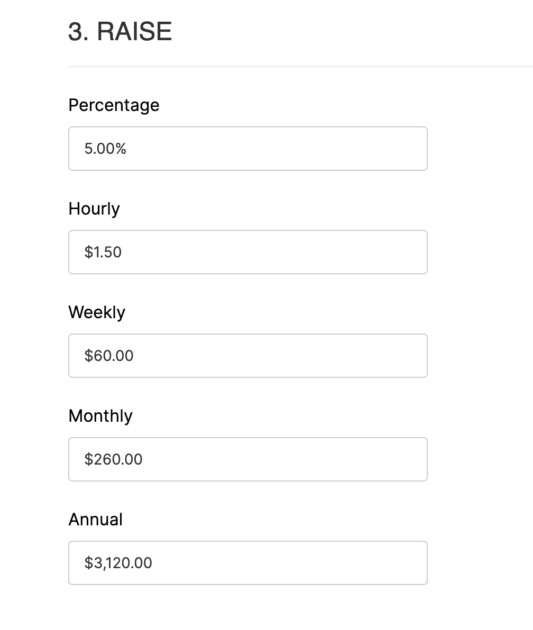
If you’re using a fixed raise amount (e.g., $3,120 per year), enter this amount in the corresponding Annual field. The calculator will automatically compute the raise percentage (5%). It’ll also calculate the other raise amounts (hourly, weekly, and monthly).
Section #4: Pay after raise
Once you provide the necessary information in the 3rd section, you’ll be able to see your employee’s new:
- Hourly pay (in this case, $31.50) in the Hourly field
- Weekly pay (in this case, $1,260) in the Weekly field
- Monthly pay (in this case, $5,460) in the Monthly field
- Annual pay (in this case, $65,520) in the Annual field
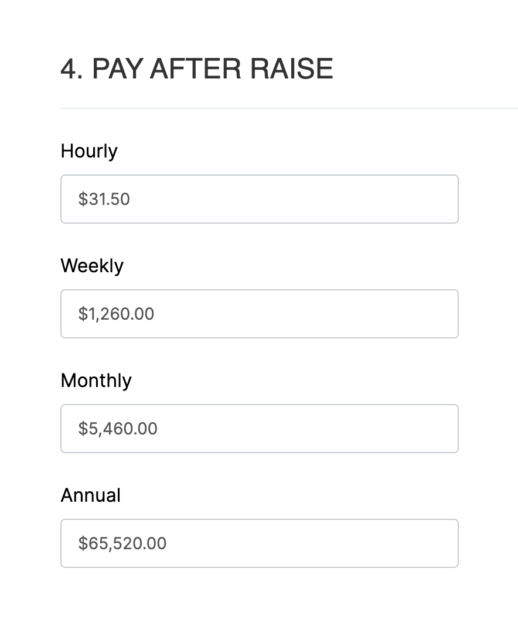
NOTE: Your employee’s new pay (or pay after raise) is calculated by adding their old pay and their raise amount.

How to calculate a pay raise manually
To manually calculate your employee’s pay increase, you can use one of the following methods:
- Calculating a raise as a percentage
- Calculating a flat rate raise
- Determining a raise within a pay grade
We’ll explain each of these methods and provide examples of pay raise calculations below.
Method #1: Calculating a raise as a percentage
To calculate a raise as a percentage of an employee’s pay, subtract their old pay from their new pay, divide that amount by the old pay, and multiply by 100.
The raise percentage formula goes like this:
[(Pay after raise – Pay before raise) ÷ Pay before raise] x 100 = The raise percentage
Say you have an hourly employee whose old pay equals $30 per hour. We’ll also say their new pay is $31.50 per hour. Here’s how you’ll calculate the raise percentage:
[($31.50 – $30) ÷ $30] x 100 = [$1.50 ÷ $30] x 100 = 0.05 x 100 = 5%
So, after a 5% raise, this employee’s new hourly wage is $31.50. This is $1.50 more per hour than their old wage (= $31.50 – $30).
To see how this increase reflects on a weekly level, multiply their hourly raise by the number of their weekly hours (e.g., 40). This is the calculation:
$1.50 x 40 = $60 raise per week
To calculate their annual raise, multiply their weekly raise by the average number of weeks in a year (52) — see below:
$60 x 52 = $3,120 raise per year
💡 CLOCKIFY PRO TIP
Explore average hourly rates across industries, locations, and experience levels in this article:
Method #2: Calculating a flat rate raise
A flat rate raise is a pay increase of a specific, fixed amount. Giving a flat raise is best for one-time adjustments, boosting the income of lower-paid employees, or when operating under a tight budget.
Here’s the formula for calculating a new pay based on a flat raise:
Pay before raise + Fixed raise amount = Pay after raise
Say you want to give an annual raise of $3,120 to an employee who earns $62,400 per year. Their new annual salary will be calculated like this:
$62,400 + $3,120 = $65,520
Therefore, after a fixed $3,120 annual raise, your employee’s new annual salary is $65,520.
To see how this raise translates to a weekly number, divide their annual raise by the average number of weeks in a year (52) — see below:
$3,120 ÷ 52 = $60 raise per week
Assuming your employee works 40 hours per week, you’ll calculate their hourly raise by dividing their weekly raise by 40. Here’s the calculation:
$60 ÷ 40 = $1.50 raise per hour
Track work hours with Clockify
Method #3: Determining a raise within a pay grade
In the pay grade compensation system, each grade has smaller milestones (steps) that an employee can reach. With each step, employees typically receive a pay raise.
Raises are often designed to move employees gradually toward the salary midpoint or beyond it. The salary midpoint is the middle between the minimum and maximum rates in a pay range. Here’s the salary midpoint formula:
(Salary range minimum + Salary range maximum) ÷ 2 = Salary range midpoint
For example, if your minimum is $50,000 and the maximum is $70,000, the salary midpoint would be $60,000. Here’s the calculation:
($50,000 + $70,000) ÷ 2 = $120,000 ÷ 2 = $60,000
This is the middle value the employee will reach at some point in their career.
To wrap up, the number of pay grades and the size of the pay gap (salary differential) between adjacent pay grades depend on:
- Budget
- Company pay structure
- Compensation philosophy
The same goes for within-grade steps and associated pay increases. For instance, in the GS compensation system (the pay system for US federal civilian employees), each grade has 10 steps, each worth about 3% of an employee’s salary.

Types of raises
There are several different types of raises, including:
- Merit raise
- Cost-of-living adjustment (COLA)
- Market adjustment raise
- Pay grade raise
- Standardized increase
Learn more about what raises are based on and when you should offer which type of raise in the following paragraphs.
Type #1: Merit raise
A merit increase is used to reward employees for their achievements at work. Merit raises don’t have a set time. Instead, they’re tied to specific goals, whether related to the employee’s career development (new skills learned, improved numbers and data) or to the projects the employee worked on.
To be able to give raises based on merit, you need:
- A roadmap of your projects, goals, and deadlines.
- An understanding between you and the employees of what achievements will grant them a merit increase (clearly communicate the goals you’ve set).
- Detailed data on employee performance and results.
- Available funds for a merit increase.
When you can objectively assess your employee’s performance, it becomes easier to determine who deserves a pay raise based on the value they provide to the company.
Also, rewarding employees for their good performance helps boost workplace productivity. According to research on employee performance under a merit-pay system, when employees believe their performance will be rewarded, they’re motivated to invest more effort in work. Consequently, this yields better results.
💡 CLOCKIFY PRO TIP
For more tips on how to boost productivity in your company, check out this blog post:
Type #2: Cost-of-living adjustment (COLA)
A cost-of-living adjustment (COLA) is an annual or biannual increase that accounts for the rising cost of living due to inflation.
Managers typically determine the cost-of-living adjustment by examining:
- Inflation rates (usually through the Consumer Price Index (CPI), which tracks the average change in the prices of everyday goods over time).
- Regional living costs (how housing, transportation, healthcare, and other costs vary in different cities or regions).
- Company’s financial resources.
General manager at PeopleHR Evo, Matthew Crook, shared his thoughts on the importance of providing COLA:

“It can be difficult for employers to keep up with inflation, particularly because supply chain costs can also increase in a way that harms cash flow. However, looking to provide employees with an inflation-beating pay rise each year is important for their financial well-being.”
Private-sector employers aren’t legally required to provide cost-of-living adjustments (unless they’ve contractually committed to it). However, some companies offer them voluntarily to increase talent retention and employee morale.
Type #3: Market adjustment raise
A market adjustment raise is designed to align employee pay with current industry standards. These adjustments are typically reviewed once or twice a year.
To determine market-based raises, you need to collect market data and compare your employees’ salaries with current market rates for similar positions. To get the necessary data, managers can use:
- Compensation data platforms
- Industry salary surveys
- Government and labor statistics
By providing market-adjusted raises, employers ensure they remain competitive. This way, they also boost employee trust and loyalty.
Type #4: Pay grade raise
A pay grade raise is a salary increase that occurs when an employee advances within a structured compensation system. Each pay grade has preset steps, and with each step, an employee receives a raise. These within-grade raises are awarded based on:
- Length of the person’s employment in that position
- Experience brought in and gained during their employment
As for the raises between pay grades, they’re affected by:
- Level of responsibility the position brings
- Level of management over others
For example, a designer starting at a company works on illustrations and website layout based on the input and instructions from supervisors. Over time, they gain more autonomy while delivering excellent results. This leads to the designer receiving pay raises within their pay grade as a junior designer.
Later, they’re assigned to supervise a new designer and help with their tasks. The designer moves to a new pay grade — a mid-level designer. Again, as their experience and tenure grow, they earn raises along with new steps.
Ultimately, they can become the chief supervisor for an entire design team. Now they make creative decisions and delegate tasks to others. At this stage, the designer moves to the highest pay grade available for that position. A higher pay grade than their current top salary would require a change of position or company.
Pay grade raises are given following annual or biannual performance reviews and are common practice in both the public and private sectors.
💡 CLOCKIFY PRO TIP
To simplify the performance evaluation process, use employee performance review templates. Get free templates here:
Type #5: Standardized increase
Standardized increases (also known as “peanut-butter” raises) are applied uniformly across the team, department, or the entire organization. These increases can come annually or biannually, and are given regardless of the employee’s performance.
In other words, high-performing workers and those lagging behind get equal raises, which can be demotivating for top performers.
As per research on the impact of recognition on employee outcomes, employees are motivated by fairness, as it boosts their sense of value. When a high performer sees that their longer hours and better results yield the same financial reward as a low-performing peer, their commitment starts to decline. This may affect employee engagement and productivity, which is why this type of raise should be carefully considered.
Track work hours with Clockify
What is a good pay raise percentage?
There’s no single “good” percentage pay raise. How much of a raise you’ll give depends on various factors, such as your pay structure, the available budget, and others. However, you can use compensation benchmarks (including average raise percentage data) to determine whether your pay increases are competitive and reasonable.
According to Payscale’s 2025–2026 Salary Budget survey, the average total base-pay increase for US employees is expected to be 3.5% in 2026, which is slightly less than the 3.6% average increase from 2025. Moreover, US employers project a mean merit increase of 3.2% in 2026.
As for the average total salary increase for different employee categories in the United States for 2026, another survey forecasts an equal increase of 3.6% for:
- Nonexempt hourly nonunion
- Nonexempt salaried
- Exempt salaried
- Executive employees
These numbers can be great reference points that you can further adjust based on your own financial standing.
To get a better idea of what’s considered a below-average, average, and strong raise percentage, refer to the table below:
| Raise % | Category |
|---|---|
| Under 3% | Below average |
| 3–3.6% | Average |
| 3.7%+ | Strong |
NOTE: A 3% raise is a standard benchmark for merit increases and cost-of-living adjustments in many companies. However, a merit increase may go up to 5%, depending on the industry.
💡 CLOCKIFY PRO TIP
Take a look at exempt vs. non-exempt employees and discover the pros and cons of each category in the following resource:
How to build a solid pay raise system
To be able to give fair raises but also keep your finances in check, you’ll need a clear, bias-free raise framework that you can apply consistently. Creating a good, objective pay raise system involves:
- Revising your budgeting plans
- Defining pay raise categories
- Creating clear rules for all
We’ll explain these steps in more detail below.
Step #1: Revise your budgeting plans
Your pay raises should be included in the year’s budget plans. Of course, each year is different, and when some are more successful than others, it’ll reflect on employees’ finances as well.
That’s why you must revise your plan once or twice a year to ensure your raise decisions are aligned with your current financial situation.
Time tracking tools like Clockify by CAKE.com allow you to generate detailed budget reports that you can use for informed financial decisions. With Clockify, you can generate a report for any period, check your profitability, and export data as PDF, CSV, or Excel files for further analysis.
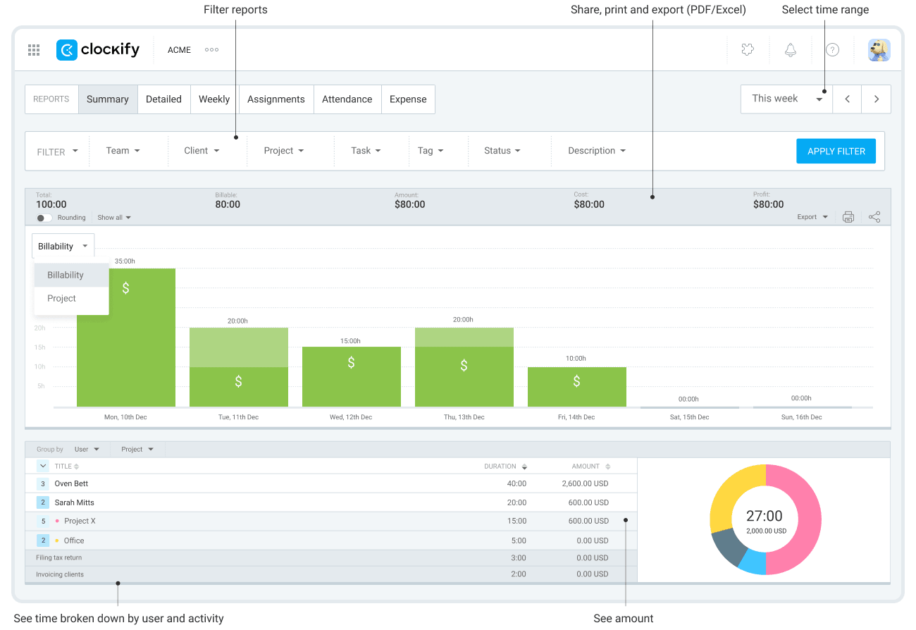
This way, you’ll be able to determine whether your budget can afford pay raises, allowing you to make sustainable compensation decisions.
How to Use Reports in Clockify | Guide
Step #2: Define pay raise categories
To manage employee expectations and avoid confusion, you need to define:
- Which types of raises you offer
- How the percentage of raise is determined in each category
- How it applies to employees at different levels
This way, you’ll create a more consistent pay raise system and help employees better understand how compensation decisions are made.
During their employment, an employee can receive multiple types of raises. For example, they may first receive a cost-of-living adjustment to keep their pay aligned with inflation. This may later be followed by a merit increase based on their strong performance, and then a promotional raise when they move into a higher pay grade.
In certain cases, an employee may receive 2 types of pay increases simultaneously. Owner at Hones Law, Edward Hones, explained how he would determine an employee’s new pay after performance-based and inflation pay increases:

“Say one of the junior associates has received a 4.8/5 rating in his performance report, but simultaneously, the country’s economic instability is increasing. When I recalculate his pay, I’ll start with the set percentage increase for his upgraded job role. On this, I’ll add the decided inflation pay raise.”
Defining pay raise categories helps companies apply raises more effectively across departments, job levels, and managers. This also allows for clearer compensation planning.
Step #3: Create clear rules
If you want to nurture transparency and motivate your employees to work as hard as they can, they should be aware of what it takes to reach that next milestone. Here are some rules you should define:
- How long they need to work here for that next pay raise
- Which skills or certifications they need to acquire
- Which responsibilities they need to take on
- Which performance goals they need to achieve
For instance, a customer support specialist may become eligible for a pay increase after 12 months in their role, provided they maintain a customer satisfaction score of at least 4.7/5 and resolve 80–90% of tickets on first contact. In addition, they may need to take on 1 extra responsibility, such as training new hires.
Make sure you communicate the rules for raises clearly to your employees. You can use 1-on-1 meetings to inform your employees of their progress toward the pay increase, including any performance gaps, required skills, and the next steps they need to take.
By defining clear rules for all and sharing them with your team, you ensure they understand what’s expected of them to earn a salary increase. This way, you eliminate any misunderstandings, build trust, and promote fairness.
NOTE: Check whether a pay raise changes an employee’s overtime status. If this move is going to make them exempt from overtime pay, it’s your legal obligation to inform them.
💡 CLOCKIFY PRO TIP
Get more information on FLSA compliance, as well as who’s exempt and non-exempt from overtime pay, in the resource below:
Track team productivity for better raise decisions — with Clockify by CAKE.com
With a powerful yet easy-to-use time tracker like Clockify, you can:
- Track employee time spent on tasks and projects
- Set reminders for your team to ensure accurate timekeeping
- Define billable and cost rates to track profitability
- Create detailed reports based on tracked time to analyze your team’s performance and make better raise decisions
To track time with Clockify’s Timer, your team needs to enter what they’re working on, choose a project, and click Start!
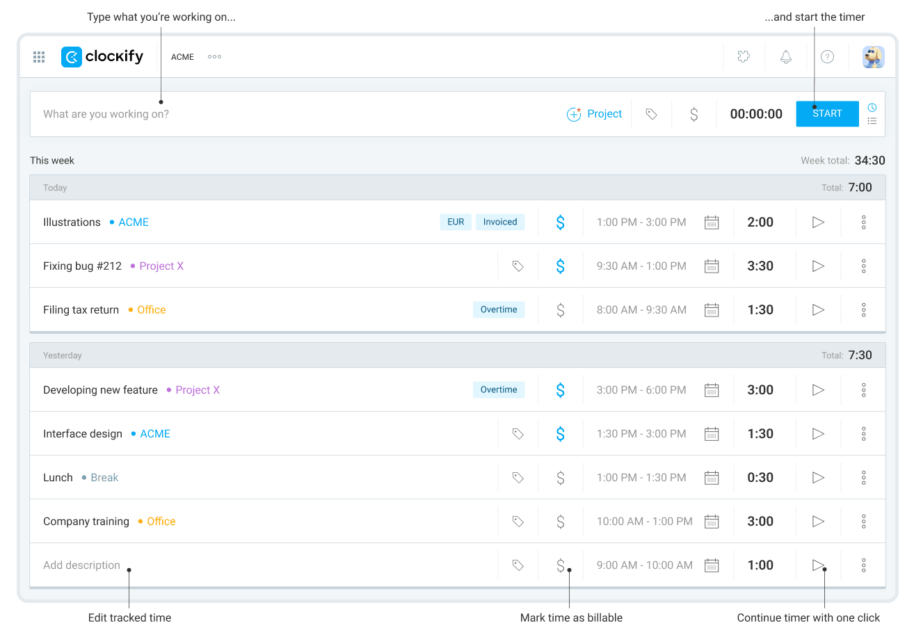
Track work hours with Clockify
As your team tracks billable time spent on tasks, Clockify automatically calculates their earnings based on their hourly rates, which you can see in Clockify’s Reports. You can then export these reports for payroll.
With Clockify’s Weekly report, you can check how much time each of your employees tracked, as well as which employees haven’t tracked any time. Apart from that, the report shows:
- Amounts
- Costs
- Profits per employee and project
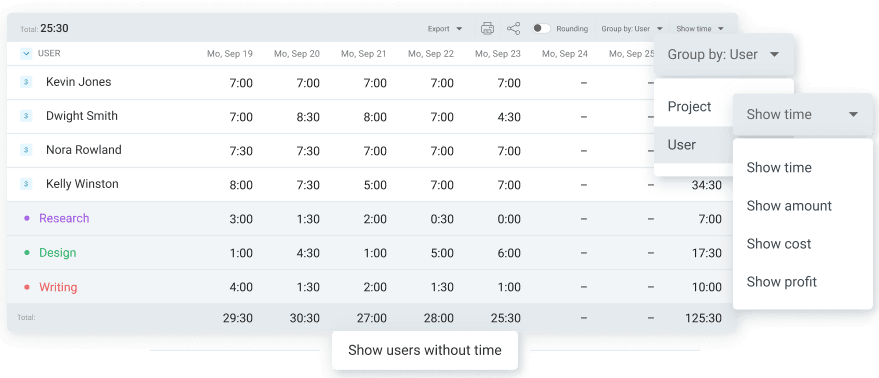
That way, you get better insight into who contributes the most with the least labor cost.
Measuring time spent at work shouldn’t be the only metric used to determine raises. But this information can be useful when coupled with other criteria, such as concrete results.
To skyrocket your team’s productivity, check out the CAKE.com Bundle. You get 3 business tools — Clockify time tracker, Pumble team chat app, and Plaky project management software at 53% off.

FAQs about pay raises
In this section, we’ll provide answers to the most frequently asked questions about pay raises and the pay increase calculation.
How do I calculate my pay raise?
If unsure how to calculate the salary increase percentage, use the formula below:
[(Pay after raise – Pay before raise) ÷ Pay before raise] x 100 = The raise percentage
For example, if your old annual salary is $50,000, and your new annual salary is $51,600, you’ll compute the percentage increase like this:
[($51,600 – $50,000) ÷ $50,000] x 100 = [$1,600 ÷ $50,000] x 100 = 0.032 x 100 = 3.2%
Therefore, after a 3.2% annual raise, your new annual salary is $51,600. This is $1,600 more per year than your old annual pay (= $51,600 – $50,000).
💡CLOCKIFY PRO TIP
To compensate employees properly, the employer needs to take into account not only their regular salary but also overtime pay. For more information on how to calculate overtime, read this:
How to calculate a 3% raise?
To calculate a 3% raise, convert the percentage to a decimal, then multiply the old pay by that amount.
Say an employee’s old pay is $50,000. Here’s how you’ll calculate their increase amount:
$50,000 x (3 ÷ 100) = $50,000 x 0.03 = $1,500 raise amount
To get this employee’s new pay, add their old pay and their raise amount — see below:
$50,000 + $1,500 = $51,500 new pay
💡 CLOCKIFY PRO TIP
Calculating payroll can be time-consuming, but there are ways to simplify this process. Discover simple tips to speed up your payroll calculation here:
Is a 3% raise really a raise?
Yes, a 3% raise is technically an increase in gross wages, though it’s generally viewed as moderate rather than significant.
While a 3% raise does increase your salary, its real value depends on inflation. For instance, if inflation is around 3%, a 3% pay increase may simply maintain your purchasing power (rather than increasing it).
What is a normal pay raise amount?
An average salary raise ranges between 3% and 3.6% of an employee’s annual pay (based on 2026 projections).
How is a 2% raise calculated?
Calculating a 2% raise follows the same formula as calculating a 3% raise — the only difference is that you’ll convert a 2% into a decimal.
If an employee’s old pay is $50,000, their raise amount will be computed like this:
$50,000 x (2 ÷ 100) = $50,000 x 0.02 = $1,000 raise amount
Finally, add the employee’s old pay and their raise amount to find their new pay. Here’s the calculation:
$50,000 + $1,000 = $51,000 new pay
How good is a 4% raise?
A 4% raise is considered a solid pay increase, slightly above the projected average of 3.6%.
Is a 5% raise really a raise?
A 5% raise is generally considered strong and often exceeds the standard cost-of-living adjustment.
Disclaimer: We hope this calculator/guide has been helpful. We strongly advise you to consult with relevant institutions or certified representatives before taking action on legal matters. Clockify is not responsible for any losses or risks incurred.
How we reviewed this post: Our writers & editors monitor the posts and update them when new information becomes available, to keep them fresh and relevant.