Timesheet discrepancy
1 min read
If you are seeing differences between your team member’s timesheet and what you see as an admin, it’s likely due to the time zone setting selected in Workspace settings.
To resolve this:
- Click on the three dots icon next to your workspace name
- Select Workspace settings
- Click Time tracking from the sidebar
- Select Original time zone under Time data display
- Click Confirm on the pop-up window
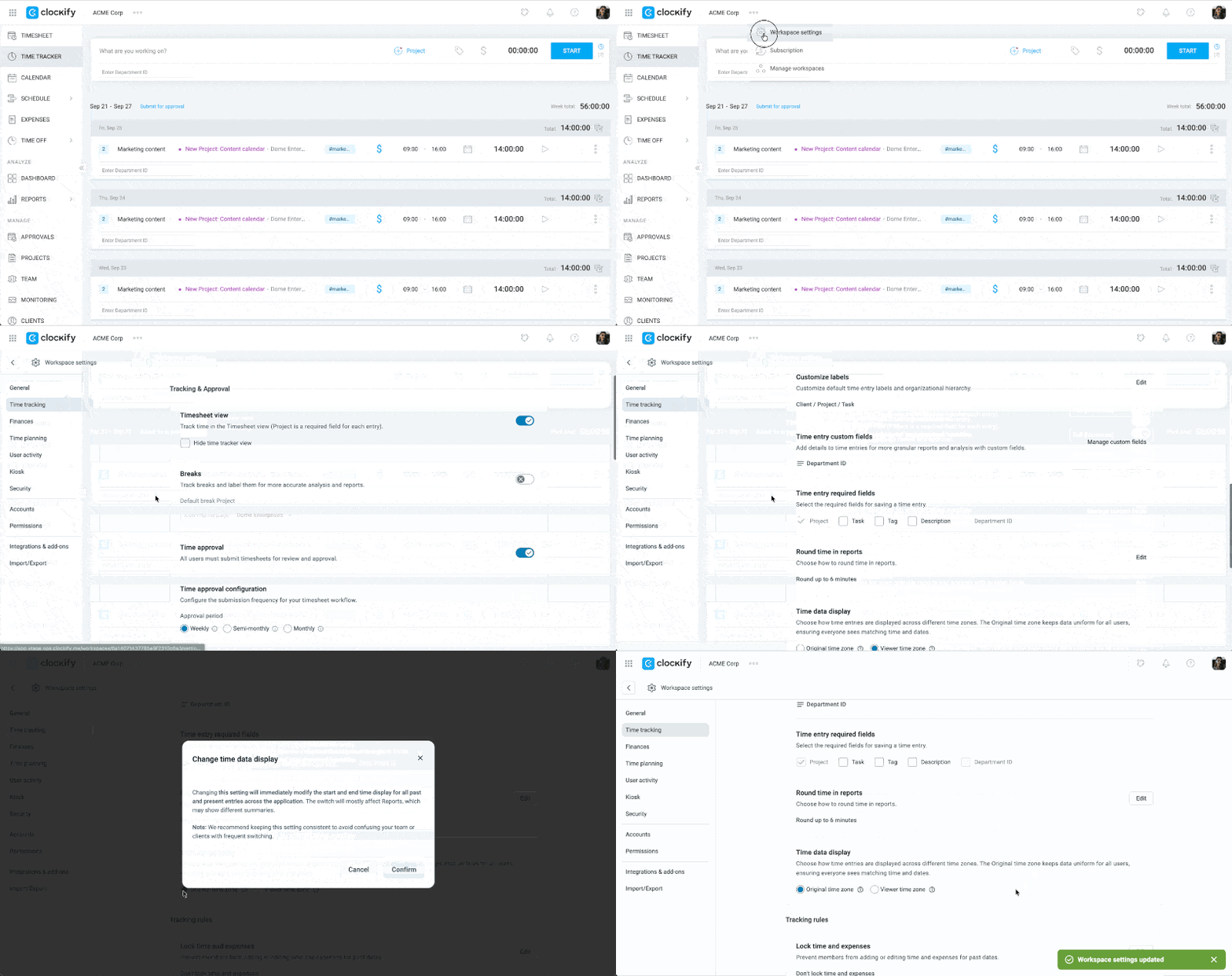
This option enables you to see all time entries in the original time zone it was logged in regardless of your local time zone.
Still having issues? The Clockify Support Team will be happy to look into it and assist you further. Please contact us at support@clockify.me and include the following details:
- Your time zone and the team member’s time zone
- A screenshot from both views (if possible)
- Affected date or time range when the discrepancy appears
Was this article helpful?
Thank you! If you’d like a member of our support team to respond to you, please drop us a note at support@clockify.me