
Companies can legally track work hours, either physically or on company-owned devices, during working hours. However, the scope of employee time tracking is subject to strict regulations depending on where your business is located. This article will only focus on US businesses.
- US companies are required to track employee hours for legal compliance.
- Tracking employee hours ensures accurate pay, overtime compensation, and PTO.
- Companies should choose the easiest time tracking method for their team to keep their hours as accurately as possible.
- If you choose a software tracker, the tool should handle all of your time tracking needs with ease.
- It’s a good idea for employees to track their hours to support work-life balance and prevent unfair treatment.
Is it legal to track employee work hours?
In the US, the federal government requires employers to track time for all non-exempt workers. Employers must:
- Keep accurate records of employees’ daily and weekly working hours.
- Retain payroll, certificates, agreements, plans, notices, sales and purchase records for at least 3 years.
- Retain basic employment and earnings records for at least 2 years.
To track time, employers are allowed to use:
- Dedicated time tracking software
- Manual timesheets or written logs
- Traditional punch clocks
- Biometric scanners (states like Illinois enforce strict privacy laws regarding the collection of fingerprints or facial scans)
Time tracking systems like Clockify let you track physical presence (via Kiosk), remote employee hours (with Timesheets), and field teams (with GPS location tracking).
Time tracking is mandatory for employer compliance and involves recording employees’ hours worked. Employee monitoring, on the other hand, involves tracking application usage, taking periodic screenshots on company computers, and logging mouse movements and keystrokes.
To learn more about employee monitoring, check out these articles:
– Clockify Paid Features Explained: Screenshots, GPS Tracking & More
– Clockify Pro Plan — Project Tracking, Budgets & Profitability
– How To Track Employee Time Without Invading Privacy
Reasons to track time as an employer
Employers track time for 3 primary reasons:
- Accurate compensation
- Labor law compliance
- Improved workforce management
First, we’ll discuss the legal side of tracking employee hours. Afterward, we’ll cover how it supports productivity and how to ensure accurate timesheets.
#1: Tracking time for accurate compensation
The first big compliance reason for time tracking is providing fair compensation to employees with hourly wages, overtime payments, and PTO.
A New York employment attorney and our expert contributor, Christine Hintze, states that software time trackers are best treated as a neutral source of truth when it comes to pay and overtime:

“Documentation such as accurate time records is critical because disputes regarding wages often turn on whether the employer and employee have accurate records of work time.”
Christine adds that good timekeeping practices can protect both employers and employees by reducing ambiguity about when an individual was working or off the clock.
Work Time Utilization Metrics
Try Clockify's Activity monitoring to better understand how your teams use their work time.

Paid time
According to the Bureau of Labor Statistics, more than half of US employees are compensated based on an hourly rate.
In practice, it’s easy to lose track of who did what and for how many hours before payroll day arrives. Tracking time ensures everyone earns what they worked.
A work hours tracker like Clockify lets you:
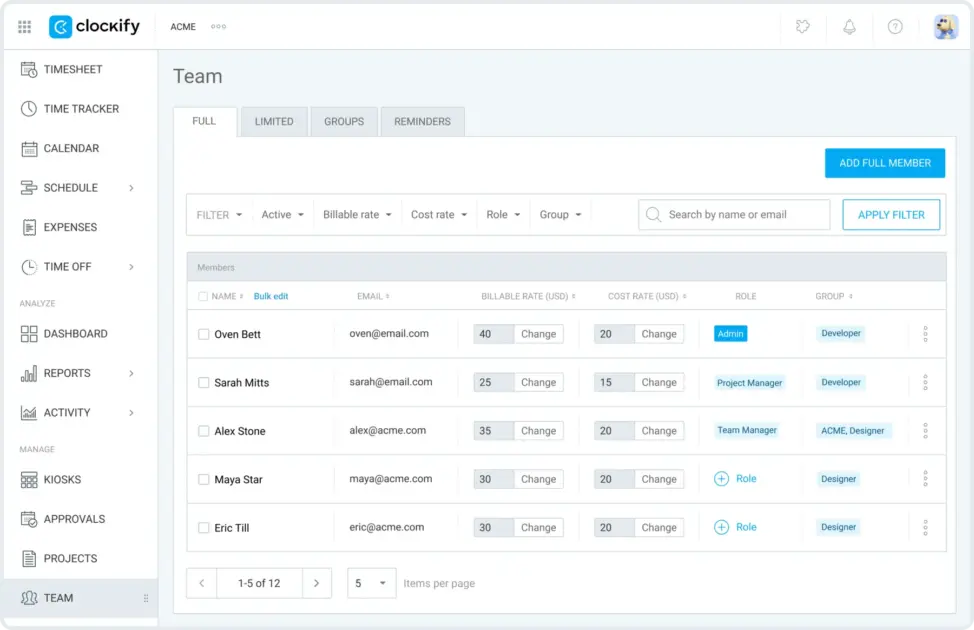
- Define hourly rates for each employee
- Get a clear overview of hourly employee tasks
- Ensure consistent and reliable time data
- Choose how long you retain information
- See exact pay amounts based on hourly rates and hours worked
Overtime pay
Overtime rates differ across states based on whether hours are worked weekly or daily and other specific criteria. Without time tracking, payroll calculations become incredibly complicated.
For example, California Overtime Law requires employers to pay 1.5 times the hourly wage during weekdays if you work more than 8 hours in any workday or 40 hours in any workweek.
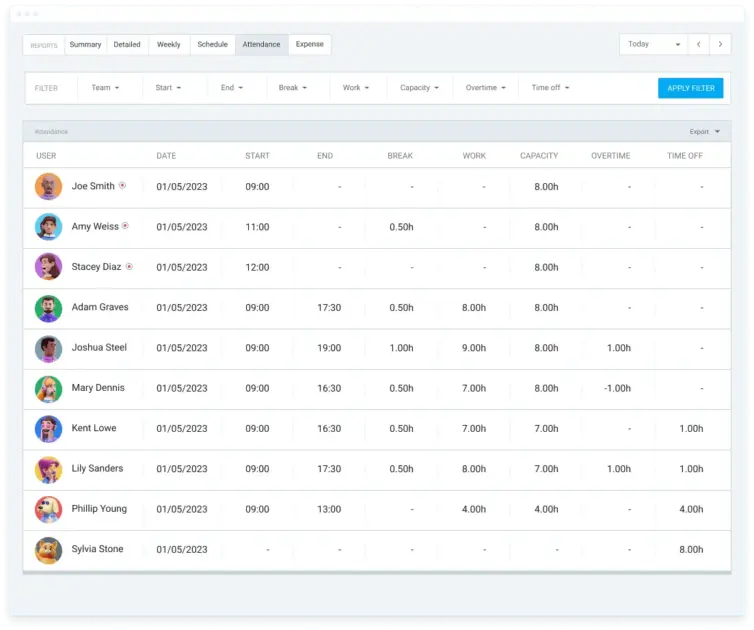
A good time tracking system clearly separates overtime vs. regular hours, based on the daily work capacity you set for employees. All overtime is neatly displayed in a separate column. This simplifies payroll at the end of the pay period and minimizes errors.
💡 CLOCKIFY PRO TIP
For a more in-depth look into overtime laws for specific regions, make sure to check out:
PTO
Time tracking systems should also keep track of paid time off (PTO). Some software automatically calculates earned PTO based on your company’s rules and tracks requested off days.
Manual timekeeping methods are prone to data-entry errors, rounding errors, or forgetting to deduct a used sick day. Conversely, a time tracker automatically subtracts used PTO from the employee’s balance as soon as it’s approved.
In Clockify, both managers and employees have a real-time view of their exact PTO balance. Clockify’s time-off policies also include custom accrual and expiration dates to prevent employees from requesting vacation time they haven’t earned yet.
#2: Tracking time for labor law compliance
Employers can unknowingly commit wage-and-hour violations, but time tracking can help employers avoid such mistakes.
Ohio-based attorney and our expert interlocutor, Scott Perlmuter, underscores the importance of using electronic time tracking systems for ensuring labor law compliance:

“One of the most common allegations in wage lawsuits is that employees’ hours that they were permitted to work have not been accurately tracked. Use of electronic time clocks with supporting metadata goes far toward proving compliance with those laws.”
Let’s see how a time tracking system helps your company stay compliant with the FLSA regulations and state labor laws, and prevent legal trouble.
Time tracking provides a reliable audit trail
The FLSA requires employers to keep accurate time and payroll records for at least 2–3 years. If the DOL conducts an audit, any company that fails to produce accurate records or has records that appear to have been manually altered faces severe penalties.
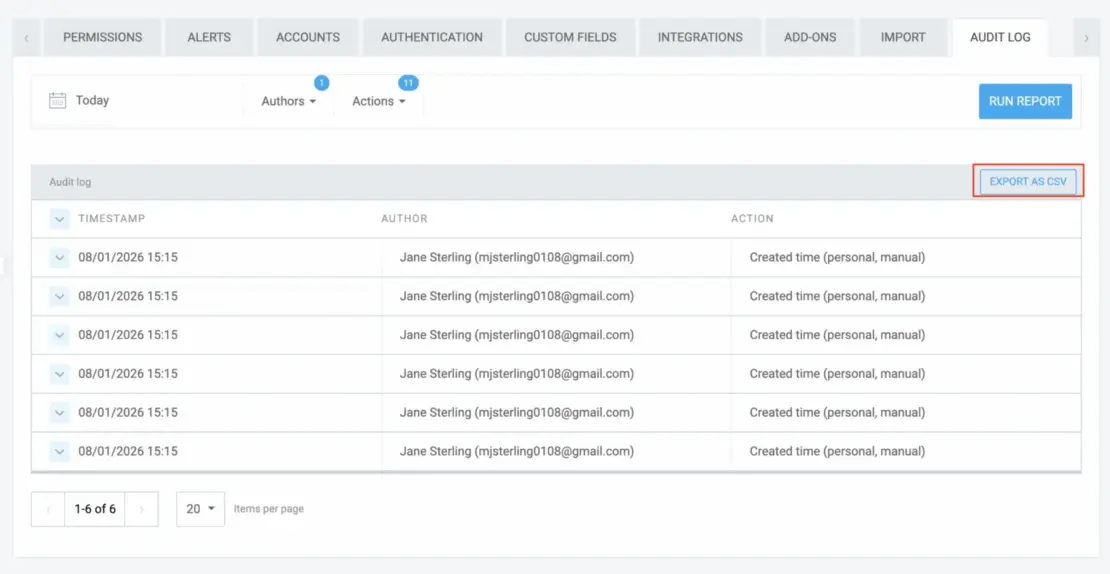
Compliant time tracking apps like Clockify use digital audit logs. Once enabled, Clockify logs all changes. If a manager ever edits an employee’s timesheet — you’ll see exactly who made the change and when.

Time tracking provides standardized time rounding
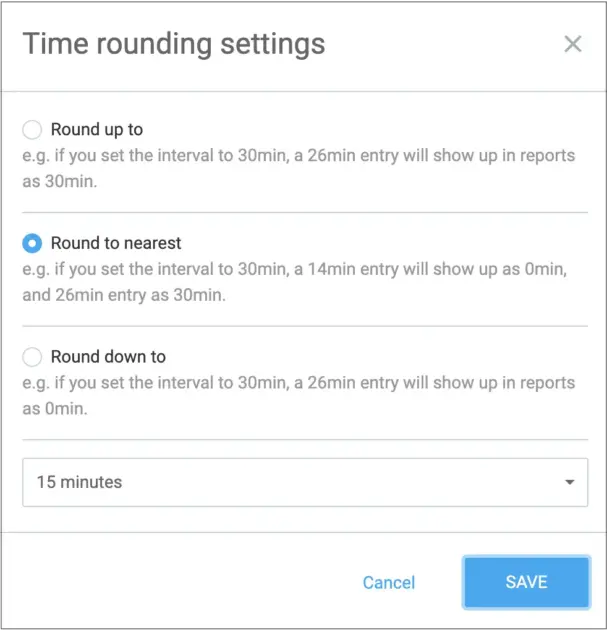
Federal law allows employers to round time (e.g., to the nearest 15 minutes), but only if the rounding is strictly neutral. If the rounding consistently benefits the employer, it’s a violation.
A manual system or company policy that always rounds start times forward can be viewed as systematically stealing minutes of pay from workers. According to HR Morning, a recent Florida contractor paid $594,313 in back wages and damages to 419 workers due to flawed time rounding and incomplete records.
Clockify applies rounding neutrally and automatically. This removes human bias and proves the 7-minute rule is being applied legally and consistently.
Time tracking prevents time and wage problems
Time tracking takes the guesswork out of your wage calculations. Relying on memory, spreadsheets, or manager discretion often leads to costly oversights.
Overtime and compensatory time are 2 of the most heavily regulated areas of payroll:
- With overtime pay, state laws dictate how much your hourly wage increases for each overtime hour.
- With compensatory time, exempt employees can take time off in exchange for overtime hours instead of additional pay.
Beyond overtime tracking, Clockify supports this through hourly accruals. First, let employees track overtime hours. Then, add the hours to a custom hourly accrual policy for each individual.
💡 CLOCKIFY PRO TIP
For a deep dive into the differences between exempt vs. non-exempt workers, make sure to read this:
Time tracking ensures compliant unpaid leave
According to the Family and Medical Leave Act, employees may take up to 12 weeks of unpaid (but job-protected) leave each year if they meet specific criteria.
The FMLA applies to all public agencies, public and private schools, and companies with 50 or more employees. If requested, these employers must provide up to 12 weeks of unpaid leave each year for any of the following reasons:
- Birth and care of the newborn child of an employee
- Placement of a child with the employee for adoption or foster care
- Taking care of an immediate family member with a serious health condition
- Taking a medical leave due to a serious health condition
In the event of an audit, the employer must prove the FMLA-based leave is legal. Without accurate and accessible data, you’ll face a lot of backtracking and digging through archives.
#3: Tracking time for improved workforce management
Time tracking helps you run your team much more efficiently. The biggest time tracking advantages for people management are smarter scheduling and preventing time theft.
As for scheduling, tracking employees’ hours worked gives you a general overview of who does what in which department. As tasks get checked off on the timesheets, you begin to notice which teams have too much on their plate and which can take on more.
You can also track time theft — which happens when an employee accepts pay for work hours they haven’t put in. This happens in several ways, such as:
- Using leeways with flexible schedules (especially with remote work)
- Clocking in/clocking out coworkers (aka buddy punching)
- Using extended breaks
- Browsing entertainment during work hours
With reliable time tracking, you’ll start to notice behavior patterns and address them accordingly.
💡 CLOCKIFY PRO TIP
For a deeper dive into time tracking and its advantages, make sure to read this:

How to keep time tracking accurate as your team grows
Time tracking habits that work for 5 people won’t survive a month with a team of 30+ employees. Inconsistent logging across different departments becomes much more difficult to fix — and time tracking challenges quickly snowball into serious problems.
Here are the top 4 steps to make the most of your time tracker.
#1: Choose the right time tracking method
Before all else, ask yourself: What’s the easiest way for my team to track time?
Depending on how your team operates, you may use:
- Kiosk — a dedicated on-site device with a custom PIN code for each employee
- Timesheet — for submitting individual hours on a daily or weekly basis
- Mobile device location — if you’re running a field crew constantly in motion
- Auto tracker or Timer — if your priority is “set-and-forget” time tracking
#2: Make time tracking simple for everyone
Before inviting people to your chosen time tracker, make sure you get familiar with it. Plan how your time entries will be structured to make the process as simple as possible for everyone.
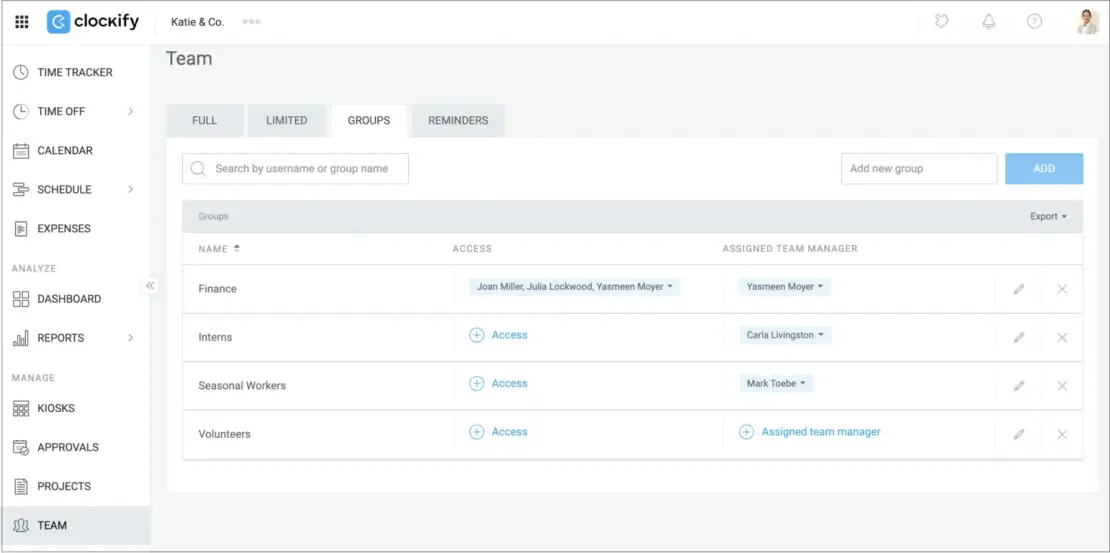
Use Clockify’s User groups to organize people into departments and subteams. Here’s how to do it in 3 steps:
- Create projects and tasks relevant to different teams and their work roles
- Invite people through their email addresses
- Assign user groups to projects and tasks
This keeps time tracking dead simple for individuals, since they’ll only see projects and tasks relevant to their group.
#3: Enforce a clear team hierarchy
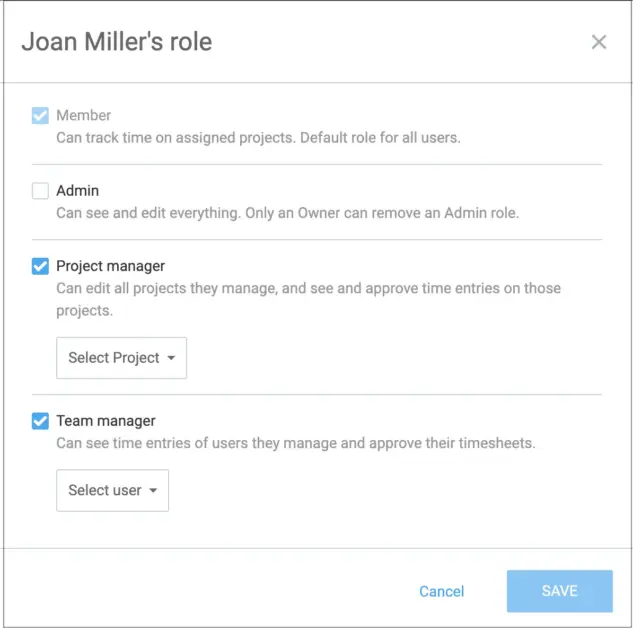
The next step is to create a hierarchy in your time tracker. First, define project managers and team managers responsible for their team’s time entries. Then, communicate that accurate employee time entries are one of the managers’ main duties.
Clockify allows you to set different manager and admin permissions, with different levels of clearance in your Organization. This way, managers only need to review time entries of the exact Projects and workers they are in charge of.
#4: Set up approvals and reminders
Depending on the size and complexity of your organization, you may need an additional layer to ensure accurate timesheets.
Modern time tracking apps like Clockify offer Timesheet approvals and Email reminders that help you catch time tracking inconsistencies early. This way, you can address them before they become a problem.
Reasons to track time as an employee
Employees, freelancers, and independent contractors also benefit from time tracking. The following list contains just some of the reasons.
#1: Better work-life balance
Digital time tracking tools and structured work blocks can foster your well-being, according to Open Access Library Journal. When you make time visible, both workers and managers see exactly where the day goes. This makes it easier to optimize workloads.
As you fill out a timesheet, you begin to notice how much time goes to your actual work, especially when the distractions accumulate during the day. A time tracker can help you set the foundation for planning future days and setting those much-needed boundaries.
💡 CLOCKIFY PRO TIP
Eager to explore what work-life balance looks like around the world? Explore the most recent findings in our post:
#2: Improved contingency planning
In some cases, tracking work hours can protect you from unfair treatment at work.
1. Track unfairly increased workload
If you begin to notice that your employer has started to pile on more obligations, you can gather enough evidence just by tracking time for each task. An archive of how many hours you’ve spent on each assignment is legitimate proof of unfair treatment, especially when averaged out.
2. Track unpaid overtime
If you’ve been pushed into overtime without compensation, tracking overtime can help you negotiate or even file for time and wage violations. Keep in mind the conditions you need to meet to be eligible for overtime pay.
3. Ensure you are compensated fairly
If you work an hourly wage, tracking time ensures you get paid properly for the time you invest. Keeping a separate account of your work hours can make for a good safety net if any time tracking mistakes arise on the employer’s side.
If you already have a time tracker at work, fill it out diligently and as specifically as possible.
According to Lisa Stroeder, an Ontario-based paralegal, accurate logs are crucial in keeping compensation fair for both sides:

“If schedules continue to change one person’s hours while everyone else’s hours stay the same, logs are evidence of the pattern, not a feeling. Logs are the difference between a complaint that remains ignored and the one that is taken seriously. Record of hours worked – paperwork is your best protection.”
#3: Organize work better
Looking at your timesheet at the end of the day, it’s easier to spot where you were at your most productive, or where things could have gone better.
Analyzing your tracked hours and improving work distribution gets you one step closer to a stress-free workday.

Generate invoices, create reports & prepare payroll with Clockify
Tracking time is just one part of running a successful business. Clockify by CAKE.com takes it further by converting tracked time into invoices, reports, and payroll-ready data.
#1: Generate invoices
Clockify lets you create client-ready invoices in seconds. Select the time range, review, and send. Track invoice status directly in Clockify, and mark them as paid.
#2: Create advanced reports
Clockify’s time data converts into multiple report categories in a single click:
- Time reports — to analyze tracked time from a variety of perspectives
- Team reports — to view employee attendance and assigned work
- Expense reports — to see all tracked expenses in a chosen time period
#3: Prepare payroll
Clockify Reports can also export payroll-ready data as CSV, PDF, or Excel files. The files can easily be read by your payroll software such as ADP or Paychex.
Clockify is made by CAKE.com, the company behind project management tool Plaky and team chat app Pumble. These tools integrate with the CAKE.com Bundle, which gives you enterprise-level features from all 3 apps for just $12.99 per user per month.
Sign up for a CAKE.com account
FAQs about tracking employee work hours
Finally, let’s explore additional questions about tracking hours for employees.
Is it illegal for your employer to track your work hours?
In almost every jurisdiction worldwide, employee time tracking is a legal requirement for employers. More intrusive methods, such as location tracking and computer screenshots, are treated differently across regions.
In GDPR regions such as the EU, your employer can’t monitor you without proving it’s strictly necessary and proportionate to the business need. In the US, these practices are legal on company devices. However, several US states now require employers to provide clear, written notice before the surveillance begins.
What’s the difference between tracked hours and payroll hours?
Payroll hours are payable hours calculated at the end of a pay period, and they’re used for employee compensation. Tracked hours represent actual time spent performing work or logged on a system.
While often similar, they become different after factoring in time rounding, overtime, and paid leave.
What is the 7-minute rounding rule?
The 7-minute rule allows employers to round employee clock-in and clock-out times to the nearest 15-minute increment.
If you clock in or out 1–7 minutes after a quarter-hour mark, your payroll time is rounded back (a clock-out at 8:47 gets rounded to 8:45).
If you clock in or out 8–14 minutes after a quarter-hour mark, your payroll time is rounded forward (a clock-out at 8:53 gets rounded to 9:00).
Can employers legally round employee clock-in/clock-out times?
In the US, the FLSA permits time rounding if it is neutral. Time-rounding boundaries include:
- The rounded time must average out: The rounding policy must apply equally to both clock-ins and clock-outs.
- Time rounding can’t result in wage theft: A system that rounds start times up, but rounds end times down is illegal.
- The 15-minute rounding limit: The rounding increments can’t be larger than 15 minutes.
Check your state laws, as they override federal laws on this matter.
Is clocking in a few minutes early considered time theft?
If you clock in a few minutes early and you don’t spend that time performing any labor for the company, that can technically be considered time theft.
If you clock in a few minutes early and immediately begin working, you’re essentially working early. Your employer is also legally required to pay you for this time. However, if your employer uses a time-rounding system (like the 7-minute rule), clocking in a few minutes early might not even register.
Can you be paid nothing for time you didn’t clock in for?
You can’t be paid nothing for the time you actually worked, even if you forgot to clock in.
If you’re a US non-exempt worker, withholding your pay as a punishment for a missed clock punch is illegal. The employer can only discipline you for failing to follow company policy. The law views these as 2 separate issues:
- The hours you worked must be paid.
- The employer can issue a verbal warning or formal write-up for failing to clock in.
REFERENCES:
- Sesay, I. T. (2025). Mastering Time Management for Remote Workers: Proven Strategies for Peak Productivity. OALib, 12(09), 1–21. https://doi.org/10.4236/oalib.1114057. License: CC BY 4.0