
Remote team monitoring can foster growth, improve accountability, and maintain productivity within a team.
But if implemented incorrectly, consequences can be detrimental — from employee turnover to legal issues.
Read on to learn all the essentials about remote team monitoring. This includes benefits, drawbacks, legal implications, and how to implement monitoring without being invasive.
- Remote team monitoring is the practice of tracking remote workers’ activity, such as monitoring their work computers and internet usage.
- Non-invasive monitoring protects employee privacy by ensuring it doesn’t track sensitive personal information.
- Company-provided computer monitoring is legal in the US, but some states require employers to provide written notice or obtain workers’ consent.
- To monitor your team’s work activities fairly, inform the employees about monitoring beforehand, clearly define expectations, and disable intrusive features.
What is remote team monitoring?
Remote team monitoring means using software to track the activity of employees who work outside the office. Monitoring can include tracking:
- Computer usage
- Internet usage
- Phone usage
- Emails
- Location
💡 CLOCKIFY PRO TIP
Learn how to monitor employee productivity in detail:
Reasons to monitor a remote team
Remote team monitoring can benefit both companies and employees — but only if implemented for the right reasons.
Here are some valid reasons to monitor a remote team:
- Cybersecurity — using monitoring software on employees’ work computers can help strengthen security.
- Overtime compliance — tracking active and idle time ensures compliance with overtime laws.
- Accountability — knowing their activity is being monitored may make employees more aware of their mistakes and more willing to take accountability.
- Accurate attendance tracking — remote team monitoring helps detect absenteeism more accurately than a simple clock-in/out solution.
- Better resource allocation — tracking employee activity helps detect who’s overworking and who’s underutilized, so that work can be distributed more fairly.
Assess Productivity Trends
Get employee productivity insights to identify productivity patterns in the work of your teams.

The difference between invasive and non-invasive monitoring
Monitoring itself isn’t inherently good or bad, but invasive and non-invasive monitoring differ.
Invasive monitoring intrudes on employee privacy and tracks more than is needed for business purposes. For instance, monitoring an employee’s computer activity after business hours can be considered invasive. This type of monitoring not only breaks employee trust but, depending on what data is gathered, may also carry legal consequences.
Non-invasive monitoring means tracking only the data needed to improve workflow. It protects employee privacy by gathering only the information related to business operations. This includes computer activity during business hours that is related to work only.
For monitoring to be non-invasive, employees should also know how and why they’re being monitored, so they don’t accidentally share private information on their work computers.
💡 CLOCKIFY PRO TIP
Monitoring can quickly become intrusive, even when you didn’t intend to invade employee privacy. For more information on how to track employee time and productivity non-invasively, check out this article:
Is team monitoring legal?
Team monitoring is legal in many countries, but laws specify what can be tracked and whether employees must know about it.
According to US federal law, employers have the right to monitor company-owned computers without notifying the employees.
However, some state laws mandate different approaches. For example, New York employers must provide employees with written notice that they’re being monitored electronically.
Delaware takes it a step further, so employers must get consent from Delaware employees before implementing any monitoring methods, in addition to providing written notice.
Similar to the US, Canada has different laws across provinces. For example, Ontario employers need to have a written policy on monitoring explaining how it’s conducted.
In the UK, employers must define how UK employees are to be monitored in the contract or in the staff handbook.
In Australia, employers can generally monitor Australian employees electronically if they inform employees beforehand.
Try Activity monitoring in Clockify
How to monitor a remote team without compromising trust
Here are the essential steps to take when monitoring a remote team to maintain trust and ensure maximum performance.
#1: Give all necessary information about monitoring to employees
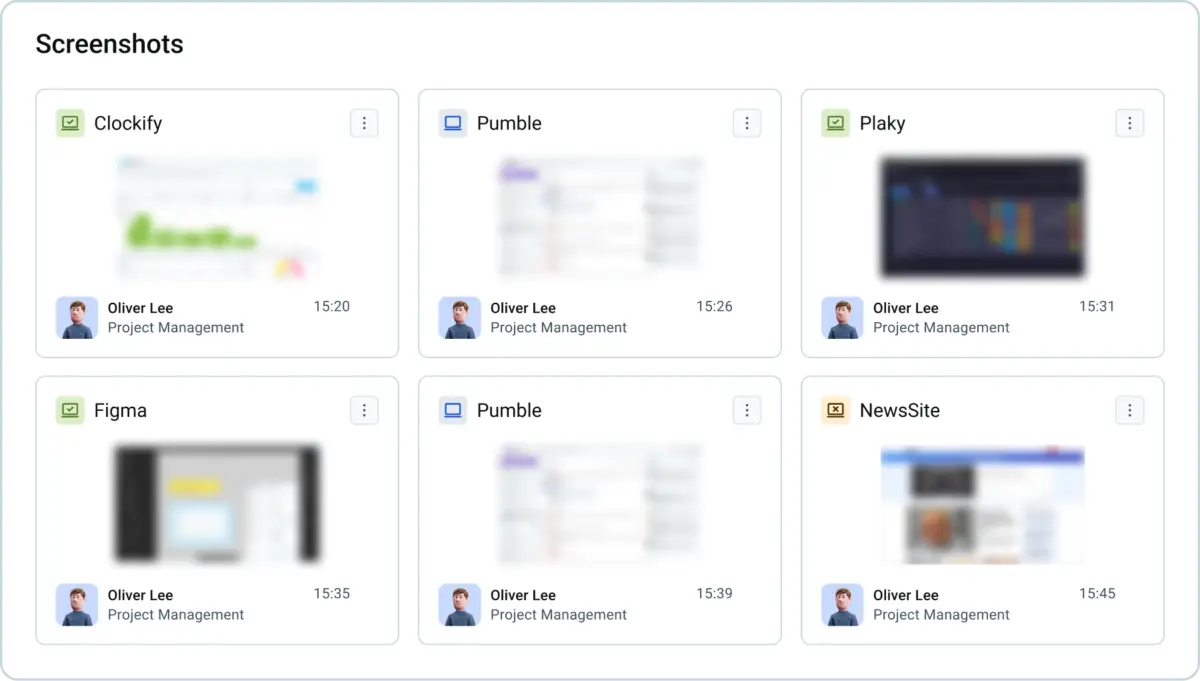
If they don’t understand how monitoring works, employees may use their work computer during breaks or outside work hours and accidentally reveal personal, sensitive information. That said, employers should be transparent about what’s being monitored and how, such as apps used, websites visited, screenshots, etc.
For example, if you enable screenshots without blurring, you may see screenshots of their personal social media accounts or personal messages if they access them after hours.
Activity-tracking apps like Clockify let you decide whether you want screenshots blurred. This way, you can see the website visited, but not read any information, such as messages in a communication app.
#2: Have employees install software on their work computers themselves
Avoid pre-installing software on the company-owned computers, even if it’s legal in your state. Instead, inform employees that you plan to introduce monitoring.
Also, it’s best to have them install the software themselves. This allows them to decide whether they want to accept this form of monitoring.
#3: Clearly define what activities count as productive
Not all activity on work computers is equal. Some team members may spend their time on social media, while others may visit websites for work-related research.
Some activity monitoring apps, like Clockify by CAKE.com, let you define what web activity is productive and what isn’t. This helps you see where your time goes.
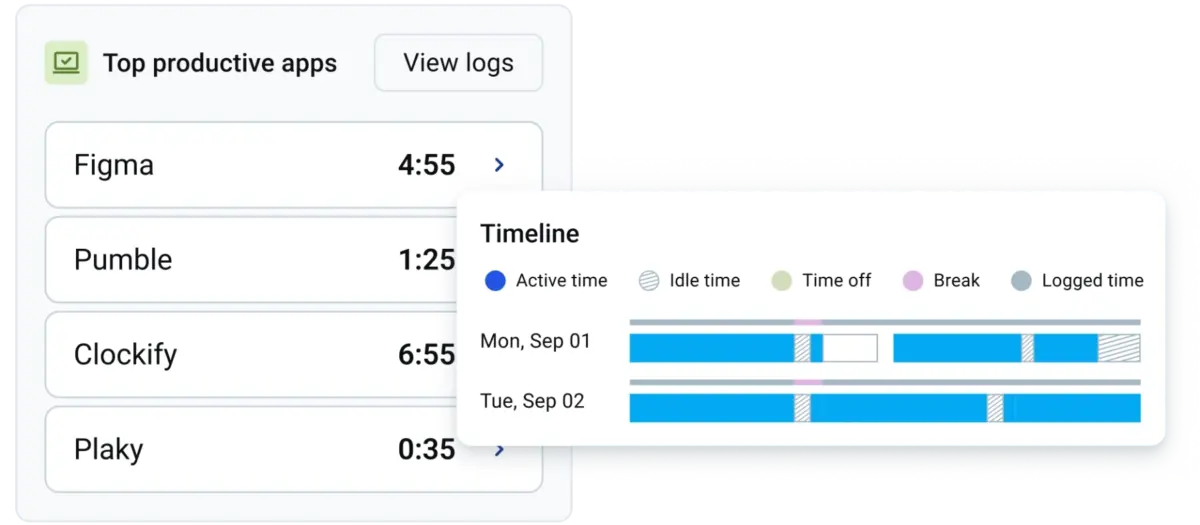
If your team knows what counts as productive and what gets flagged as unproductive, they may be more mindful of how they spend their work time. In turn, you can ensure work is delivered to clients on time and avoid unnecessary cost overruns.
Work Time Utilization Metrics
Try Clockify's Activity monitoring to better understand how your teams use their work time.

Common mistakes when monitoring a remote team
Here are some common mistakes companies make when introducing remote team monitoring and what to do instead.
Mistake #1: Applying methods that resemble complete surveillance
If remote employees feel like someone is breathing down their neck while they work, they won’t be productive. In fact, their morale will likely plummet, and they may even find ways to look busy instead of focusing on the actual work.
Surveillance methods of remote workers include:
- Webcam and mic monitoring. Using employees’ computer cameras and microphones to ensure attendance is excessive, as it goes beyond reasonable monitoring that serves a legitimate business purpose.
- Keystroke logging. Capturing individual keystrokes means everything that employees type is being recorded, not just keyboard activity. While tracking keyboard activity lets employees detect idle time, keystroke logging goes further by tracking what is actually typed, which is intrusive because it can capture sensitive data like passwords.
- Screen recording the entire time. Recording employees’ screens the whole time they’re working is another surveillance technique that doesn’t produce better results than simple screen capturing. Not only can non-stop screen recording stress employees out, but it takes too much time to review, making it costly, time-consuming, and downright ineffective.
Solution: Use tools that focus on activity, measure utilization rate, and capture idle time. These are enough to ensure attendance and measure productivity without surveillance.
Mistake #2: Applying the same approach to all departments
Using the same remote team monitoring approach usually doesn’t work across the company. A typical workday looks different from department to department. While a data entry clerk mostly works on their computer, a content writer may spend a lot of time thinking, reading, and taking handwritten notes before typing in the document.
Solution: Tailor monitoring to your team’s field of work. For example, if you use software to detect idle time, be mindful of how you define idle time. If you have a team that spends a lot of time brainstorming, you may set a longer period for what counts as idle time (e.g., 10 minutes).
Get activity insights in Clockify
Mistake #3: Relying strictly on data without communicating with the team
Monitoring data can give you valuable insights — but that doesn’t mean you should forget the human element. Acting rashly on discrepancies the tool flags without further context won’t deliver results.
Solution: If monitoring data shows a team member is struggling (e.g., unusually low or high activity), contact them to see if they need help, and review the data together.
Try Activity monitoring in Clockify by CAKE.com
You can monitor your remote team using Clockify by CAKE.com fairly and in accordance with the law in your state/country. For example, Clockify’s Activity monitoring calculates employee utilization, which indicates how effectively your team uses their time.
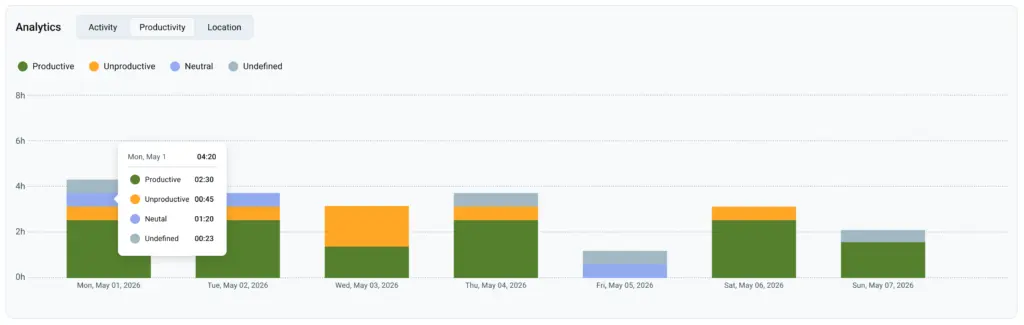
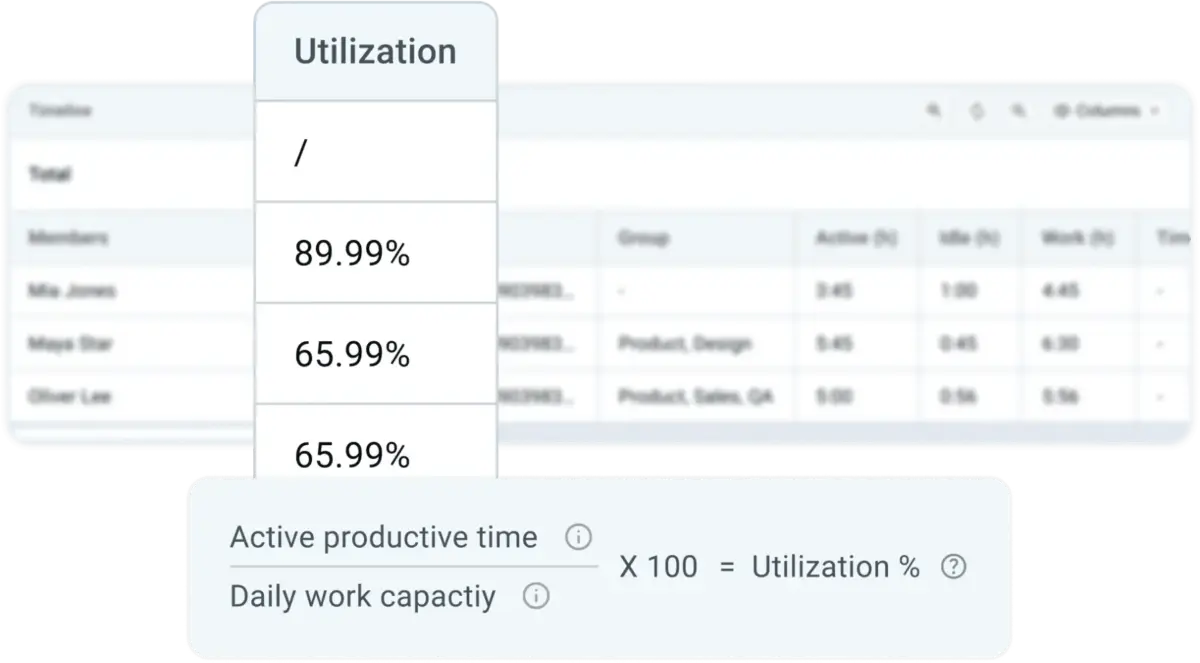
Clockify accounts for active productive time, which is the time spent on activities you marked as productive. The app compares that time to daily work capacity — how many hours a day your employees are expected to work — which you set in the app.
In a nutshell, Clockify calculates the utilization rate using the following formula:
Active productive time / Daily work capacity x 100% = Utilization (%)
Clockify also comes with regular time tracking options, such as Timer and Timesheets, which you can use in conjunction with Activity monitoring. This means that your team can track their work hours regularly and select projects and tasks they work on. This gives you more context when reviewing website and app usage recorded by the Activity tool.
FAQ about remote team monitoring
Want to learn more about remote team monitoring? Check out these frequently asked questions.
How to monitor staff working remotely?
Activity monitoring software makes monitoring remote teams easier. Depending on the software, you may track productivity, idle time, or simply have workers clock in and out.
Can I tell if my employer is monitoring my computer?
Under US federal law, an employer doesn’t have to inform you about monitoring if they provided you with a work device. However, some states require employers to give employees written notice. So, if you live in a state where this rule doesn’t apply, it’s best to always assume that you’re being monitored if you’re using a company-owned device.
Do companies monitor activity when WFH?
Some companies monitor the activity of remote employees, while others don’t (the level of monitoring varies). Businesses may use sophisticated activity monitoring software, a simple time tracker, or nothing at all.