Performance reviews feel like a guessing game when you lack tangible data about employee productivity.
To gather concrete data, you can measure or monitor employee productivity. Measuring involves using formulas to manually calculate average productivity. On the other hand, monitoring is an ongoing process that gives you real-time productivity data.
Read on to find out how to monitor employee productivity accurately.
- Productivity monitoring means observing employee activity during work hours to track workflow efficiency.
- Types of employee monitoring include work hours tracking, GPS tracking, activity monitoring, screenshot capturing, etc.
- Employee productivity metrics are formulas for measuring productivity, including utilization rate, turnaround time, and error rate.
- To monitor employee productivity fairly, you should inform employees that monitoring will be introduced and why.
- Some of the best tools for productivity monitoring include time trackers, project management apps, and activity monitoring software.
What is employee productivity monitoring?
Employee productivity monitoring is the act of measuring and observing each team member’s productivity during work hours. Productivity monitoring is usually performed using special tools.
Types of employee monitoring
Multiple types of employee monitoring exist — some provide productivity insights, while others focus more on attendance.
Here are the most common types of employee monitoring:
- Work hours tracking involves employees logging their own work hours, including work start and end times. This type of monitoring tracks attendance rather than productivity.
- GPS tracking monitors employees’ clock-in and out locations. This type of monitoring tracks attendance in a way that prevents buddy-punching.
- Activity monitoring tracks keyboard and mouse activity, and logs website and app usage. This type of monitoring gives detailed productivity insights.
- Screenshot capturing includes periodic screenshots on employees’ work computers. This type of monitoring can be used alongside activity monitoring, as it provides additional context when monitoring software detects discrepancies, such as seemingly unproductive work.
In this text, we’ll focus on techniques for monitoring employee productivity — not just attendance. However, productivity monitoring and attendance tracking can be used in conjunction.
For illustration, Clockify by CAKE.com offers both — simple time tracking to monitor attendance and time spent on projects, plus productivity monitoring to detect actual activity and idle time.
Track team activity in Clockify
Pros and cons of productivity monitoring
On the one hand, productivity monitoring provides insightful data about the company’s operations. You can see whether employees are overwhelmed with tasks or their capacity is underutilized.
On the other hand, if implemented as a surveillance technique, productivity monitoring can harm employee morale. As Jason Long, the founder of Support My Website and JH Media Group, tells us:

“On its own, tracking is neither good nor bad. If done properly, it helps. If overdone, it has a negative effect.”
That’s why how you implement monitoring matters a lot — it can help you discover and strengthen weaknesses in the workflow, so read on to find out how to use productivity monitoring effectively.
Types of employee productivity metrics
Employee productivity metrics are specific formulas used to measure productivity. For example, you can measure:
- Utilization
- Output
- Task-completion rate
- Turnaround time
- Error rate
Let’s go through each.
Utilization rate
Utilization rate is the percentage of time the employee spent productively. This metric compares total available hours to productive hours. Here’s how to calculate it:
Productive hours / Available hours × 100% = Time utilization rate
If an employee works productively for 5 hours out of their 8-hour workday, their utilization rate will look like this:
5 hours / 8 hours x 100% = 62.5%
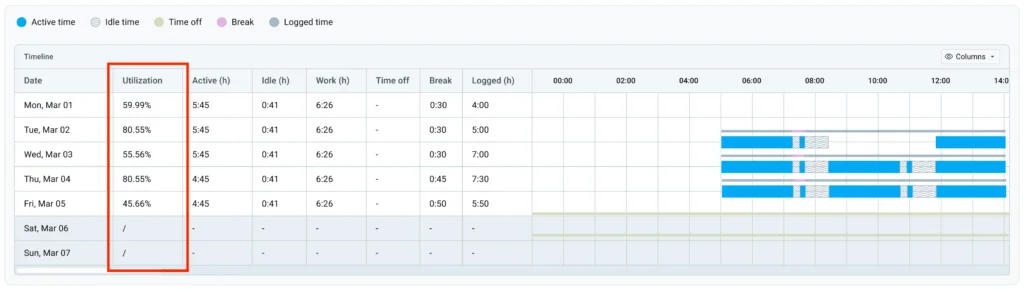
For example, Clockify’s Activity monitoring uses this formula to measure productivity in real time.
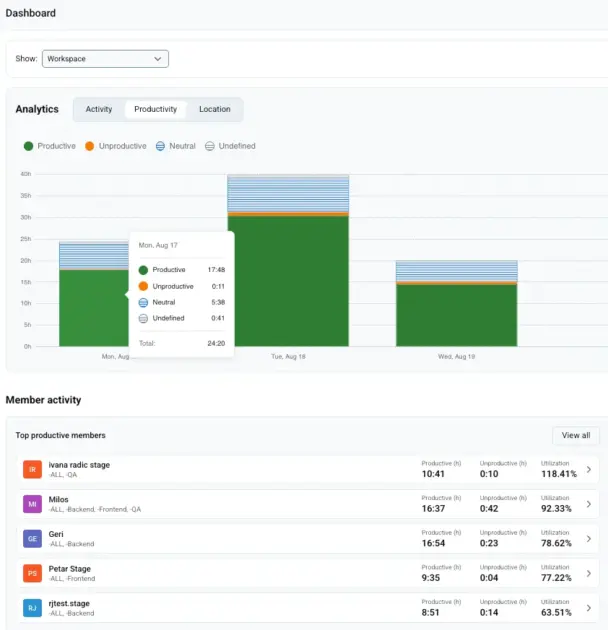
Once you mark apps and websites your team visits as productive, unproductive, or neutral, Clockify calculates the utilization rate for you.
💡 CLOCKIFY PRO TIP
To learn more about the utilization rate, refer to this article:
Task-completion rate
The task completion rate is the percentage of tasks or goals finished in reference to the number of tasks assigned.
Tasks completed / Total tasks assigned × 100% = Task completion rate
For instance, a team member gets assigned 12 tasks but completes only 7 after getting distracted by an unusual number of meetings and emails. This employee’s task completion rate would be calculated like this:
7 / 12 x 100% = 58%
Turnaround time
Turnaround time measures the time it took to complete a task. It simply accounts for when the employee started working on a task and when they finished it. Here’s the formula:
Completion time – Start time = Turnaround time
So, let’s say a team member started working on a task at 2 p.m. and finished at 6 p.m. Here’s how you’d calculate the turnaround time:
6 p.m. – 2 p.m. = 4 hours
Error rate
The error rate measures errors as a percentage. It shows the quality and accuracy of work. In theory, the lower the error rate, the better the work quality. The formula for calculating the error rate is the following:
Number of errors / Total tasks × 100% = Error rate
For illustration, a team member made 2 errors while working on 7 tasks. Here’s their error rate:
2 / 7 x 100% = 28%
You can apply one or more of these metrics by considering which type best suits the job role. For example, a software developer has a very different job from a sales representative, as one is dedicated to apps while the other works with potential customers. This means their productivity may be measured differently.
💡 CLOCKIFY PRO TIP
For more metrics for measuring productivity, you can refer to this article:
Here’s a table showing how you can apply these metrics to different roles:
| Role | Metric | Example |
|---|---|---|
| Software developer | Error rate | Tracking the error rate of software developers can give you insight into the employee’s quality of work and the likelihood of future bugs. However, this metric doesn’t account for task complexity and whether a very important task was successfully completed, despite initial errors. |
| Marketing specialist | Task-completion rate | Tracking a marketing specialist’s task-completion rate gives you insight into the employee’s efficacy. However, this method fails to account for work quality. |
| Sales representative | Output | Measuring a sales representative’s output can give you an idea of how long it takes them to acquire a customer on average. In that case, the input would be the time spent talking to customers, and the output would be the number of units sold. |
| Team manager | Utilization rate | Tracking the team manager’s (and the entire team’s) utilization rate helps identify tasks and activities that are productive versus those that waste the team’s time (e.g., too many meetings that don’t move work forward). |
Track work productivity in Clockify
Keep in mind that one metric doesn’t show the full picture, such as task complexity and task importance. These are just examples of how each metric can potentially be used by role. Combining more metrics and communicating with team members will give you more context rather than raw numbers.
💡 CLOCKIFY PRO TIP
Learn how to set KPIs for your team and accomplish great results:
How to monitor employee productivity fairly
Here are 6 steps to monitor employee productivity fairly. Following these steps will minimize the chances of hurting employee morale. Introducing monitoring incorrectly can damage trust and actually lower productivity.
#1: Tell your employees about monitoring plans before you implement them
According to a 2025 ExpressVPN survey, 3 in 4 employers use monitoring software, but only 22% of employees reported being aware they’re being monitored.
Not telling the team about productivity monitoring before you implement it, even if they’re using a company-owned device, breaks trust.
Activity monitoring software like Clockify by CAKE.com requires the computer user’s permission to be installed. Employees have to install an agent and grant the necessary permissions for the software to work. This means you’ll need to explain everything to your team beforehand to ensure full transparency.
Try Activity monitoring in Clockify
#2: Define what’s being tracked and why
Beyond informing employees about productivity monitoring, tell them what’s being tracked and why. That’s exactly what our expert contributor Jason Long advises:
“Explicitly state what you are measuring and why. Describe what will be monitored and what won’t, and how employees will be helped. Seek input, do a pilot test, and apply privacy data. Once people have the information and understand the reasons, trust comes.”
Similarly, Darren Taylor, founder of Lead Velocity and a digital marketing expert, believes that transparency helps employees be more effective:

“Monitoring should serve as an opportunity to start conversations with employees regarding the effectiveness of their workflow. As opposed to working in a surveillance mechanism.”
#3: Inform the team about the expectations
Team members should also know what goals they should aim for when their productivity is monitored. When goals aren’t defined or aren’t specific enough, employees will struggle to meet your expectations.
According to Darren Taylor, by being aware of the metrics used and the objectives they’re meant to meet, employees can optimize their performance to achieve better results, rather than try to appear busier:
“When employees are aware of exactly which performance metrics are being monitored, the potential exists for them to optimize their performance based solely on the metrics being measured versus optimizing their performance for desired business results.”
💡 CLOCKIFY PRO TIP
Achieving outstanding results is impossible without clearly set goals. Read about goal-setting methodology, Objectives and Key Results (OKR), in the following article:
#4: Review data regularly
Employee productivity is never exactly the same every day, so analyze the data periodically. This will show you what time of day your team is most productive. You can also identify longer periods of unusually low or high productivity.
While monitoring software can alert you to unusual inactivity or unproductive work, reviewing data regularly helps you identify problems before they become unmanageable and reward high performers.
#5: Act on trends, not moments
If you see one moment of unusual inactivity, it’s not ideal to react right away. Rather, wait until you have enough information to analyze the productivity data.
For example, you see that an employee is particularly unproductive for 3 hours at the same time every day, the entire month. You can then check with the employee to see why that happens. If you find that their focus simply drops at that time of day, you can offer more flexible work hours if possible.
💡 CLOCKIFY PRO TIP
You can use productivity report templates to analyze productivity data and show it to employees at performance reviews:
#6: Find an appropriate monitoring tool
Monitoring software solutions use one or more of these formulas. The difference is that tools let you see productivity levels at any time and monitor progress. Manually calculating productivity gives you a one-time measurement, which doesn’t provide the full picture.
In the next section, we’ll cover the types of tools you can use to track employee performance.
Analyze employee activity in Clockify
Best tools for tracking employee performance
Here are the best types of tools you can use to track employee performance — including attendance, progress, and productivity.
Time trackers
Simple time tracking apps allow employees to track their own time and breaks. These tools primarily track attendance. A powerful time tracker like Clockify offers multiple options to log hours, including:
- Timer
- Digital timesheet
- Manual mode
- Calendar mode
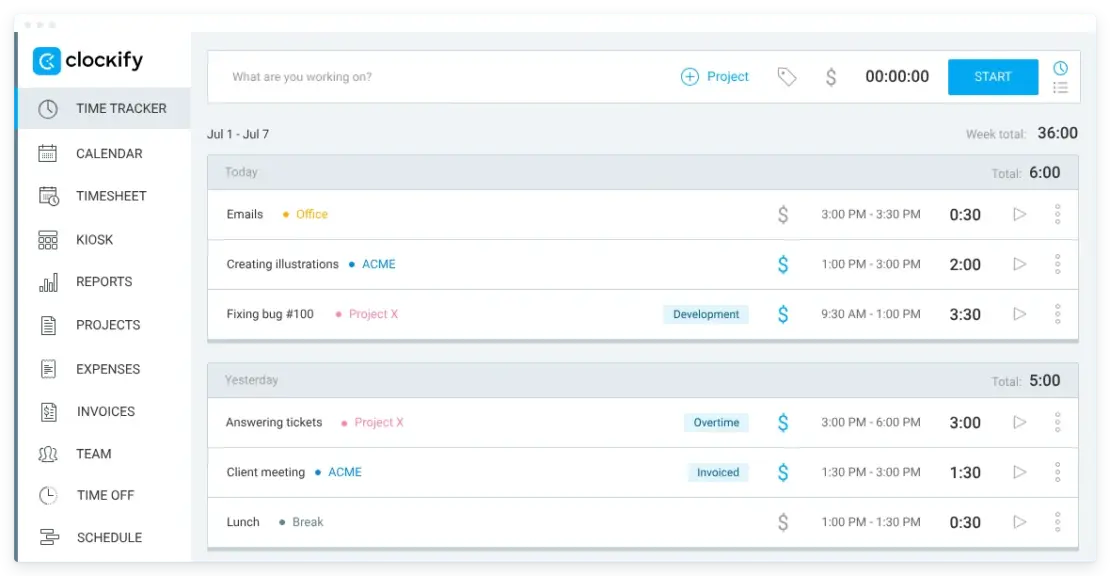
Employees can then choose the method of time tracking that fits them most, or you can lock certain features so that they use the options required by the company. For example, Clockify has the Force timer option, which locks all the other time tracking features for users, ensuring they use the Timer for hours tracking.
Example: Clockify, Toggl Track, My Hours
Project management tools
Project management tools help monitor project progress. These apps let you assign tasks, set deadlines, and add task descriptions. Employees can set task statuses, such as “in progress” or “done.”
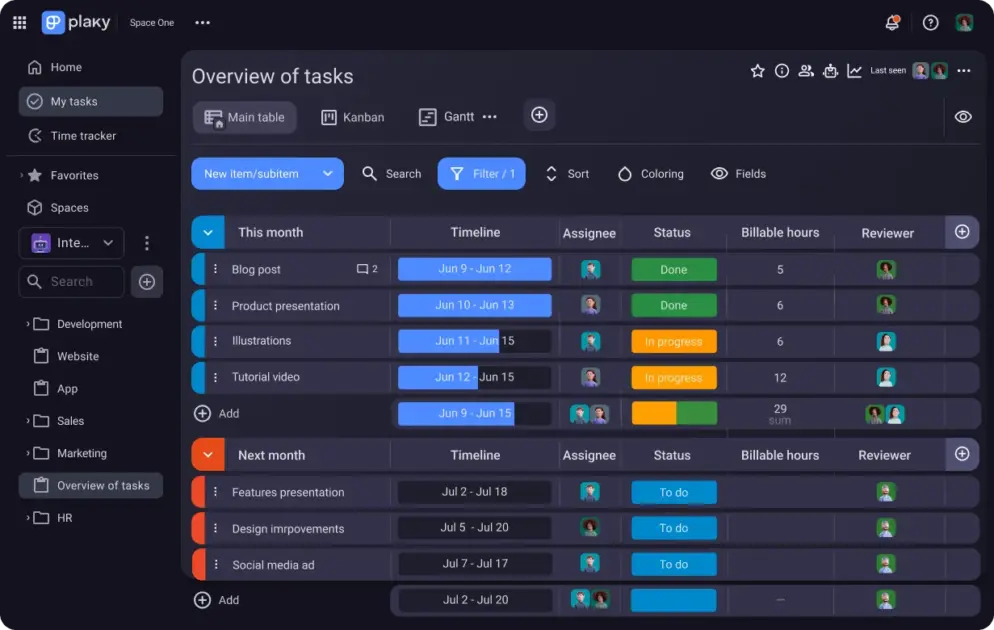
Project management software can be used in conjunction with a time tracking app or another productivity tool. For example, if you use Plaky for project management, you can connect it to the time tracker Clockify. This allows you to track hours on your Plaky tasks.
As the founder of Iris Partnering, a fractional operations and marketing company, Christa Spear tells us, pairing the 2 types of tools helps track both time and progress:

“We pair time tracking with clear descriptions in Clockify of the work completed during that time. We also use Asana to determine whether assigned responsibilities, deliverables, and deadlines are on track.”
Christa adds this helps her team evaluate progress based on the work itself rather than relying solely on the number of hours recorded.
Example: Plaky, Asana, Trello

Activity monitoring software
Some time trackers, like Clockify, also have activity monitoring features. This means they can track website visits, app usage, and detect idle time.
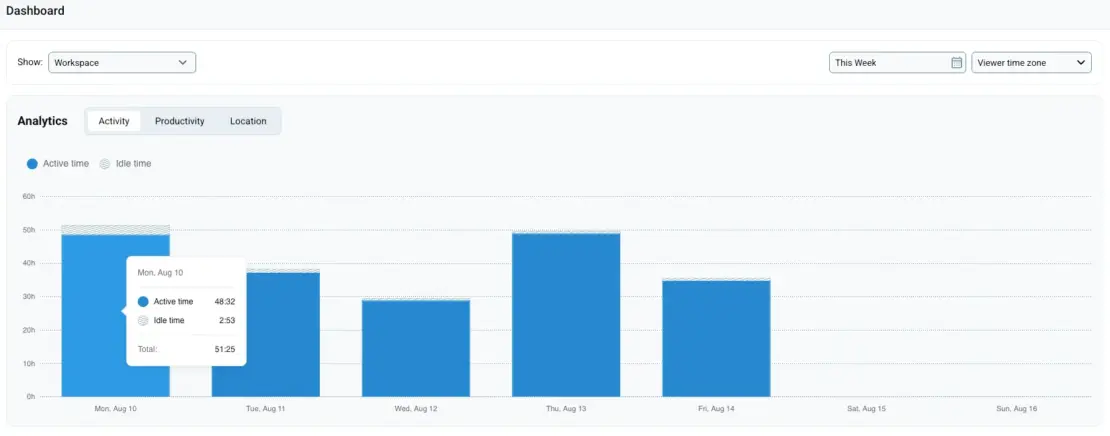
This kind of software gives you detailed insights into employee productivity, since you can see exactly how team members spend their time.
Example: Clockify, Insightful, WorkTime
💡 CLOCKIFY PRO TIP
Learn how to avoid invading employee privacy when tracking employee work hours and monitoring productivity:
How to use Clockify by CAKE.com to monitor employee productivity
Clockify is a time tracker that helps log work hours, breaks, and time off. Apart from different time tracking modes, Clockify also offers detailed Activity monitoring. This means you can see:
- Websites visited — how much time was spent on each productive/unproductive website.
- Apps used — how much time was spent on each productive/unproductive app.
- Utilization — the amount of time the user spent on productive websites/apps shown as a percentage.
- Idle time — the time spent being inactive.
You can view this information for each team member.
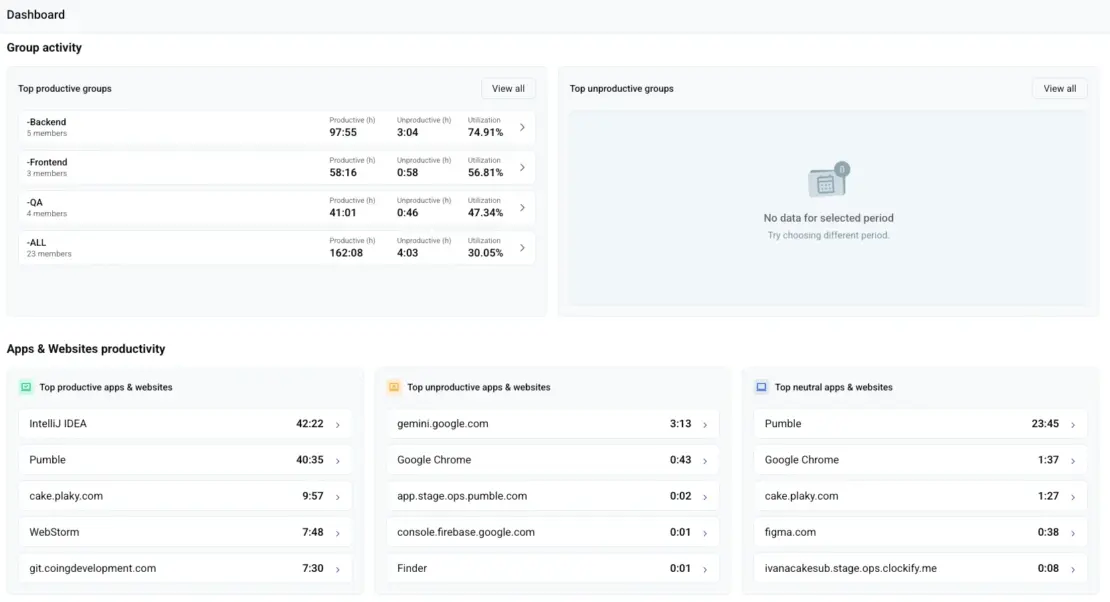
In the dashboard, you can also see top trends company-wide, including the following details:
- Top productive groups
- Top productive websites and apps
- Top unproductive websites and apps
- Top neutral websites and apps
With Clockify, you can easily spot trends like low productivity toward the end of the week, which could indicate employee fatigue and potential burnout. This way, you can adjust the workflow to highlight employees’ strengths and help them optimize productivity.

FAQ about productivity monitoring
To learn more about employee productivity monitoring, check out these frequently asked questions.
What is the best way to track employee productivity?
The best way to track employee productivity depends on many factors, including the company’s goals, the type of work performed, and where staff work. For example, a company with remote employees who do most of their work on computers will likely benefit from productivity monitoring software.
How can I see what my employees are doing on their computers?
To see what employees are doing on their computers, you can use activity monitoring software. These tools typically track website visits you can classify as productive or unproductive, and detect idle time. This gives you insight into how employees spend their time with concrete numbers, such as productivity percentage. Tools for this purpose include Clockify, WorkTime, Hubstaff, and others.
What is the best software for monitoring employees?
The best software for monitoring employees depends on what data you need. For instance, Clockify by CAKE.com lets you track work hours, see websites and apps visited, and automatically calculate the time utilization rate.
Is it illegal to monitor employees’ computers?
According to the Electronic Communications Privacy Act of 1986 (ECPA), monitoring a company-owned device used by an employee is legal in the US. Monitoring must have a legitimate business purpose. Some US states, like Connecticut and Delaware, require employers to give employees written notice that they’re being monitored electronically.
Can my employer see everything I do on my computer?
What an employer can see depends on the software installed on the computer. The employer must inform employees what is being tracked and why. For example, using activity monitoring software requires the employer to ask employees to install it, so employees know they are being monitored. However, the employees should also be informed whether the software is active after hours to avoid accidentally tracking personal data.
Track productivity with Clockify
How we reviewed this post: Our writers & editors monitor the posts and update them when new information becomes available, to keep them fresh and relevant.