With remote and hybrid work becoming the norm for many organizations, businesses rely on employee monitoring to gain visibility into workflows and improve productivity.
In this guide, we’ll explain employee monitoring in detail, the main types of employee monitoring, how to get started, and more.
- Employee monitoring involves tracking employee activities during work hours to measure productivity, ensure compliance, and improve efficiency.
- Some types of employee monitoring include time and attendance tracking, app monitoring, keyboard activity tracking, and email monitoring.
- Employee tracking benefits include increased productivity, stronger security, and fair pay for distributed teams.
- Choosing a transparent monitoring tool helps build trust, reduce employee anxiety, and foster team accountability.
What is employee monitoring?
Employee monitoring is the practice of tracking employees’ work activities during working hours. Rather than being about surveillance, employee monitoring is designed to help managers:
- Understand employee productivity
- Support employee performance
- Optimize workflows
Clockify by CAKE.com helps businesses gain full visibility into remote work. The app allows managers to track employee time, activity, plus web and app usage, helping identify productivity gaps and reduce inefficiencies.
Track productivity with Clockify
Types of employee monitoring
Different types of employee monitoring include:
Time and attendance tracking. Using an efficient clock-in/out system to record employee hours is essential for precise payroll processing. Attendance monitoring also helps managers track daily arrivals/departures, break times, and absences, allowing for more effective employee scheduling.
Application monitoring. Tracking which apps are being used and how much time is spent on them helps managers identify distractions and highlight productive tools. Application monitoring also lets managers identify opportunities for better software license allocation.
Email monitoring. Tracking and analyzing workplace email communications helps organizations ensure employees follow communication policies. Email monitoring also helps detect unauthorized data sharing and phishing attempts, allowing companies to protect sensitive information.
Website browsing. Monitoring employee internet usage helps managers identify excessive time spent on non-work websites. These insights help improve employees’ work habits.
Social media monitoring. Tracking social media usage makes productivity monitoring easier. You can spot when an employee spends too much time on social media platforms irrelevant to their tasks and redirect their focus to work-related activities.
Screenshots and video monitoring. Capturing images of an employee’s computer screen during work hours provides you with objective visual evidence of their work activity. The best monitoring software offers options to adjust screenshot frequency and blur screenshots to protect employee privacy. Some apps also offer the option to record continuous screen video clips.
Keyboard activity tracking. Monitoring and analyzing keyboard activity helps ensure employees are actively using their computers. Unlike keylogging (which records exact keys pressed), keyboard activity tracking measures only the presence, frequency, or volume of input (e.g., total keystrokes/day).
GPS/location tracking. Tracking employee locations while they’re on the clock is especially important for field teams in industries such as construction or transportation. It helps managers verify job site arrivals, optimize daily routes, and increase efficiency.

Why do companies monitor employees?
Companies monitor employees to:
- Gain insights into productivity — to see how time is spent and identify workflow issues.
- Protect company data — to detect potential data leaks and reduce security risks.
- Ensure compliance — to get accurate records of employee working hours, attendance, and overtime, and stay compliant with labor laws and regulations.
- Manage remote and distributed teams — to gain visibility into work without requiring employees to be in the same location.
Benefits of employee monitoring
Some benefits of employee monitoring are:
- Improved productivity. By tracking employee performance, managers can identify areas where employees may need support, training, or clearer expectations.
- Increased accountability. When employees know monitoring tools are in place, they’re more mindful of how they manage their time. It encourages employees to stay focused on their tasks and reduce workplace distractions.
- Fair pay for distributed teams. Accurate time data helps managers compensate employees appropriately, even if they work remotely or across different locations. By paying employees properly for their hours worked, businesses build trust and maintain legal compliance.
By monitoring employees’ online activity, businesses can also detect and address potential security threats (e.g., malicious software downloads).
Track employee hours with Clockify
Risks, ethics, and the trust problem of using employee monitoring
Employee monitoring brings many benefits to businesses. Still, employees often view it as intrusive, and it can raise privacy concerns. For instance, employees may worry about how much of their online activity is being tracked, or how their personal data is handled.
💡 CLOCKIFY PRO TIP
Learn how to introduce a time tracking system while maintaining employee privacy:
According to research on workplace surveillance, excessive monitoring can cause tension and reduce employees’ sense of autonomy. In fact, it may lead employees to assume their employer doesn’t trust them. As a result, their engagement may decline.
However, the same study suggests employers can mitigate the risk of losing employee trust by being transparent, setting clear expectations, and openly communicating with employees about monitoring.
So, when introducing monitoring, first explain to employees what is being monitored and when. This will help improve productivity without compromising employee privacy, morale, or well-being.
As a manager or business owner, you should also disclose why the data is being collected and how it is used. By providing full transparency, you’ll make your employees feel more comfortable with monitoring. It’ll also help them understand how they can benefit from it (e.g., receiving more objective, data-based performance feedback).
To keep your team productive while avoiding micromanagement, use monitoring data to identify areas for improvement and provide support when needed.
Is employee monitoring legal?
In the United States, employee monitoring is generally legal when performed on company-owned devices during work hours for legitimate business purposes.
Also, there’s no federal law requiring employers to disclose employee monitoring. However, certain US states, such as Maine, Connecticut, Delaware, New York, and Colorado, require advance written notice. Penalties for failing to provide the required notice may include fines and other legal consequences.
To prevent legal risks, check US state requirements for employee notice, consent, and privacy rights.
But if your employees are working outside the United States (e.g., Canada, Australia, EU countries), you should also check local privacy laws, such as:
- Canada’s Personal Information Protection and Electronic Documents Act (PIPEDA) and provincial laws
- Australia’s Privacy Act 1988
- EU’s General Data Protection Regulation (GDPR)
💡 CLOCKIFY PRO TIP
For more information about the EU time tracking law, read the following guide:
How to choose employee monitoring software
To choose the best monitoring software for your business, consider the features you’ll need (based on your team type), integration capabilities, and ease of use.
We’ll explain each aspect below.
#1: Explore the features you’ll need (based on your team type)
If you manage field teams, you’ll need a monitoring tool with GPS location tracking.
With Clockify’s Location tracking, employees can clock in via their mobile app when they arrive at their assigned work site, helping managers verify where and when work begins. In addition to who’s currently working at a specific location, you can see everyone’s location history throughout the day while they’re on the clock.
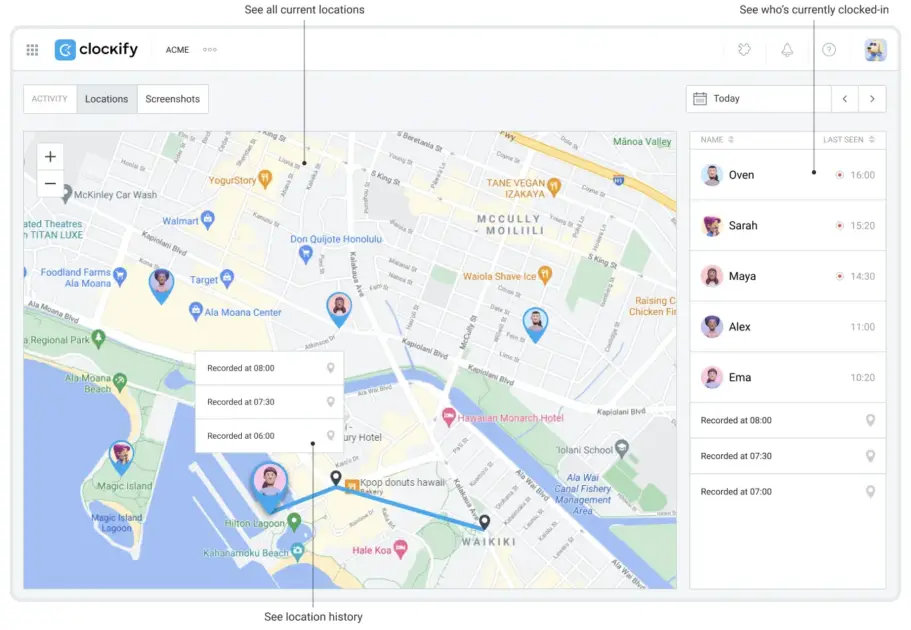
By tracking your team members’ locations, you can improve accountability and ensure employees are where they’re expected to be.
For remote or hybrid teams, features like computer activity tracking and screenshots help you gain visibility into employees’ work activity. With Clockify’s Activity monitoring, you can:
- Check your employees’ active and idle time — based on their keyboard and mouse activity/inactivity.
- Identify top productive and unproductive members — based on their time spent on websites marked as productive/unproductive.
- Check whether your employees are working from or outside of the office — based on whether their device is connected to the company’s workplace internet or Wi-Fi network.
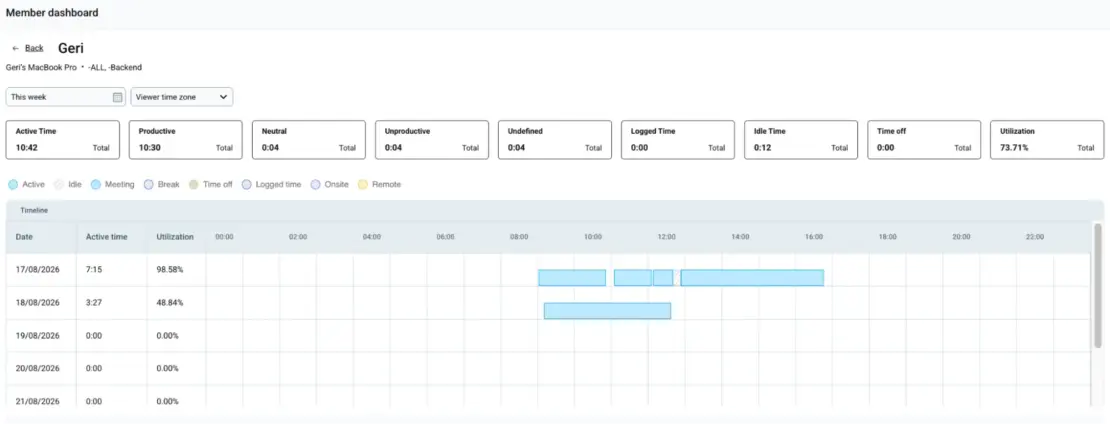
Under the Productivity tab (within the Dashboard), you can see which members (or groups of members) have been most productive and which spend too much time on non-work websites and apps.
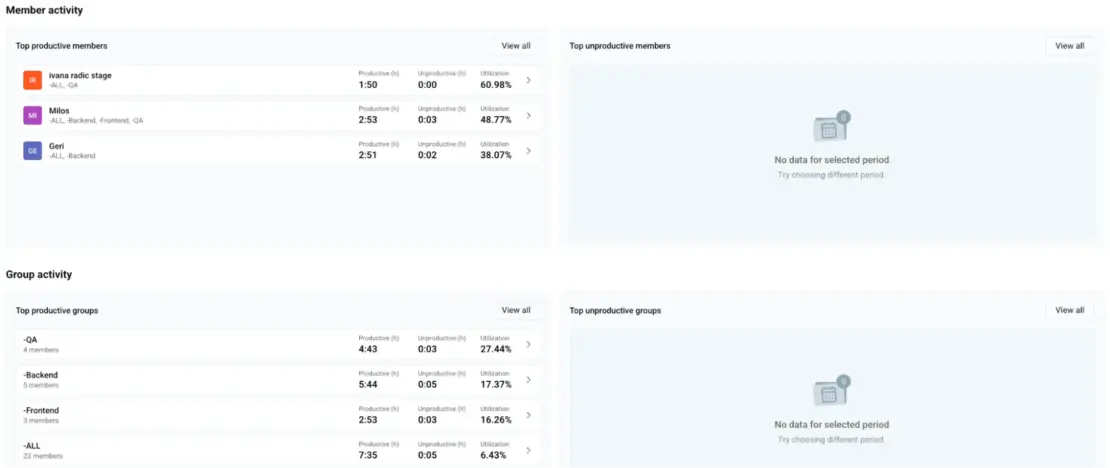
By analyzing your team members’ activity, you can identify areas for improvement.
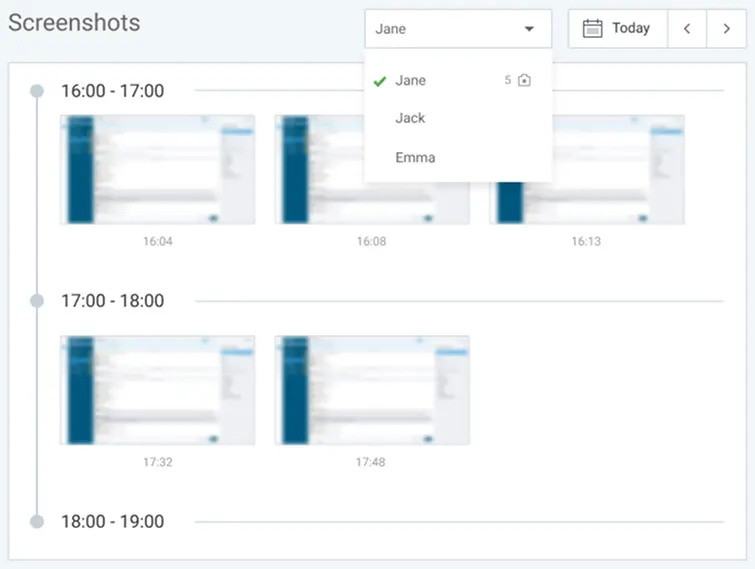
To verify your employees are working on job-related tasks, use Clockify Screenshots. Set the screenshot capturing frequency (e.g., every 5 min) and review screenshots to spot potential distractions.
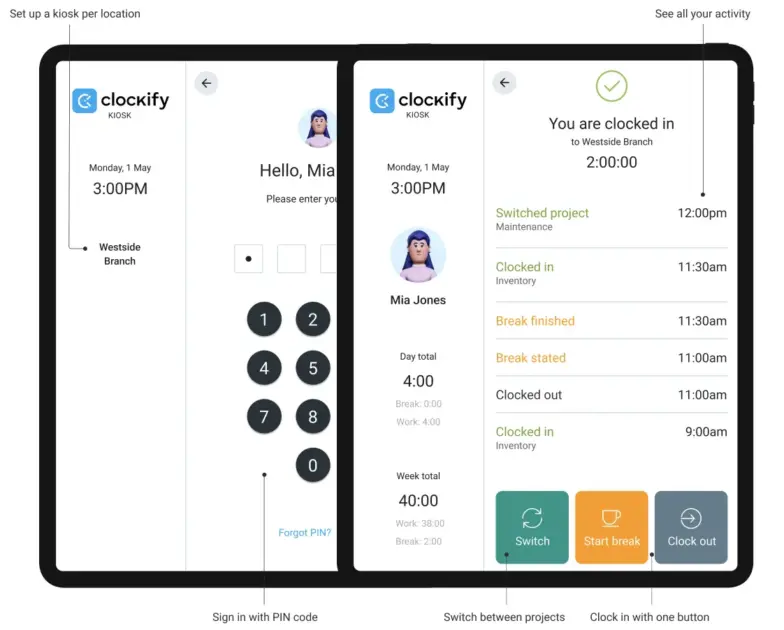
If your employees all work from one office, Timer and Kiosk are probably the most relevant functionalities to look for. With Clockify’s Kiosk, employees can clock in from a shared device via their PIN, QR code, or photo capture, reducing the risk of buddy punching.
💡 CLOCKIFY PRO TIP
Check out our blog post with 3 employee monitoring tools compared to see how they stack up:
#2: Think about integration capabilities
In addition to offering all the necessary tracking features, your monitoring software should integrate with your existing business tools. Integrating your monitoring tool with your project management or accounting platform helps you streamline workflows.
For instance, if you use QuickBooks for payroll, you can integrate Clockify with QuickBooks to speed up payroll processing. Send tracked time entries directly to your accounting tool, and minimize errors from manual data transfers.
You can also connect Clockify with Asana, Jira, or project management software Plaky. For example, the Clockify-Jira integration lets employees track time spent on Jira tasks directly in Jira, while you can review their time entries in Clockify.
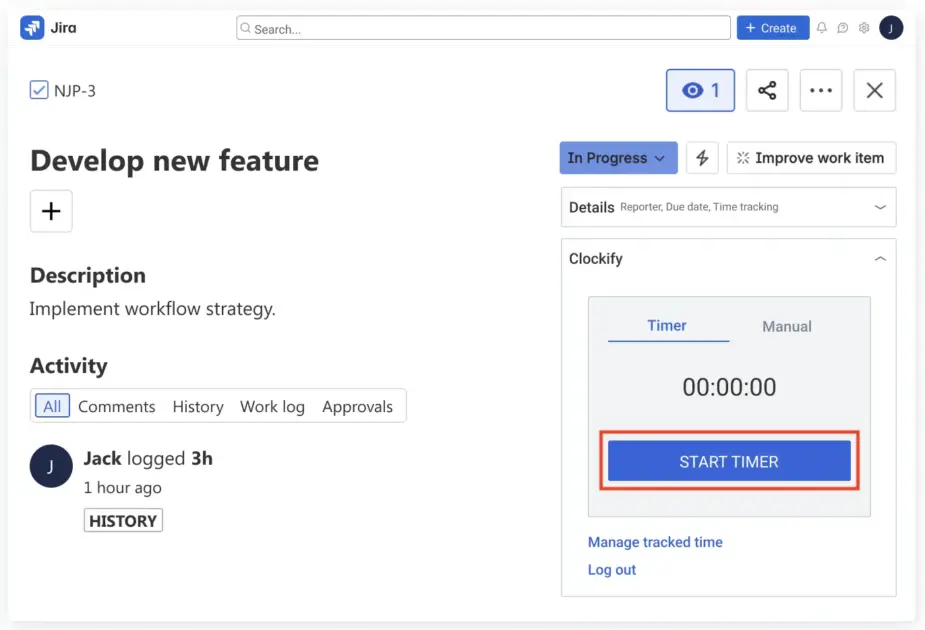
By integrating monitoring software with their existing tools, teams can reduce context switching and improve efficiency.
💡 CLOCKIFY PRO TIP
Discover the benefits of Clockify-Asana integration in our article:
#3: Choose tools that are easy to use
Your employee monitoring tool should have:
- An intuitive interface
- Straightforward settings
- Simple-to-use tracking features
According to a Clockify user review on Capterra, Clockify has made time logging much easier for their team: “We have used many tools over the years, and this one has been the easiest.”
Another user review on G2 also praised Clockify for its ease of use: “Clockify is a straightforward time tracking tool that’s easy to roll out across a team.”
💡 CLOCKIFY PRO TIP
To learn how to set up your workspace, track time and expenses, and set up the Activity monitoring feature in Clockify, refer to our help page:
Yooz’s 2025 Workplace Tech Resistance Report found that nearly 39% of employees believe workplace tools should require minimal training. So, prioritize ease of use when choosing the monitoring tool for your organization.
How to get started with employee monitoring tools
In this section, we’ll explain how to get started with employee monitoring and implement it effectively.
#1: Explain the benefits
To secure employee buy-in, explain how they can benefit from employee monitoring. In short, you can mention benefits such as:
- Objective performance reviews
- Fairer workload distribution
- Improved work-life balance
To introduce these benefits, explain how monitoring can help employees maintain productivity while protecting their well-being.
Similarly, research on employee performance evaluation shows that fair, effective evaluations contribute to higher productivity and motivation.
Monitoring also gives managers a clear, real-time view of team capacity, task completion, and active assignments. Capacity insights help managers distribute work better, which helps prevent employee burnout.
Clockify time tracker lets you visualize your team’s availability and plan who will work on what and for how long.
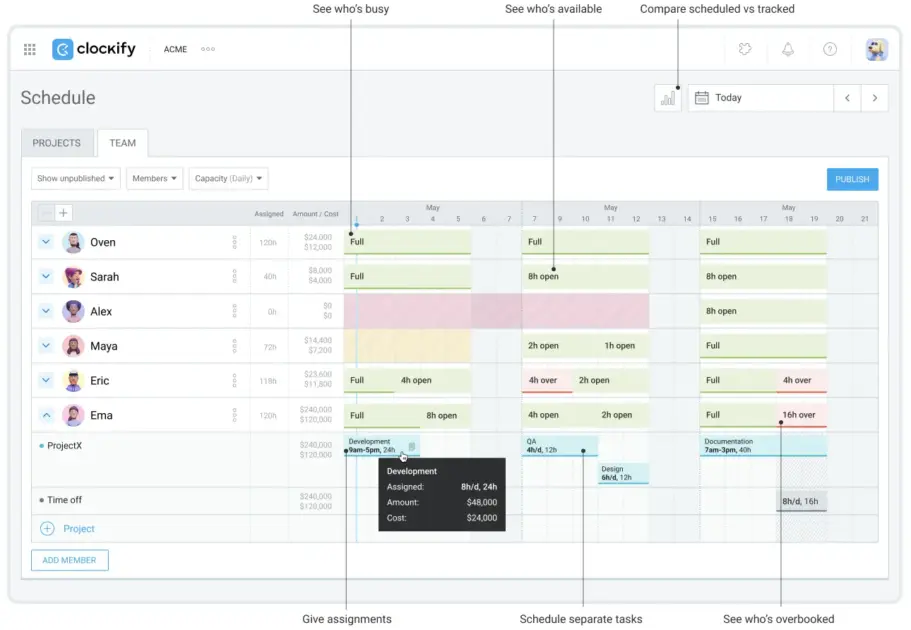
By checking team availability in real time, managers can prevent some employees from becoming overloaded while others have lighter workloads.
Monitoring also helps managers identify who’s consistently working long hours. You can then provide the necessary support to help employees complete tasks more efficiently.
By showing employees how monitoring can benefit them, you’ll minimize resistance and ensure smooth implementation.
#2: Create a policy
Creating a formal monitoring policy is crucial for establishing clear rules, expectations, and privacy boundaries.
A strong employee monitoring policy should cover:
- What tools are used
- What is the purpose of monitoring
- How regularly monitoring will take place
- What kind of data will be collected
- What will be done with that data
- How long monitoring data will be stored
- What employees should do if they have any questions regarding the policy or monitoring process
To build trust and loyalty, share the monitoring policy with employees in writing before monitoring begins. You should also collect a signed acknowledgment from each employee confirming that they’ve read and understood the policy.
To ensure you stay compliant with changing privacy laws, update your policy at least once a year.
💡 CLOCKIFY PRO TIP
Using Clockify to record work hours, daily breaks, and overtime can help you stay compliant with timekeeping regulations in your country. Learn more here:
#3: Prevent discriminatory practices
If you plan to implement employee monitoring, make sure it applies consistently across the organization.
Monitoring only specific employees, or some employees more closely than others, can create perceptions of unfairness and discrimination.
According to research on fair employee treatment, when workers feel like they’re being treated differently or unfairly, it can reduce their job satisfaction. For example, managers shouldn’t monitor only junior employees, new hires, or employees they assume are less efficient due to their age.
By monitoring all employees, you’ll collect more data and get a clearer picture of organization-wide productivity.
#4: Pick a transparent tool
An employee monitoring tool should provide visible on-screen indicators to show employees when they’re being monitored. For example, it could be a colored dot near the clock indicating that screenshots are being captured. In fact, research on employee monitoring software suggests that hidden monitoring reduces transparency in organizations.
In Clockify, your team members receive a notification when screenshot capturing is enabled (via both the web and desktop apps). As a result, screenshots are recorded with users’ knowledge, which promotes transparency.
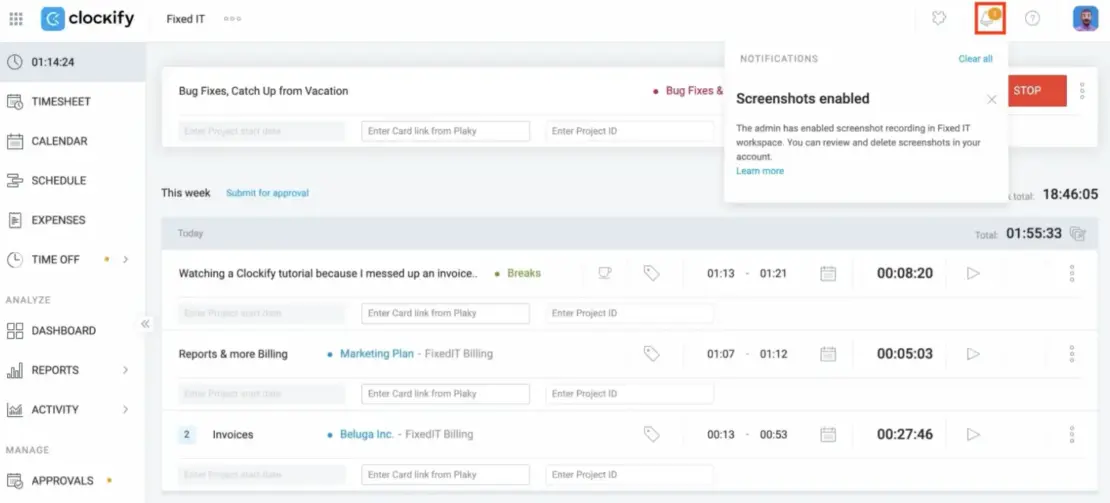
Employees can also view their own personal screenshots in Clockify.
Using transparent employee monitoring software is key to creating a culture of trust and accountability in the workplace.
Employee Activity Monitoring
Get better visibility into how your team spends work time with Clockify’s data-driven insights.

Track and improve employee productivity — with Clockify by CAKE.com
As a simple yet feature-rich time tracking tool, Clockify helps business owners:
- Track employee time for compliance
- Monitor productivity for performance insights
- Track project progress for better resource allocation
- Create transparent reports for improved client accountability
Whether you’re managing a remote or hybrid team, Clockify helps you see how work hours are spent and improve productivity.
With Clockify’s Activity monitoring, you can classify apps and websites as Productive, Neutral, or Unproductive to get an accurate overview of team productivity. Click on the Productivity field beside a certain app/website (apps and websites are initially classified as Undefined) and select the desired category:
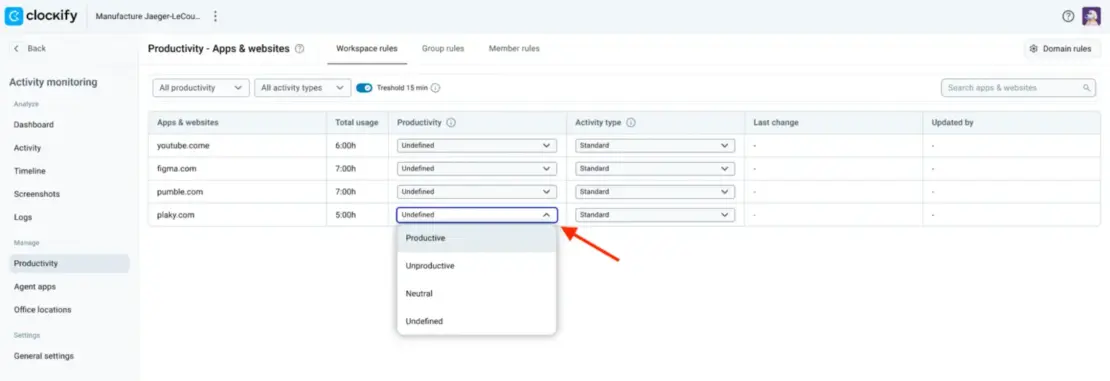
You can classify apps and websites on a workspace, group, or member level for more effective monitoring. For instance, YouTube can be productive for the marketing team but unproductive for the customer support team.
For a quick overview of tracking data, go to Dashboard and click on the Productivity tab — see below:
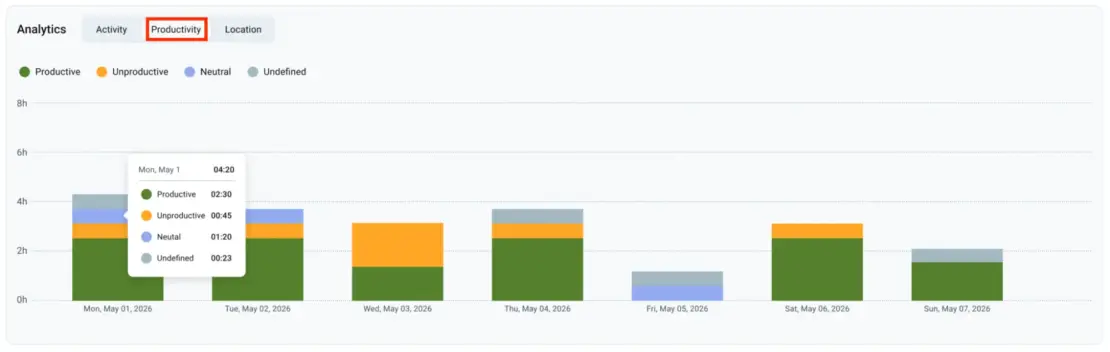
The Dashboard displays data at the workspace or group level. To analyze a specific member’s data, click on that employee to open the Member dashboard.
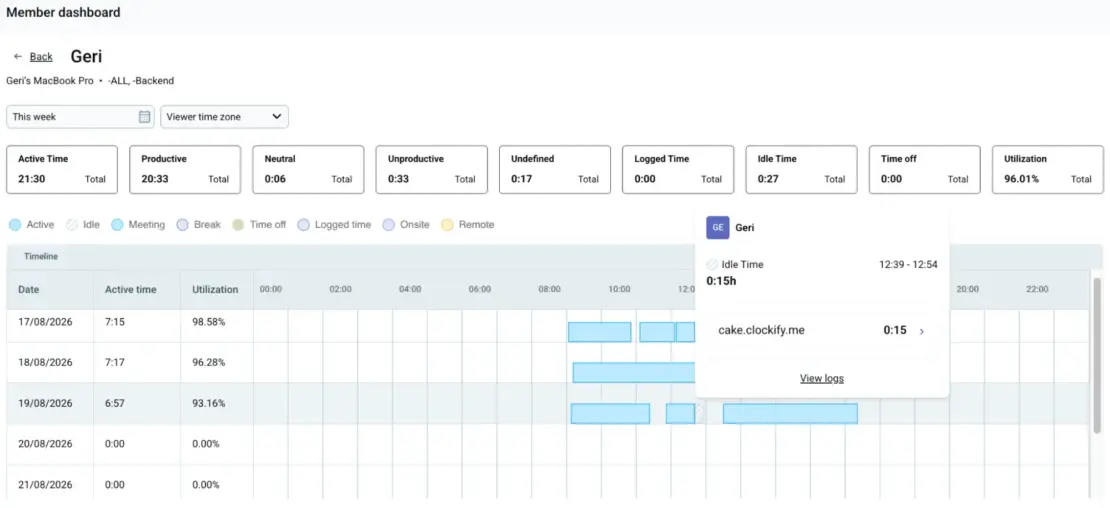
You don’t have to guess how your team’s work hours are being spent, or chase employees for constant progress updates. Track team activity, capacity, and project progress in real time and make informed decisions with Clockify by CAKE.com.
To get 3 productivity tools — Clockify time tracker, Pumble team chat app, and Plaky project management software — at 53% off, check out CAKE.com’s Bundle.

FAQs about employee monitoring
Here are answers to some common questions about employee monitoring.
What are some examples of monitoring?
Examples of employee monitoring include:
- Recording when employees start/end their shift or take breaks.
- Tracking which websites employees visit during work hours.
- Tracking how much time employees spend on tasks and projects.
- Tracking keyboard/mouse activity or periods of inactivity.
- Tracking employee location when they’re working in the field.
- Periodically capturing screenshots of an employee’s screen.
💡 CLOCKIFY PRO TIP
Get more information about Clockify’s paid features (Screenshots, Breaks, GPS tracking, and more) in the following resource:
Is it appropriate for employers to monitor employees?
Whether monitoring employees is appropriate depends on how the employer balances the business’s needs with employees’ privacy. For example, tracking employee work hours for compliance serves a legitimate business purpose and is considered appropriate. In contrast, off-hour tracking or monitoring personal devices without employee consent and a valid reason is generally inappropriate and often illegal.
What are the negative effects of employee monitoring?
Some negative effects of employee monitoring are:
- Increased anxiety — per research on workplace surveillance and worker well-being, excessive monitoring can cause stress and affect employee mental health.
- Reduced trust — if not implemented transparently, employee monitoring can weaken trust between the employer and employees.
- Decreased creativity — employees may focus on ‘appearing productive’ rather than on experimenting with new approaches, which can hinder innovation.
- Higher employee turnover — intrusive monitoring can reduce job satisfaction, making employees more likely to leave their organizations.
💡 CLOCKIFY PRO TIP
Want to learn about the benefits of creating a culture of transparency in your team? Read the article below:
Can employees tell if they are being monitored?
Yes, employees can tell if they’re being monitored through technical clues on their work devices:
- Unexpected pop-ups or increased CPU usage
- Unfamiliar background apps in their system manager
- Restricted website access
The simplest way to check if monitoring is being implemented is to review the company’s policy for any updates on employee monitoring.
What are the 5 principles of monitoring?
The 5 principles of ethical monitoring include:
- Transparency — employees should know what is being monitored, why, and how the data will be used.
- Purpose limitation — monitoring should have a clear, valid business purpose (e.g., performance improvement, compliance).
- Proportionality — employers should collect only the information necessary to achieve the stated purpose.
- Privacy and data security — monitoring data should be stored securely and accessed only by authorized personnel (e.g., managers, HR).
- Fairness — monitoring should be applied consistently and without discrimination.
REFERENCES
License for research — Attribution-NonCommercial 4.0 International (CC BY-NC 4.0)
– Glavin, P., Bierman, A., & Schieman, S. (2024). Private Eyes, They See Your Every Move: Workplace Surveillance and Worker Well-Being. Social Currents, 11(4), 327–345. https://doi.org/10.1177/23294965241228874
License for research — Attribution 4.0 International (CC BY 4.0)
– Laksanadjaja, F., & Oviedo-Trespalacios, O. (2024). Uncovering the Web of Secrets Surrounding Employee Monitoring Software: A Content Analysis of Information Provided by Vendors. Human Behavior and Emerging Technologies, 2024(1). https://doi.org/10.1155/2024/7951911
– Parent-Rocheleau, X., Provost, Y., & Ollier-Malaterre, A. (2026). Unveiling Big Brother: The Limits of Transparency in Mitigating the Effects of Electronic Workplace Surveillance. European Management Journal. https://doi.org/10.1016/j.emj.2026.07.006