

Alex Beadon
Founder of Together We Launch
"We use Clockify to see where our time is going and how to solve any problems. It’s just so beneficial."
More stories

Find new apps that fit you team's needs
Enter your team size and hourly rate — our free time tracking ROI calculator will show you what untracked hours are costing you.
Enter your average hourly rate to see how much untracked hours are costing you.
The time tracking ROI calculator estimates what untracked hours are costing you based on:
To calculate the cost of untracked time, drag the Number of team members slider to the right to reflect your team size (e.g., 25). After that, input the average hourly rate for your team members (e.g., $45) in the Average hourly rate field.

Once you enter the average hourly rate, you’ll see how much your team is losing approximately per year to untracked time (in this case, $94,500). You’ll also see your total annual untracked hours (in this case, 2,100 hours).
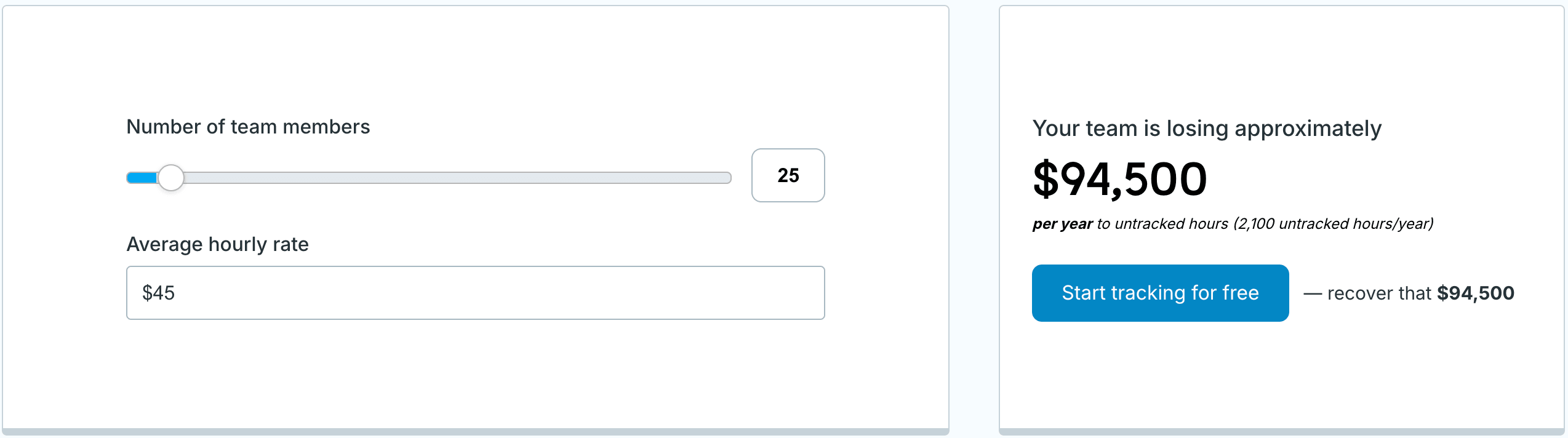
NOTE: To compute the annual cost of untracked time, the calculator multiplies the number of annual untracked hours by the average hourly rate.
To calculate the annual untracked hours, the calculator multiplies the number of employees by the untracked hours per employee per week. Then it multiplies that result by the number of productive working weeks per year.
🎓 How Many Work Hours in a Year: A Guide for 2026
Using our calculator to measure the cost of untracked time helps you:
Ultimately, seeing how much money and time are lost to poor tracking helps you justify the investment in a timesheet app.

The Clockify time tracker helps teams record every hour spent on projects, ensuring no billable time goes unaccounted for.
With Clockify's billable hours calculator, managers can:
First, employees track billable time with Clockify’s Timer by entering what they’re working on and choosing a project. Then they click the dollar sign (it turns blue) and click Start. To finish tracking, they click Stop — very easy.

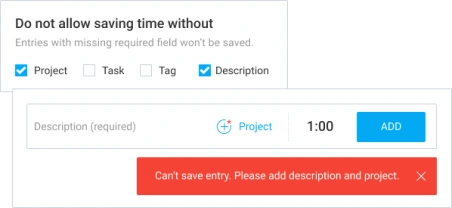
To prevent employees from adding incomplete time entries, use Clockify’s Required fields. Make the Project, Task, Tag, and/or Description field mandatory, and your employees won’t be able to save a time log without adding critical information.
All tracked time can be analyzed in Clockify Reports and exported as a PDF or CSV/Excel for sharing. With the Summary report, you can sort the report data using filters (Project, Task, Tag, Description, Client, etc.) to see exactly what you need:

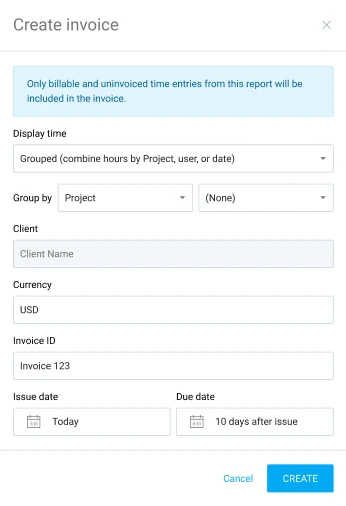
Additionally, you can generate invoices directly from the Reports page — choose a report type, filter out the report based on time entries you want to bill for, and click Create invoice. Then, fill out the Create invoice form and click Create. You’ll be able to review generated invoices and send them to your clients from Clockify’s Invoices page.
Learn more about how Clockify works on our help page for getting started ➞
If you want to boost your team’s productivity, check out the CAKE.com Bundle. Get 3 productivity tools — Clockify time tracker, Pumble team chat app, and Plaky project management software — at 53% off.
As a reliable time clock app, Clockify by CAKE.com helps users achieve better business results (based on thousands of user reviews on Capterra and G2 and our customer stories).
One Clockify user, Virginia, praised Clockify for preventing revenue loss:
“Before Clockify, many times revenue would fall between the cracks in reporting time, so it really reduces revenue loss. Also, Clockify was a big help in tracking workloads, employee productivity, and expenses.” — Virginia G.
Another user, Abhishek, highlighted Clockify’s strong ROI:
“We’ve been using the platform for over 3 years now and have not found another tool that comes close in functionality per dollar spent.” — Abhishek G.
Before Diana switched from Excel sheets to Clockify, she used to forget to log her time and dread sending invoices since it required so much work:
“Now, as soon as I start work, I start my timer. I’m able to add in the task description so that when I pull it for the invoice, it tells the client exactly what I worked on. Sending invoices is so easy because you can pull them by the dates, AND it can also send follow-up reminders. Now, I send my invoices 2x a month and get paid on time!” — Diana T.
Spainlink’s Jeff Frade shared how Clockify saves his team a lot of money by reducing administrative work:

“Clockify has saved us €1,300 a month in the coordination and administrative time we’d otherwise spend chasing project status.” — Jeff Frade
As another customer pointed out, Clockify helps her team better plan projects:

“With Clockify, not only can I quote and budget time accurately, but also advise delegates on how long they should expect to work on tasks.” — Maria Bayley
🎓 This Tech Pro Sets Profitable Rates With Clockify
Here are answers to some frequently asked questions about the ROI of time tracking.
To calculate time tracking ROI, use this formula:
If a company’s timekeeping tool’s costs are $5,000/year, and they gain $35,000/year from recovered billable hours and reduced admin time, their time tracking ROI is calculated like this:
For every $1 spent on the timekeeping tool, the company earns $6 in net financial value.
A good annual ROI for time tracking software is typically between 200% and 400%, meaning that for every $1 spent on the tool, a business generates $2–4 in net value.
🎓 Time Tracking Statistics You Should Know
To calculate the cost of untracked time, multiply the number of employees (e.g., 25), the average number of untracked hours/employee/week (e.g., 1.75), and the number of working weeks/year (48) to estimate the total annual untracked hours. Here’s the calculation:
Convert untracked hours into potential lost revenue by multiplying the total annual untracked hours by the average hourly rate (e.g., $45) — see below:
🎓 Free Employee Cost Calculator | How To Calculate Labor Cost (+ Labor Cost Calculator)
Disclaimer: We hope this calculator/guide has been helpful. We strongly advise you to consult with relevant institutions or certified representatives before taking action on legal matters. Clockify is not responsible for any losses or risks incurred.
