



Without a clear workflow, agencies may struggle to keep projects on schedule, allocate resources, and provide a smooth client experience.
We’ll explain how to build an effective agency workflow, including how a time tracker can help you manage team hours, track project progress, and bill your clients efficiently.
- An agency workflow is a structured approach to moving projects from initial client request to delivery.
- Utilization rate helps you evaluate team productivity, resource allocation, and overall efficiency. A healthy utilization rate for most marketing agencies typically falls within the 70–80% range, balancing client work with non-billable tasks.
- Clockify time tracker helps agencies manage billable and non-billable hours, monitor project progress, and create client invoices for accurate billing.
What is an agency workflow?
An agency workflow is a structured process agencies follow to manage projects from initial client request and planning through execution, monitoring, and delivery.
Having a well-defined workflow helps teams:
- Prioritize tasks
- Understand project requirements
- Allocate time effectively between billable and non-billable activities
💡 CLOCKIFY PRO TIP
Learn more about the importance of tracking billable and non-billable hours here:
Types of agency workflows
There are several types of agency workflows, including digital marketing agency workflows, creative agency workflows, and IT and software agency workflows.
| Workflow type | Main focus | Typical billable work | Typical billing model |
|---|---|---|---|
| Digital marketing agency | Campaigns and ongoing marketing | SEO, social media marketing, email marketing, content creation | Retainer-based billing |
| Creative agency | Producing creative assets | Branding, graphic design, video, copywriting, creative concepts | Project-based and retainer-based billing |
| IT and software agency | Building and maintaining technology | Coding, testing, debugging, system integrations, technical support | Project-based, time and materials, and retainer-based billing |
Let’s learn more about each type of agency workflow below.
#1: Digital marketing agency workflow
A digital marketing agency workflow involves planning, executing, and optimizing marketing campaigns to help clients achieve their marketing objectives. This workflow combines SEO, content marketing, paid ads, and other digital strategies to improve online visibility, attract potential customers, and drive growth.
Analytics play a key role in managing marketing projects. Analyzing metrics such as conversion and click-through rates allows marketing teams to improve campaign performance.
As most of their services are ongoing, digital marketing agencies often use a retainer-based billing structure.
#2: Creative agency workflow
A creative agency workflow leverages brainstorming, collaboration, and other creative processes to develop ideas and turn them into finished creative assets. These assets include designs, branding materials, and marketing content.
Collaborating with clients is vital for creative teams, as it boosts innovation and helps them understand the client’s needs.
Creative agencies typically use a project-based billing structure for projects with a clear scope, timelines, and deliverables (e.g., branding packages). For ongoing creative support (e.g., regular content production), they use retainers.
In creative agencies, managing time can be challenging due to the sheer number of creative tasks, projects, and client requests. CEO of Kfactor Marketing e Design, Kevin Oliveira, used to struggle with time management, but Clockify helped him organize his days:

“With Clockify, I noticed better control of the day-to-day activities and also an increase in productivity beyond the ordinary.”
#3: IT and software agency workflow
An IT and software agency workflow focuses on building and maintaining software solutions for clients. It usually begins with analyzing client requirements and creating a development plan, followed by coding, testing, and deployment.
To be successful, IT and software projects require close collaboration between different teams, including:
- Development
- Design
- Quality assurance
- IT support
Typical billing models for software agencies include project-based, time and materials, and retainer, depending on project complexity and the ongoing support required.
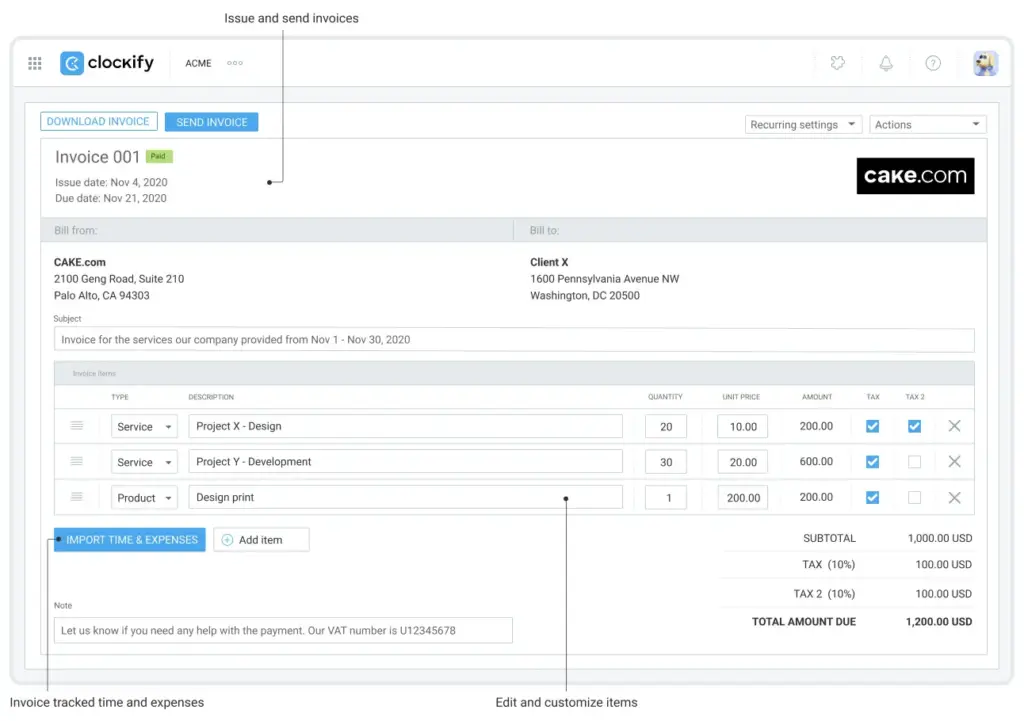
Clockify by CAKE.com makes client billing easier by allowing you to track billable hours on your projects and create invoices based on your tracked time and expenses.
How to measure your agency workflow: Utilization rate and KPIs
One of the most widely used metrics for measuring agency performance is the utilization rate. This KPI helps agencies improve team efficiency and overall profitability by measuring how much of their available work time employees spend on billable tasks.
The standard formula for calculating the utilization rate is:
(Total Billable Hours ÷ Total Available Hours) × 100 = Utilization rate
Say an employee works 40 hours per week. During that week, they spend 30 hours on billable client projects and 10 hours on non-billable research tasks. In this case, the employee spent 75% of their available working time on revenue-generating activities — see below:
(30 ÷ 40) × 100 = 75%
The ideal utilization rate varies by agency type, with most marketing agencies aiming for a billable utilization rate of 70-80%.
An excessively high agency utilization rate can lead to employee burnout and reduced work quality. Conversely, a low utilization rate indicates underused capacity or excess admin work — which can negatively impact agency profitability.
So, finding the right balance between billable and non-billable activities is essential for ensuring sustainable agency growth.
💡 CLOCKIFY PRO TIP
To find out how Clockify can help you estimate employee utilization, read this
Agency workflow example: 8 steps from new client to paid invoice
Building an agency workflow involves 8 steps:
- Add a new client to your database
- Split your project into tasks
- Organize team members and assign roles
- Distribute employee time
- Track billable and non-billable tasks
- Track expenses
- Sum up your work on the project
- Manage invoices and bill clients
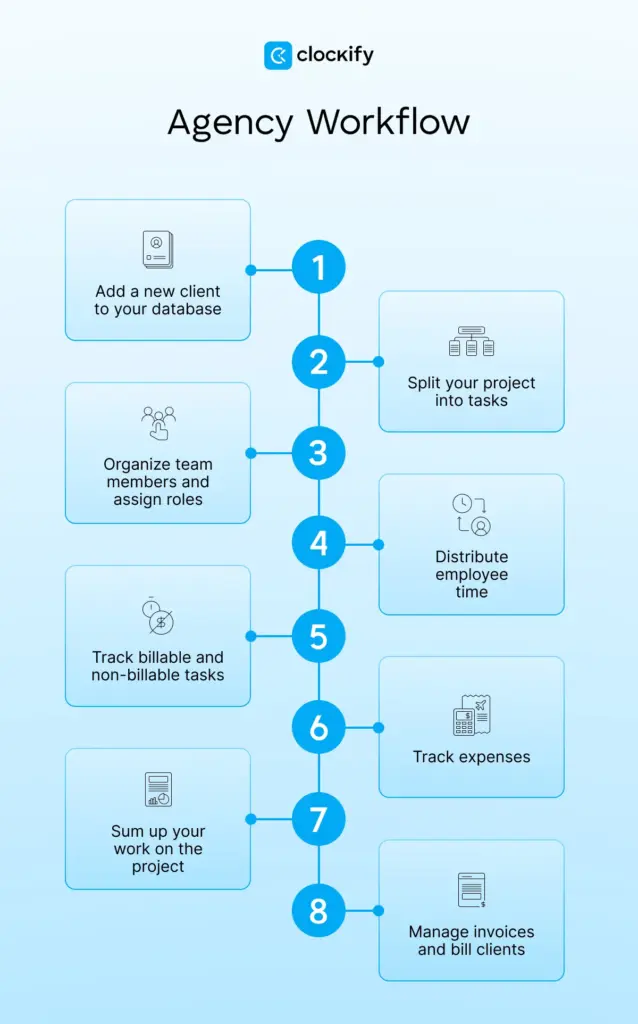
Let’s imagine you got a new project. This is what your typical workflow would look like.
#1: Add a new client to your database
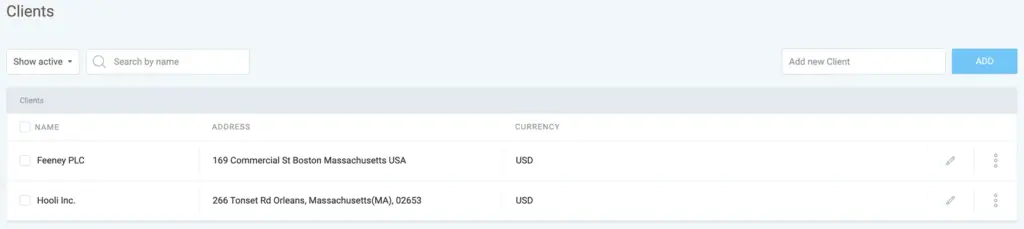
Each time you get a project from a new client, you should add their details to your client database, including client name, contact information, and address for invoicing.
Having a clear record of client data helps you access important information quickly and avoid confusion.
With a project tracker like Clockify, you get a dedicated space for all your clients where you can manage their info with ease.
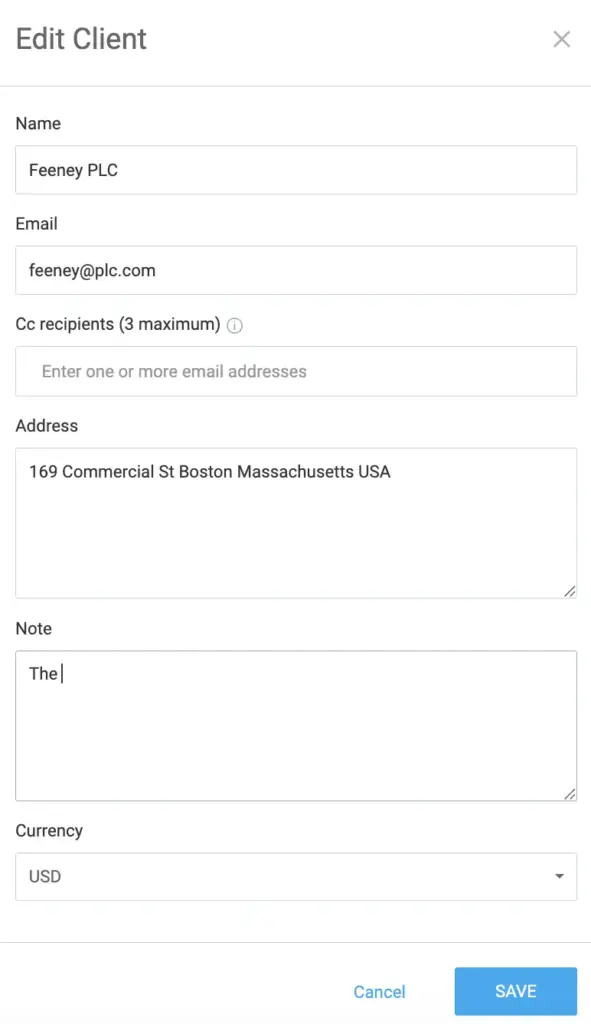
For each client in Clockify, you can add a client name, email address, physical address, and a note. You can also assign a currency to a client, which is especially useful if you have international clients who are billed in different currencies.
#2: Split your project into tasks
Tracking project progress is easier when you divide the project into smaller tasks. Doing so also makes a project seem less daunting.
In Clockify, you can create a project (e.g., Website Design) and tasks within that project (e.g., Research, Wireframe creation, UI design, Revisions). When creating a project, you’ll be able to enter the project name and choose the client (e.g., Feeney PLC) your project’s tied to:
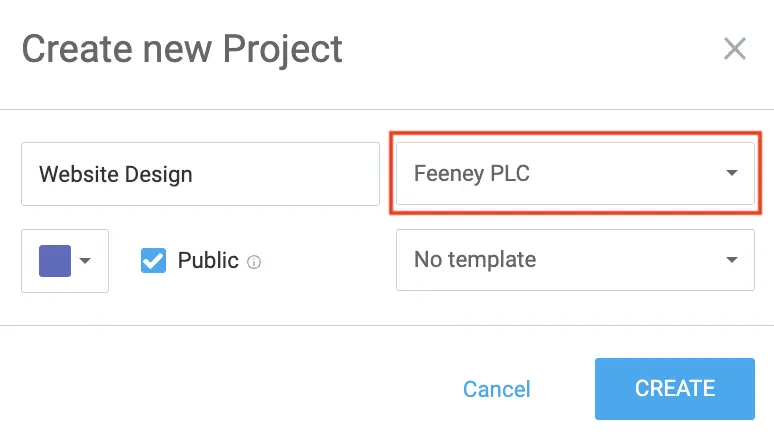
NOTE: You can create project templates in Clockify to save time when setting up recurring or similar projects.
After creating a project, you’ll be able to add Clockify tasks that your team will track time on. You can add as many tasks as you need.
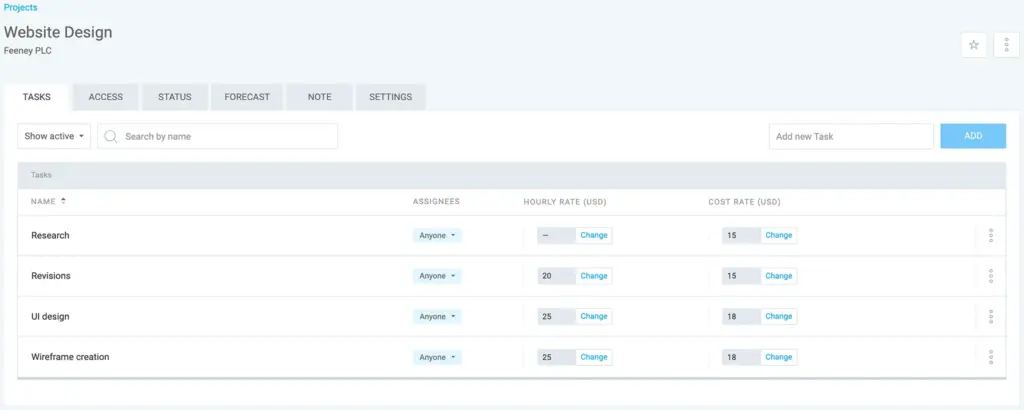
Once your team starts tracking time on these tasks, you’ll be able to follow the progress. You can track project progress by setting time or budget estimates in Clockify. For instance, you can estimate the length of a project (e.g., 120 hours) and then monitor progress in real time by comparing estimated vs. tracked time.
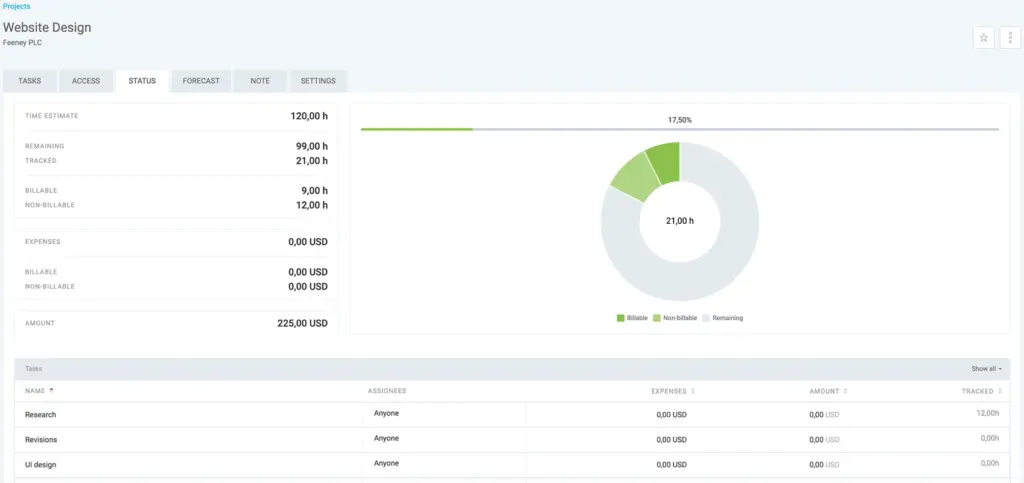
Learn more about tracking progress and estimates in Clockify ➜
To stay on top of project budgets and deadlines, set alerts in Clockify. You’ll get notified via email when a project reaches a certain percentage (e.g., 50%) of its estimated time or budget.
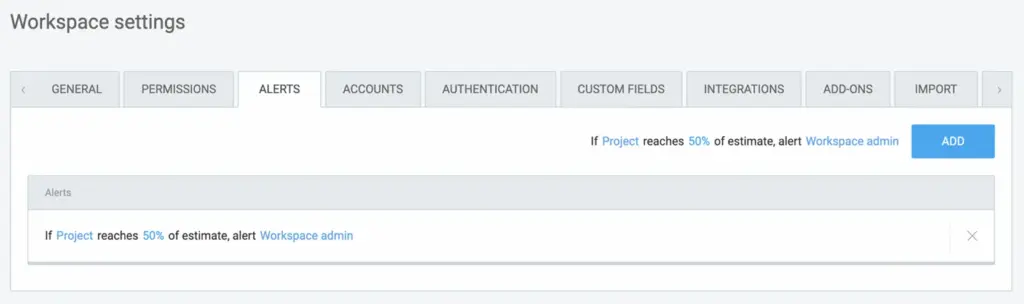
By using Clockify Alerts, you’ll be able to prevent budget overruns and keep your projects running smoothly.
Track project progress in Clockify
#3: Organize team members and assign roles
Whenever your agency takes on a new project, you’ll need to determine how many people are needed to complete it.
You’ll also need to specify team roles, so there’s no confusion about who’s responsible for each part of the project. In Clockify, you can manage your team by adding team members to your workspace, defining roles, and setting billable and cost rates for each member.
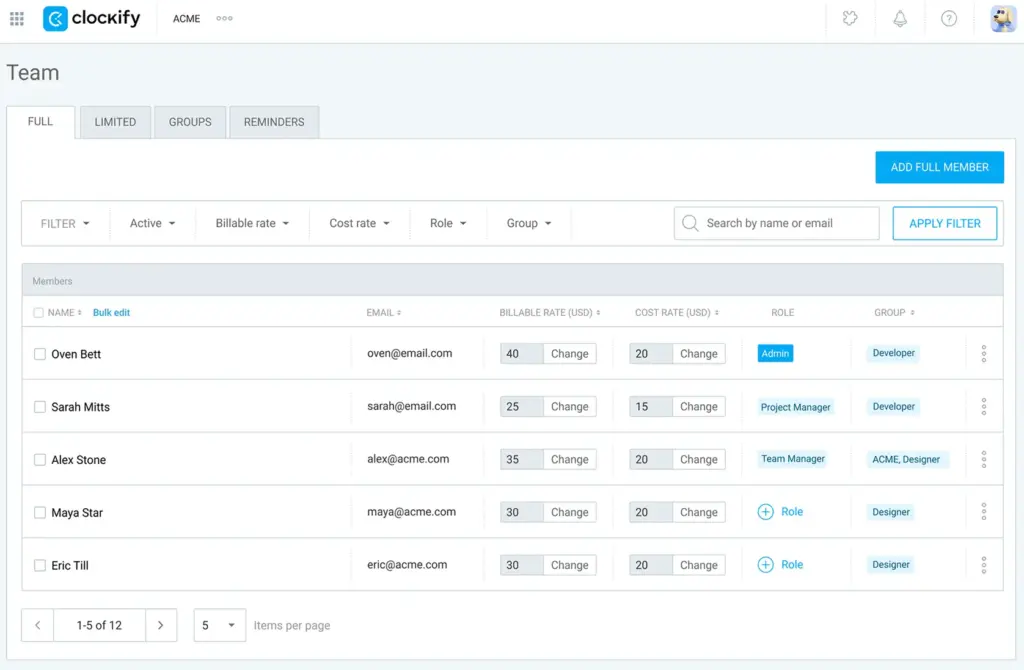
Setting billable and cost rates in Clockify will later help you measure project profitability and bill for your services.
Learn more about billable rates in Clockify ➜
#4: Distribute employee time
Effective employee time distribution is crucial for maximizing productivity and preventing employee burnout in your agency.
Decide who will work on what and how much time employees should spend on each task. By doing that, you ensure the right people are assigned to the right tasks.
Clockify lets you create a schedule for your team — add members, create assignments for them, and publish the schedule to make assignments visible to your team.
When creating an assignment for a member, you’ll be able to select a project task (e.g., Revisions), define a period (e.g., Aug. 3–7), and specify working hours/day (e.g., 8 hr):
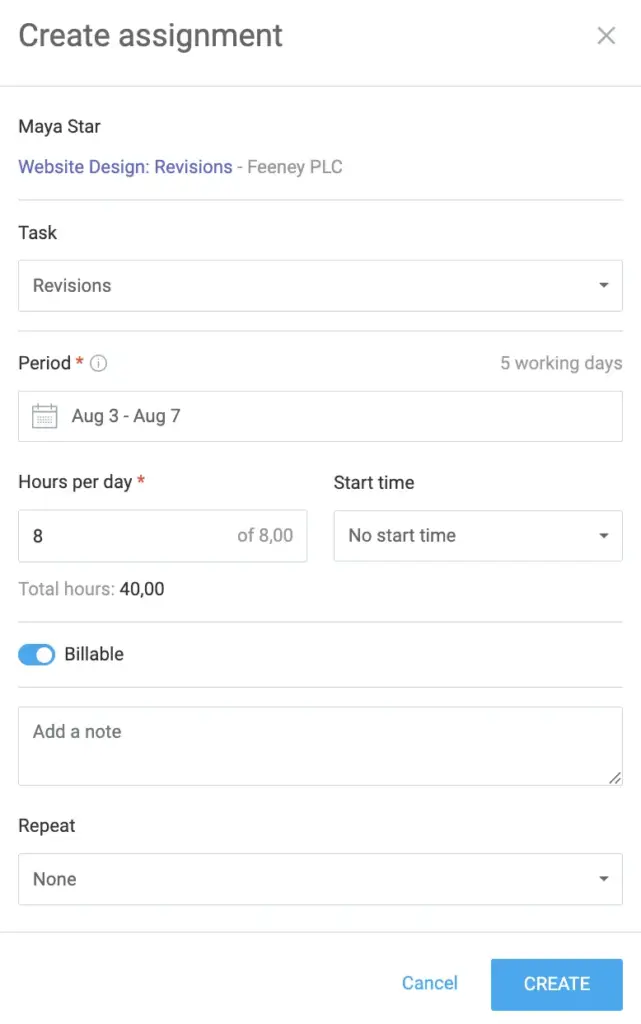
NOTE: You can set team assignments to repeat regularly in Clockify (e.g., weekly or every 2 weeks) to plan schedules ahead of time.
When creating a schedule for your team, make sure to check your team members’ capacity. In Clockify, your team’s capacity is calculated based on the time tracking targets you set on a daily, weekly, or monthly basis.

Based on the time tracking targets you set for each member, you’ll know:
- Who’s booked to their full capacity
- Who has free hours
- Who’s overbooked
Say your team member’s capacity is 8 hours/day, and they’re assigned 8 hours of work per day. In that case, they’re fully booked, meaning they have no remaining availability for additional tasks.
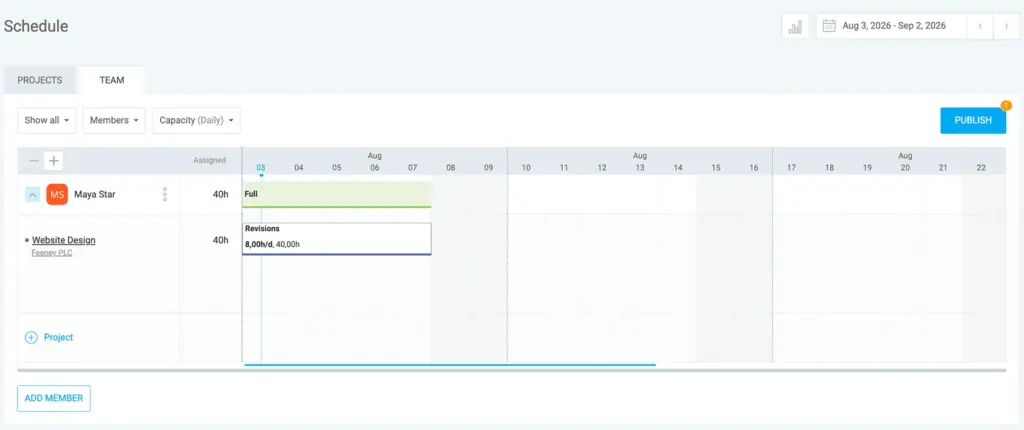
Get more information on scheduling team assignments in Clockify.
💡 CLOCKIFY PRO TIP
To master resource planning with Clockify, check out the following article:
#5: Track billable and non-billable tasks
To prevent payment disputes, you should agree with your client on which tasks will be billable and which won’t. After that, your team can start tracking the time spent on billable and non-billable activities. Tracking both helps agencies get a complete picture of how their team spends their time.
Clockify allows you and your team members to track billable time by using Clockify’s Timer — enter what you’re working on, select the project, and click the dollar sign (it’ll turn blue) to mark your entry as billable. Then click Start.

Once you’re done, click Stop.
For non-billable activities, such as initial research or admin tasks, follow the steps above, except don’t click the dollar sign (it should remain gray). All time entries (billable and non-billable) will be saved in Clockify.
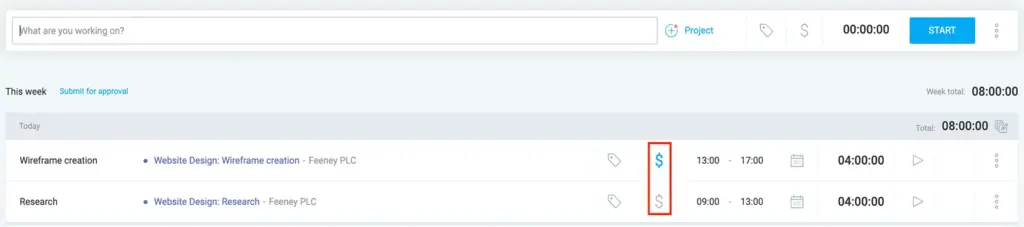
By tracking both billable and non-billable hours, you’ll be able to identify and reduce time-consuming activities and improve billable utilization.
#6: Track expenses
Working on a project sometimes requires additional expenses you have to bill, too.
Let’s say your client would like to have an in-person kickoff meeting at their office and your entire team needs to travel to attend. If this isn’t your usual practice, the cost of that trip will probably be something you can charge for.
Clockify by CAKE.com lets you record all your project-related expenses, which you can later include in an invoice you send to your client.

You can organize expenses by category (e.g., Overtime, Mileage), record them by sum (e.g., $10) or unit (e.g., 20 miles) — and even attach a receipt as an image or PDF. A receipt helps verify project-related spending and improves transparency between agencies and clients.
NOTE: You can also track expenses on the go via the Clockify mobile app (Android, iOS), allowing you to capture expenses wherever you are.
#7: Sum up your work on the project
Real-time reporting is a vital part of project management in agencies. Reports let you to check whether you need to change something mid-project to stay within the deadline or budget. It also gives you insights on how to organize your team for future projects.
When summarizing work on a project, reports should show the tracked time for each team member, along with:
- Profit they earned (based on the billable rate)
- Costs associated with their work (based on the cost rate)
Here’s what the Summary report generated in Clockify looks like:
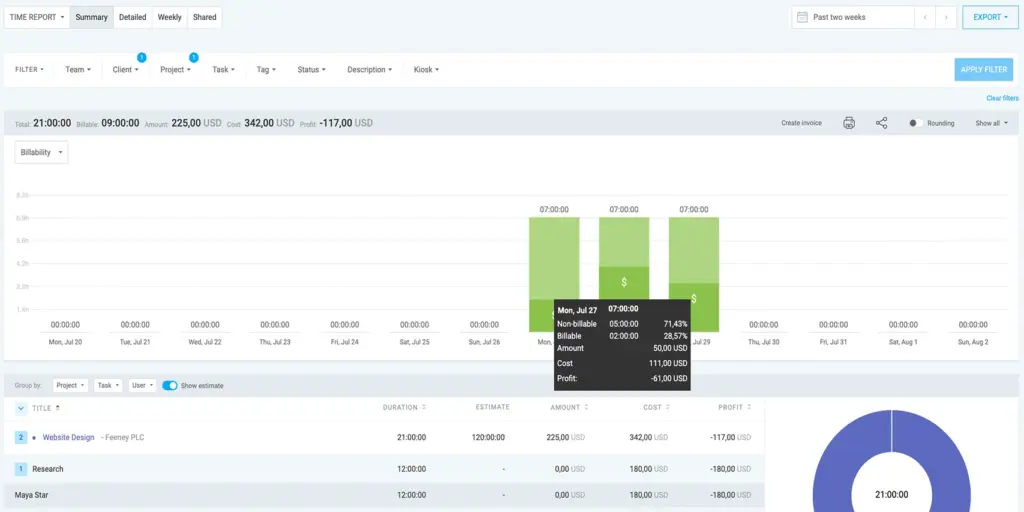
Having an overview of which team or team member generates which amount of costs and profit gives guidance on optimal resource allocation.
If you’re charging a retainer fee to your client, it’s good to know how many hours you’ve used from the total billable hours of the project. Select the date range and filter the Summary report by client, project, and the billable status. Then compare tracked billable time with the total number of hours (time estimate) to determine how many hours remain.
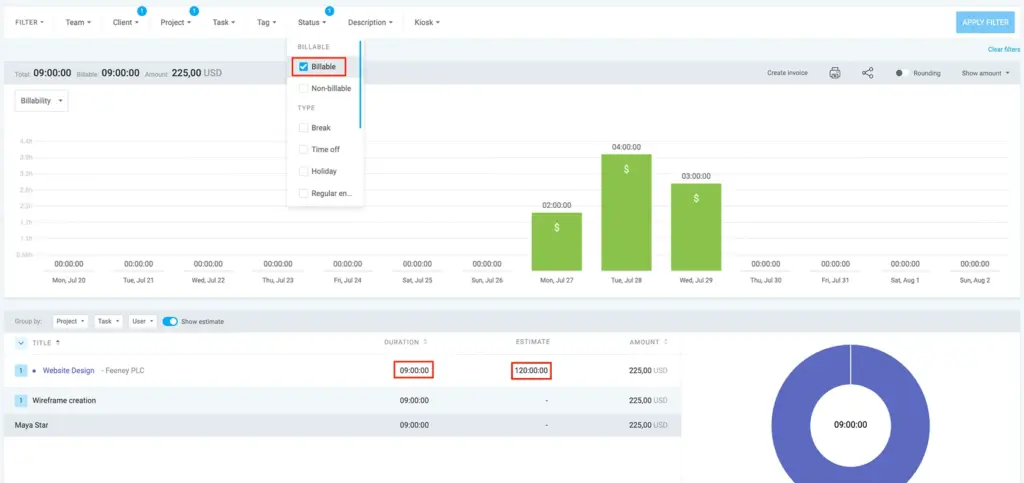
To keep your client informed of all the work done so far, you can share a public link to your report. Just filter the data you want to show them and click on the share icon to generate a public link.
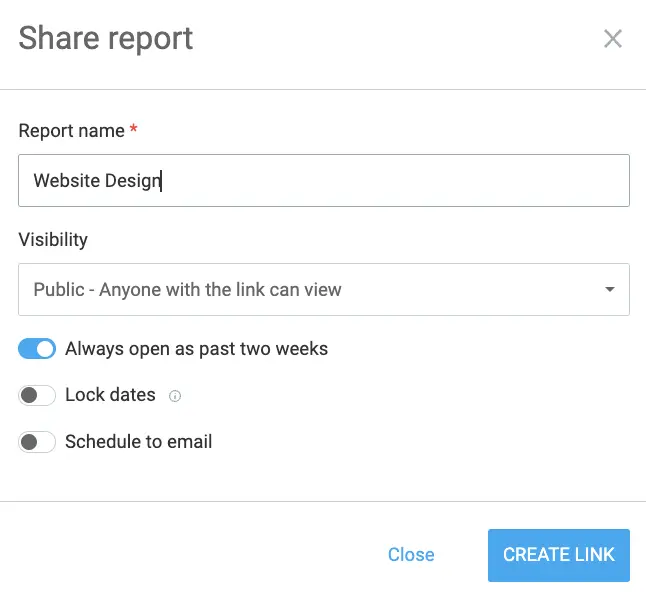
By allowing your clients to follow project progress in real time, you strengthen trust and ensure everyone stays aligned throughout the project.
#8: Manage invoices and bill clients
After you’ve done the work, it’s time to send an invoice out to your client. The following details are a usual part of a client invoice:
- Your agency information
- Services provided
- Additional expenses
- Date range
- Taxes
- Discounts
- Issue date
- Due date
- Client information
With Clockify, you can customize your invoice to look more professional and get paid faster. For example, you can attach your agency logo or change text for invoice labels (e.g., instead of the default Tax label, you can change it to VAT when invoicing clients in countries where VAT applies).
After you import your tracked time and expenses and add any discounts or taxes, you can email your invoice to your client directly from Clockify.
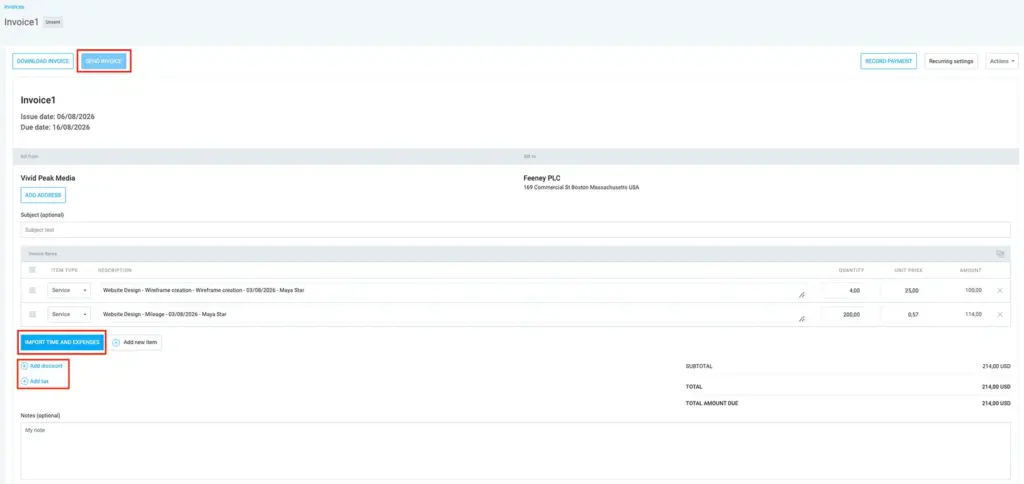
To make sure you manage all the invoices properly and don’t accidentally double-bill clients, you can manage their status (sent/unsent/paid/void) in the invoice list.
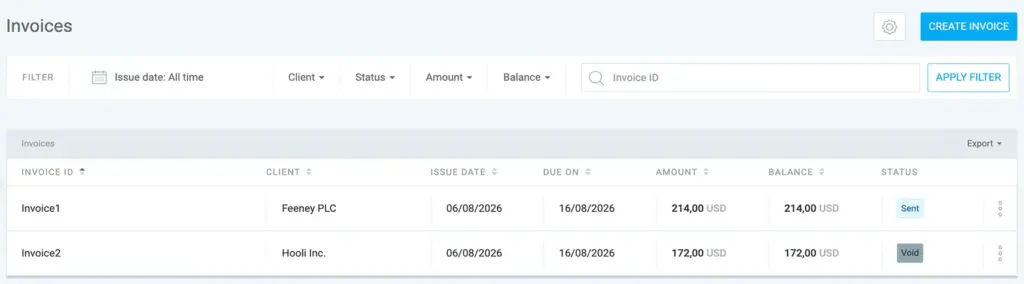
NOTE: Clockify also lets you send email reminders for overdue invoices to your clients.
Effectively managing client invoices helps agencies improve cash flow and reduce payment delays.
Common agency workflow bottlenecks (and fixes)
In this section, we’ll cover common agency workflow issues and provide practical fixes.
#1: Unclear project scope and changing requirements
As the project progresses, clients often request “small” changes that gradually increase the workload without adjusting the timeline or budget. These changes lead to scope creep, causing teams to spend more time on unplanned tasks.
Example: A marketing agency agrees to create 5 social media posts for a client. Halfway through the project, the client asks for 3 additional posts, new design variations, and several rounds of revisions. The marketing team now spends more hours on extra tasks, putting the project timeline at risk.
Fix: By tracking time spent on design work and revisions, marketing agencies can identify scope creep early and use accurate data to adjust estimates and budgets. Doing so helps them prevent cost overruns and finish projects on time.
HR Director of WITHIN, Danielle Aalund, says that Clockify provides the visibility into what everyone’s working on, making inefficiencies easier to spot:

“Clockify is great for tracking workloads, making sure everyone’s on the same page, and spotting any inefficiencies we might have missed otherwise.”
#2: Poor resource allocation
Managers often lack visibility into who’s available and who’s overloaded, leading to poor task assignment, employee burnout, and project delays.
Example: An IT agency is developing a custom software solution for a client. The project manager continues assigning critical tasks to the same senior developer who’s already handling complex development work and code reviews. As a result, the developer becomes overloaded, while other members have capacity available.
Fix: Monitoring team capacity helps managers identify workload imbalances and reassign work to available members. By doing that, managers can improve efficiency and reduce the risk of employees becoming overworked.
According to Adesso Spain’s Marc Carreras, analyzing time data in Clockify helps avoid underutilization:

“We use Clockify Reports to measure efficiency and optimize resources.”
#3: Communication and approval delays
The client provides feedback through different channels, such as email, chat apps, or meetings, which creates communication gaps and delays in approvals.
Example: A creative agency is designing a new brand identity for a client. The creative team sends logo concepts and design drafts for review, and the client provides feedback — some comments are sent by email while others are shared through meetings. Because feedback is scattered, the team struggles to track all requested changes and clarify priorities.
Fix: By creating a centralized feedback system, creative agencies can avoid missed requests, improve team-client collaboration, and speed up the approval process.
As Tina Ballew of NMCO Studio explains, Clockify Reports help her team avoid misunderstandings with clients and validate the pricing:

“When we present a report for an identity system, clients see the time logged, number of meetings, requested revisions, workshopping, and everything with detailed notes and time spent. It keeps everyone accountable, and there’s no guesswork.”
#4: Lack of visibility into project progress
Managers may fail to identify project risks early, making it harder to maintain control over the project.
Example: A marketing agency manages a client campaign. The manager realizes only halfway through the project that content production is behind schedule and some tasks require more resources than planned. They now have limited time to reallocate resources and get the project back on track.
Fix: Tracking project progress in real time allows managers to compare actual progress with the project plan and spot areas that need immediate attention. They can then address issues proactively (e.g., by assigning more resources to content production) before these issues affect project outcomes.
Track your agency workflow with Clockify by CAKE.com
Clockify lets you follow each phase of your work on projects from one place. From concept making to project billing — onboard and easily manage multiple projects at once.
Clockify Forecasting lets you predict whether you’ll complete your project on time based on tracked time, scheduled assignments, and project estimates.
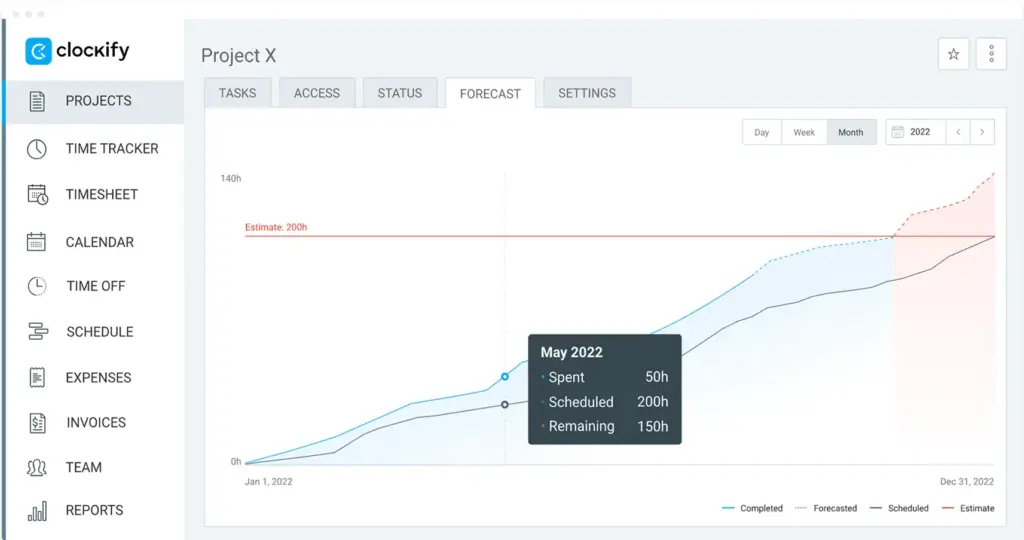
With Clockify’s Forecasting, you can spot potential delays and adjust your resources and deadlines to keep projects within budget and on schedule.
If you’re looking for a way to boost your team’s productivity, try the CAKE.com Bundle. Replace at least 3 of your existing business apps with a single solution — and simplify your daily operations.

FAQs on agency workflows
Here are answers to some frequently asked questions about agency workflow and how to improve it.
What are the 3 basic components of a workflow?
The 3 basic components of an agency workflow are:
- Intake — focuses on understanding client requirements, defining project scope, and assigning resources.
- Execution — teams complete project tasks, track progress, and review work internally.
- Delivery — involves finalizing deliverables, incorporating client feedback, and presenting the finished project to the client for approval.
💡 CLOCKIFY PRO TIP
Learn how to manage projects easily in Clockify here:
What is an organizational workflow?
An organizational workflow is a structured sequence of tasks, steps, and activities designed to move work from start to finish. An organizational workflow clarifies who does what, when, and in what order, ensuring goals are met efficiently.
What makes a successful agency?
Whether an agency is considered successful depends on several factors:
- Client retention — an agency that consistently meets or exceeds client expectations is more likely to retain existing clients (by increasing client satisfaction) and attract new ones through referrals.
- Profitability — an agency that generates more revenue than it spends on operating costs can make a profit, invest in growth, and maintain long-term stability.
- Operational efficiency — efficient agencies minimize wasted time and effort, allowing them to stay productive and deliver positive results.
💡 CLOCKIFY PRO TIP
Discover which methods you can use to measure employee productivity in our article:
Can one person run an agency?
Yes, one person can run an agency (often called a solo agency or solopreneur agency).
How can using a time tracker improve my agency’s profitability?
Modern time trackers that combine billable hour tracking with advanced analytics and reporting can help agencies understand their performance, identify areas for improvement, and make data-driven decisions.
For instance, analyzing project costs and profit in Clockify can help you identify which projects are profitable and where you can reduce costs to improve margins.
Track profitability with Clockify
How do I determine my utilization rate with Clockify?
Determining employee or agency utilization rate with Clockify is a straightforward process:
- Have your employees track their billable hours in Clockify (by marking their time entries as billable).
- Divide their total billable hours (pull this figure using Clockify Reports) by their total available work hours.
- Multiply that result by 100.
Can Clockify be used for project and billable/non-billable time management?
Yes, you can manage projects in Clockify. You can also set billable rates for your team members, enabling easy billable time tracking.
To manage projects and team members in Clockify, organize your workspace by:
- Creating projects and tasks
- Inviting users and assigning roles
- Setting budgets
- Tracking progress and estimates
Define billable rates for team members from the Clockify Team page. After that, each member will be able to mark tasks and projects billable directly from the Clockify time tracker.
How we reviewed this post: Our writers & editors monitor the posts and update them when new information becomes available, to keep them fresh and relevant.