
All 3 tools — Clockify, Hubstaff, and Time Doctor — track time, but they have different approaches to how much visibility managers need.
Clockify leans on flexibility, Hubstaff on operational control, and Time Doctor on oversight.
By the end of this time tracking software comparison, you’ll know which tool fits your team the best.
WHY TRUST US?
The apps we talk about are selected, tested, and written about by human reviewers who follow strict review and editorial guidelines. We pick solutions that are practical, purposeful, and can offer real value for the specific use case or business context we’re covering — while also being justified in their pricing. Our methodology is transparent, clear, and available to everyone:
Clockify vs. Hubstaff vs. Time Doctor at a glance
Before diving into the details, here’s how all 3 tools stack up across the features that matter most.
All three platforms have standard foundational time management and reporting features, including:
- Timer + manual entry
- Idle detection
- Screenshots
- Team timesheets & Timesheet approvals
- Project budgeting
- Scheduling & Time off management
In the table below, you’ll find what is specific about each tool.
| Considerations | Clockify | Hubstaff | Time Doctor |
|---|---|---|---|
| What it is | The flexible & budget-friendly choice | The operational & field team choice | The high-oversight & accountability choice |
| Unique features | The only tool that includes an Auto tracker and a Kiosk option | The only tool that offers native payroll | The only tool featuring Distraction alerts, and its reporting depth is rated the highest. |
| Strengths | Includes GPS tracking, Geofencing, Budget alerts, and Expense tracking. Reporting depth is high. | It balances operational tools with employee monitoring features. Reporting depth is high. | Focuses heavily on desk-based accountability, featuring detailed productivity metrics. |
| What it lacks | It lacks native payroll and distraction alerts. | It lacks an Auto tracker, Kiosk, and Distraction alerts. | It lacks many field-centric and budget features, meaning no Auto tracker, Kiosk, GPS tracking, Geofencing, Budget alerts, Expense tracking, or Native payroll. |
| Pricing | It is the only option with a Free plan. Its entry paid plan is the cheapest at $3.99 per user/month. | There is no free plan. The entry paid tier is $4.99 per user/month. | There is no free plan, and it has the highest starting cost at $6.67 per user/month. |
| Best for | Teams looking for flexible tracking, client billing, and low overhead without invasive monitoring. | Operational control and field team management (GPS & Native payroll). | Strict remote oversight, distraction management, and deep behavioral analytics. |
Time tracking features
All 3 tools cover the basics — timer, manual entry, idle detection — but the similarities end there. How each tool handles tracking reflects exactly what it was built for.
Where Clockify offers the most tracking flexibility across work contexts
Clockify gives you more ways to log time than either competitor. You can:
- Start/stop the timer,
- Add time manually,
- Log entries through a calendar view, or
- Let the auto tracker record which apps and docs you work in so you can fill in the timesheets later.
Idle detection, Pomodoro timer, Kiosk for on-site clock-ins, and GPS tracking round out a very versatile setup.
With Clockify by CAKE.com, you get a tool that works whether your team is in an office, on a client site, in the field, or fully remote. Billable time marking and shared team timesheets mean project managers can see where hours are going without needing a monitoring layer to do it.
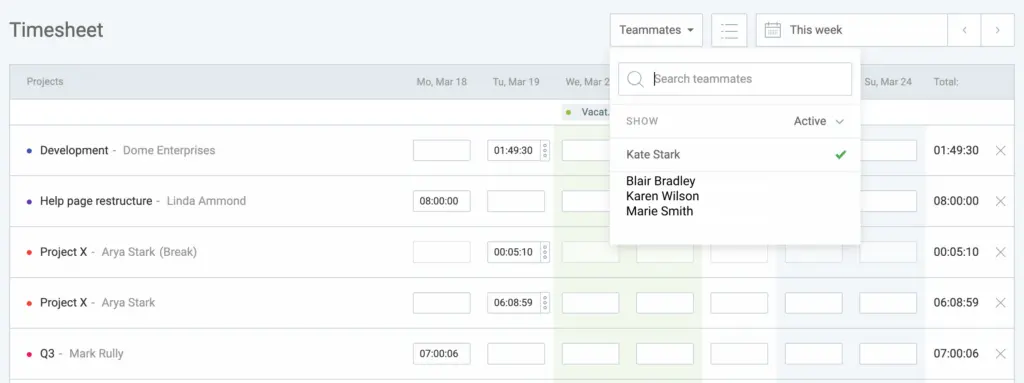
That flexibility is a deliberate design choice as Clockify doesn’t assume everyone tracks time the same way.
Where Hubstaff’s tracking connects directly to field operations
Hubstaff’s tracking is built to do more than log hours; it also connects to scheduling, payroll, and field team management.
The desktop timer works as expected, but the standout here is GPS tracking with geofencing — employees can be clocked in automatically when they arrive at a job site and clocked out when they leave.
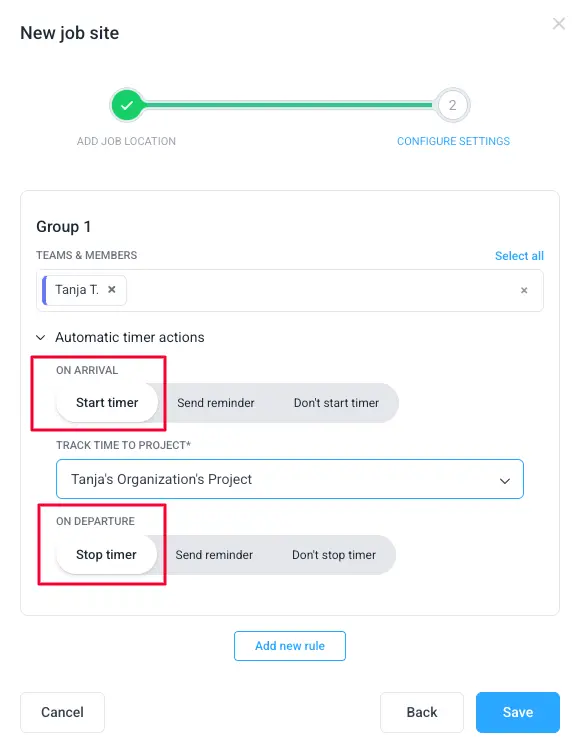
Offline tracking means hours aren’t lost when connectivity drops. Project and task tracking connects directly to budget reports and client billing. Attendance integrates with scheduling, so late clock-ins and no-shows are visible on the same calendar you use to set shifts.
If you’re managing field teams or distributed crews where location matters as much as hours, Hubstaff’s tracking is designed with that use case in mind.
Where Time Doctor’s tracking is built around accountability
Time Doctor’s tracking centers on the desktop timer. Employees select a task, start the clock, and the app begins building an activity record — idle time, breaks, and work patterns included. Offline tracking works reliably, while break tracking helps produce cleaner logs.
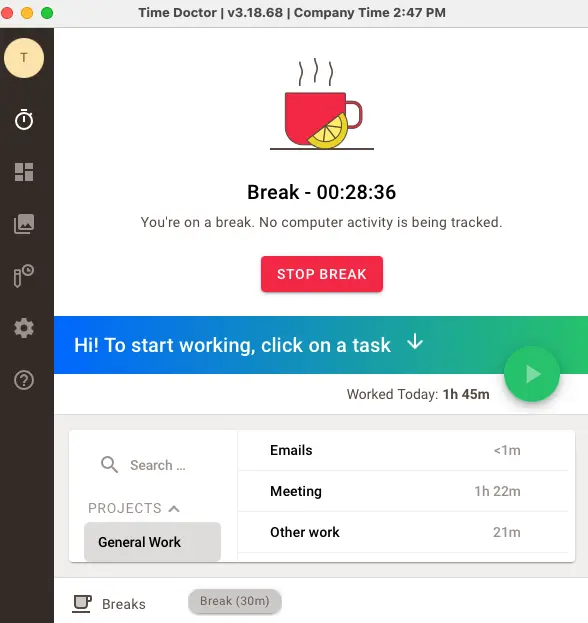
Time Doctor’s design assumes employees are consistently at their desks with active input devices. After all, the app’s tracking is built to generate data for productivity analysis, not just to capture billable hours.
For teams with varied work environments (e.g., field work, hybrid), this desktop-centric model starts to show limits.
Read full Time Doctor review ➜
💡 CLOCKIFY PRO TIP
Did you know that a good productivity score lies between 70% and 75%? For more interesting productivity stats, check out this article:
Employee monitoring and productivity visibility
This is where the 3 tools diverge most — and where your management philosophy matters more than the feature list.
Where Time Doctor goes furthest on oversight and accountability
Time Doctor treats monitoring as a core feature, not an add-on. Screenshots are captured at configurable intervals (3, 9, 15, or 30 minutes). Keyboard and mouse activity is tracked to measure active vs. idle time. In fact, app and website usage is logged and labeled as productive, unproductive, or neutral, and managers can set those labels at the team level.
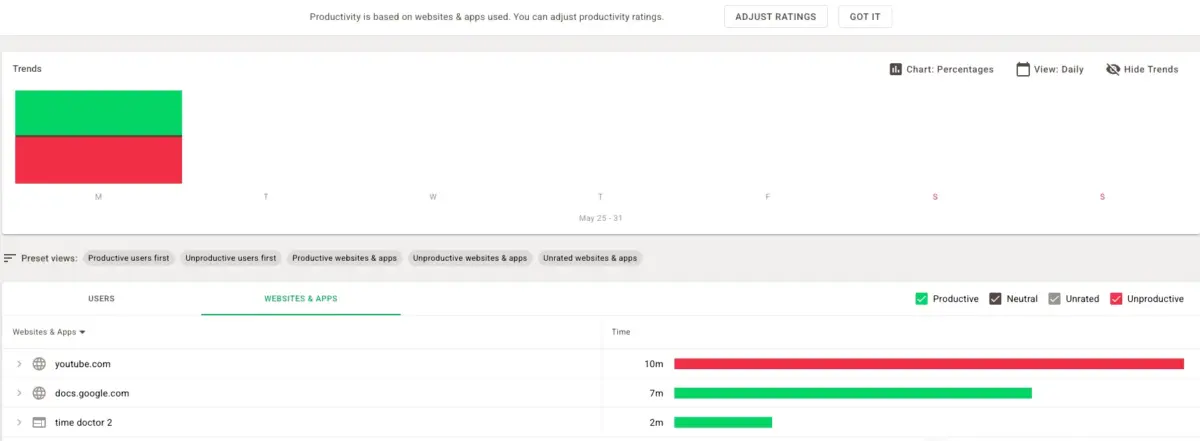
Distraction alerts go further — when an employee visits a flagged site, the tool interrupts them with a pop-up. Productivity scoring turns all this data into a composite metric. The executive dashboard provides organization-wide visibility.
For fully remote teams where accountability is the primary concern, no tool in this comparison goes as deep as Time Doctor. However, among teams where trust is important to employee morale and retention, this level of monitoring can create friction.
In contrast, Clockify’s Activity monitoring offers more intuitive dashboards that managers can easily use to assess who’s working on what, how much, and from where.
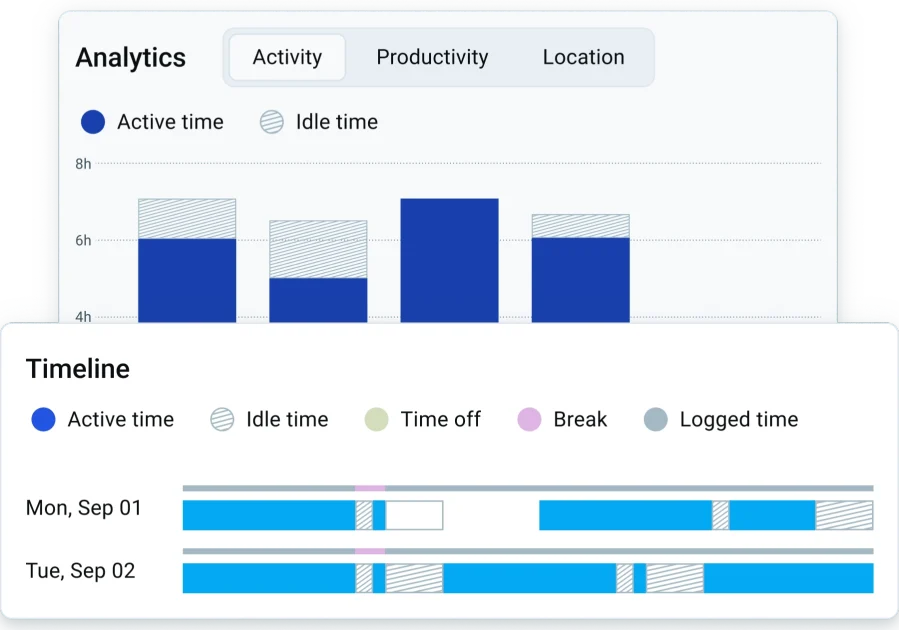
Where Hubstaff balances monitoring with operational oversight
Hubstaff takes 1–3 screenshots roughly every 10 minutes. Unlike Clockify, app and URL tracking are visible to admins, so managers can see which sites employees spent time on. Hubstaff measures keyboard and mouse activity in 10-minute blocks to flag inactivity. Also, GPS location data and geofencing alerts add a field operations layer that Time Doctor doesn’t have.
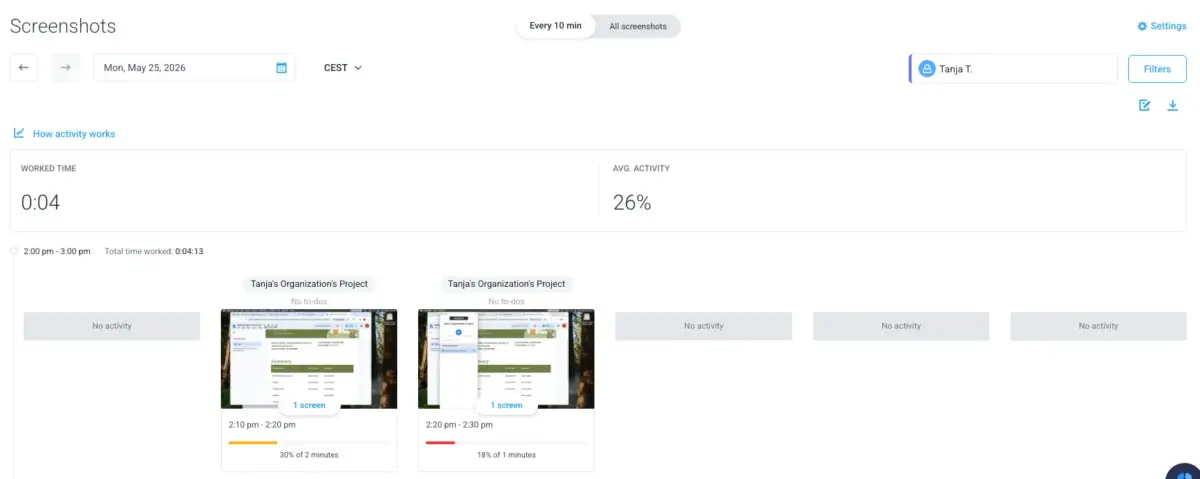
Hubstaff’s monitoring is tied to operational accountability — compliance, attendance, payroll accuracy — rather than distraction management or productivity scoring. There are no interruption alerts or reports on poor time usage.
When comparing Hubstaff vs. Time Doctor on monitoring philosophy, Hubstaff lands in the middle — more oversight than Clockify, but less behavioral intervention than Time Doctor.
Where Clockify takes a lighter approach to monitoring
Clockify’s monitoring approach is deliberately limited. Screenshots are available, but optional and off by default.
If your primary concern is whether your team is working, Clockify isn’t the right tool for you. But if your primary concern is whether your team’s working on the right projects, Clockify’s time logs, project breakdowns, and billable hour reports give you enough data to get your answer — without the oversight overhead.
| Monitoring features | Clockify | Hubstaff | Time Doctor |
|---|---|---|---|
| Screenshots | ✅ | ✅ | ✅ |
| Admin-visible app/URL tracking | ✅ | ✅ | ✅ |
| Keyboard/mouse activity | ✅ | ✅ | ✅ |
| GPS location | ✅ | ✅ | ❌ |
| Geofencing | ✅ | ✅ | ❌ |
| Distraction alerts | ❌ | ❌ | ✅ |
| Productivity scoring | ✅ | ✅ | ✅ |
| Work-life balance metrics | ❌ | ❌ | ✅ |

Reporting and analytics
Each tool generates reports, but they’re answering different questions. Time Doctor shows how people work, while Hubstaff reveals how much the work costs. And Clockify shows where the billable time went.
💡 CLOCKIFY PRO TIP
Learn how you can easily calculate billable hours and find out the exact amount you should charge your client:
Where Time Doctor’s analytics go deepest on productivity patterns
Time Doctor’s reporting is built for managers who want to inspect behavior and not just totals. With this app, you get:
- Timeline reports,
- Hours tracked,
- Web and app usage breakdowns, custom exports, and
- Executive dashboard that gathers productivity data across the entire organization.
Work-life balance metrics and unusual activity reports round out a reporting suite that goes well beyond typical time tracking.
If you need to understand not just how many hours were logged but how those hours were spent (site by site, app by app), Time Doctor gives you that level of detail.
Where Hubstaff’s reporting connects to business operations
Hubstaff offers 19 report types, covering everything from time and activity tracking to project budgets, payroll, and capacity planning. The apps and URLs report is admin-visible and ties directly to productivity data. Additionally, the remote vs. in-office performance comparison adds a layer of workforce insight useful for hybrid teams.
The key distinction between Hubstaff and Time Doctor in reporting is that Hubstaff’s reports are designed to answer operational and financial questions (e.g., what did this project cost, are we over budget, who needs to be paid, etc.) rather than behavioral ones.
Where Clockify’s reporting covers billing and team visibility without the overhead
Clockify’s report types include summary, detailed, and weekly shareable reports, with advanced filters and PDF/CSV/Excel exports. Assignments, attendance, and expense reports are also available.
For agencies and consulting firms managing multiple client projects, the ability to map tracked time directly to billable amounts and share those reports with clients is where Clockify’s Reports earn their place.
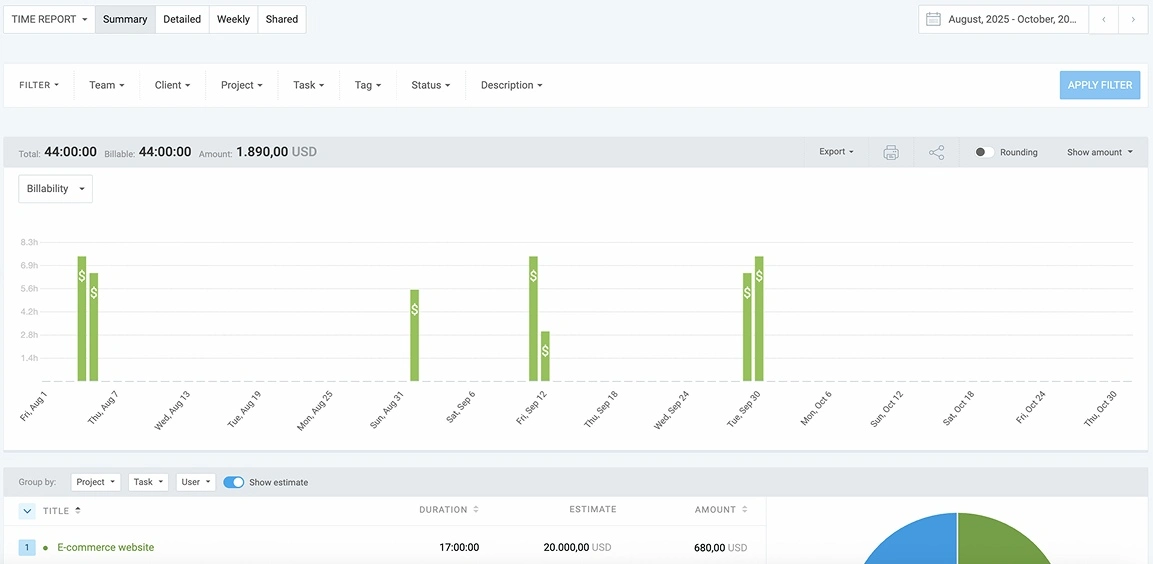
While Clockify isn’t meant to tell you which websites your employees visited, it’s built to tell you how time maps to projects, clients, and profitability.
Payroll, billing, and integrations
If you need your tracked hours to turn into paychecks or client invoices, keep in mind that these 3 tools take meaningfully different approaches.
Where Hubstaff wins on native payroll
Hubstaff converts tracked hours directly to employee pay through native integrations with PayPal, Wise, Payoneer, Bitwage, Deel, and Gusto, all without leaving the platform. This makes Hubstaff the winner of this section. You can:
- Set hourly rates per employee,
- Review amounts owed, and
- Run payments manually or automatically.
For businesses where payroll accuracy is tied directly to logged hours, Hubstaff’s end-to-end flow from time entry to payment is a clear operational advantage over competitors.
Where Time Doctor handles payroll via integrations
Time Doctor connects to payroll processors (Gusto, ADP, and others), but the workflow requires a 3rd-party connection rather than native processing.
Timesheet exports can be used with external payroll software, which is one extra step in Time Doctor compared to Hubstaff, specifically for payroll.
Where Clockify sits in the breadth of integrations
Clockify by CAKE.com offers 100+ integrations — more than either Hubstaff (35+) or Time Doctor (60+) — spanning project management tools, accounting platforms, CRMs, and communication apps.
Invoice generation is built in, with multi-currency support and customizable templates. Time entries can be imported directly into invoices.
When comparing Clockify and Hubstaff on payroll, the gap is clear — Clockify has no native payroll processing. If you need to pay employees directly from tracked hours, Hubstaff is the better fit. If you need to bill clients from tracked hours, Clockify has a stronger native workflow.
Pricing: What you get before you pay more
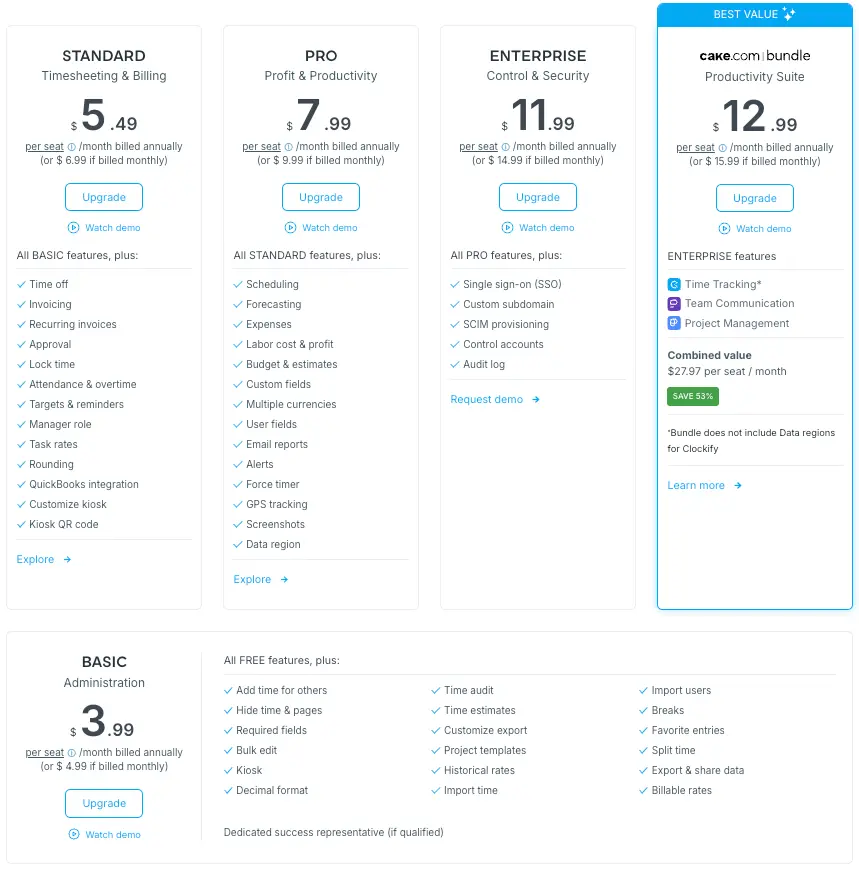
Clockify is the only tool here with a free plan. Beyond that, entry prices and what you get at each tier vary enough to affect your decision.
| Plan | Clockify | Hubstaff | Time Doctor |
|---|---|---|---|
| Free | ✅ Up to 5 users | ❌ 14-day trial only | ❌ 14-day trial only |
| Entry paid | $3.99/user/month | $4.99/user/month | $6.67/user/month |
| Mid tier | $5.49/user/month | $7.50/user/month | $11.67/user/month |
| Top tier | $7.99/user/month | $10/user/month | $16.70/user/month |
| Enterprise | $11.99/user/month | $25/user/month | Custom |
Clockify is the only tool with a functional free plan for teams — up to 5 users with core time tracking features. Also, 24/7 fully human customer support is available on all plans, including the free one.

As for Clockify’s paid plans, the entry paid tier unlocks time audits, Kiosk, CSV/Excel report exports (PDF exports are free), and billable rates. The next paid plan includes timesheet approvals, time-off management, and invoicing.
Hubstaff and Time Doctor both require payment to go beyond a trial. On the Clockify vs. Hubstaff pricing comparison, Clockify’s entry paid tier is cheaper. On Hubstaff vs. Time Doctor, Hubstaff costs less at every tier and includes more operational features at the mid-level plan.
Time Doctor’s entry pricing is the highest of the 3 — and many of its most-used monitoring features sit in the Standard and Premium tiers, where costs climb quickly.

What users are saying
Review scores tell part of the story. Here’s the recurring sentiment across G2 and Capterra for each tool.
About Clockify
Clockify users consistently praise the Free plan and the reporting flexibility. The common criticism is that the mobile app could be improved.
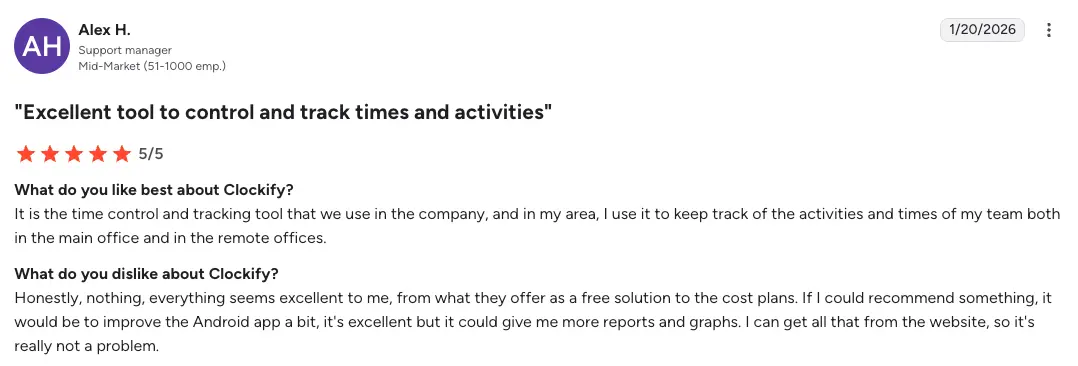
For instance, Alex H. left a Clockify user review on G2, saying that it’s an “excellent tool to control and track times and activities.”
What the user likes best about Clockify: “It is the time control and tracking tool that we use in the company. In my area, I use it to keep track of the activities and times of my team both in the main office and in the remote offices.”
What the user dislikes about Clockify: “Honestly, nothing. Everything seems excellent to me, from what they offer as a free solution to the cost plans. If I could recommend something, it would be to improve the Android app a bit. It’s excellent but it could give me more reports and graphs. I can get all that from the website, so it’s not really a problem.”
About Hubstaff
Hubstaff gets consistent praise for its clean interface and reliable scheduling tools. The recurring complaint is slow customer support response. Some users also note that reports have room for improvement.
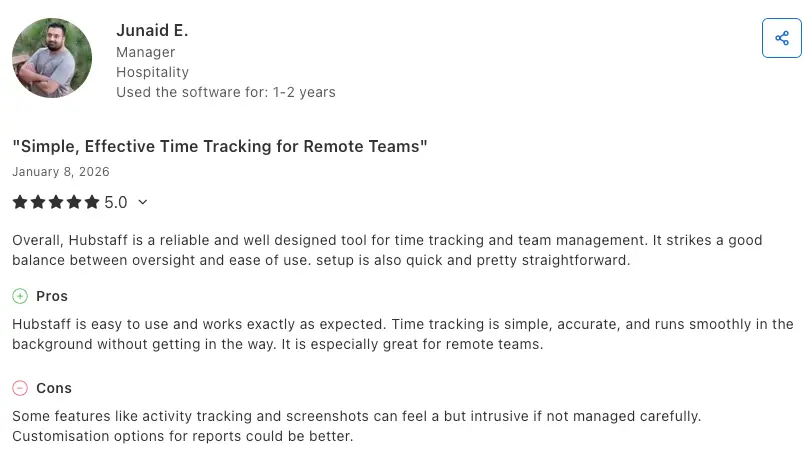
Junaid E. left a Hubstaff user review on Capterra, describing it as “simple, effective time tracking for remote teams”. They state that “overall, Hubstaff is a reliable and well designed tool for time tracking and team management. It strikes a good balance between oversight and ease of use. Setup is also quick and pretty straightforward.”
Hubstaff pros, according to this user: “Hubstaff is easy to use and works exactly as expected. Time tracking is simple, accurate, and runs smoothly in the background without getting in the way. It is especially great for remote teams.”
Hubstaff cons, according to this user: “Some features like activity tracking and screenshots can feel a bit intrusive if not managed carefully. Customization options for reports could be better.”
About Time Doctor
Time Doctor earns high marks for its workforce analytics and the transparency it brings to remote work. The dominant criticism is the monitoring intensity and some accuracy/navigation issues.
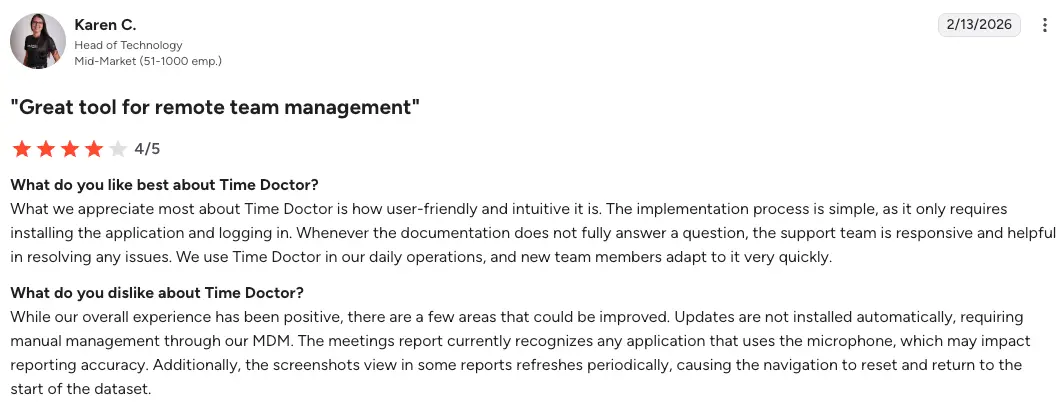
Karen C. left a Time Doctor user review on G2, calling it a “great tool for remote team management.”
What the user likes best about Time Doctor: “What we appreciate most about Time Doctor is how user-friendly and intuitive it is. The implementation process is simple, as it only requires installing the application and logging in. Whenever the documentation does not fully answer a question, the support team is responsive and helpful in resolving any issues.”
What the user dislikes about Time Doctor: “While our overall experience has been positive, there are a few areas that could be improved. Updates are not installed automatically, requiring manual management through our MDM. The meetings report currently recognizes any application that uses the microphone, which may impact reporting accuracy.”
Clockify vs. Hubstaff vs. Time Doctor — which one is right for your team?
Now you have a clear picture of what each tool does and who it’s built for. Here’s how to make the final call.
Choose Clockify if you:
- Want the broadest feature set without a surveillance layer.
- Manage a mix of office, remote, and field workers with different workflows.
- Need time tracking that maps cleanly to client billing and project profitability.
If you’re considering moving from Time Doctor to Clockify, the main trade-off is reduced monitoring depth in exchange for greater flexibility and lower cost.
Choose Hubstaff if you:
- Manage field teams that need GPS time tracking and geofencing.
- Want payroll processed natively from tracked hours without having to use multiple tools.
- Need scheduling and attendance baked into the same platform.
For teams switching from Hubstaff to Clockify, the main thing you’d give up is the native payroll feature.
Choose Time Doctor if you:
- Manage a fully remote team.
- Need detailed accountability with screenshots, activity logs, distraction management, and productivity monitoring analytics in one place.
- Have a team that understands and accepts closer monitoring as part of how the company operates.
The choice between Clockify, Hubstaff, and Time Doctor comes down to one question: How much visibility does your team really need at the expense of their trust?
Time Doctor is built for deep oversight. Hubstaff is built for operational control. And Clockify is built for flexibility across diverse work contexts.
None of them is the right tool for every team — but one of them is likely the right tool for yours. If you’re not sure where to start, Clockify’s 7-day free trial lets you try out all of its features without a credit card.
Clockify vs. Hubstaff vs. Time Doctor — FAQs
Still have questions? Here are some additional answers that might help you compare these 3 tools.
Which is better, Hubstaff or Time Doctor?
Whether Hubstaff or Time Doctor is better for you depends on what you’re managing. Hubstaff is the better fit for field teams that need GPS tracking, geofencing, and native payroll. Time Doctor is the better choice for fully remote teams where detailed employee accountability is the priority. Neither is universally better as they serve different management styles.
What’s the difference between Hubstaff and Clockify?
The biggest differences between Hubstaff and Clockify include monitoring depth and payroll. Hubstaff tracks app and URL usage (admin-visible) together with keyboard and mouse activity. It also processes payroll natively.
Clockify by CAKE.com offers greater tracking flexibility (Auto tracker, Kiosk, Calendar), a free plan, and stronger client billing and invoicing features.
💡 CLOCKIFY PRO TIP
Learn how to automate the invoicing process with Clockify, from billable hours tracking to getting paid faster:
Does Time Doctor record your screen?
Yes. When screen monitoring is enabled, Time Doctor captures screenshots at configurable intervals (every 3, 9, 15, or 30 minutes). The Premium plan also supports video recordings of employee screens. Screenshots can be blurred to protect sensitive information.
What’s the best employee monitoring software?
What’s the best monitoring software depends on how much oversight your team actually needs. Time Doctor goes deep on behavioral monitoring, while Hubstaff balances monitoring with operational tools. Clockify takes the lightest approach with optional screenshots.
How many minutes before Hubstaff marks you as idle?
Hubstaff measures keyboard and mouse activity in 10-minute blocks. If there’s no activity within a block, that time is flagged as idle.
How does Time Doctor track idle time?
Time Doctor detects idle time by monitoring keyboard and mouse activity. If no input is detected for a set period, the timer pauses and prompts the employees to confirm whether they were working. That idle period is then logged separately in the activity report.
What can my boss see on Clockify?
On all Clockify plans, admins can see time entries, project breakdowns, and team timesheets. On Clockify’s Pro plan (and above), screenshots are also available. What admins can’t see is which websites or apps employees used.
Clockify stores that data locally per user. There’s no keyboard or mouse tracking, and no productivity scoring. The manager can see how time is logged, but not how the employee behaves at their desk.
How we reviewed this post: Our writers & editors monitor the posts and update them when new information becomes available, to keep them fresh and relevant.