Clockify, Toggl Track, and Harvest are all solid time tracking tools — but they’re built for very different teams.
Clockify covers the most ground, from time tracking to workforce management and invoicing, all at the lowest price point. Toggl Track wins on UX simplicity and automatic tracking. Harvest is the go-to for freelancers who need clean, built-in invoicing with payment collection.
Read this time tracking software comparison, and you’ll know exactly which one fits your use case.
WHY TRUST US?
The apps we talk about are selected, tested, and written about by human reviewers who follow strict review and editorial guidelines. We pick solutions that are practical, purposeful, and can offer real value for the specific use case or business context we’re covering — while also being justified in their pricing. Our methodology is transparent, clear, and available to everyone:
Clockify vs. Toggl vs. Harvest at a glance
All 3 tools track time and handle client billing — but they diverge quickly on team features, reporting depth, and price. Use the table below to see where each one stands before diving into details.
| Feature | Clockify by CAKE.com | Toggl Track | Harvest |
| Timer + Manual entry | ✅ | ✅ | ✅ |
| Auto tracker | ✅ | ✅ | ❌ |
| Idle detection | ✅ | ✅ | ❌ |
| Pomodoro timer | ✅ | ✅ | ❌ |
| Billable time marking | ✅ | ✅ | ✅ |
| Kiosk | ✅ | ❌ | ❌ |
| GPS tracking | ✅ | ❌ | ❌ |
| Team timesheets | ✅ | ✅ | ✅ |
| Approvals | ✅ | ✅ | ✅ |
| Project budgeting | ✅ | ✅ | ✅ |
| Budget alerts | ✅ | ✅ | ✅ |
| Time off management | ✅ | ❌ | ❌ |
| Scheduling | ✅ | ❌ | ❌ |
| Expense tracking | ✅ | ❌ | ✅ |
| Labor cost tracking | ✅ | ✅ | ❌ |
| Reporting depth | Advanced | Advanced | Basic |
| Native invoicing | ✅ | ✅ | ✅ |
| Built-in payments | ❌ | ❌ | ✅ |
| Free plan seats | 5 | 5 | 1 |
| Entry paid price/user/month when billed annually | $3.99 | $9 | $9 |
Time tracking features
Time tracking is the core of all 3 tools, but how they do it varies more than you’d expect. Here’s where each one pulls ahead — and where it falls short.
Where Clockify offers more tracking flexibility than Toggl and Harvest
Clockify by CAKE.com gives you the widest range of time tracking options:
- Timer,
- Manual entry,
- Shared team timesheets,
- Auto tracker,
- Idle detection,
- Pomodoro timer, and
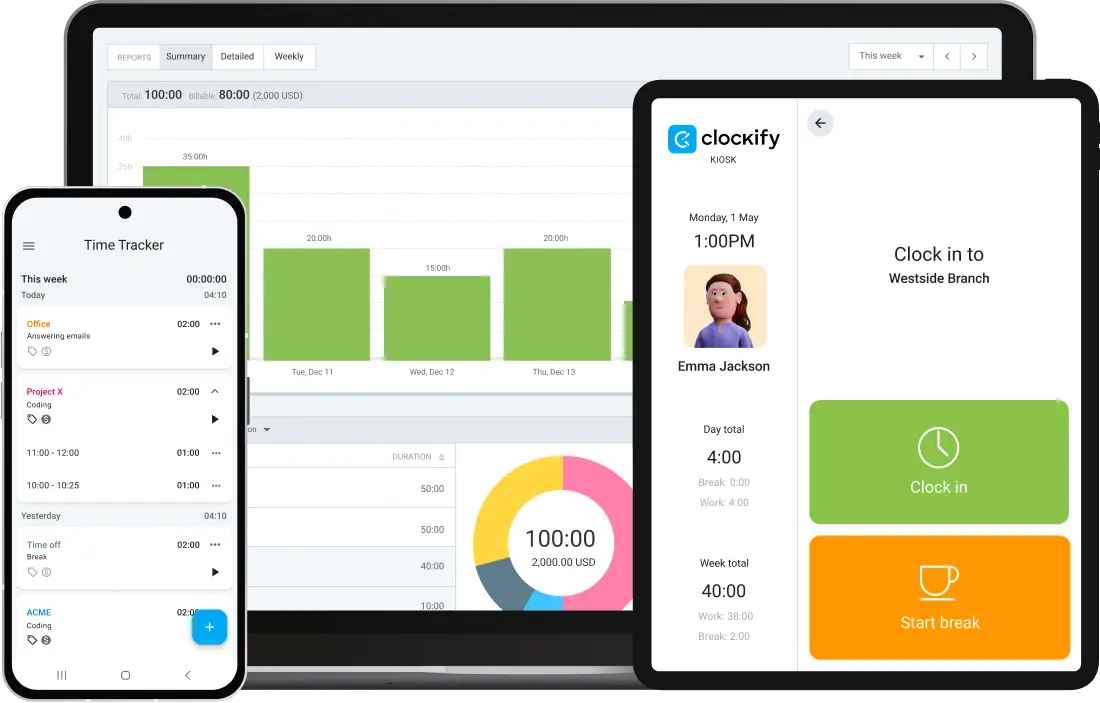
- Kiosk mode for teams clocking in and out on shared devices.
Clockify also supports GPS tracking for field-based employees, while keyboard shortcuts make tracking simpler. That breadth is what makes Clockify fit for diverse teams — for example, a remote developer, a field technician, and an office employee can all track time in the same workspace.
However, if your team dislikes complexity, that may be an important matter. Clockify has more features, which means more to configure. To cut the learning curve in half, bear in mind that you may qualify for a tailored onboarding as well.
Where Toggl Track’s UX simplicity beats Harvest and Clockify
Toggl Track’s interface is elegant, simple, and easy to use. You get:
- 1-click timer,
- Clean list and calendar view,
- Pomodoro timer and reminders,
- Keyboard shortcuts, and
- Desktop-based automatic time tracking.
The onboarding checklist makes the setup approachable even for teams that have never used a time tracker before.
However, the app doesn’t have GPS, Kiosk, or any team scheduling tools. For a solopreneur or a very small team, that’s fine. But for a growing team with mixed work locations, gaps start to emerge.
Where Harvest’s tracking falls short beyond billing basics
With Harvest, you can count on:
- Clean timer and manual entry,
- Mobile tracking,
- Weekly timesheet view, and
- Straightforward billable rates assignment.
The app does these things simple and well, with a minimalist interface.

However, there’s no idle detection, Kiosk, GPS, or Pomodoro timer. Time tracking in Harvest is essentially a means to an end — the end being an invoice. If you’re a freelancer logging hours to bill a client, that’s enough. If you’re managing a team and want operational visibility, you’re better off looking elsewhere.
💡 CLOCKIFY PRO TIP
If you want to better understand the importance and benefits of time tracking for your business, check out this article:
Reporting and analytics
Good reports turn time data into decisions. The gap between these 3 tools in reporting is significant, pricing included.
Where Clockify’s reporting depth beats Harvest at a lower price than Toggl
Clockify’s Reports feature covers summary, detailed, and weekly views. You can filter by team, client, project, task, tag, and status, then share reports via a public link or export as PDF, CSV, or Excel.
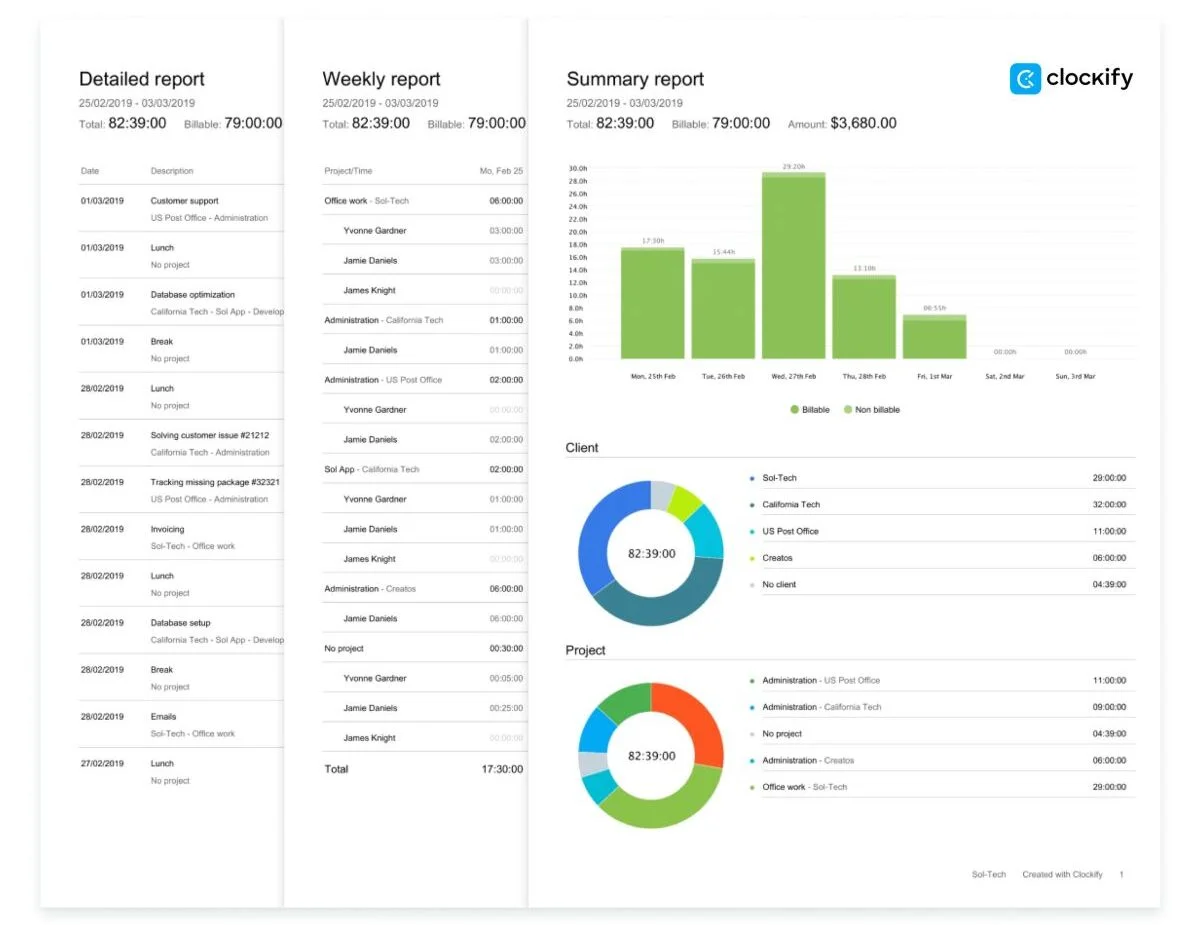
Time audits help catch incomplete or missing entries before they become a payroll problem. Additionally, you also have the option to create assignments, attendance, and expenses reports.
You get a dashboard for users, managers, and admins. It may not be customizable, but it’s functional — and considerably more affordable than Toggl’s prices.
Where Toggl’s advanced analytics come at a cost
Toggl Track’s reporting is genuinely impressive, thanks to:
- Custom analytics dashboards,
- Profitability and ROI reports, and
- Insights feature that shows trends across teams, projects, and clients.
The app lets you build charts, pivot tables, and graphs that you can then share with stakeholders.
The catch, however, is that a lot of it is locked behind the Premium plan at $18/user/month (when billed annually). If you need this level of reporting depth, such an investment may be worth it. But teams on a tighter budget will find that Clockify by CAKE.com delivers comparable visibility at a fraction of the cost.
Where Harvest reporting stops for non-billing use cases
Harvest lets you generate time and expense reports, filter them, and export them as CSV, PDF, or Excel. It’s clean, and it works — for billing.
If you need to analyze team performance, track project health beyond budget consumption, or spot productivity trends, Harvest’s reporting won’t get you there. It’s built for billing and not workforce analysis.

Project management and workforce features
This is where the comparison gets decisive for growing teams. One tool covers the full stack, while the other 2 stop at project budgets.
Where Clockify extends beyond time tracking into workforce management
Clockify is the only one of the 3 that covers the full workforce management stack:
- Project estimates, budgets, and forecasting,
- Budget alerts when spending approaches limits,
- Timesheet approvals for managers,
- Time off management (request, approve, and track remaining balance),
- Employee scheduling with drag-and-drop task assignment,
- GPS time tracking for teams in the field,
- Kiosk with PIN-based clock-in/out,
- Expense tracking,
- Labor cost tracking via cost rates, and
- Break mode.
If your team is growing past 10 people, or if you have a mix of remote and on-site employees, these features save a lot of manual work.
💡 CLOCKIFY PRO TIP
What happens when you suddenly find yourself in the predicament of not having enough staff to cover all the work? Learn more about it here:
Where Toggl and Harvest stop short on team management
Toggl Track has project estimates, team-level time tracking, and basic workforce reporting. But it lacks time-off management or employee scheduling, while timesheet approvals are locked behind Premium.
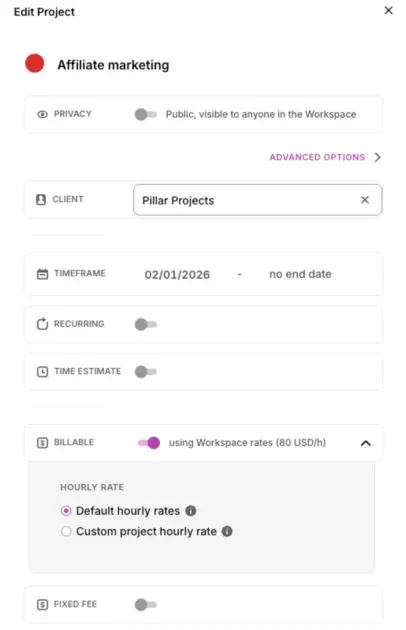
Harvest has project budgets tied to invoicing, but nothing beyond that — no time off, scheduling, or approvals.
So, if approvals, time off requests, or employee scheduling are on your list, neither Harvest nor Toggl covers them.
| Feature | Clockify by CAKE.com | Toggl Track | Harvest |
| Time off management | ✅ | ❌ | ❌ |
| Employee scheduling | ✅ | ❌ | ❌ |
| Timesheet approvals | ✅ | ✅ | ✅ |
| Expense tracking | ✅ | ❌ | ✅ (billing only) |
| Labor cost tracking | ✅ | ✅ | ❌ |
| Break tracking | ✅ | ✅ (Pomodoro only) | ❌ |
Expense tracking, labor costs, and breaks — what each tool covers
Clockify tracks expenses and labor costs independently of invoicing, giving you a fuller picture of project profitability.
Harvest tracks expenses, too, but only in the context of billing a client. As such, it’s not a standalone workforce cost tool.
Toggl Track doesn’t track expenses on its own — you’d need an integration to get that data into your reporting.
Invoicing and billing
All 3 tools generate invoices, but the experience (and what you can do with them) is very different. If billing is central to your workflow, this section matters most.
Where Harvest wins outright on native payment collection
Harvest wins this section. If collecting payment from clients is a core part of your workflow, no other tool here comes close. Thanks to its client billing portal, Harvest lets you:
- Generate professional invoices from tracked time and expenses,
- Send them via email,
- Set up recurring invoices, and
- Accept payment directly through Stripe or PayPal.
You can schedule automatic reminders when invoices go overdue. For a freelancer or billing-heavy agency, it’s a complete billing loop in one tool.
Where Clockify’s invoicing connects to the rest of your team data
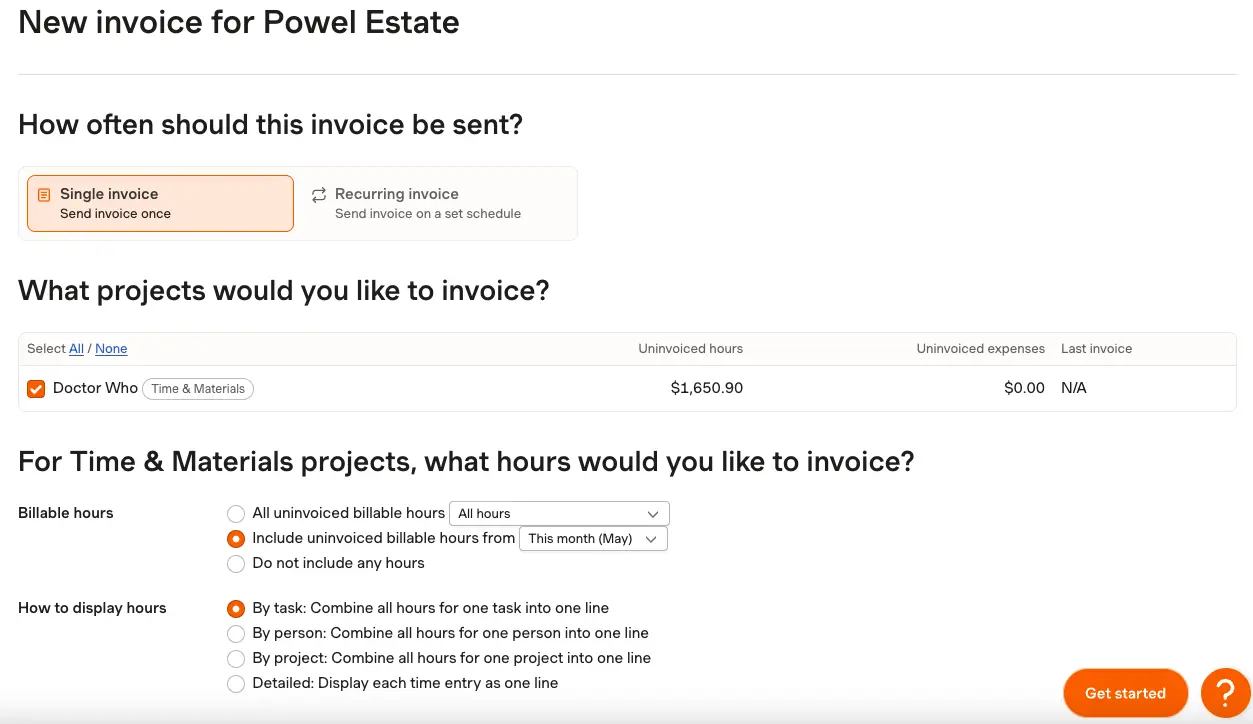
When comparing Clockify and Harvest on invoicing, the key difference is payment collection vs. integration depth. Clockify’s Invoicing connects to your tracked time, project budget management, expenses, and workforce data — everything in one platform. You can:
- Generate invoices from billable hours or expenses,
- Customize templates,
- Add taxes and discounts,
- Support multiple currencies, and
- Email invoices directly as PDFs.
Thanks to the QuickBooks integration, you can also send data to this app.
On the other hand, Clockify doesn’t accept payments natively. You’ll still need an external payment tool. In case you’re already using accounting software, that may not be a dealbreaker.
Where Toggl’s invoicing requires outside tools
Toggl Track offers basic invoice creation, but it’s tucked away in the Reports section. You can export to QuickBooks, Xero, or FreshBooks. As such, invoicing is not this app’s core strength.
If billing is important to you, Harvest or Clockify will serve you better.
💡 CLOCKIFY PRO TIP
Learn how to automate the invoicing process with Clockify, from billable hours tracking to getting paid faster:
Pricing: Which tool gives you the most before you pay more
Lower price doesn’t always mean fewer features. In this case, it’s actually quite the contrary.
| Plan | Clockify by CAKE.com | Toggl Track | Harvest |
| Free | Up to 5 users | Up to 5 users | 1 user, 2 projects |
| Entry paid | $3.99/user/month | $9/user/month | $9/user/month |
| Mid tier | $5.49/user/month | / | / |
| Top tier | $7.99/user/month | $18/user/month | / |
| Enterprise | $11.99/user/month | Custom | $14/user/month |
All 3 tools cap their free plans — Clockify and Toggl Track at 5 users with unlimited projects, and Harvest at 1 user with just 2 active projects. That said, Harvest’s free plan is effectively non-functional for a real business.
Toggl Track and Clockify are pretty much tied in terms of free-tier functionality. Still, Clockify provides 24/7 fully human customer support for users on the Free plan as well.
💡 CLOCKIFY PRO TIP
For a detailed guide on Clockify’s Free plan features, check out this article:
So, when does it make sense to pay? In terms of Clockify’s pricing, the Basic plan at just $3.99/user/month unlocks time audits, Kiosk, CSV/Excel report exports (PDF exports are free), and billable rates. The Standard plan at $5.49/user/month includes timesheet approvals, time-off management, and invoicing.
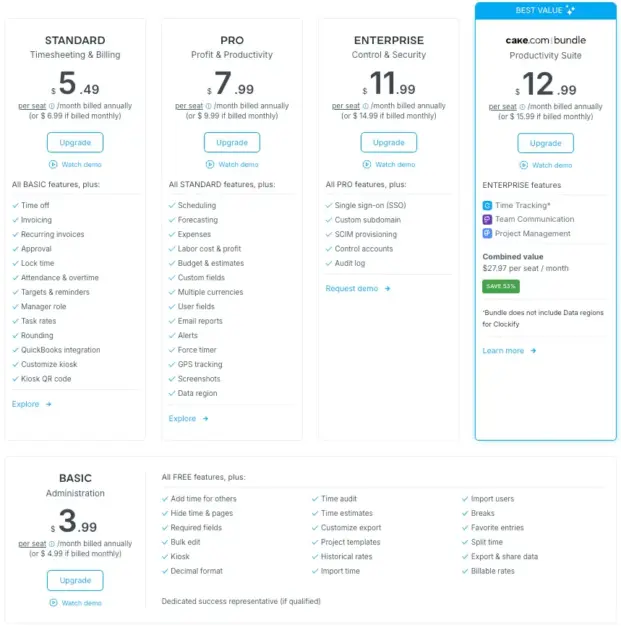
For Toggl Track, billable rates require the Starter plan at $9/user/month — essential for client work, but it adds up fast. The same is true of Harvest’s Teams plan. And for timesheet approvals, the price goes even higher ($18/user/month for Toggl Track and $14/user/month for Harvest), which can be rather expensive for larger teams.
When it comes to Harvest vs. Clockify for a solo freelancer or duo, Harvest’s flat pricing is easy to budget. For a team of 10+, the per-seat cost compounds quickly, and Clockify vs. Toggl becomes the more relevant comparison — where Clockify’s entry price (and even mid and top tier) is meaningfully lower while the feature set is broader.

What users are saying
While you can assess what a tool can do via feature lists, user reviews on G2 and Capterra can help put things in perspective in terms of day-to-day use.
About Clockify
Clockify consistently receives praise for its feature depth and value. On the other hand, some users note that the number of features can be overwhelming at first.
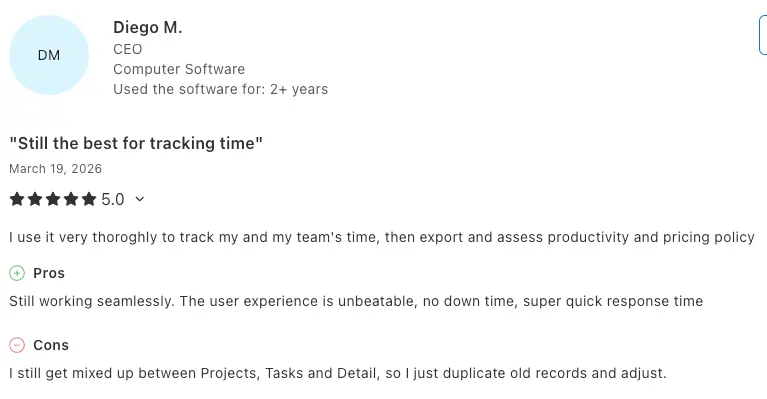
Diego M. left a Clockify user review on Capterra, saying that the tool is “still the best for tracking time”. The user reveals: “I use it very thoroughly to track my and my team’s time, then export and assess productivity and pricing policy.”
Clockify pros, according to this user: “Still working seamlessly. The user experience is unbeatable, no downtime, super quick response time.”
Clockify cons, according to this user: “I still get mixed up between Projects, Tasks, and Detail, so I just duplicate old records and adjust.”
About Toggl Track
Toggl Track earns strong reviews for its clean design and ease of use. The most common complaints are about pricing and slower customer support response times.
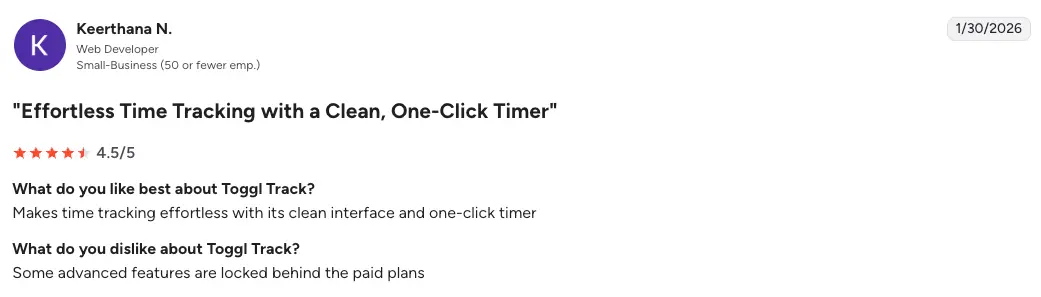
Keerthana N. left a Toggl Track user review on G2, claiming “effortless time tracking with a clean, one-click timer”.
What the user likes best about Toggl Track: “Makes time tracking effortless with its clean interface and one-click timer.”
What the user dislikes about Toggl Track: “Some advanced features are locked behind the paid plans.”
About Harvest
Harvest is well-regarded for its simplicity and invoicing workflow. Recurring complaints center on limited reporting and the barely usable free plan.
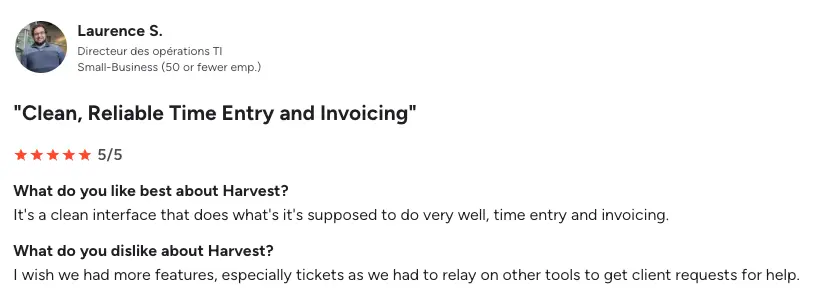
Laurence S. left a Harvest user review on G2, emphasizing “clean, reliable time entry and invoicing”.
What the user likes best about Harvest: “It’s a clean interface that does what it’s supposed to do very well, time entry and invoicing.”
What the user dislikes about Harvest: “I wish we had more features, especially tickets as we had to rely on other tools to get client requests for help.”
But is Clockify better than Toggl Track? For teams, yes — thanks to more features at a lower price. For individual users who prioritize a clean interface, Toggl Track’s UX edge is real.

Clockify vs. Toggl vs. Harvest — which one is right for you?
Here’s how to pick the ideal software for your business based on your situation.
Choose Clockify if you:
- Manage a growing team and need more than basic time tracking.
- Need time off requests, scheduling, or timesheet approvals.
- Have field employees who need GPS tracking or Kiosk clock-ins.
- Want time tracking, workforce management, and invoicing in one place.
As long as you format your data properly, migrating from Harvest to Clockify is quick and easy. The same goes for switching from Toggl to Clockify.
Choose Toggl Track if you:
- Are a solo consultant or part of a small team.
- Consider UX simplicity and fast onboarding as the top priority.
- Want automatic tracking without any monitoring and surveillance.
- Don’t need team scheduling, time off, or kiosk features.
Choose Harvest if you:
- Need invoicing before anything else.
- Run a billing-heavy freelance or agency operation.
- Want built-in client payment collection.
- Don’t need team management features beyond basic time and expense reporting.
Clockify, Toggl Track, and Harvest each occupy a distinct lane.
Harvest is a strong choice for freelancers who live and die by their invoices.
Toggl Track is an elegant option for small teams that value simplicity and trust-based work cultures.
Clockify covers the most ground (workforce management, deep reporting, and competitive pricing), making it the practical choice for growing teams who want one platform that scales with them.
If you’re not sure where to start, Clockify’s 7-day free trial lets you test all of the Pro plan features with no credit card required.
Clockify vs. Toggl vs. Harvest — FAQs
Find some quick answers to the most common questions about these time trackers in the following section.
Which is better, Clockify or Toggl?
Whether Clockify or Toggl is better for you and your business depends on your team size and needs. Clockify has more features at a lower price per user. Toggl Track wins on UX simplicity and automatic tracking.
For growing teams, Clockify is the stronger fit. For solo users or small teams who want a clean, no-fuss experience, Toggl Track holds its own.
Is Clockify worth it?
Yes, Clockify offers great value for money, as its paid plans are competitively priced and unlock features like invoicing, a timesheet approval workflow, and advanced reporting that most teams eventually need. Compared to Toggl and Harvest, you get more for less at every tier.
Is Toggl still free?
Yes, Toggl Track has a free plan that supports up to 5 users with unlimited time tracking, basic reporting, and 100+ integrations.
Is Clockify no longer free?
Clockify by CAKE.com offers a generous free plan with unlimited projects and time tracking for up to 5 users. This also includes detailed monthly reports with PDF exports, 100+ time tracking integrations, Pomodoro timer, Idle detection and Reminders, Team activity, and more.

How much does Clockify cost per month?
Here are the prices for Clockify’s paid plans for annual billing:
- Basic: $3.99/user/month
- Standard: $5.49/user/month
- Pro: $7.99/user/month
- Enterprise: $11.99/user/month
- Bundle (Clockify + Pumble + Plaky): $12.99/user/month
What is the best free time tracker?
For teams, Clockify offers the most capable free plan — up to 5 users, unlimited projects, and a solid feature set — with 24/7 fully human customer support. Toggl Track’s free plan is also strong, albeit without the same level of customer service. Harvest’s free plan is too limited for practical team use.
Who are the competitors of the Harvest app?
Harvest’s main competitors are Clockify and Toggl Track for time tracking, and FreshBooks and QuickBooks for billing and invoicing.
Is Harvest better than Clockify for invoicing?
Yes, Harvest is better than Clockify for invoicing in one specific area — payment collection. Harvest lets you accept payments directly via Stripe or PayPal, which Clockify doesn’t support natively. For everything else — invoice customization, connection to project and workforce data, multi-currency support — Clockify’s invoicing is more integrated.
If collecting payment in-app matters to you, Harvest wins. If you use external accounting software anyway, Clockify covers the rest.
Does Clockify have invoicing?
Yes, Clockify has a dedicated invoicing feature that pulls tracked time and expenses, supports custom templates, taxes, discounts, and multiple currencies, and lets you email invoices directly to clients as PDFs. It also integrates with QuickBooks. The one thing it doesn’t do is accept payments natively — for that, you’d pair it with a payment tool or accounting software.
How we reviewed this post: Our writers & editors monitor the posts and update them when new information becomes available, to keep them fresh and relevant.