Somewhere between your last Harvest renewal and the most recent one, the bill stopped matching the pricing page. That’s the story behind most searches for Harvest pricing right now.
Here’s a quick answer to why: Harvest pricing plans show a per-seat rate, but that’s only the base. On top of it, Harvest started charging usage-based fees once your account passes a set number of projects, tasks, invoices, or clients.
This guide breaks down how Harvest app pricing works and how it compares to Clockify’s transparent, predictable pricing.
- Harvest has a Free plan and 3 paid tiers: Teams (from $9/seat/month annual), Enterprise (from $14/seat/month annual), and Enterprise Plus (custom).
- Harvest’s per-seat price is a base rate; it also has usage fees (Unlimited and Flex packages) for invoices, projects, clients, tasks, and invoiced amount after you exceed the limit.
- Harvest doesn’t publish its usage fee rates. Users don’t know their real bill until they check their account or receive an email from Harvest.
- Some teams have reported renewal bills several times higher than their previous year, tied to the new usage layer.
- Harvest remains strong on invoicing, payment collection, simplicity, and integrations. The tradeoff is cost predictability.
- Clockify’s plans stay flat per seat with no usage fees. Teams switching from Harvest get an extended 30-day trial and free migration support; they just need to contact sales@clockify.me and explicitly state they’re moving from Harvest.
How Harvest pricing works in 2026
Harvest software pricing now has 2 layers: A per-seat base rate tied to your plan and usage-based fees that apply once your account passes a set allowance.
Harvest pricing plans and per-seat rates
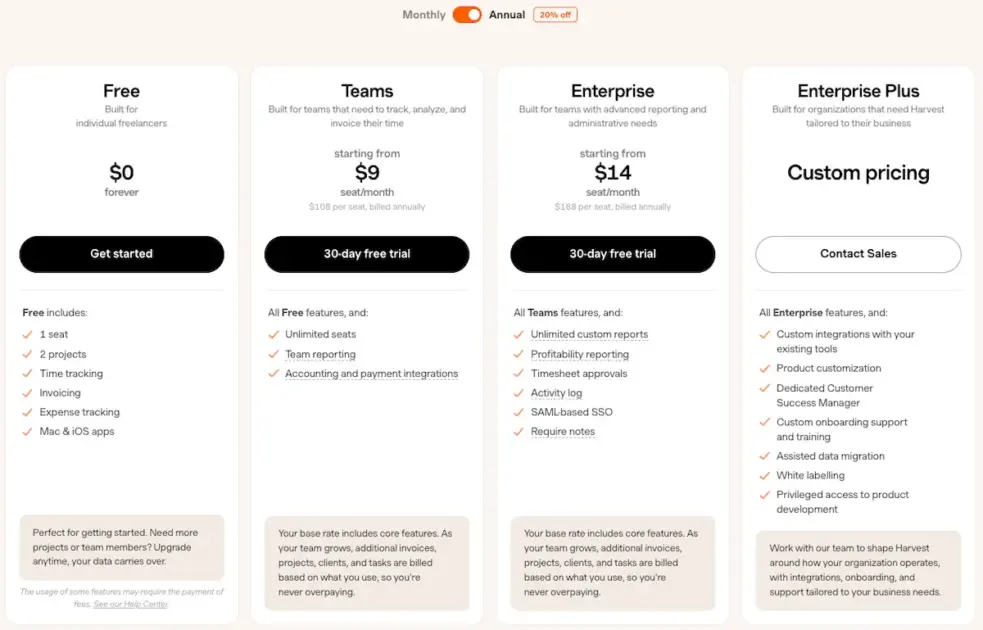
Harvest offers 4 tiers:
- Free plan is for individual freelancers and includes 1 seat and 2 projects, plus time tracking, invoicing, and expense tracking.
- Teams plan adds unlimited seats, team reporting, and accounting/payment integrations with tools like QuickBooks Online, Xero, and Stripe.
- Enterprise plan adds unlimited custom reports, profitability reporting, timesheet approvals, an activity log, and SAML-based SSO.
- Enterprise Plus plan adds custom integrations with existing tools, a dedicated customer success manager, assisted data migration, and more.
| Plan | Price (billed annually) | Price (billed monthly) | Built for |
|---|---|---|---|
| Free | $0 | $0 | Individual freelancers, 1 seat, 2 projects |
| Teams | From $9/seat/month | From $11/seat/month | Teams tracking, analyzing, and invoicing time |
| Enterprise | From $14/seat/month | From $17.50/seat/month | Teams needing advanced reporting and admin controls |
| Enterprise Plus | Custom | Custom | Organizations needing custom integrations and dedicated support |
Harvest usage-based fees, explained
Harvest also introduced 2 usage-billing packages — Unlimited and Flex. This is the part that most people miss when they scan the Harvest pricing page.
Your per-seat rate covers a base allowance of core usage. Once your team creates more invoices, projects, clients, or tasks than that allowance covers, Harvest bills you extra for the overage.
Harvest doesn’t list these per-unit rates publicly. You have to check your account or wait for a renewal notice to see the real number.
Unlimited usage billing
Even though usage pricing isn’t available on the Harvest website, some users have shared their experience with the new pricing on Reddit.
According to the user mr_smith1983’s Reddit post, their original charge of $180 for 15 seats on the old Pro plan (retired Legacy pricing) would increase to $2,162.50 a month (with a discount) when moved to the new Enterprise plan with Unlimited usage package. They shared their renewal email; screenshot below.
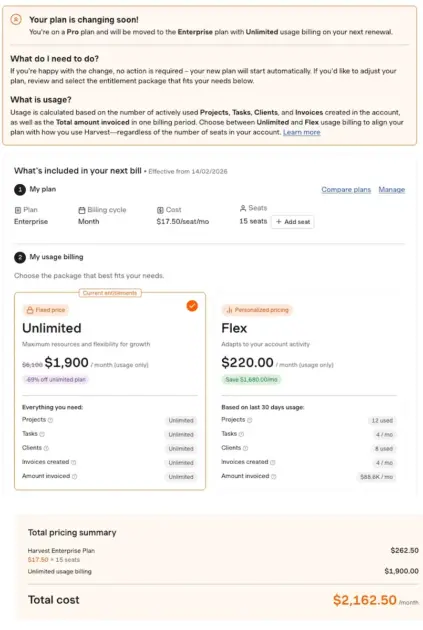
The cost of the Unlimited package is fixed and currently discounted. For the Reddit user who shared their email, that discount comes to a fixed $1,900 a month, which is added to the price for the chosen per-seat plan, as shown in the screenshot above ($1,900 + $17.50 x 15 seats = $2,162.50/month). We can’t be certain whether this discount is the same for everyone or user-specific.
Flex usage billing
On the other hand, users can opt for Flex usage billing, which changes every month depending on the company’s account activity. That amount would also be added to the price for the chosen per-seat plan.
According to another Reddit user, each category of Flex usage charges separately, and it stacks. This user shared a screenshot of the Flex pricing in this Reddit thread, which you can see below.
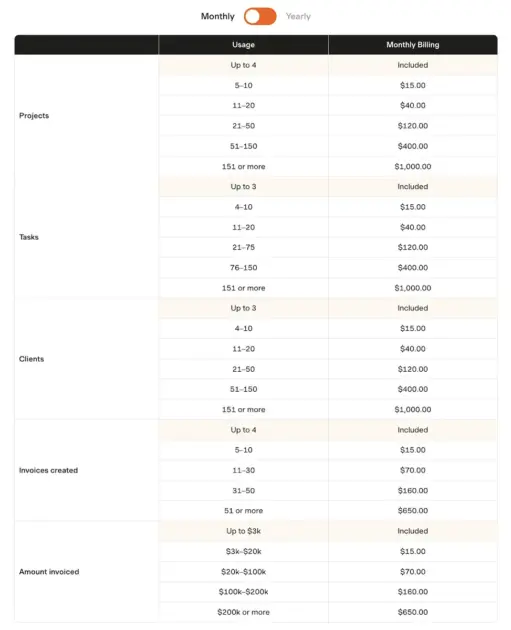
According to the screenshot, the monthly usage that won’t warrant additional charges to your base per-seat price is limited to:
- Up to 4 projects
- Up to 3 tasks
- Up to 3 clients
- Up to 4 invoices
- Up to $3,000 amount invoiced
That’s the mechanic behind the renewal shocks people have been reporting. A growing team naturally creates more projects, adds more clients, and sends more invoices over time, and each of those additions can add to the bill.
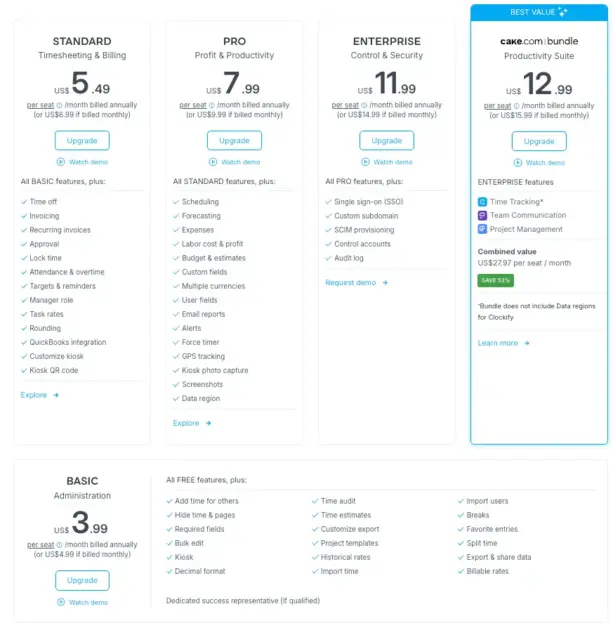
Cost transparency can be a crucial factor when choosing the right software. With Clockify by CAKE.com, what you see on the pricing page is what you pay for. All Clockify’s paid tiers are priced per user, with a 20% annual billing discount and no unexpected usage fees.
An example of what Harvest actually costs
For this example, we’ll use an 8-person marketing agency on the Teams plan with a Flex usage package, billed annually.
Base seat cost: 8 seats x $9/seat/month x 12 months = $864/year
That’s the number on the pricing page. But it’s not the number that will show up on your bill if your account passes its included allowance of invoices, projects, clients, and tasks.
Let’s say that your marketing agency has 10 clients, with 10 projects for each client. Each client project has 3 tasks. And you create 10 invoices a month.
Keep in mind that we won’t account for the amount invoiced, but if it’s more than $3,000 a month, that will be charged, too.
Here’s the bill for the Flex usage package:
- 10 clients = $15
- 10 projects = $15
- 3 tasks x 10 projects = 30 tasks = $120
- 10 invoices = $15
Usage cost: $165/month or $1,980/year (assuming you won’t have more of any category the entire time and your monthly invoiced amount won’t go over $3K)
The annual price: Base seat cost ($864/year) + Usage cost ($1,980/year) = $2,844/year
Now, if you don’t want to deal with the unpredictable Flex usage package and opt for the Unlimited one (we’ll use the $1,900/month discounted flat fee), your annual price would be: Base seat cost ($864/year) + Usage cost ($22,800/year) = $23,664/year.
If your agency prefers Harvest’s Enterprise base plan instead of Teams, the charges would go up by $480 — so $3,324 a year with the Flex usage package or $24,144 a year with the Unlimited usage package.
How much could you save by switching from Harvest to Clockify?
The usage fees make Harvest’s real cost hard to predict, which isn’t easy to justify when other apps offer flat, transparent pricing.
User | Harvest Teams + Flex | Harvest Teams + Unlimited | Harvest Enterprise + Flex | Harvest Enterprise + Unlimited | Clockify Standard | Clockify Pro | Clockify Enterprise |
|---|---|---|---|---|---|---|---|
| 8-people marketing agency | $2,844/year (subject to change on a month-to-month basis) | $23,664/year | $3,324/year (subject to change on a month-to-month basis) | $24,144/year | $527.04/year | $767.04/year | $1,151.04/year |
The Harvest pricing with included usage fees above is illustrative, built from the reported renewal cases mentioned earlier, not a guaranteed figure. That unpredictability is exactly the point. On Clockify, the number of user seats is the number on your bill, whether your team logs 10 projects a month or 100.
Even on Clockify’s most expensive plan (Enterprise), you’d still save about 60% compared to Harvest’s cheapest paid plan paired with the unpredictable Flex usage package. With the Harvest Unlimited package added to the comparison, Clockify costs 95% less.
For more detailed feature and plans comparison, as well as the migration guide, read Clockify vs. Harvest: Key Differences & How To Switch →
Why Harvest got more expensive: The Bending Spoons acquisition
Harvest launched in 2006 and was built by Iridesco. Bending Spoons acquired the company in 2025.
Bending Spoons is an Italian technology company with a specific playbook. It acquires established apps it considers underperforming, then reworks their pricing, features, and operations.
The usage-fee model added to Harvest in 2026 follows the same pattern users have reported after other Bending Spoons acquisitions, including Evernote and WeTransfer.
This doesn’t make Harvest a bad product. It means the per-seat number on the pricing page no longer determines your bill.
Is there a free version of Harvest?
Yes, Harvest has a Free plan that includes 1 seat and 2 projects, with time tracking, invoicing, and expense tracking.
The Harvest Free plan is built for a single freelancer, not a team. The moment you need a 2nd seat or a 3rd project, you’re into paid territory. Also, the free tier doesn’t show you how usage fees will behave once you scale.
Small teams looking for a free time tracking app may have better luck with Clockify → Clockify Free Plan Features, Explained

Is Harvest worth it in 2026? An honest look
Now, let’s weigh what Harvest still gets right against what the new pricing makes harder to justify, gathered from G2 reviews and the Harvest subreddit.
What Harvest does well:
- Invoicing that converts tracked time and expenses into a polished invoice automatically, without manual line-item entry.
- A simple, uncluttered interface that new team members pick up quickly.
- A wide integration list, including QuickBooks, Xero, Stripe, Slack, and Asana.
What’s harder to defend at 2026 prices:
- Cost unpredictability: Your bill depends on usage fees you can’t see until you’re already billed.
- No retainer tracking: Agencies managing monthly client retainers still need a workaround outside Harvest.
- No native project management: Boards, task lists, and timelines all need a separate tool.
- Limited advanced reporting depth: This complaint predates the 2026 pricing change.
For a solo freelancer or a very small team with not that many clients or projects, none of this changes much. For a growing team watching usage climb, however, the calculus is different. You’re paying more for the same core workflow, with less certainty about what the next renewal will look like.
💡 CLOCKIFY PRO TIP
For more in-depth information about Harvest and its features, check out our honest review article:
The predictable alternative: Clockify by CAKE.com
If the appeal of Harvest was simplicity, a predictable bill should be part of that promise. That’s where Clockify’s pricing works differently.
For starters, Clockify’s Free plan supports up to 5 users, with unlimited time tracking — no cap on projects, tasks, or clients, and no usage-based fees layered on top.
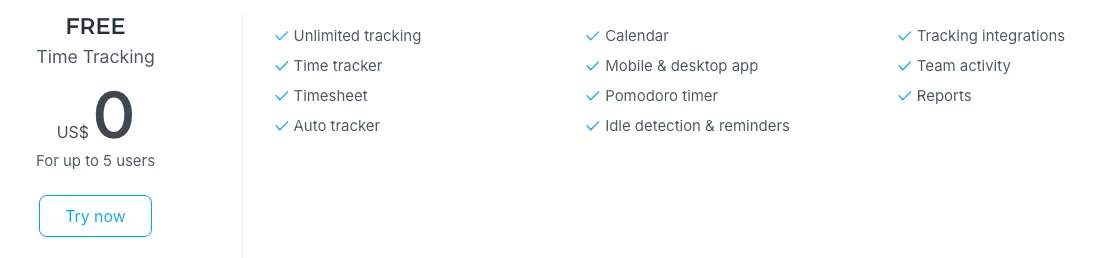
Paid plans move to a flat per-seat rate that doesn’t change based on how many projects you run, clients you bill, or invoices you send. That’s what we mean by transparent, predictable pricing.
To be direct about the one place that Harvest and Clockify diverge:
- Harvest’s invoicing is deeply built into its core workflow, generating invoices straight from tracked time with very little manual setup.
- Harvest has native payment collection.
Clockify handles invoicing through its own Invoicing feature, built for hourly and fixed-fee billing, but has no native payment option. It’s worth checking whether this matches your exact workflow before you commit.
💡 CLOCKIFY PRO TIP
Turn your approved, billable Clockify time and expenses into a polished PDF in one click with the Contractor Invoice Generator add-on, available on CAKE.com Marketplace:
Here’s where Clockify and Harvest match, making Clockify a good Harvest alternative:
- A clean, easy-to-learn interface
- Straightforward time tracking
- Integrations with the common accounting and project tools
You get that without wondering what a busier month does to your bill.
Try an affordable Harvest alternative
Switching from Harvest to Clockify? Here’s what’s included
Moving tools is a real project, so if you’re coming from Harvest, Clockify includes a few things to make the transition less painful:
- 30-day extended free trial for teams switching from Harvest. To claim your 30-day trial extension, contact sales@clockify.me (or fill out this form) and explicitly state that you’re switching from Harvest.
- Straightforward import process. Bringing over your projects, clients, and time entries from Harvest is designed to be simple, and you can test it yourself during the trial. Here’s the step-by-step guide to migrating from Harvest to Clockify.
- Tailored sales demo, walked through with your team’s specific setup in mind.
- Tailored success onboarding for paid plans, so your team won’t be figuring out the new tool alone.
- 24/7 human support through live chat, email, or phone, at every plan tier (on all plans).
Move your Harvest data to Clockify
Harvest pricing in 2026 FAQs
Here are quick answers to common questions people have before deciding whether to stay on Harvest or switch.
How much does Harvest cost per month?
Harvest’s Teams plan starts at $9 per seat per month billed annually, or $11 per seat per month billed monthly. The Enterprise plan starts at $14 per seat per month billed annually, or $17.50 per seat per month billed monthly. Usage-based fees for invoices, projects, clients, and tasks can apply on top of these base rates.
Is there a free version of Harvest?
Yes, Harvest’s Free plan costs $0 and includes 1 seat and 2 projects, with time tracking, invoicing, and expense tracking.
What is Harvest Pro?
Harvest Pro plan is one of the old Harvest plans (so-called Legacy pricing) that is no longer available. The software’s current paid tiers are Teams and Enterprise, alongside the custom-priced Enterprise Plus tier.
Is Harvest invoicing free?
Invoicing is included on every Harvest plan, including the Free tier. The Free plan is limited to 1 seat and 2 projects. Other usage limits apply as well.
Is the Harvest app good for small businesses?
For a small team with straightforward time tracking and invoicing needs, Harvest still works well. The consideration is cost predictability as the team and its usage grow, since the bill isn’t fixed to seat count alone.
What is the alternative to the Harvest app?
Clockify is a direct Harvest alternative with a free plan for unlimited time tracking and flat per-seat paid plans with no usage-based fees. Other alternatives include Toggl Track and QuickBooks Time, depending on whether the priority is simplicity, resource planning, or accounting integration.
💡 CLOCKIFY PRO TIP
Read the software comparison to understand which tool fits the needs of your team the best:
Is the Harvest app legit?
Yes, Harvest is an established, functional time tracking and invoicing product now owned by Bending Spoons. The pricing model changed in 2026, but the product itself remains actively maintained and widely used.
What happened to Harvest after the Bending Spoons acquisition?
Bending Spoons acquired Harvest in 2025 and introduced usage-based fees on top of the existing per-seat pricing in 2026. As a result, some customers have reported renewal bills significantly higher than the previous year.
Does Clockify offer anything for teams switching from Harvest?
Yes, teams moving from Harvest get an extended 30-day free trial with Clockify, a guided import process for existing data, a tailored sales demo, and tailored onboarding once on a paid plan. To claim the extended trial, reach out to sales@clockify.me and let our team know that you are migrating from Harvest.
How we reviewed this post: Our writers & editors monitor the posts and update them when new information becomes available, to keep them fresh and relevant.