

Alex Beadon
Founder of Together We Launch
"We use Clockify to see where our time is going and how to solve any problems. It’s just so beneficial."
More stories

Find new apps that fit you team's needs
You’re sick of nagging employees for unlogged work and underestimating your services. So, you try complex apps that give everyone a hard time — instead of hard data on over-serviced clients.
Now you’re researching Toggl Track reviews, unsure whether it’s really a simple time tracker with reliable performance stats.
Find out in my Toggl Track review, where I test the app’s capabilities and assess whether it enables fast adoption and provides rich reporting.
Toggl Track is a business management app that offers time tracking, project management, reporting, and invoicing.
In this review, I tested and rated Toggl Track’s features on a scale of 1 to 5. But before you move on to my in-app experience, here’s a list of the main pros and cons of Toggl Track:
| Pros | Cons |
| ✅ 30-day trial with unlocked Premium features | ❌ Overpriced plans (compared to competitors) |
| ✅ Forever-free plan | ❌ Confusing role-based permissions |
| ✅ Interactive tutorial in the form of a to-do list | ❌ No switching between admin and user view |
| ✅ Chat and email support | ❌ No phone support |
| ✅ Automated time tracking | ❌ No insights into staff timesheets until submission |
| ✅ Pomodoro tracker | ❌ Users can manage their own 2FA settings |
| ✅ Billable and project rates | ❌ Tricky reporting filters |
| ✅ Payroll integration | ❌ Tracking budget estimates not supported |
| ✅ Project forecasting based on estimated time and rates | ❌ Invoicing done within reports |
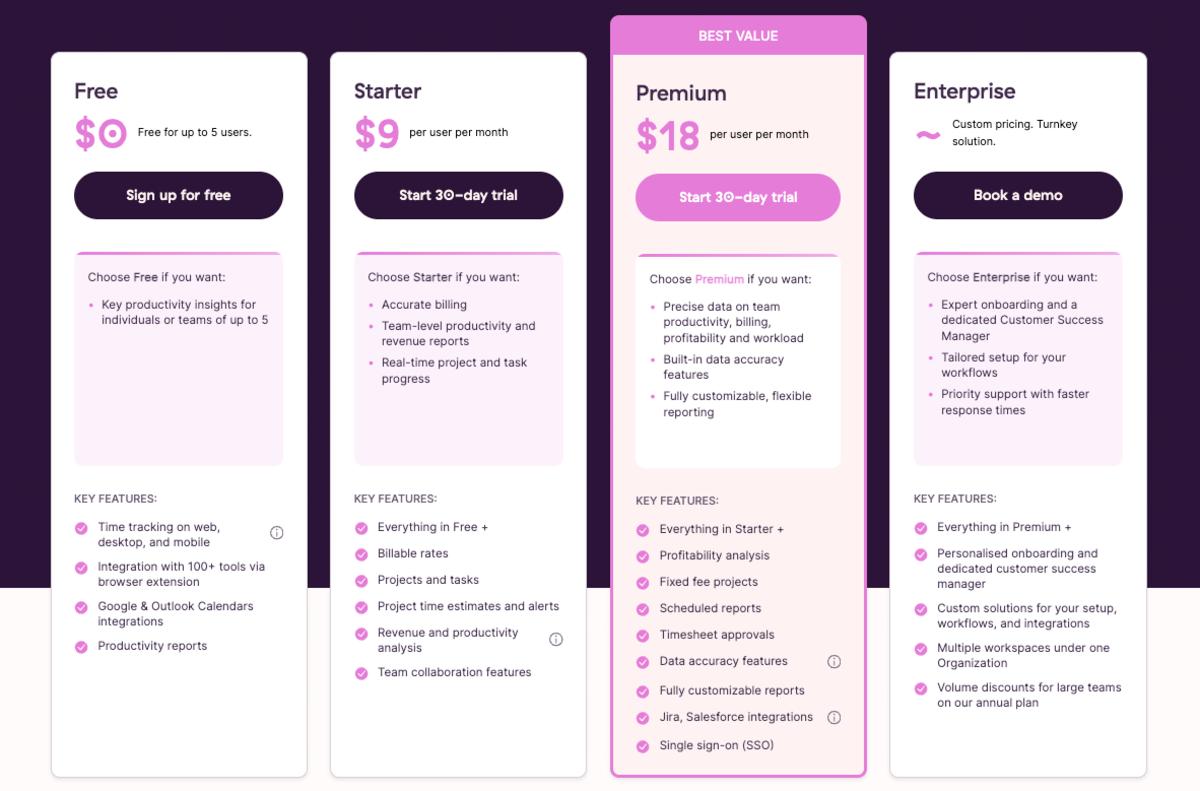
Toggl Track’s pricing is pretty transparent, with a 10% discount on annual plans. Even more useful is their 30-day trial, which includes access to all Premium features. This gave me ample time to learn the basics at a relaxed pace.
However, I was taken aback by the price list when I looked into each plan’s contents. You can choose among 4 plans:
🎓 Project Billing: Guide to Accurate and Efficient Invoicing
After a quick setup in my browser, Toggl Track opens to a clean interface. The left-hand sidebar neatly sorts all features by their intended purpose: Track, Analyze, and Manage.
By default, Toggl Track greets you with the Overview, the first feature on the side menu. It shows a weekly summary of time tracked and team activity. What I found especially rewarding was the checklist onboarding guide — I could easily organize my workspace by checking off boxes.
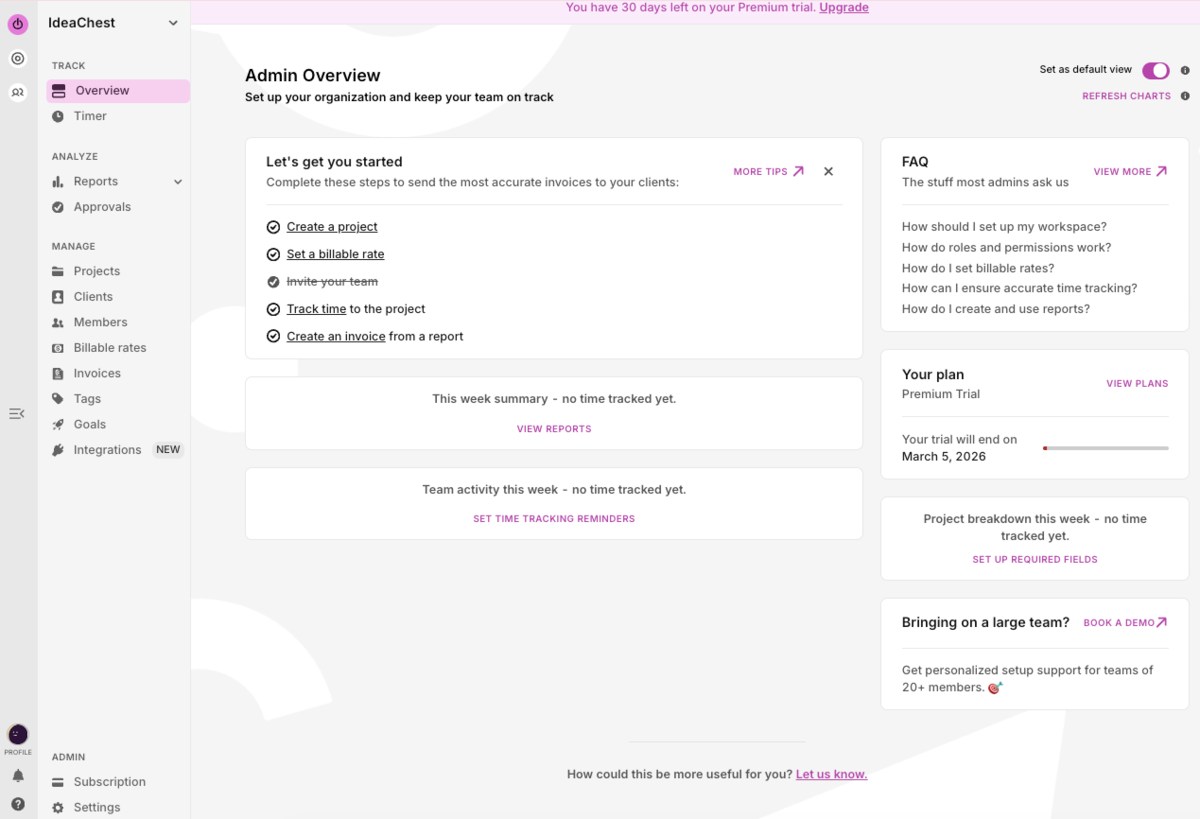
Yet, the 3 icons next to the side panel puzzled me. I soon realized these were separate tools that work together — Toggl Track, Toggl Focus, and Toggl Work. Personally, a dropdown menu for switching tools would be less confusing for newbies. (For comparison, Clockify by CAKE.com already delivers on that).
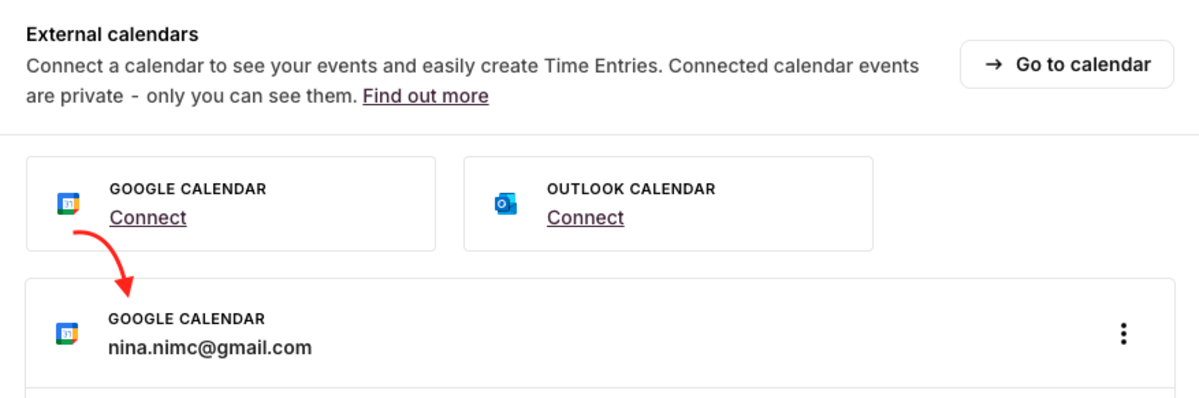
During sign-up, Toggl Track offered flexible options — like creating projects right away or connecting my Google Calendar. After the integration, the web app wouldn’t load the next step. Confused, I clicked on “No, thanks” to continue.
Later, I found that the calendar integration was successful in my profile settings. So… was it a glitch? No idea, but it didn’t work properly.
Surprisingly, you can’t toggle between user and admin views in Toggl Track. I had to create a mock account to confirm what my employees can see. For me, this workaround felt impractical and raised concerns about invading employee privacy.
Overall, simplicity is what Toggl Track is all about — and I agree. However, I suspect that defining roles would be daunting for less techy managers. The toolkit display could also annoy staff who take longer to adapt.
🎓 Employees Don’t Like Time Tracking? It’s Probably Your Fault
To ensure client trust, Toggl Track stays compliant with industry protocols, like TLC data encryption, SOC 2 Type 1, and ISO 27001. The platform also adheres to the EU’s GDPR rules and US privacy laws.
For extra data protection, you can set permissions in Toggl Track for admins or everyone else. Deciding who can see staff activity and create projects or clients helped me build a safe workspace.
Yet, I would’ve appreciated a more tiered approach to roles. Team leaders should have more flexibility than team members but less than admins. After all, I don’t want them deleting projects and clients without my say-so.
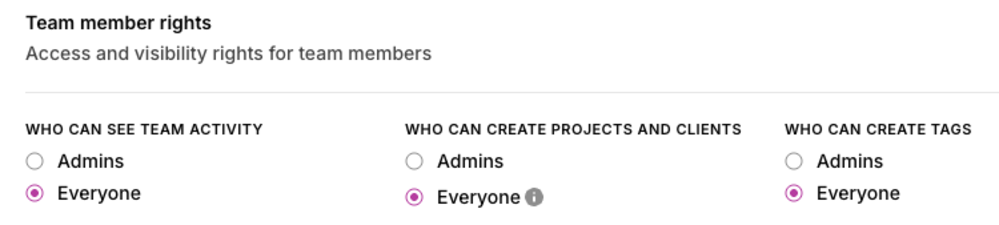
During my Toggl Track review, I could assign more specific access rights for different people on the Admin Console. But getting there meant clicking through Subscriptions -> Members. Frankly, this feature felt tucked away.
Toggl Track also provides Single Sign-On for safe access to all Toggl tools with 1 set of credentials. Since I’m only interested in Toggl Track, this feature is nice-to-have but irrelevant.
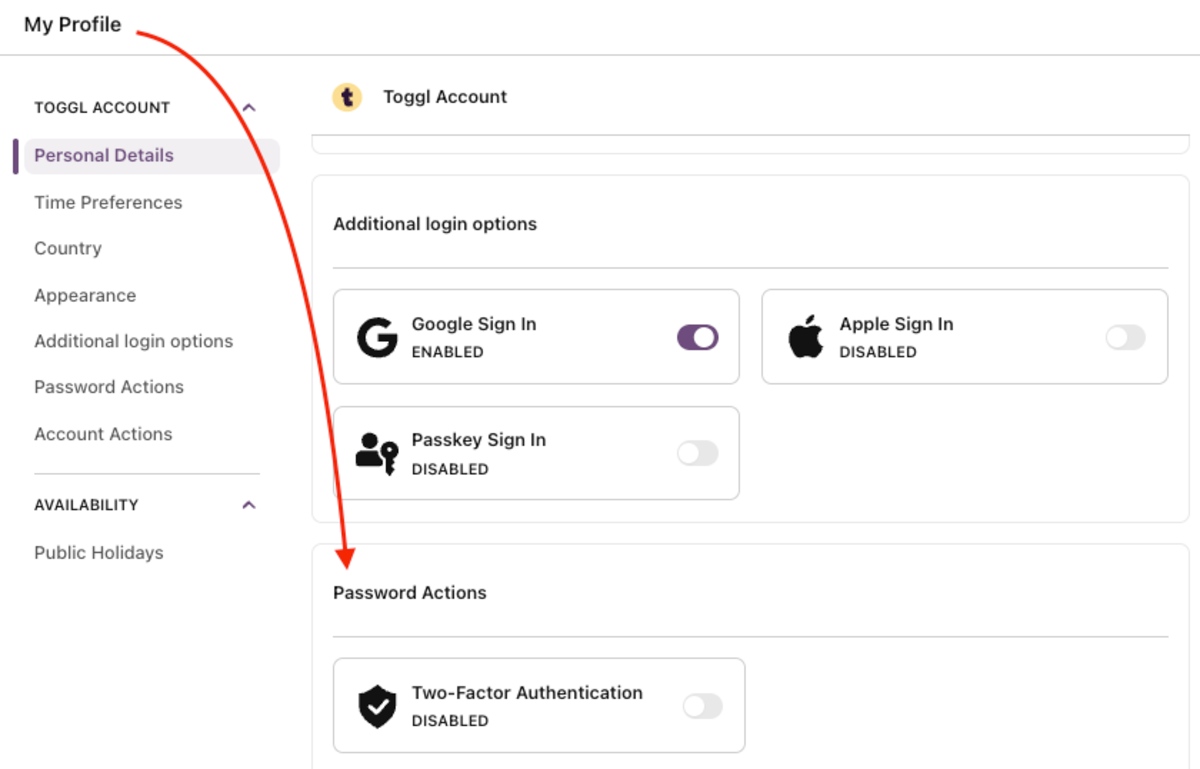
More importantly, the app offers two-factor authentication. But, even as the workspace owner, I couldn’t enforce 2FA for everyone, just myself. I felt uneasy relying on others — especially when I could make 2FA mandatory in Clockify by CAKE.com
No GPS location tracking also concerned me. In my opinion, having transparent data on employee movements during work hours could increase team accountability — especially in remote settings.
Overall, the app’s compliance with global timekeeping laws meant I could trust it with company data. But I had no control over the 2FA setup across my workspace, nor any insight into employee movements. This put me on edge.
🎓 DCAA-Compliant Timekeeping — Definition, Requirements, and Tips
On the website, Toggl Track’s Help Center provides insightful how-to articles and an FAQ section. To my delight, I could also use the FAQ section in the app for faster troubleshooting.
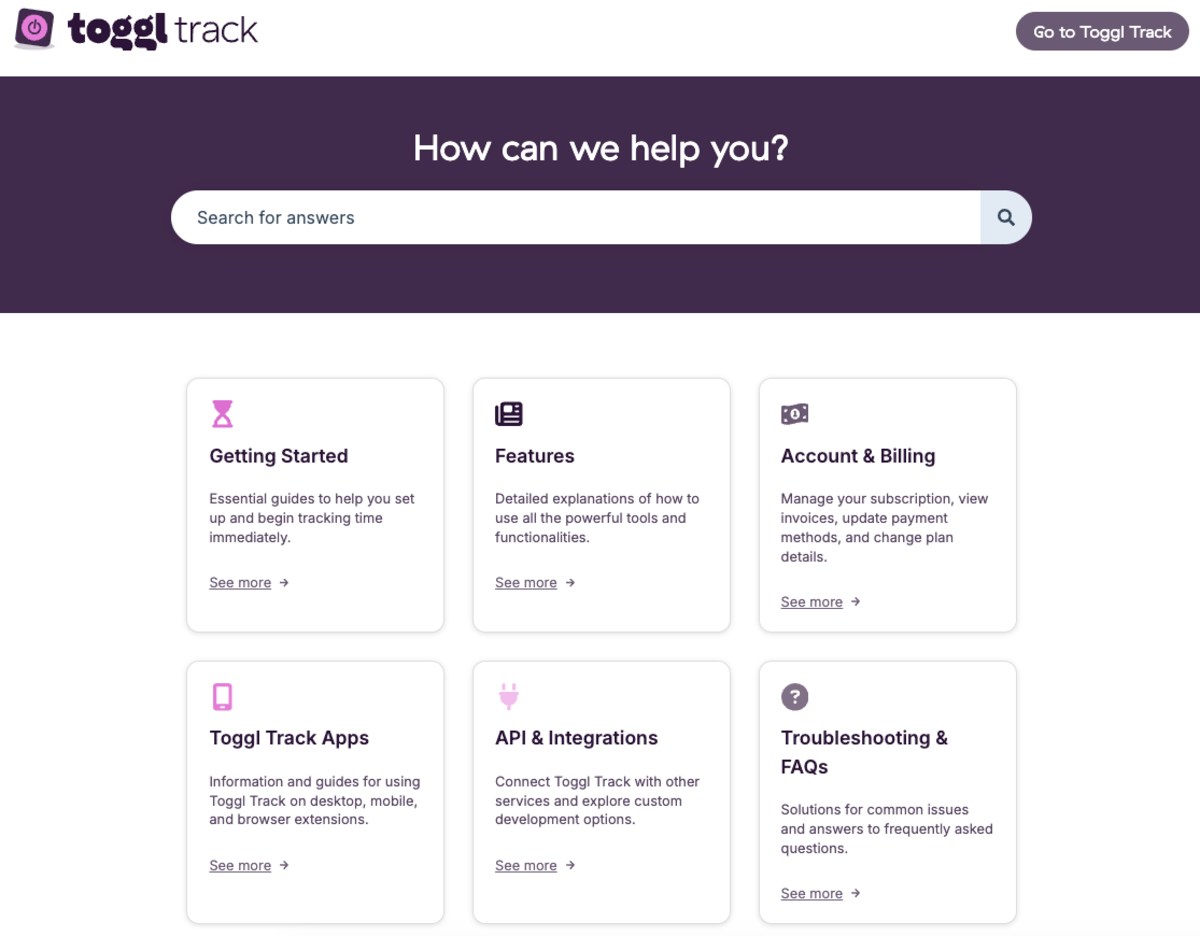
Commendably, the app offers a built-in chat and responses within 24 hours. Attaching files like screenshots helped me communicate my issues more directly.
Also, Toggl Track’s support claims their average response time via chat is 1 hour — but my experience was different. I contacted them on a random Wednesday afternoon. The message “We typically reply within a day” immediately popped up — a worrisome sign.
Their support agent responded after 4 hours, when I was already off work. What’s more, I didn’t get notified — just opened the chat out of curiosity. My guess is that managers looking for a user–friendly time tracker would expect the same from its customer support.
The support team is also reportedly available via email. Ironically, I couldn’t find said email on the website, so I had to consult the painfully slow chat. Meanwhile, phone support isn’t provided.
To summarize, Toggl Track’s chat failed to provide timely assistance, which delayed my learning and, worse, my work. With no other alternative, I felt trapped and helpless. In stark contrast, Clockify by CAKE.com respects your time by offering 24-7 support via chat, email, and phone
Toggl Track is generally praised for its user-friendly design and automated time tracking.
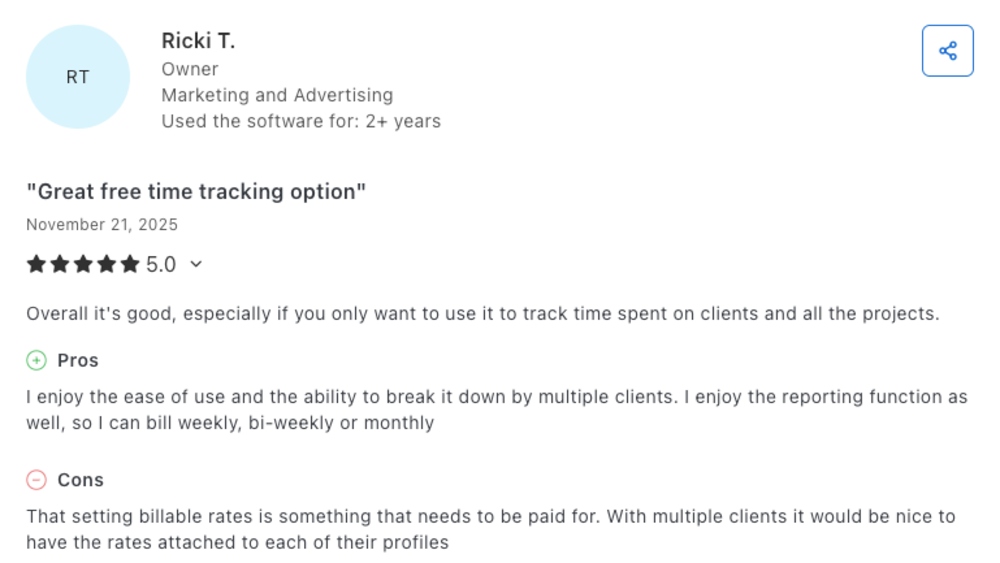
That said, some noteworthy complaints echoed my own concerns. Take their slow customer service, for example. It seems that even long-standing users receive the same treatment — see the complaint below.
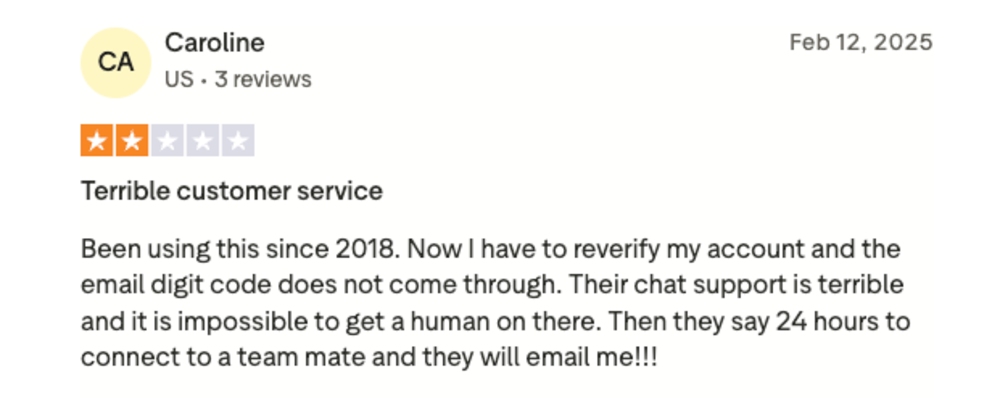
While many celebrate Toggl Track’s simplicity, others complain about its unintuitive layout for non-technical users and high prices. I can understand their concerns since the app promises a smooth team adoption.
Even stellar reviews had remarks about how Toggl Track works. For example, a longtime customer described billable rates as impractical and costly. In fact, they require an annual subscription at $9/month — a bit excessive, if you ask me.
Here are the overall customer ratings from prominent review sites:
If we factor in all 3 scores, Toggl Track gets an average rating of 3.9 based on all customer reviews.
P.S. Trustpilot has fewer Toggl Track reviews than G2 and Capterra, resulting in a starkly lower overall score.
Now, let’s cover the core Toggl Track features to see how Toggl Track really works. The feature scores (1-5) are based on how their pros and cons fare in comparison.
Toggl Track’s Timer, the second feature in the sidebar, made logging activities with one click easy for me. I enjoyed categorizing time entries by project, tag, and billable status.
Setting required fields in the admin settings controls how time entries are created. Great for keeping personal and agency time tracking tidy, I thought. Sadly, this too is a Premium feature.
Toggl Track’s Chrome extension tracks time across tabs — too bad there’s no manual mode. It also comes with the Pomodoro timer, which seems to be the only way to track breaks in Toggl Track.
In the web app, you can toggle modes for viewing time entries, like:
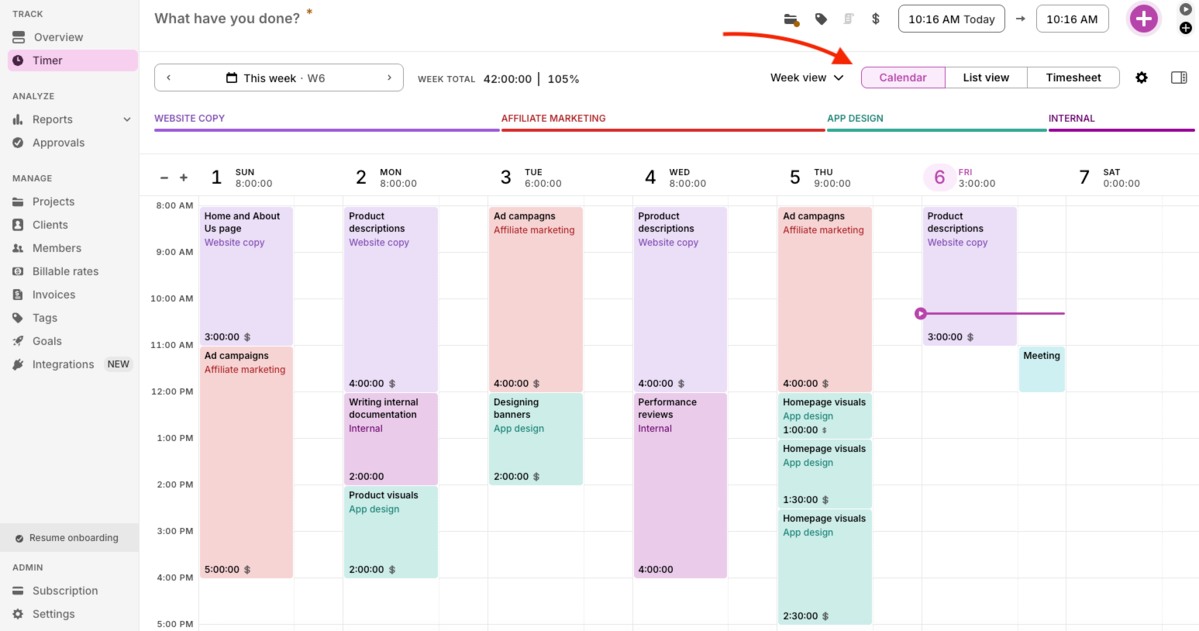
I liked using the Calendar as a color-coded, interactive planner for my project activities. The List view is more practical for editing time entries. Meanwhile, the Timesheet felt too simple, listing only my total hours per project over the week.
During my Toggl Track review, I noticed some time-tracking limitations. The app shows Google Calendar events and converts them into time entries. But you have to create them manually if you’ve enabled the required fields — as I did.
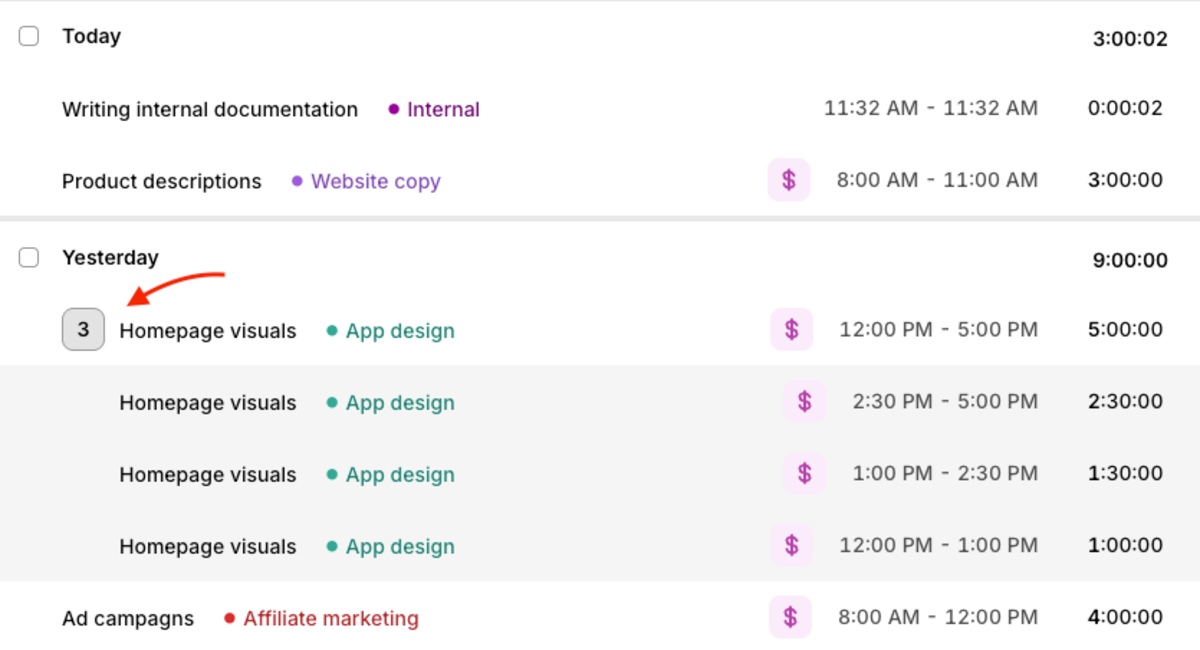
When I continue timing a task, Toggl Track creates a separate time entry. With no way to merge entries, I ended up with a cluttered List view.
Surprisingly, I could only set people’s weekly hours. So, I was never notified if someone exceeded their daily capacity. Missing extra hours could violate labor laws, which is too risky for me.
Toggl Track’s desktop app stores personal tracked time across programs and websites on your computer. This may appeal to privacy-conscious businesses, but it also limits monitoring insights for managers. For instance, tracking remote staff locations with GPS would’ve helped me spot inefficiencies — something competitors like Clockify by CAKE.com already offer.
🎓 Overtime Laws by State — Comprehensive Guide for 2025
Tracking projects is straightforward in the web app. The Projects tab — listed first under the Manage section — is a handy toolkit for project management. In the project settings, I could:
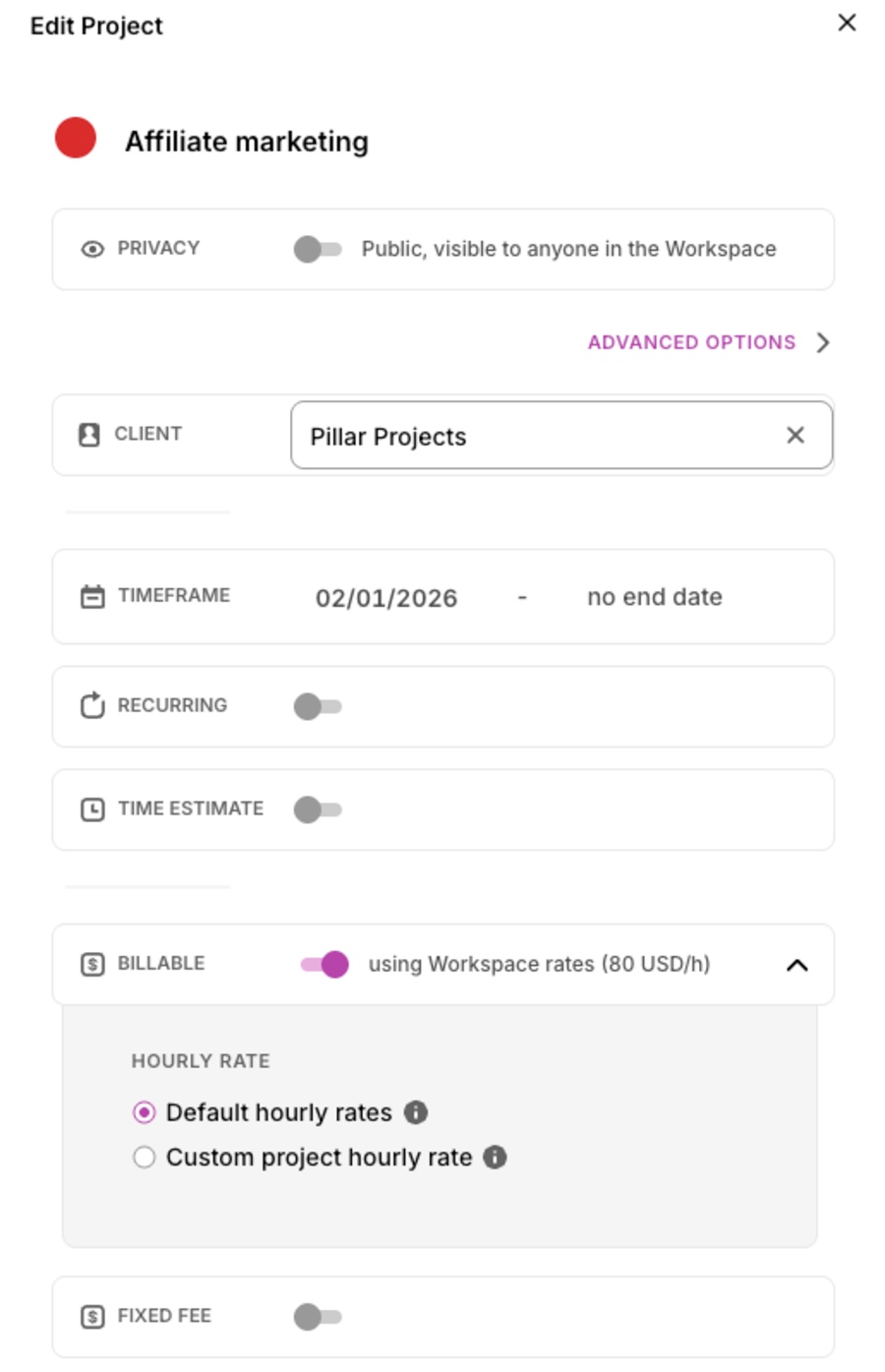
In Toggl Track, creating clients is done in the Clients section. From there, you can attach them to projects, which then applies to all project-related time entries. Neat addition, I thought.
Back in the project setup, I tried assigning users… and failed. According to Toggl Track’s page on managing projects, you should make them private and then add members — but no such option exists. Unable to delegate projects, I left them accessible to everyone, which made me feel powerless and insecure as to who could access which information.
Later, I discovered I could assign users to project tasks, a relief that made me wonder why not both?
On the bright side, Toggl Track forecasts project progress based on time estimates. It also offers project budget tracking using billable and cost rates to make predictions. I only wish I could set a budget estimate to avoid cost overruns.
While monitoring progress, I experienced some serious glitching. My Projects page would load certain billable projects without their billable amounts — even after refreshing multiple times. This made me panic for a full minute.
For a team of 50, Toggl Track charges $900 per month for full-scale project planning (billed annually). Here’s how it fares against competitor prices:
| User count | Toggl Track (Premium) | Harvest (Teams) | Clockify (Pro) |
| 50 users | 900$ | $450 | $399.5 |
My takeaway: Toggl Track provides key project management tools, except for budget estimation. Incorrectly loaded data also made me question the app’s reliability.
Toggl Track uses your team’s time to create custom reports on productivity and profitability. The Overview tab is useful for real-time insights into:
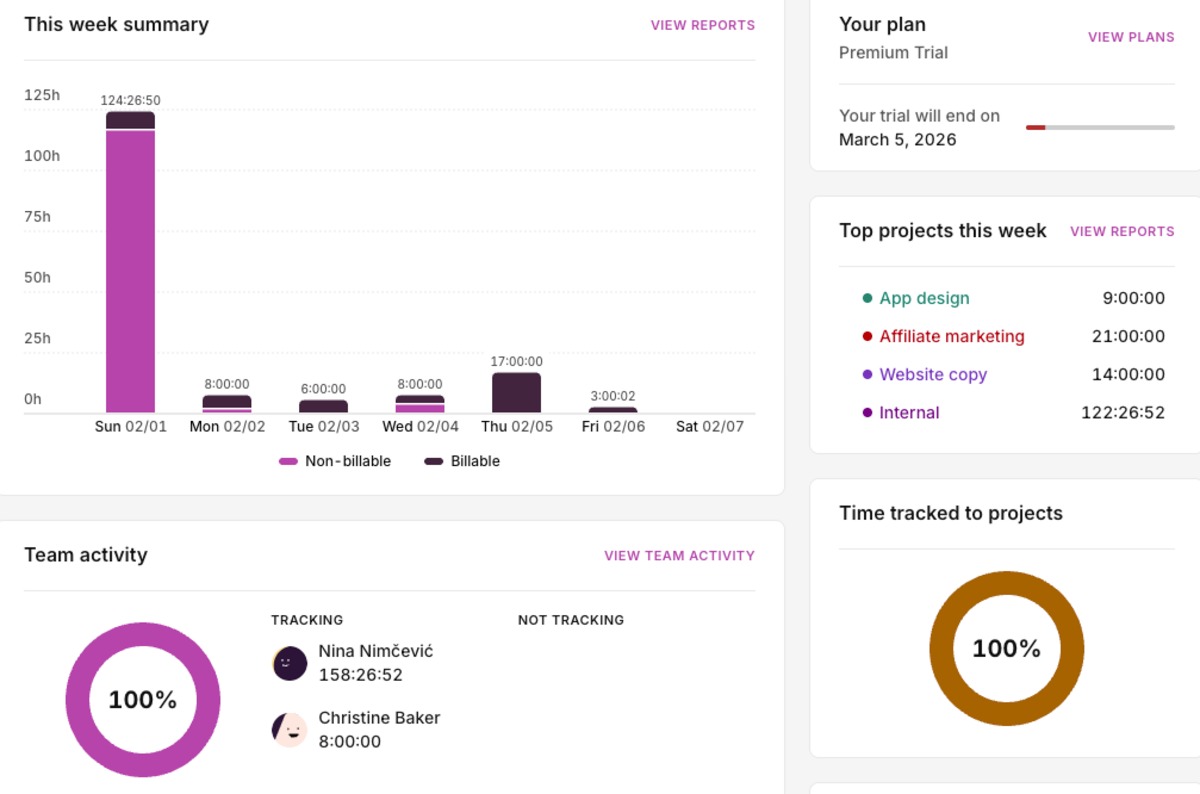
However, I couldn’t set a custom date range. Instead, I had to consult the reports for past insights. A pointless effort, if you ask me.
The Reports tab is where deep business analysis happens. It neatly shows total, daily, and paid hours, along with the total payable amount. Depending on your interests, you can choose between 4 report types:
I could tailor reports with ample yet tricky filters. To filter by description or task, I had to search time entries based on keywords — which made spotting lucrative activities hard.
The Detailed report provided in-depth time insights, but no separate column for profits. To me, this felt like an oversight — especially when some competitors list time entry details along with earnings.
So, I moved on to the Profitability report. It helped me plan project budgets during the free trial. But here’s my concern — it could strain my budget over the long term, since this report is on the Premium plan.
An option called My reports allowed me to create reports from scratch and save them. This meant I had full control over what I wanted to share with staff and clients.
Overall, Toggl Track’s reporting features provide deep, personalized insights into various business areas. Yet, I was annoyed by the knotty filtering.
Frankly, the Invoices tab has a backwards way of working. I was prompted to create my invoice in Reports and then come back to see it. Next came another confusing discovery — I couldn’t open or edit the invoice in the Invoices section; I could only download it as a PDF.
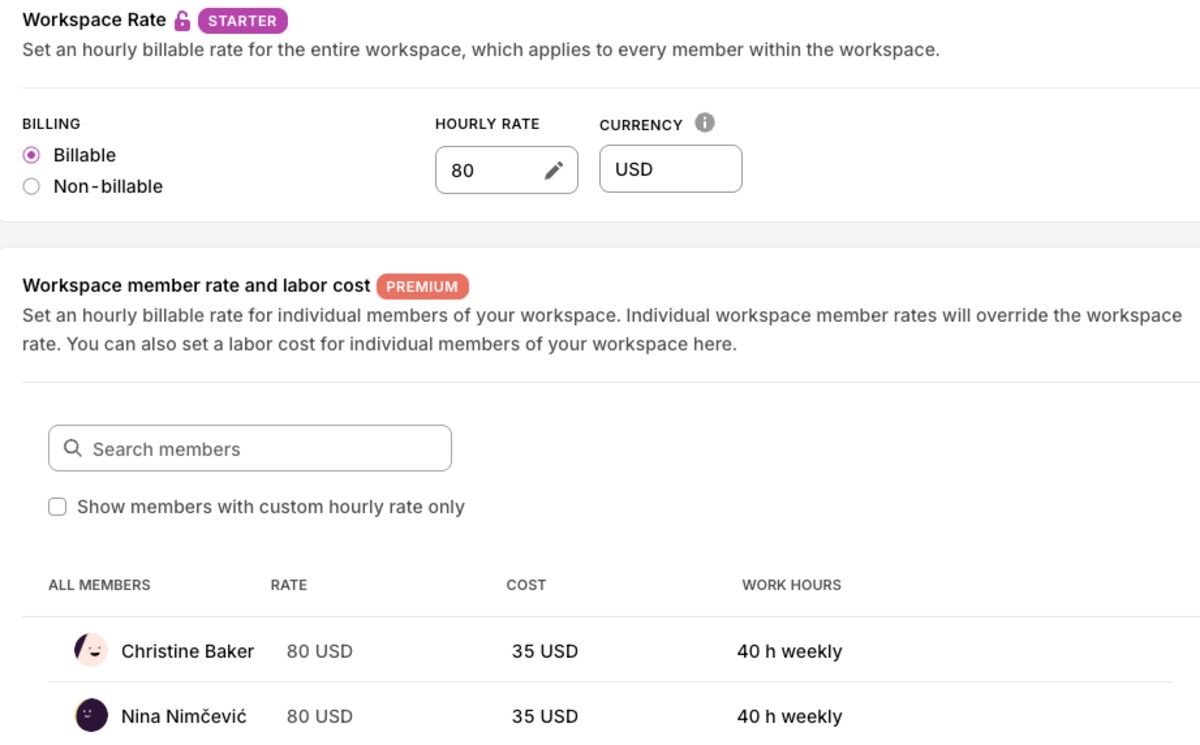
While reviewing Toggl Track’s invoicing, I discovered the option to define labor costs — a welcome addition. I only wish I could bulk-select users to assign the same rates at once.
Applying a workspace rate overrides all custom rates. However, all rate settings are hidden behind costly plans, which can be a deal breaker for budget control. Ironic, if you ask me.
Additionally, locking time entries seemed ideal for accurate billing to me. But this option doesn’t just prevent changes on old entries — it also blocks anyone from logging time up to a specific date. So, it only disrupted everyone’s timekeeping and gave me a headache.
For me, creating invoices in Toggl Track seemed simple in theory, yet confusing in practice. The app also lacked basic options, which made things harder for me.
🎓 Simplify Billing and Automate Client Invoicing With Clockify
As part of my Toggl Track review, I tested the app for payroll solutions. Essentially, managers have 2 options:
Yet, I noticed a few glaring issues.
First, you can’t see or edit employee timesheets until their submission. So, I had to dig through reports to make real-time changes — a tough chore. This workaround also increased the risk of error, as well as my stress levels.
Surprisingly, I couldn’t edit submitted timesheets; I could only request employees to re-edit and resubmit them. The same applied to my own timesheet. This felt like a pointless waste of time. Am I not the workspace owner (and assigned approver, by the way)?
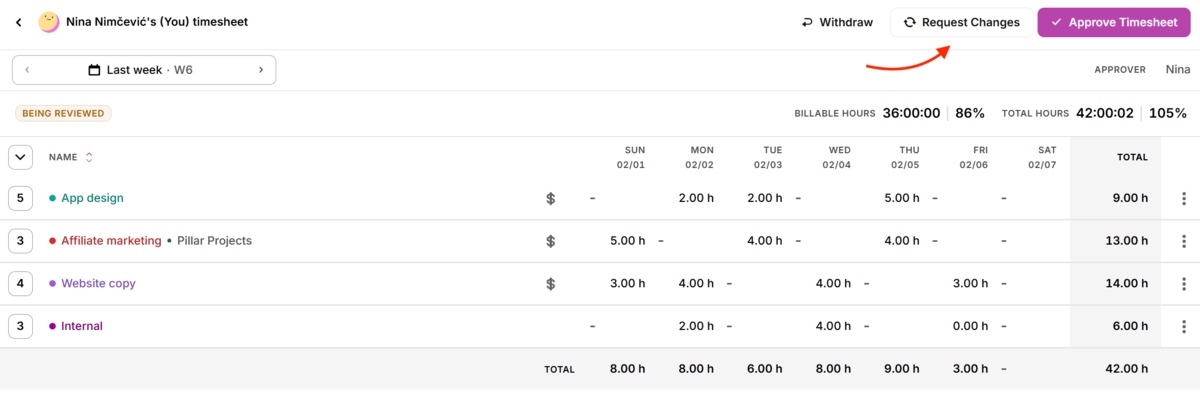
Once timesheets are approved, you can view them in reports for last-minute fixes and export. The report layout impressed me. Still, I would’ve appreciated separate columns for the billable rates to speed up payroll calculations.
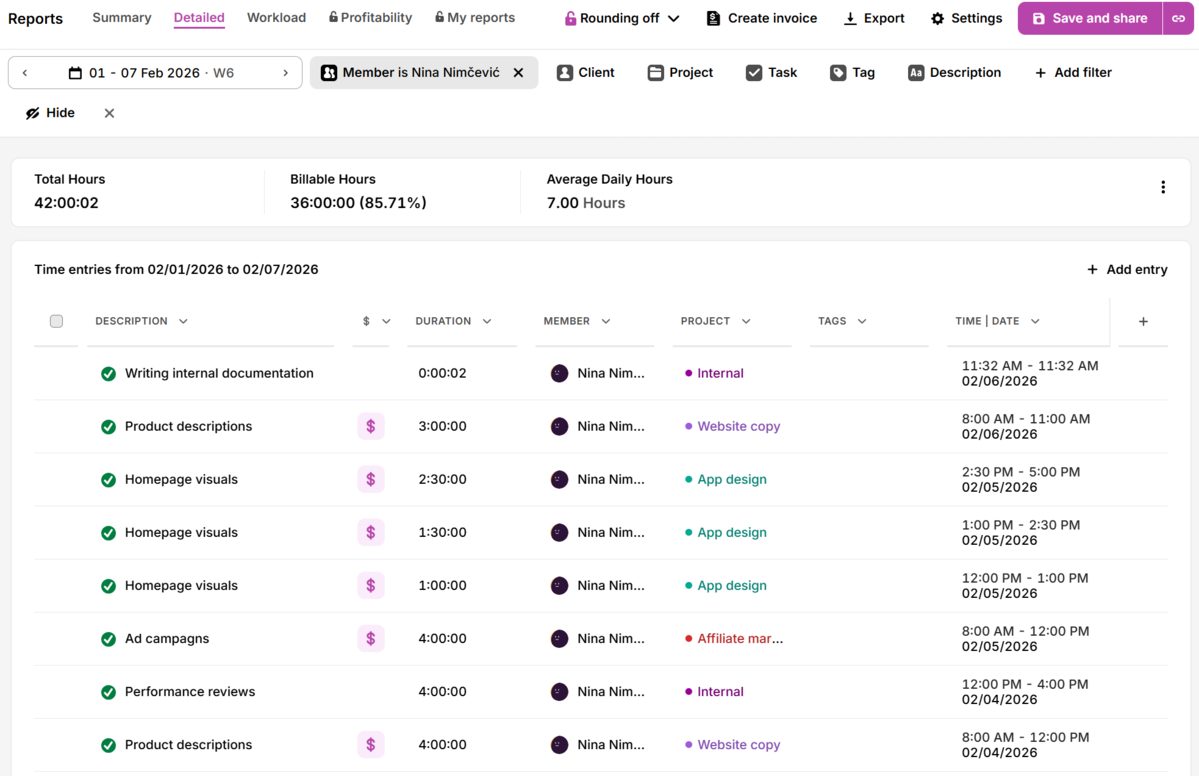
As you can see above, overtime hours aren’t flagged, only counted as part of the total hours. Looking at this report, I could easily overlook my employee’s overtime and face legal trouble. This had me triple-checking amounts.
To automate staff payments, Toggl Track offers only 1 integration — with QuickBooks. I imagine that many managers would reluctantly go back to manually running payroll in spreadsheets. After all, I neither expected nor intended to spend extra for a QuickBooks account.
Additionally, both payroll options are hidden behind a paywall. QuickBooks integration is included in the Starter plan while timesheet approvals are a Premium feature.
For me, tracking payroll in Toggl Track was manageable yet restrictive — causing a lot of gruntwork and lost time. Plus, key options are annoyingly locked in expensive plans.
🎓 A Guide to Overtime Pay + Free Overtime Calculator
Toggl Track connects with 100+ apps, but it’s not so cut and dry. In truth, Toggl Track offers only 9 native integrations (direct app-to-app syncing), including the 6 apps below and 3 external calendars.
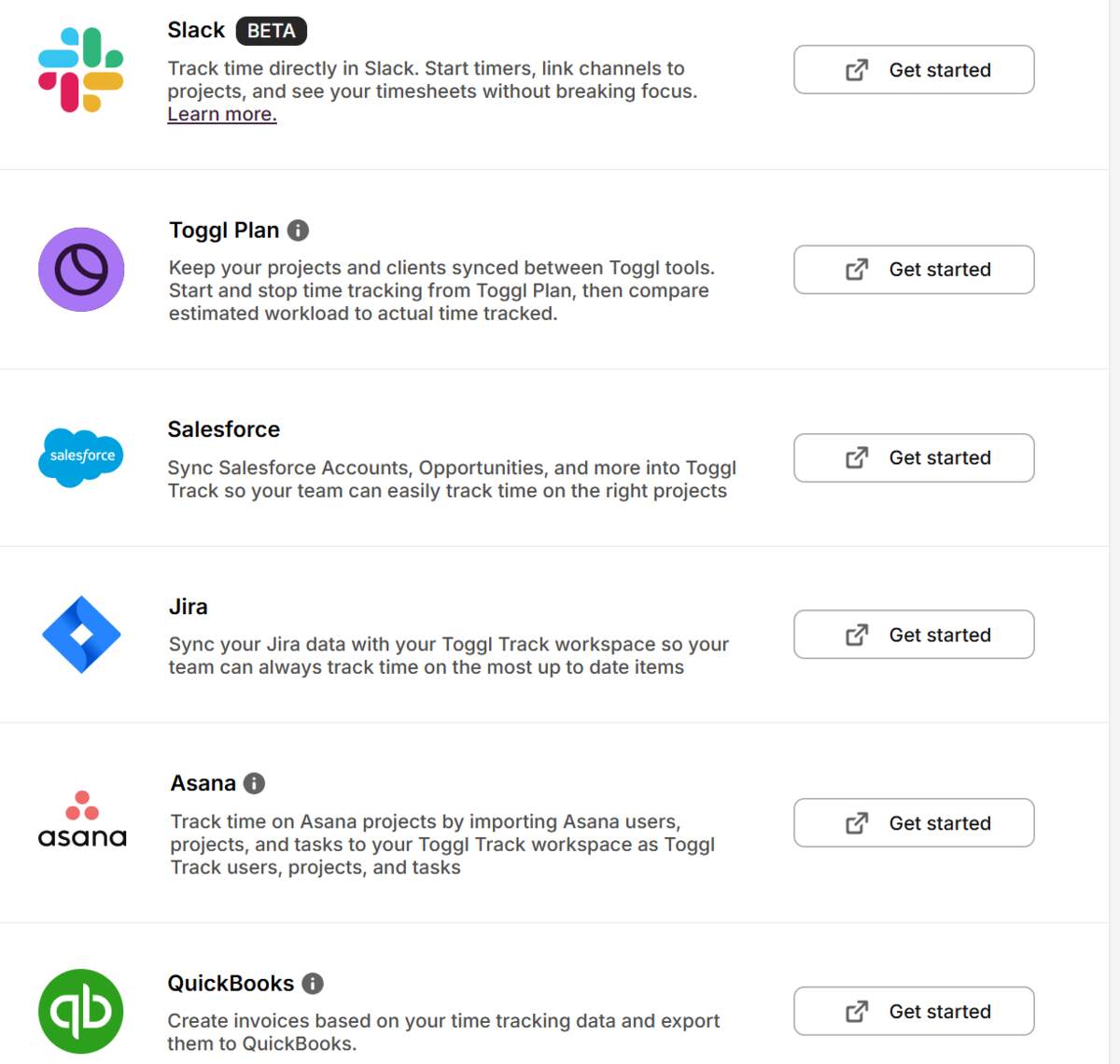
The rest are browser extensions that support time tracking inside other platforms, but don’t fully automate it.
Toggl Track’s integrations page neatly sorts its available connections by category:
While reviewing Toggl Track, I noticed the app only syncs with 1 communication app — Slack. On top of that, it’s only available in beta mode. Most managers would’ve probably liked more communication options to pair with Toggl Track.
Interestingly, the app offers integrations built by its users. However, they aren’t tested or endorsed by Toggl Track. To me, this means third-party integrations aren’t 100% safe, so why make them public?
—
Now, let’s calculate the overall rating for the Toggl Track browser app.
| Toggl Track web app | Rating |
| Time tracking | 3.5/5 |
| Project management | 3.5/5 |
| Reporting | 4/5 |
| Invoicing | 3/5 |
| Payroll | 3.5/5 |
| Integrations | 4/5 |
| Final rating | 3.6/5 |
The Toggl Track mobile app is compatible with iOS and Android devices — great news for remote teams. That said, it has fewer options than the browser app. Read on for an honest look at the app’s usability.
Toggl Track’s phone app boasts a clean yet stripped-down design with only 3 features:
They’re simplified versions of their browser counterparts.
While reviewing Toggl Track’s mobile app, I noticed syncing issues. An exclamation point indicating sync failure would appear even when I wasn’t recording time and had Internet access. Refreshing the page didn’t help, and signing out meant I would lose any unsynced data. This really bugged me.
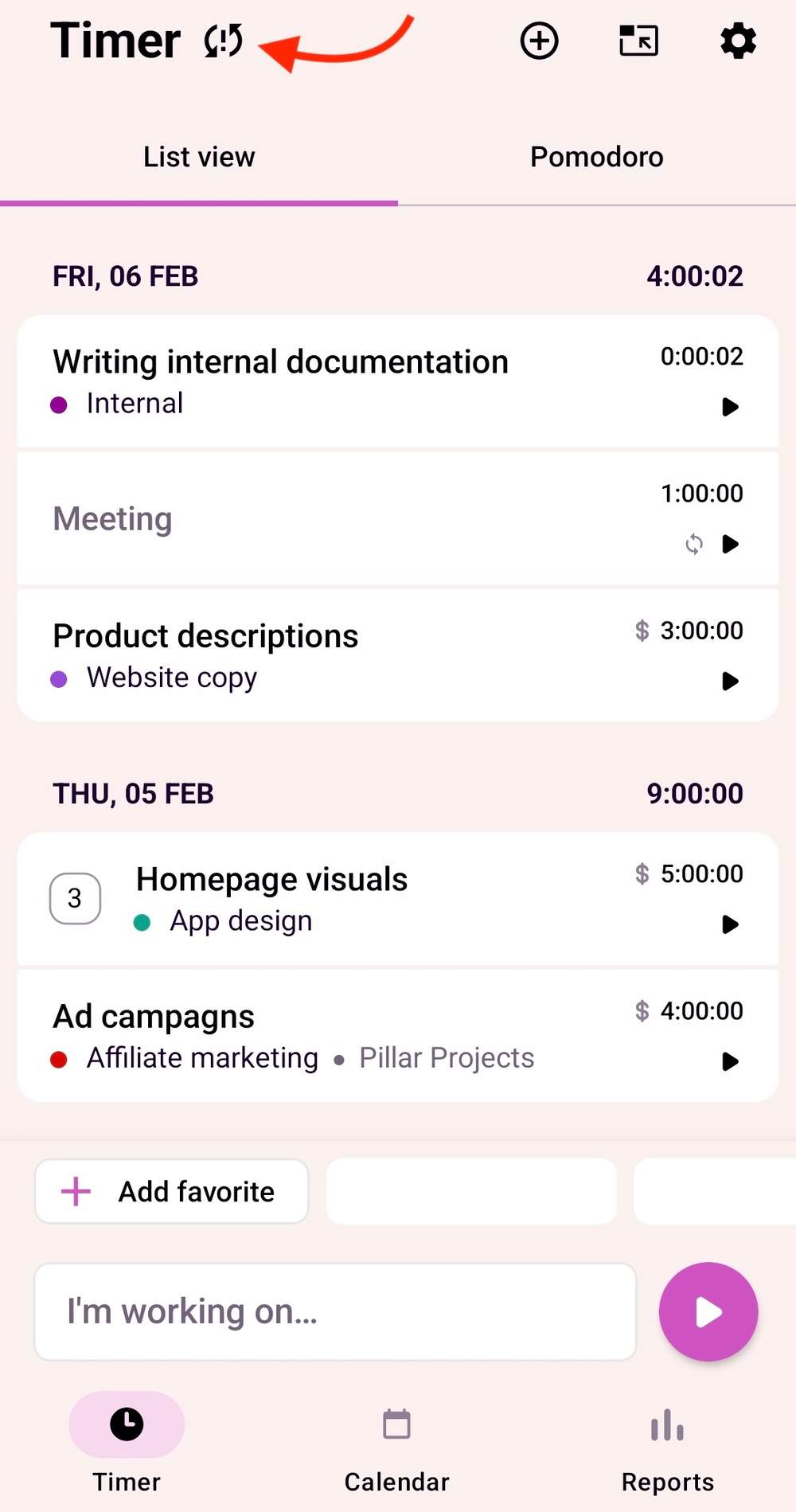
Since customer support isn’t available via chat or phone, I couldn’t fix issues on the move.
On the bright side, the app offers a useful reporting widget for quick business insights. Moreover, you can minimize the timer to turn it into a floating window, which shows your current time entry. I found this convenient for on-the-go time tracking.
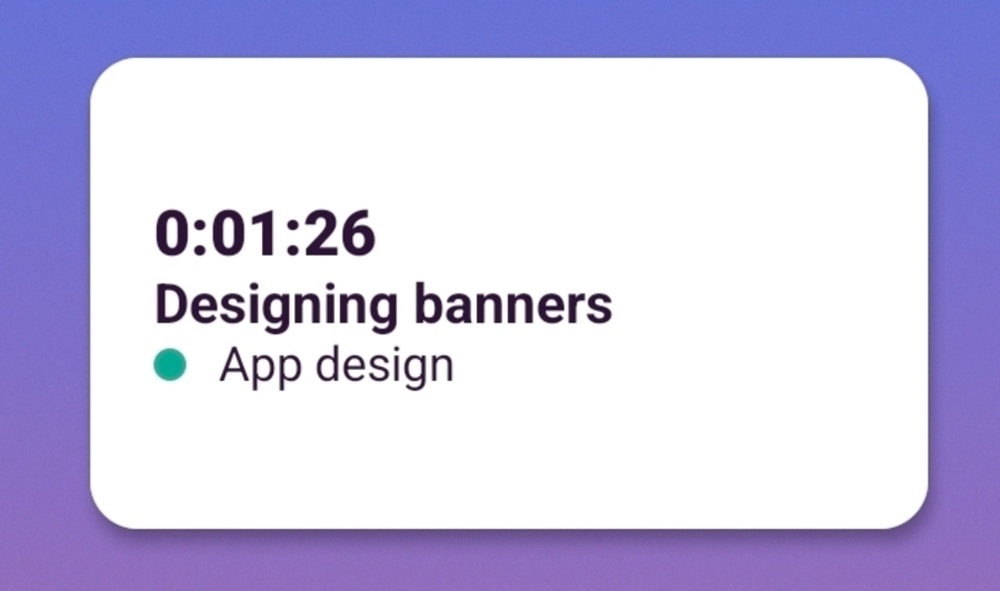
My biggest issue was the lack of tools for employee and project management. This, along with other shortcomings, made me dependent on the browser app.
The Timer feature operates the same as in the browser — with a few changes and limitations.
I was pleasantly surprised upon launching the timer. After setting the required fields for time entries, a disclaimer now appears with the rules for adding them. I felt confident knowing this was communicated transparently on all devices.
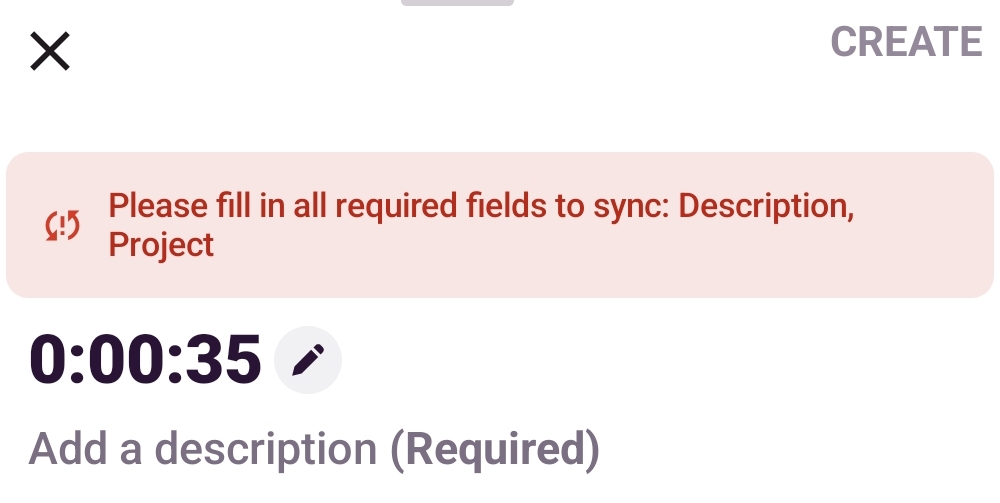
I could view my entries either in the List or Calendar view. The options worked just like in the browser but felt more user-friendly on the phone. In my opinion, Clockify by CAKE.com offers more advanced controls, such as duplicating or splitting time entries.
Moreover, the app includes a Pomodoro option that allows employees to track breaks as entries. But having no control over the break length unnerved me.
Unfortunately, I experienced real-time glitches while timing tasks. For me, resuming a time entry in the browser didn’t start the timer in the mobile app. Once I stopped timing my task in the web app, the entry appeared on the phone. This meant I couldn’t start tracking time on the web and then monitor it on the go.
Reporting on the phone reminded me of the Overview tab in the browser. It uses color-coded graphs to break down tracked time and projects.
What I’ve found particularly interesting is the variety of filters, which allowed me to categorize tracked time by:
In my opinion, it’s missing the option to sort by description or task for more precise activity insights. For that, I had to consult Toggl Track’s browser app.
| Toggl Track mobile app | Rating |
| User interface | 3/5 |
| Time tracking | 3/5 |
| Reporting | 4.5/5 |
| Final rating | 3.5/5 |
For fresh news on Toggl Track’s features, customers can refer to the Toggl Product Hub or the Toggl Blog’s Product News page.
In December 2025, the app released its Time off feature, which is currently in testing. So it won’t appear in your workspace unless you request it by email or book a demo.
Also, the latest Slack integration is available but incomplete, as it hasn’t been approved on the Slack Marketplace.
Finally, Toggl Track’s team is working on introducing the Admin Console. It’s meant to help admins manage all workspaces and Toggl tools in one place.
Toggl Track’s reporting features made the biggest impression on me with its versatile analytics. Although it offered solid payroll and invoicing options, both processes felt clunky and limited.
In my opinion, the app delivered on its promise for easy time tracking — but not for professional use. For instance, the automatic splitting of time entries created a messy time log, and syncing issues between the web and mobile apps only added to my worries.
After reviewing Toggl Track, I believe it’s most suitable for desk-bound freelancers and independent contractors — especially the Free plan. This app could also be useful for small remote teams with unshakeable trust. Not field teams, though.
Taking all user experience factors into account, here’s my final verdict on Toggl Track.
| Toggl Track | Rating |
| Web app | 3.6/5 |
| Mobile app | 3.5/5 |
| Pricing | 3.5/5 |
| User interface | 3.5/5 |
| Security and privacy | 3.5/5 |
| Customer support | 2/5 |
| Customer reviews | 3.9/5 |
| Final verdict | 3.4/5 |
If you want flexible and beginner-friendly options, try Clockify by CAKE.com. As a free Toggl Track alternative, Clockify offers fast adoption, deep, custom reporting, and 99.99% uptime. Here’s a sneak peek into our app’s timekeeping features:
Beyond that, our affordable time tracker includes dedicated invoicing that pulls tracked time and expenses, lets you edit details, and sends email invoices. Create custom invoice layouts and save them as templates to match your needs.
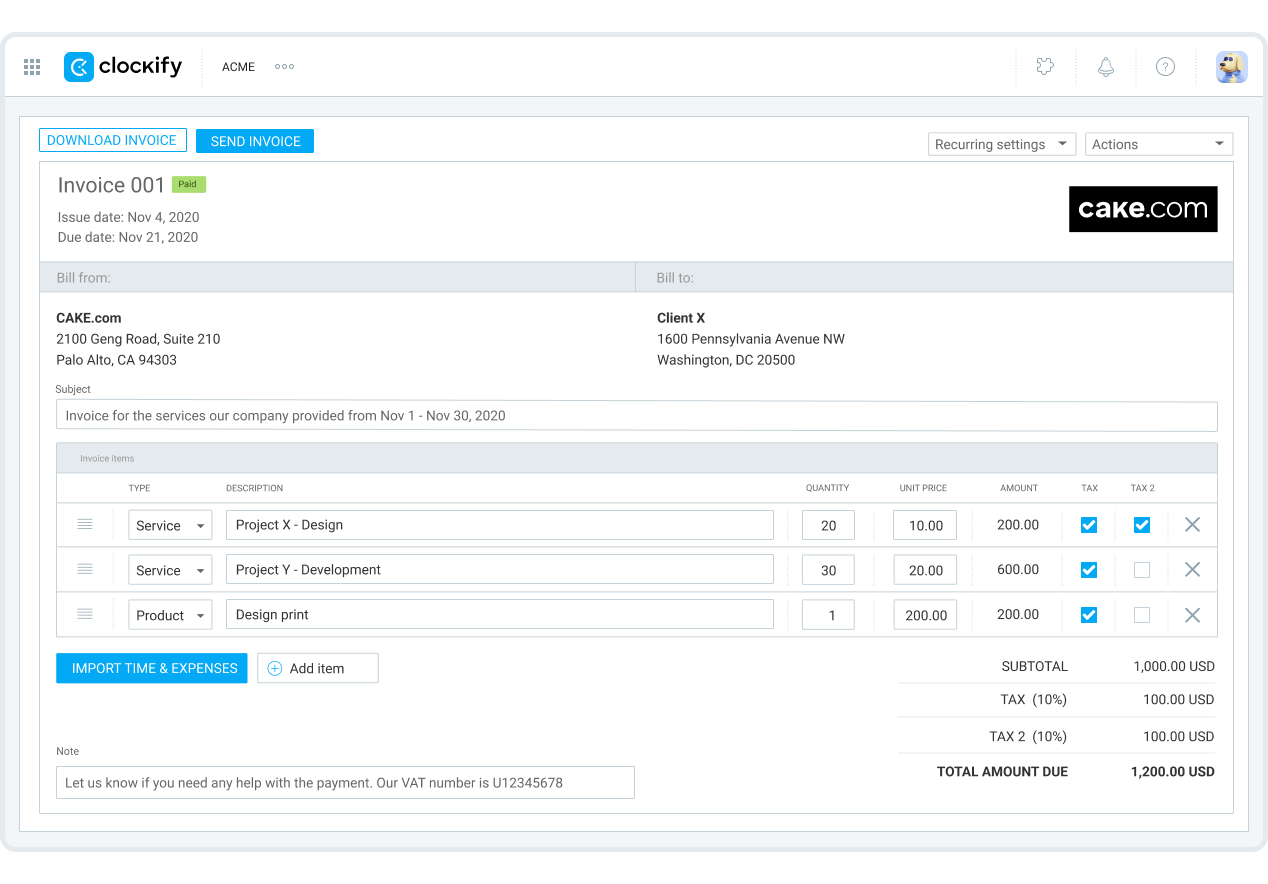
With our robust app, you can ditch guesstimates for reliable project forecasting. Compare tracked vs. planned time and budgets and view past project timelines for continued success.
Wait, there’s more: Clockify’s scheduling ensures balanced workloads. Drag and drop tasks and see availability to avoid time gaps or missed overtime. To stay on schedule, check your staff’s estimated vs. tracked time.
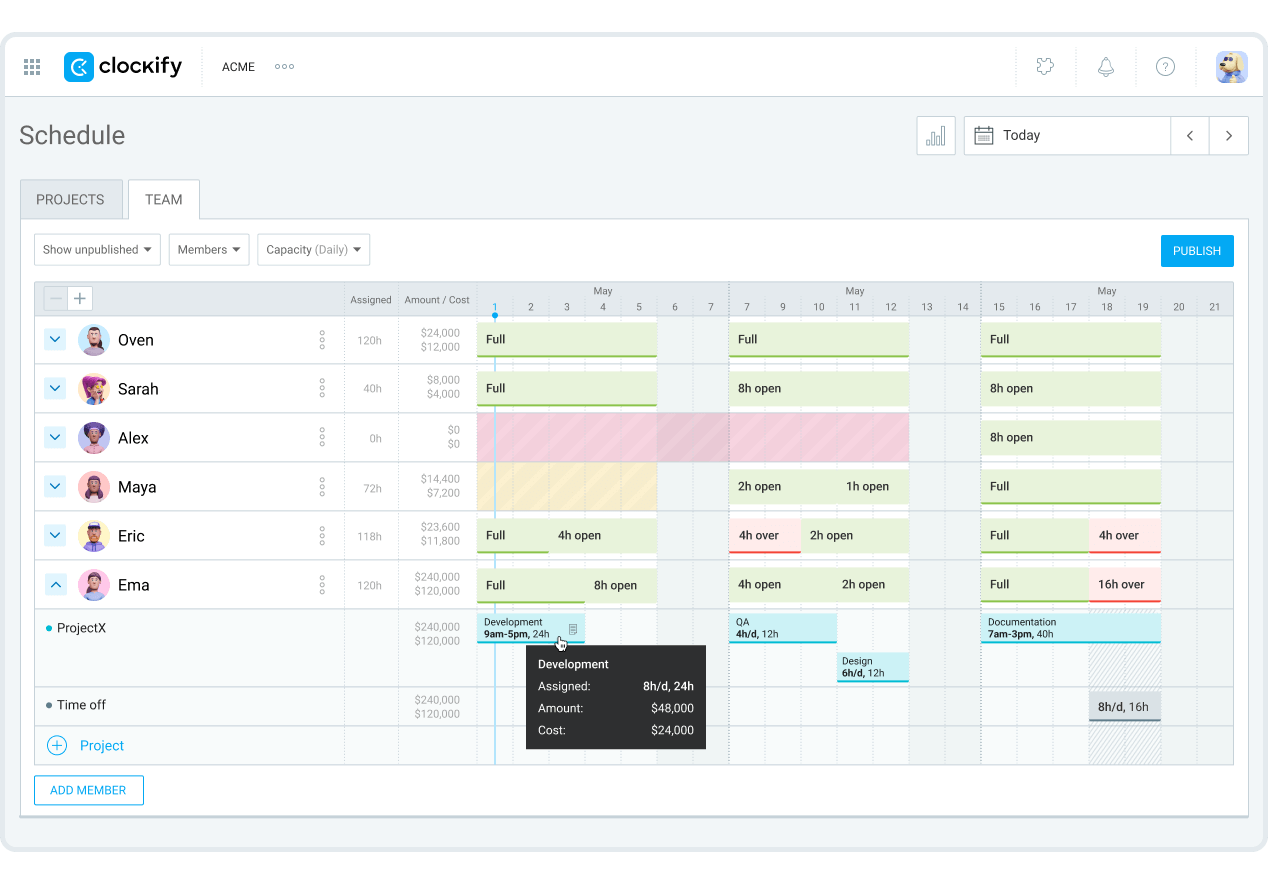
As part of the CAKE.com Suite, our time tracker comes bundled with 2 more work apps:

Have questions about Clockify or the whole CAKE.com package? Hop on a call or chat with our 24/7 human customer support — it’s on the house.
| Features | Toggl Track | Clockify by CAKE.com |
| Primary use | Time tracking Productivity and profitability insights Project/Task handling |
Time tracking Team scheduling Project/Task management Deep, adaptable reporting Invoicing |
| Time tracking | Timer Timesheets Pomodoro tracker Calendar Auto tracker |
Timer with break mode Timesheets Pomodoro tracker Calendar Auto tracker Kiosk |
| Project management | Projects/tasks Assigning tasks Time-based forecasting |
Projects/tasks Project and task allocation Project status Forecasting based on estimated time and budgets |
| Reporting | Productivity Profitability Conditional filtering Workload |
Team performance Profitability Abundant, simple filters Attendance Expenses |
| Invoicing | Invoices created in reports Limited invoice customization |
Dedicated invoicing feature Automated import of time and expenses Advanced invoice editing Custom invoice design |
| Payroll | Hourly rates Workspace and project rates 1 payroll integration |
Billable and payroll rates Workspace, project, and task rates Overtime 12 payroll integrations |
| Free plan | Free plan for 5 users (1 owner + 4 users) |
Free for unlimited projects and up to 5 users |
| Suitable for | Freelancers Independent contractors Trusting remote teams |
All industries and work locations — off and on-site, including hospitality, retail, manufacturing, construction, agencies, IT, logistics, accounting, attorneys, transportation, security, healthcare, and more |
| Pricing | Starting at $9 per user/month if billed annually | Starting at $3.99 per seat/month if billed annually |
Still considering Toggl Track? Then, you’ll find the answers below especially useful.
The answer will depend on your specific business needs. For instance, Toggl Track focuses on team productivity checks and simple time tracking. Meanwhile, Clockify expands on these benefits — bringing managers more granular visibility over employee time and project budgeting.
Based on their free plans, Toggl Track benefits freelancers and micro-teams (2-5). In contrast, Clockify caters to growing businesses in various markets.
Exploring free, full-featured options? Check out Clockify as a Toggl Track alternative.

Toggl Track is generally secure, offering data encryption and compliance with global privacy standards. However, workspace owners can’t enable 2-step authentication for all users, which is a security risk.
Additionally, Toggl Track has no dedicated break tracking or overtime indicators. With that, you risk violating your employees’ rights or worse — committing wage theft.
No, Toggl Track doesn’t make screenshots. Besides recording visited websites for personal productivity insights, the app doesn’t offer any other monitoring options.
For non-invasive supervision, Clockify by CAKE.com captures blurred screenshots to protect privacy. Users get notified when screen capturing is enabled. Plus, they can see and even delete their screenshots.
The general misconception is that time trackers fuel micromanagement, trust issues, and low team morale. However, pinning workplace issues on a single app is pointless. The issue isn’t the app but how it’s used.
The key to solving work challenges is clear communication between managers and employees. Let staff voice their concerns. Then, develop a win-win strategy for time tracking. And remember to check whether the team’s on board — it builds trust.
Some app features may appeal to employee needs. For instance, Clockify lets employees enter time manually, giving them more control over their personal data. Also, idle detection alerts employees when they’re inactive and allows them to delete that time.
The best time tracker is one that meets your business requirements. So, you may consider Connecteam if you’re looking for a comprehensive, fieldwork tracking solution. If you need an easily adaptable, all-inclusive tracker, look no further than Clockify.
Now, let’s look at a specific use case to determine which solution is better: If geofencing is your main concern, Connecteam takes the high ground. But Clockify’s GPS tracking is the safer choice, as it stores data during network issues.
🎓 Clockify Voted the Best Overall Time-Tracking App by Forbes