Free Work Schedule Templates — Excel, Google Sheets & PDF
Editable work schedule templates you can use to create different types of schedules for your team.
Excel • Google Sheets • PDF
What is a work schedule template?
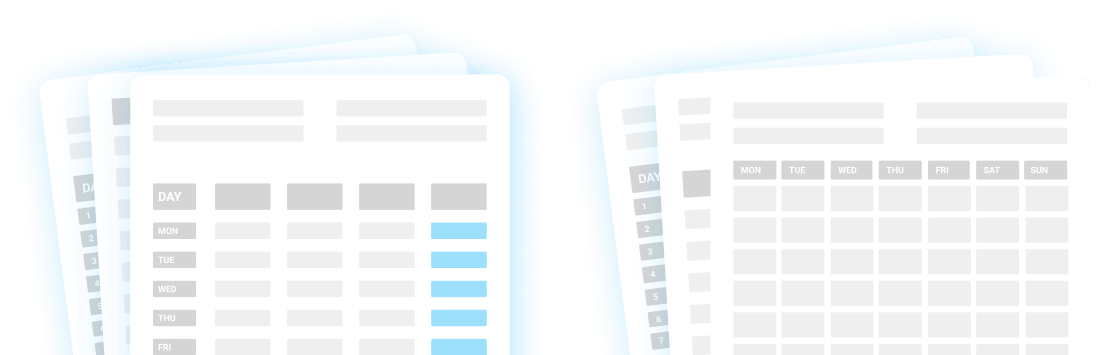
A work schedule template is a pre-made outline used to organize work shifts and schedule assignments. Work schedule templates come in different formats, including:
- Monthly,
- Weekly, and
- Daily schedules.
They can also be tailored to a specific industry or shift schedule. Here are different types of work schedule templates you can download in Google Sheets, Excel, and PDF format.
Daily Work Schedule Weekly Work Schedule 4/4 Schedule Monthly Work Schedule 8-Hour 24/7 Coverage Schedule Employee Absence Schedule Night Shift Schedule Construction Schedule Restaurant Schedule Retail Work Schedule 2/2/3 Schedule Work Event Schedule
Simple employee schedule templates
First, here are some free printable employee schedule templates that work across industries — from IT and marketing to retail and hospitality.
Daily Work Schedule Template
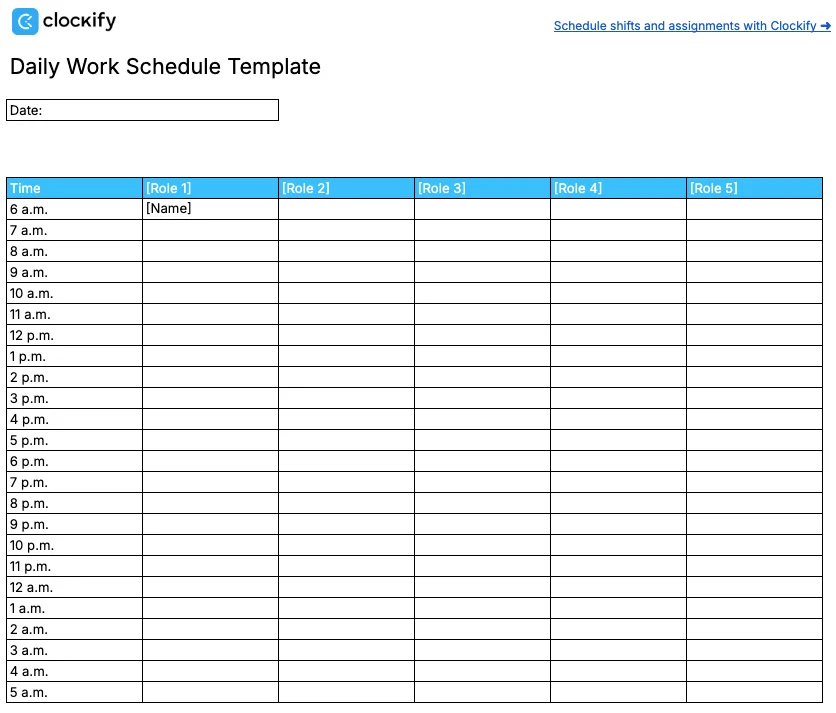
The Daily Work Schedule Template is a simple work template that displays each hour of the day. The first row allows you to define different roles. Then, add their name under the appropriate role for the times they need to clock in and out.
⬇️ Daily Work Schedule Template (Google Sheets)
⬇️ Daily Work Schedule Template (Excel)
⬇️ Daily Work Schedule Template (PDF)
Weekly Work Schedule Template
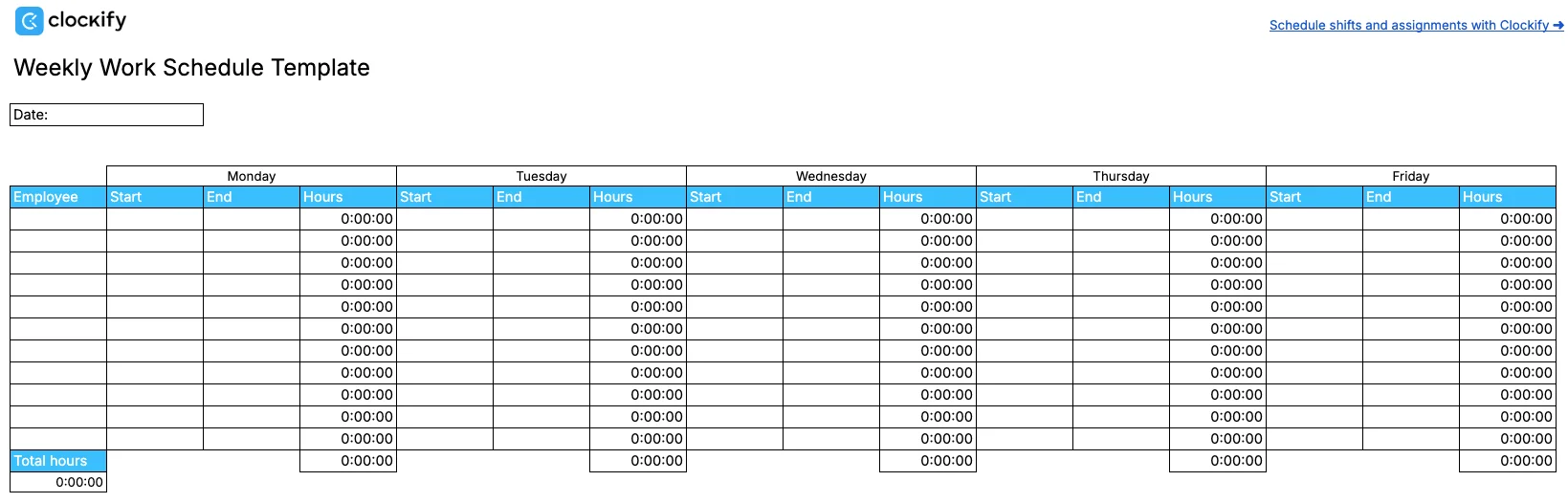
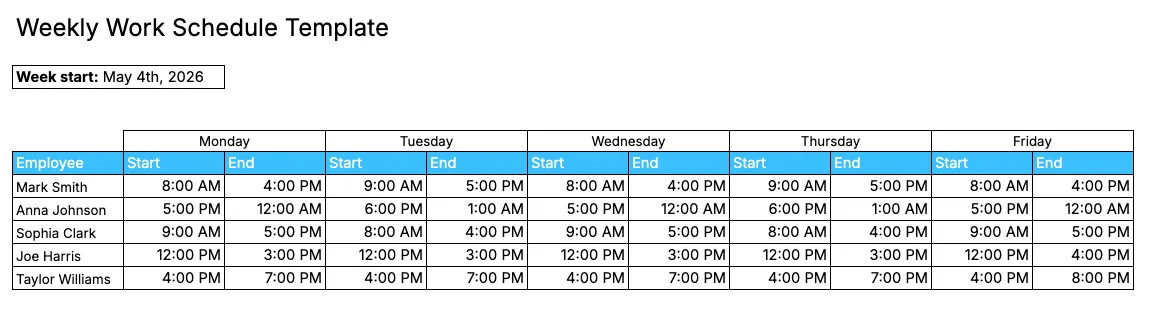
The Weekly Work Schedule Template allows you to schedule employee shifts for the entire week. This simple layout includes:
- Dates,
- Days of the week,
- Employee names column,
- Shift start times,
- Shift end times, and
- Total work hours.
This template is useful when you need information about employee clock-in and clock-out times on a weekly basis. It also automatically calculates total work hours for each day and the entire week.
To use it, just add work start and end times in AM or PM format to ensure everything is calculated properly.
⬇️ Weekly Work Schedule Template (Google Sheets)
⬇️ Weekly Work Schedule Template (Excel)
⬇️ Weekly Work Schedule Template (PDF)
Monthly Work Schedule Template
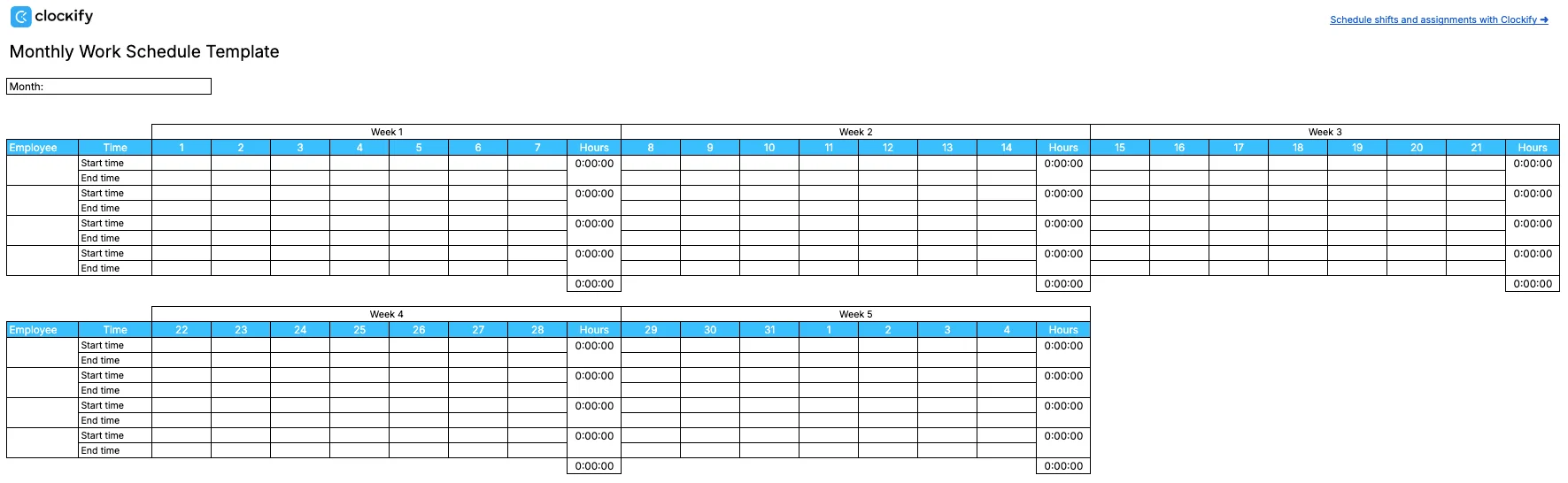
The Monthly Work Schedule Template lets you create schedules for your team in an editable layout. This template is made to be filled out once per month. It contains space for employee names and work start/end times for each day of the week.
It works similarly to the Weekly Work Schedule Template — you need to enter work start/end times in AM or PM format.
The template also calculates total hours worked for each week automatically — for every employee and the entire team.
⬇️ Monthly Work Schedule Template (Google Sheets)
⬇️ Monthly Work Schedule Template (Excel)
⬇️ Monthly Work Schedule Template (PDF)
Shift schedule templates
Shift-based schedules allow you to manage different types of shifts. The layouts are adapted to fit these types of schedules as separate templates for:
- 8-hour shift (24/7 coverage),
- 4-on 4-off,
- 2-2-3, and
- Night shifts.

8-Hour 24/7 Coverage Schedule Template
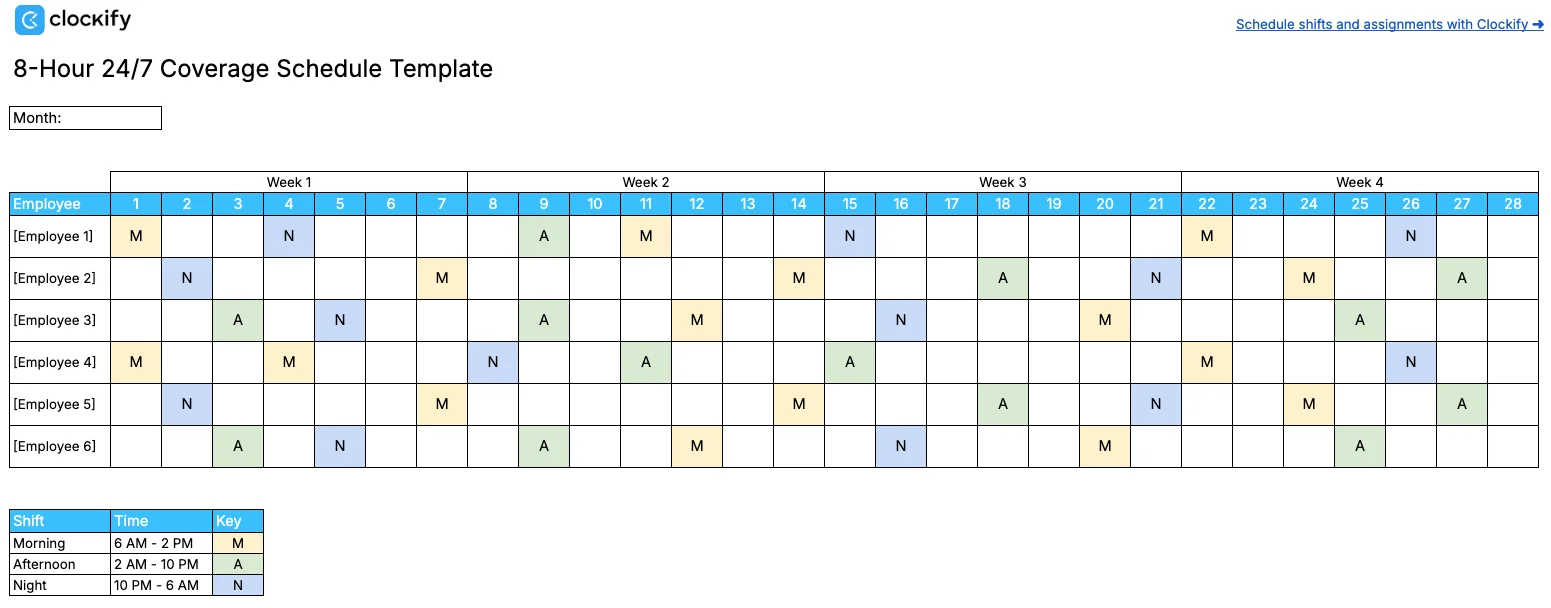
The 8-Hour 24/7 Coverage Schedule Template gives you a simple way to schedule morning, afternoon, and night shifts. The template automatically color-codes your schedule based on what letter you type in:
- M (Morning) — yellow,
- A (Afternoon) — green, and
- N (Night) — blue.
⬇️ 8-Hour 24/7 Coverage Schedule Template (Google Sheets)
⬇️ 8-Hour 24/7 Coverage Schedule Template (Excel)
⬇️ 8-Hour 24/7 Coverage Schedule Template (PDF)
4/4 Schedule Template
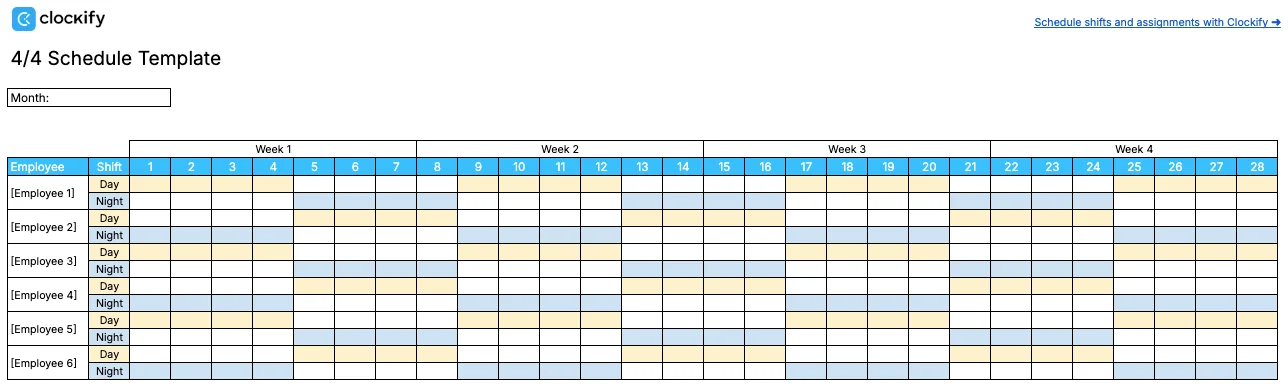
If your team works 12-hour shifts with a 4-on 4-off shift pattern, the 4/4 Schedule Template can help you organize.
This template is color-coded, with yellow cells for day shifts and blue cells for night shifts. It allows you to add employees’ names and mark the day of the week when each is scheduled to work.
⬇️ 4/4 Schedule Template (Google Sheets)
⬇️ 4/4 Schedule Template (Excel)
⬇️ 4/4 Schedule Template (PDF)
2/2/3 Schedule Template
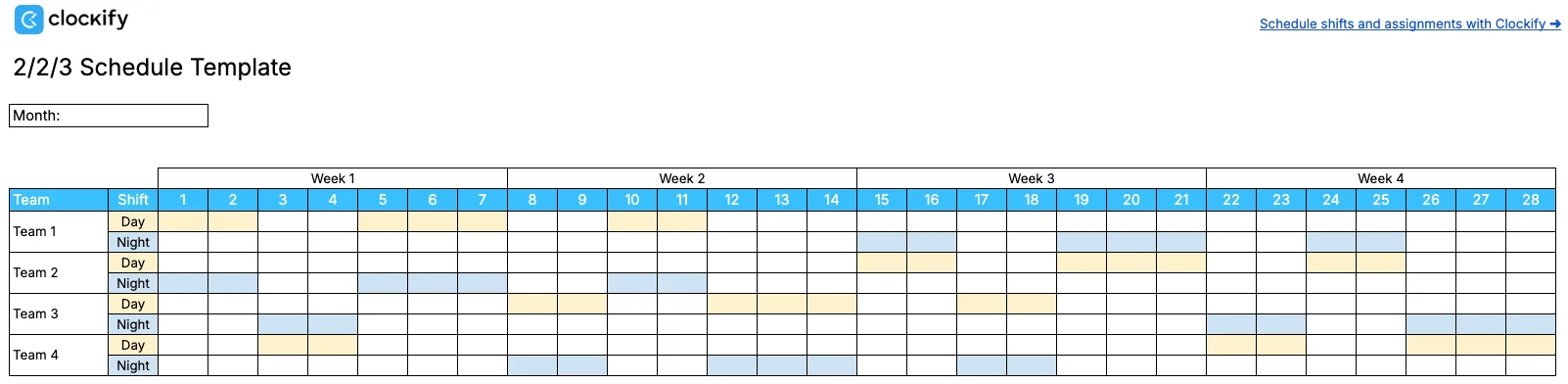
The 2-2-3 Schedule Template is adapted to fit the Panama work schedule. This template requires teams to work for 2 days, have 2 days off, and then work another 3 days. The shifts are usually 12 hours long.
Like with the 4/4 Schedule Template, cells are color-coded to fit the 2-2-3 shift pattern.
⬇️ 2/2/3 Schedule Template (Google Sheets)
⬇️ 2/2/3 Schedule Template (Excel)
⬇️ 2/2/3 Schedule Template (PDF)
Night Shift Schedule Template
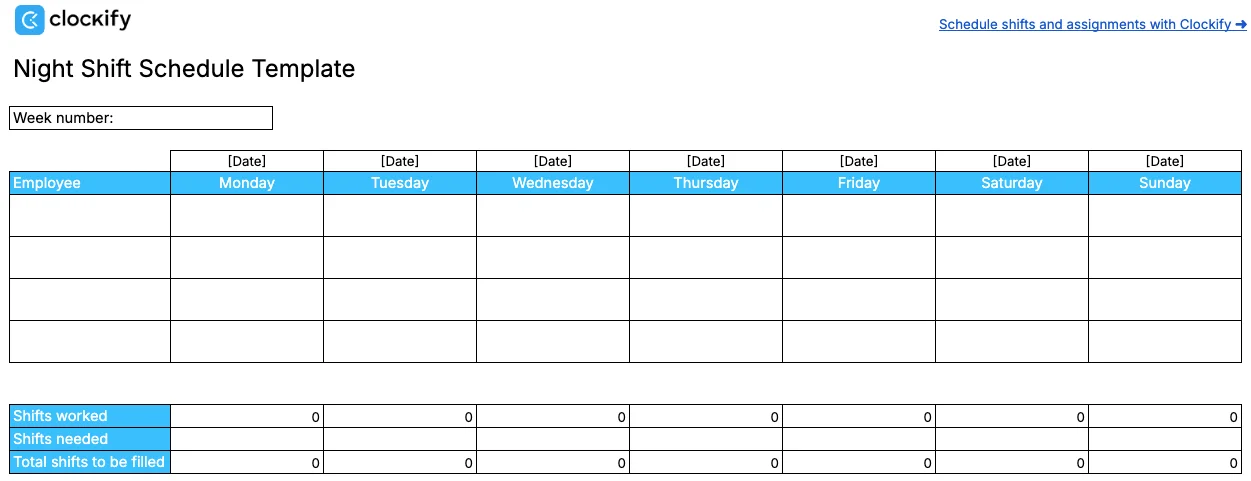
If you need to track how many night shifts your employees work each week — the Night Shift Schedule Template is for you. It’s a weekly template that automatically counts the number of night shifts worked.
Simply put an ‘X’ or any other value under a specific day, and the template will count the shifts. If you enter the number of shifts needed, the template will also calculate how many shifts need to be filled based on the shifts worked.
⬇️ Night Shift Schedule Template (Google Sheets)
⬇️ Night Shift Schedule Template (Excel)
⬇️ Night Shift Schedule Template (PDF)
Industry-specific templates
If you need more detailed templates that fit specific industries, here are the most suitable templates for construction and restaurant shift schedules.
Construction Schedule Template
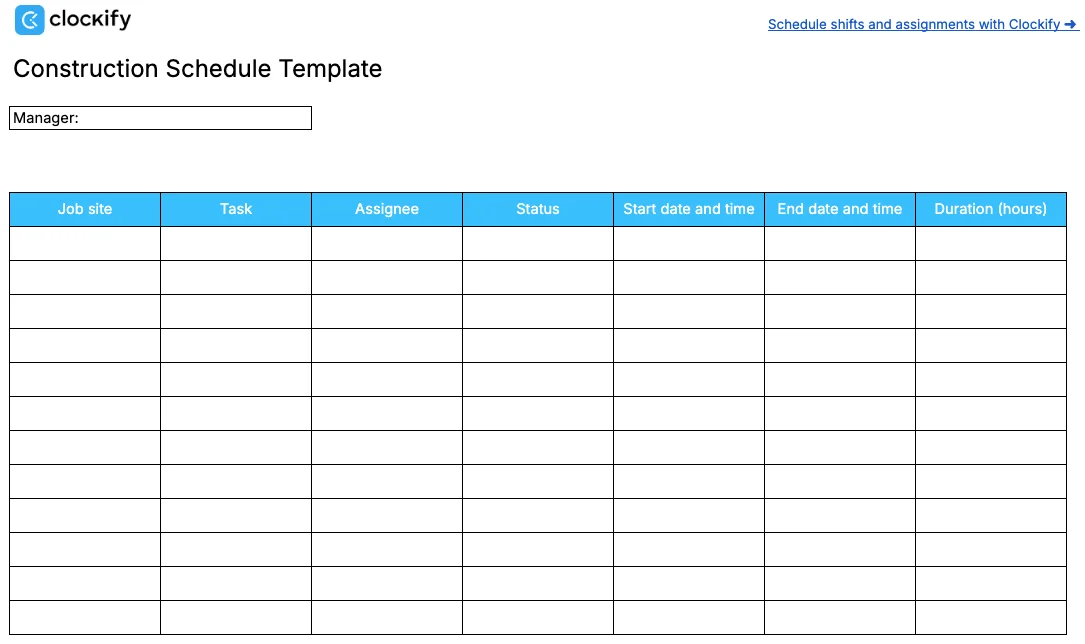
The Construction Schedule Template lets you track the tasks your construction team performs across job sites. This template includes the following fields:
- Job site,
- Task description,
- Status,
- Assignee,
- Start date,
- End date, and
- Task duration.
⬇️ Construction Schedule Template (Google Sheets)
⬇️ Construction Schedule Template (Excel)
⬇️ Construction Schedule Template (PDF)
Restaurant Schedule Template
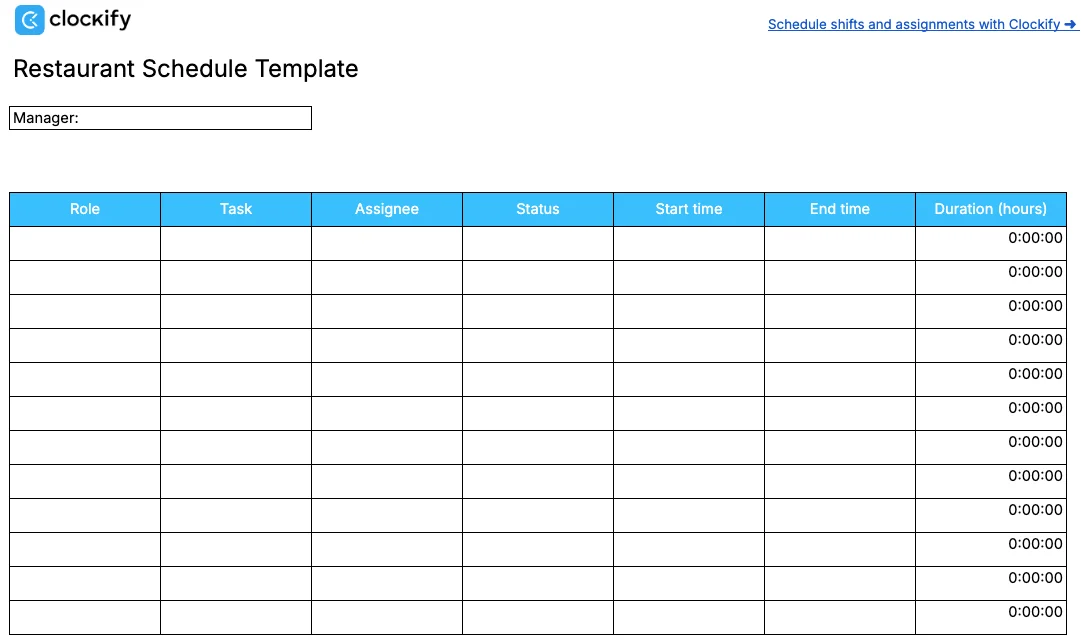
The Restaurant Schedule Template is useful for scheduling restaurant staff shifts. It allows you to define roles and list tasks, and to add start and end times for work. Then, the template automatically calculates the task duration.
⬇️ Restaurant Schedule Template (Google Sheets)
⬇️ Restaurant Schedule Template (Excel)
⬇️ Restaurant Schedule Template (PDF)
Retail Schedule Template
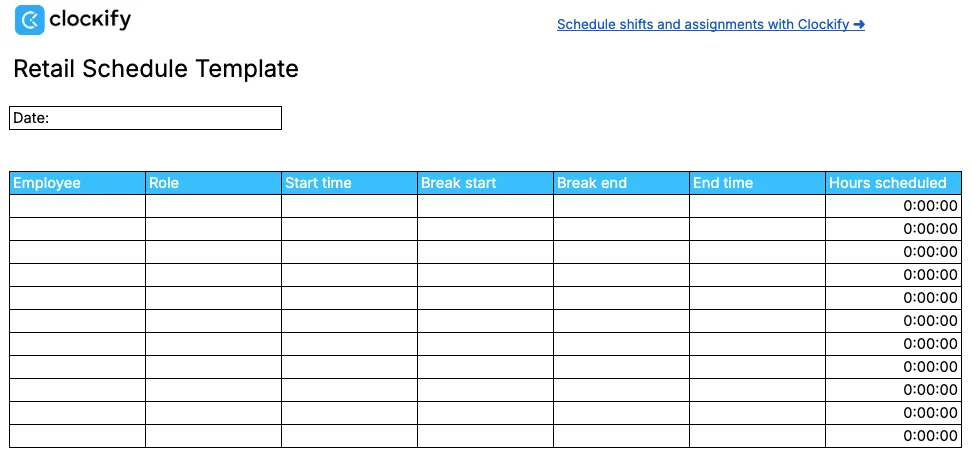
The Retail Schedule Template is designed to track shifts in retail stores. However, it can fit other industries where you need to schedule work and break time. The template has the following fields for you to fill out:
- Employee,
- Role,
- Start time,
- Break start,
- Break end,
- End time, and
- Hours scheduled.
Once you enter work and break start/end times, you’ll get the exact number of hours you scheduled. The break is deducted from the total hours.
⬇️ Retail Schedule Template (Google Sheets)
⬇️ Retail Schedule Template (Excel)
⬇️ Retail Schedule Template (PDF)
Other work-related schedule templates
If you need other work-related schedule templates that don’t involve shift scheduling — you can find Absence and Work Event Schedule Templates below.
Employee Absence Schedule Template
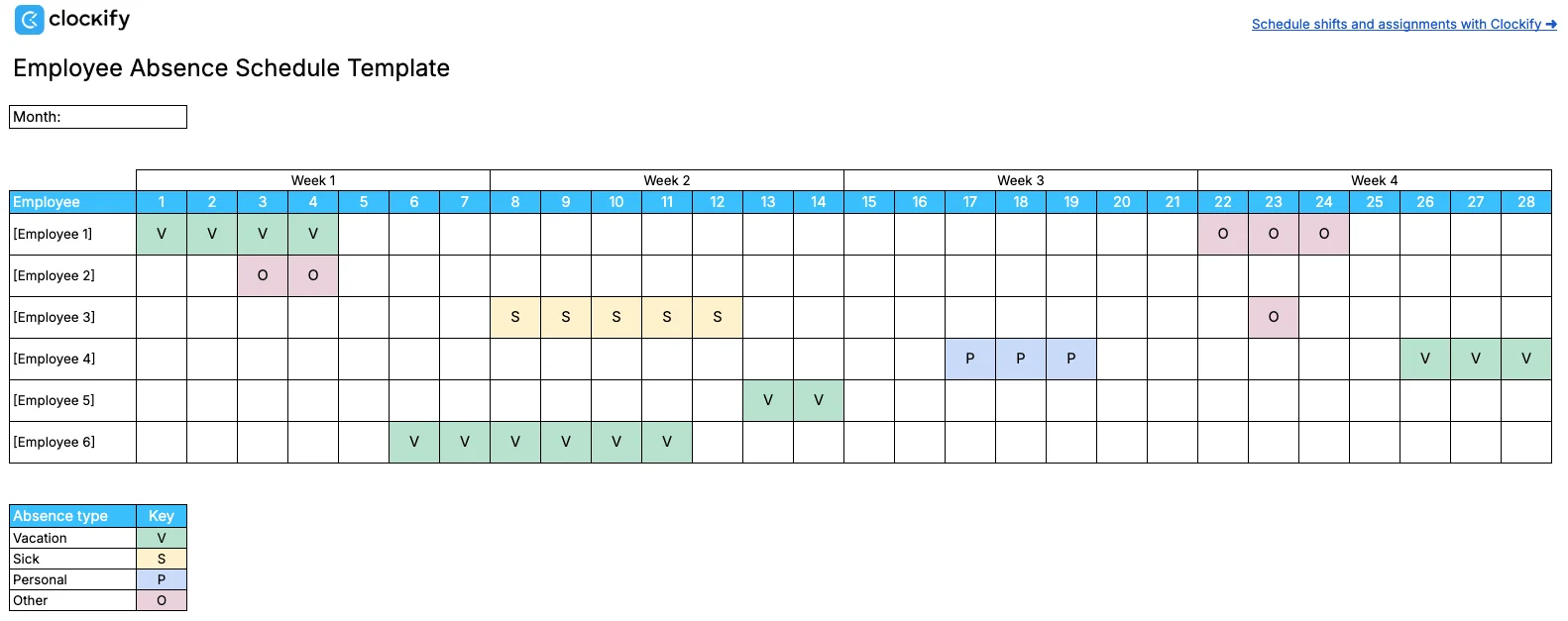
The Employee Absence Schedule Template allows you to schedule time off. The template automatically color-codes different absence types. For example, if you type V (for vacation) anywhere in the schedule, the cell will turn green.
Here’s the entire list of absence types found in this template, along with their corresponding colors:
- V (Vacation) — green
- S (Sick leave) — yellow
- P (Personal leave) — blue
- O (Other absence) — pink
⬇️ Employee Absence Schedule Template (Google Sheets)
⬇️ Employee Absence Schedule Template (Excel)
⬇️ Employee Absence Schedule Template (PDF)
Work Event Schedule Template
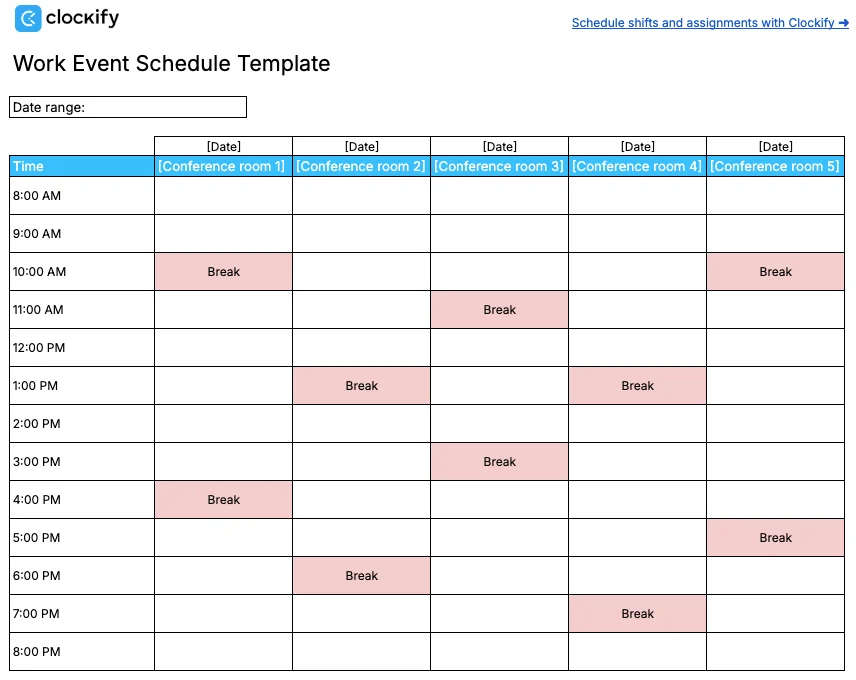
The Work Event Schedule Template lets you schedule meetings, training sessions, and other work events. The template includes 1-hour time slots and space to add dates and different locations/conference rooms.
To schedule an event using this template, simply name your conference room and specify the type of work event next to the adequate time slot. You can add breaks as well. If you type ‘break’, the cell will automatically be colored pink.
⬇️ Work Event Schedule Template (Google Sheets)
⬇️ Work Event Schedule Template (Excel)
⬇️ Work Event Schedule Template (PDF)
FAQs about schedule templates
Here are some frequently asked questions about schedule templates to dispel any confusion you might still have.
How do I make my own work schedule?
If you decide to create a work schedule for your team yourself, you first need to determine which tool to use. You can go the traditional pen-and-paper route or use a digital tool like Google Sheets.
Here are the basic steps to creating a simple schedule in Google Sheets:
- Name your schedule,
- Add a column for the date range or month,
- List the days of the week your business operates,
- Create a column for employees’ names’,
- Add start time and end time columns,
- Format cells to display time automatically, and
- Fill out the schedule.
The steps will vary depending on the type of work schedule and what information you need the schedule to display.
Can you use Excel as a scheduling tool?
You can create the schedule yourself in Excel or use pre-made templates available on this page. Creating a schedule in Excel from scratch requires adding the cells you need and writing formulas if you want total work hours or similar calculations to be calculated automatically.
Is there a free scheduling tool?
Yes, there are free scheduling tools. You can use Google Sheets to create schedules from scratch or get free pre-made Google Sheets templates. You can also use software like Clockify to fill out weekly timesheets for free or try Clockify’s Scheduling for free for 7 days.
Does Google have a schedule template?
Yes, Google has a simple weekly schedule template. You can access this template from the template gallery in Google Sheets.
What is a 4/4 work schedule?
A 4/4 work schedule is a shift pattern in which employees work 4 consecutive days or nights, then have 4 consecutive days off.
Work schedule template vs. scheduling software
In many cases, work schedule templates are more convenient than creating a schedule from scratch. You don’t need to enter complex formulas yourself — everything is set correctly already.
However, what can make your life (i.e., work) even easier is scheduling software. Here are the advantages scheduling software has over templates:
- Employees’ need to be added only once — no need to list employees manually every time, all data related to them is in one place.
- Employee availability is visible in real time — scheduling apps give you insight into employee capacity at all times.
- Data is neatly arranged — since apps have multiple windows you can switch between, you usually don’t have massive tables with many rows and columns, which are difficult to navigate.
- Reports are clear and detailed — scheduling apps have reports that represent data visually, typically in the form of charts.
Work schedule templates can work at first, when you have small teams and not too much data. However, growing teams may struggle with using templates. The more employees and other data you have, the more difficult it becomes to use the templates.
🎓 The Best Scheduling Software Comparison
When a template isn’t enough, schedule shifts and assignments with Clockify by CAKE.com
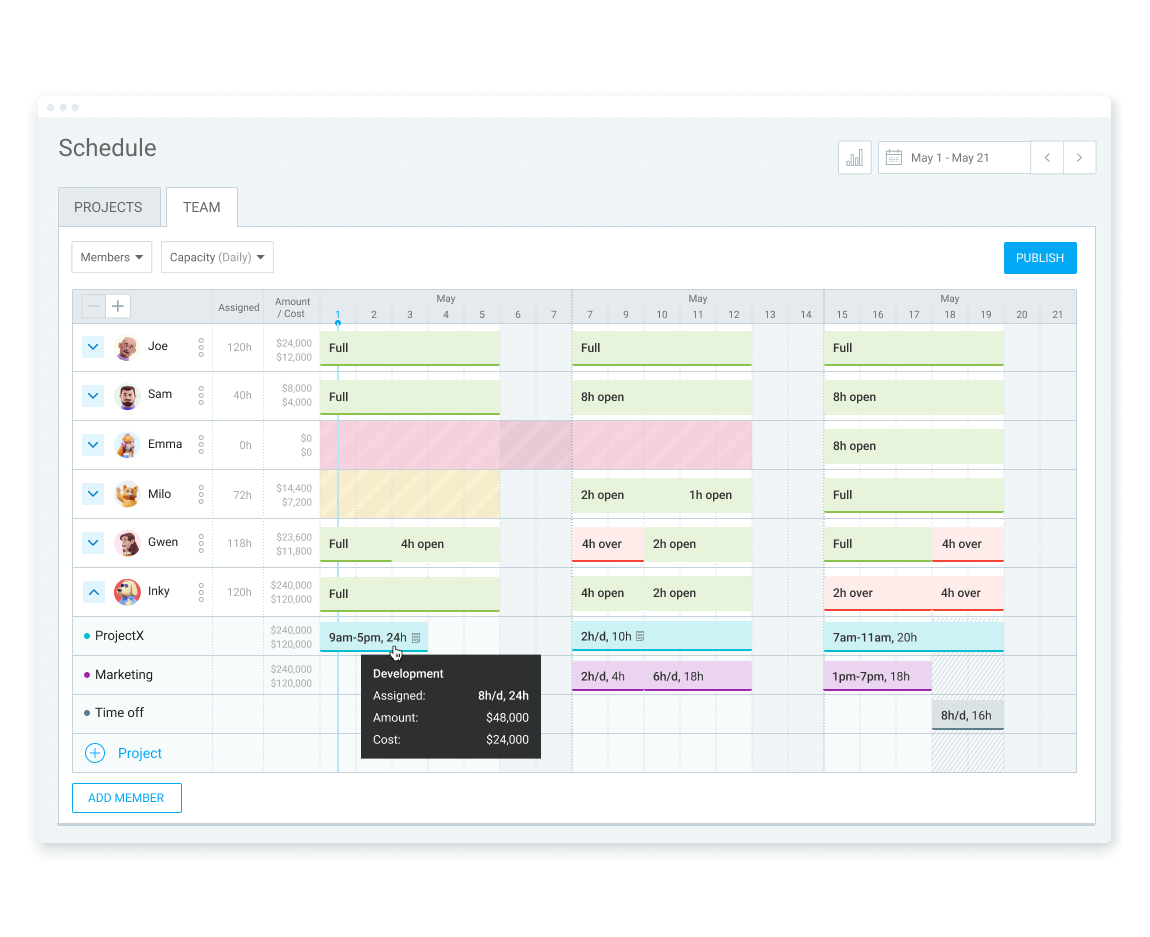
Aside from our schedule templates, you can also use Clockify by CAKE.com to schedule your projects and employees. This feature is handy for managers because it helps them schedule employee work time to ensure that all team members meet their deadlines.
The team option in Clockify’s Scheduling allows you to view team availability. You simply add daily capacity for your team and assign tasks. Then Clockify automatically displays each team member’s remaining capacity. This way, managers can assign new tasks to the right people and ensure everyone has an equal share of work during the week.
Additionally, your team can use Timesheets to track time worked every week.If the schedules follow a certain pattern, they can save the timesheet as a template for future use.
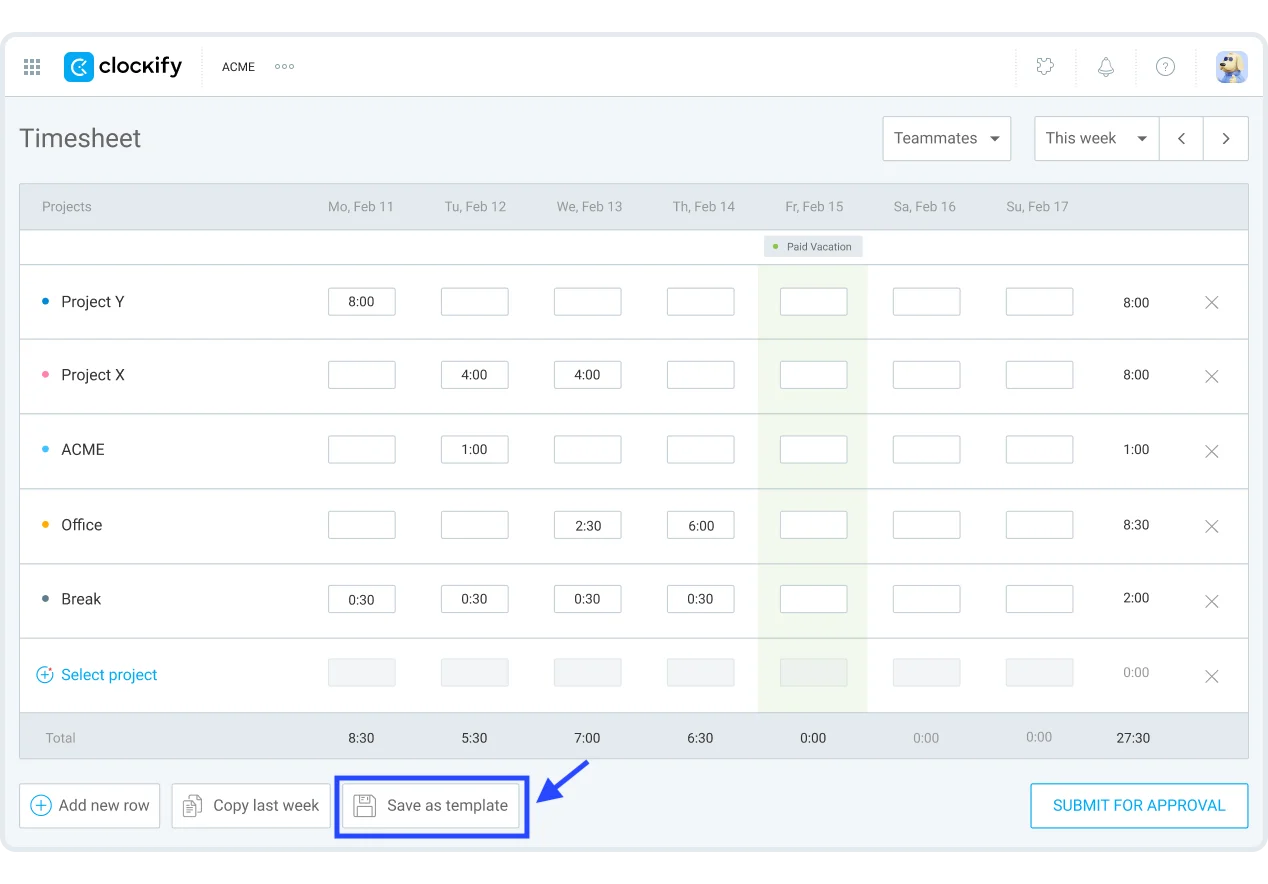
Saving a timesheet as a template saves you and your team time, as you don’t have to add time in timesheets every week from scratch. When you apply a template you saved, all projects and hours from the template appear in the week you select.
If you run into any issues, Clockify’s support is available 24/7 free of charge.

