The e-invoice (or electronic invoice) is created and sent system-to-system to reduce manual work and ensure fast, flawless payments.
But that’s just scratching the surface.
Read ahead to discover:
- What is e-invoicing,
- How it differs from traditional billing, and
- The most sustainable solution.

What is e-invoicing (or electronic invoicing)?
E-invoicing is the automatic exchange of invoices in a structured format between you and your client. Structured invoice data (like EDI, XML, or HTML) allows different accounting systems to easily process information.
Beyond that, invoice automation leads to more efficient and accurate billing, which helps finance managers:
- Avoid billing errors (like incorrect project hours) and undercharging,
- Cut overhead costs (like admin tasks and postal services), and
- Reduce client disputes with clear, professional billing statements.
E-invoicing is on a roll — a 2025 report on the US e-invoicing market shows it was valued at $3,850 million in 2024 and expects it to hit $19,140 million by 2033. In fact, a growing number of businesses are adopting e-invoicing, thanks to easy access to electronic invoicing software like Clockify by CAKE.com. After all, this simple time and billing tool lets you:
- Track billable work hours,
- Generate clear invoices, and
- Charge clients — all in one place.

What’s the difference between e-invoices and normal invoices?
E-invoicing and traditional invoicing mainly differ in how an invoice is represented and processed — while the content remains the same. Let’s explore key differences.
Difference #1: Invoice appearance
An electronic invoice is a form of paperless billing — NOT a hand-typed letter you receive in your mailbox. Likewise, it’s NOT a digital version of a paper invoice, like a PDF or scanned image. Instead, it includes structured, encoded data that is exchanged between accounting software.
An e-invoice stores information in a machine-readable format (designed for devices), like:
- EDI,
- XML, or
- HTML.
Generally, EDI (electronic data interchange) is the most common e-invoicing format, especially in the supply chain market. Partners exchange EDI files computer-to-computer to:
- Speed up payment processing,
- Increase client satisfaction, and
- Boost profits.
If you’re using EDI, you’ll need a specialized tool to convert EDI files so that your accounting software can read them. This can make your EDI setup more difficult.
Unlike EDIs, XML and HTML combine simple code and text to make content easy for both machines and humans to understand. This allows billing systems to process them directly.
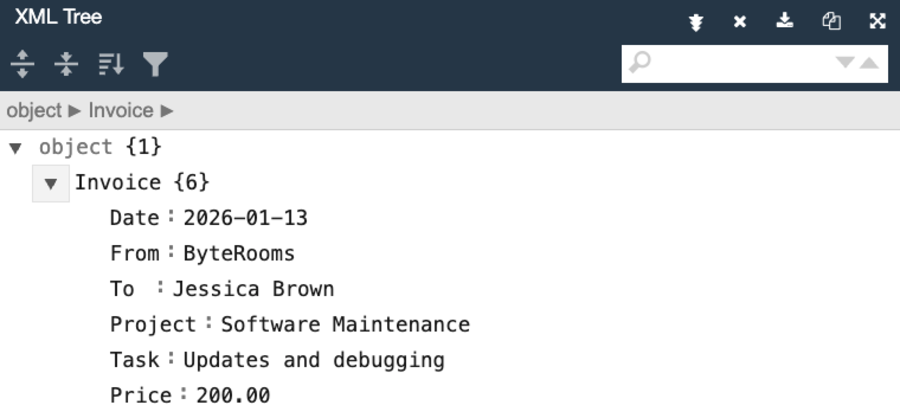
Here’s our plain example of an XML invoice.
<Invoice>
<Date>2026-01-13</Date>
<From>ByteRooms</From>
<To>Jessica Brown</To>
<Project>Software Maintenance</Project>
<Task>Updates and debugging</Task>
<Price>200.00</Price>
</Invoice>
This translates to the following content — as shown in an XML viewer below:
Difference #2: Invoice processing
In traditional invoicing, you handle paper or PDF invoices, which involve the following steps:
- Manual invoice creation and/or printing,
- Delivery by post or email,
- Manual review and approval.
This process goes beyond hindering your team’s productivity. It also creates needless issues — like having to ask for payments when they’re running late.
In contrast, e-invoicing eliminates extra costs and human error with automated invoice management, digital transmission, and invoice validation.
Track expenses for speedy approvals
So, electronic invoicing software streamlines invoicing, but what about tracking employee hours? Time trackers like Clockify by CAKE.com offer you a practical alternative, where you can:
- Pull reports on tracked time,
- Create invoices from tracked time and expenses,
- Edit billing data (like contact info or totals), and
- Send invoices directly to customers.
For basic invoicing, Clockify lets you download invoices as PDF or CSV for Excel.
💡 CLOCKIFY PRO TIP
Are you a startup weighing your billing options? Here’s how to charge clients like a pro AND protect your time:
Types of e-invoicing systems
Businesses can choose among several types of electronic invoicing systems, depending on their current setup and compliance requirements.
Type #1: Direct integration systems
Your computer directly sends invoices to your clients, using predefined rules and formats. This digital invoicing system introduces maximum automation, but setting it up requires the most work — like EDI.
Type #2: Cloud-based platforms
This system allows for digital document exchange among multiple companies and contractors over a shared platform — like Xero, a digital invoicing app.
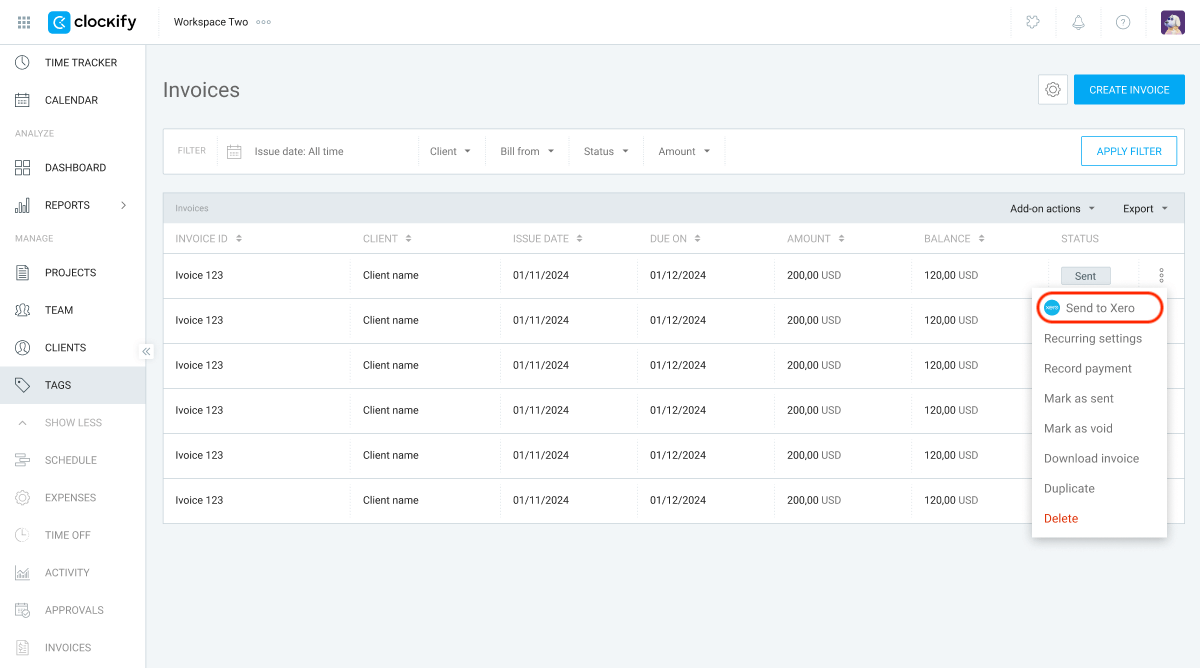
As part of this category, Clockify helps you manage billable time online and connects with Xero. Simply install the Xero Integration add-on on the CAKE.com Marketplace.
Type #3: Hybrid systems
To foster flexible client relationships, switch between direct integration and cloud-based solutions. You can exchange invoices via direct integrations with some business partners and use online platforms to bill others.
💡 CLOCKIFY PRO TIP
A busy company juggles various invoice types. So, here’s a quick recap of the most common billing statements:
Benefits of e-invoicing
The pros of electronic invoices go beyond increasing billing efficiency and client transparency. We’ll list the most important e-invoicing advantages below.
Benefit #1: Reduced costs
Going paperless in the billing department helps you cut costs, especially office supplies. On a larger scale, this frees up your project budget — where every dollar counts — making nasty cost overruns less likely.
The US Office of Financial Innovation & Transformation sees e-invoicing as a huge financial relief, as it helps the government cut expenses by $450 million annually. With this form of digital invoicing, they save 25% to 45% per invoice.
In the corporate world, subscription businesses can streamline recurring payments with e-invoicing — this reduces admin tasks and increases revenue.
Track costs in Clockify by CAKE.com
Benefit #2: Increased security
Businesses worldwide are introducing e-invoicing to enhance cybersecurity. After all, electronic invoice management includes added layers of security, like:
- Encrypted file sharing,
- Digital signatures, and
- Secure networks.
Finance expert, Ali Zane, describes e-invoicing as a reliable fraud detection system:

“E-invoicing helps control your exposure to fraud. I have documented payment redirection fraud schemes, and e-invoicing fraud loss mitigation practices eliminate these vulnerabilities.”
💡 CLOCKIFY PRO TIP
Shield your company from financial fraud with an automated expense approval system. Find out how to set it up below:
Benefit #3: Invoice automation
Less human intervention means faster billing and better invoice accuracy. It also frees up time for operations managers to focus on other work areas — like auditing and preparing fiscal reports.
Pull expense reports in Clockify
With a self-operating electronic invoicing software, you can also:
- Automate record-keeping,
- Get clear insights into your cash flow,
- Improve budget plans, and
- Decrease overdue payments.
💡 CLOCKIFY PRO TIP
Learn healthy invoicing habits to encourage on-time payments in the article below:
Benefit #4: Legal compliance
E-invoicing helps you stay within legal bounds. However, your company location will determine how you integrate e-invoicing into your compliance strategy.
In the US, no state or federal law mandates electronic invoices. However, our expert interlocutor, Ali Zane, explains how e-invoicing adheres to US laws:
“E-invoicing is compliant with IRS guidelines as long as your system has immutable audit trails. Reputable platforms handle these manual processes for you and mitigate your liability through proof of delivery and proof of receipt, with timestamps.”
Over in Europe, the European Commission developed an e-invoicing standard known as the semantic data model. Specifically, the invoice model covers core elements and rules that all EU countries apply for easy integration and compliance.
That said, e-invoicing requirements may vary by country, so check your local laws.
💡 CLOCKIFY PRO TIP
Compliance dictates your billing practices and timekeeping. So, here’s a refresher on current timekeeping regulations:
Challenges of e-invoicing
Now, let’s look at e-invoicing from a different angle. We’ve compiled a few noteworthy challenges brought on by electronic invoices. Have a look-see below!
Challenge #1: Tricky setup
CEO at a software company, Kseniya Kobryn, notes that business partners need to agree on the e-invoice structure to prevent system errors:

“Amongst the chief hurdles are melding with current ERP/accounting setups and personnel instruction. Certain firms encounter trouble when harmonizing document structures between collaborators.”
If you and your clients don’t follow the same invoice standard, you may face costly issues like data and formatting mismatches. So, make sure you’re on the same page.
To ease your team into this form of digital invoicing, you can:
- Hold workshops to foster skill building,
- Invite questions to avoid misunderstandings, and
- Support flustered employees in learning a new technology.
💡 CLOCKIFY PRO TIP
Constant market shifts have made habit stacking indispensable. Learn how to build new habits on top of existing ones for peak productivity:
Challenge #2: Tax compliance
E-invoicing enables real-time transactions, which allows tax authorities to review them immediately. With paper invoicing, governments inspect invoices retrospectively.
As more businesses implement e-invoicing, governments worldwide can reduce tax gaps (money lost due to unpaid taxes). So, companies using electronic invoicing software must adopt a proactive approach to billing — and review invoices before sending to dodge any tax fines.
The IRS lists steps for avoiding penalties for businesses, such as:
- File tax forms with correct information,
- Pay taxes before the deadline, and
- Send tax documents to both the IRS and employees on time.
💡 CLOCKIFY PRO TIP
Just like established businesses, independent contractors must play their taxpayer roles diligently. Here’s how that’s done:
Challenge #3: Slow client adoption
Another obstacle in implementing e-invoicing is client consent. Some of them aren’t familiar with digital systems and may be reluctant to exchange electronic invoices.
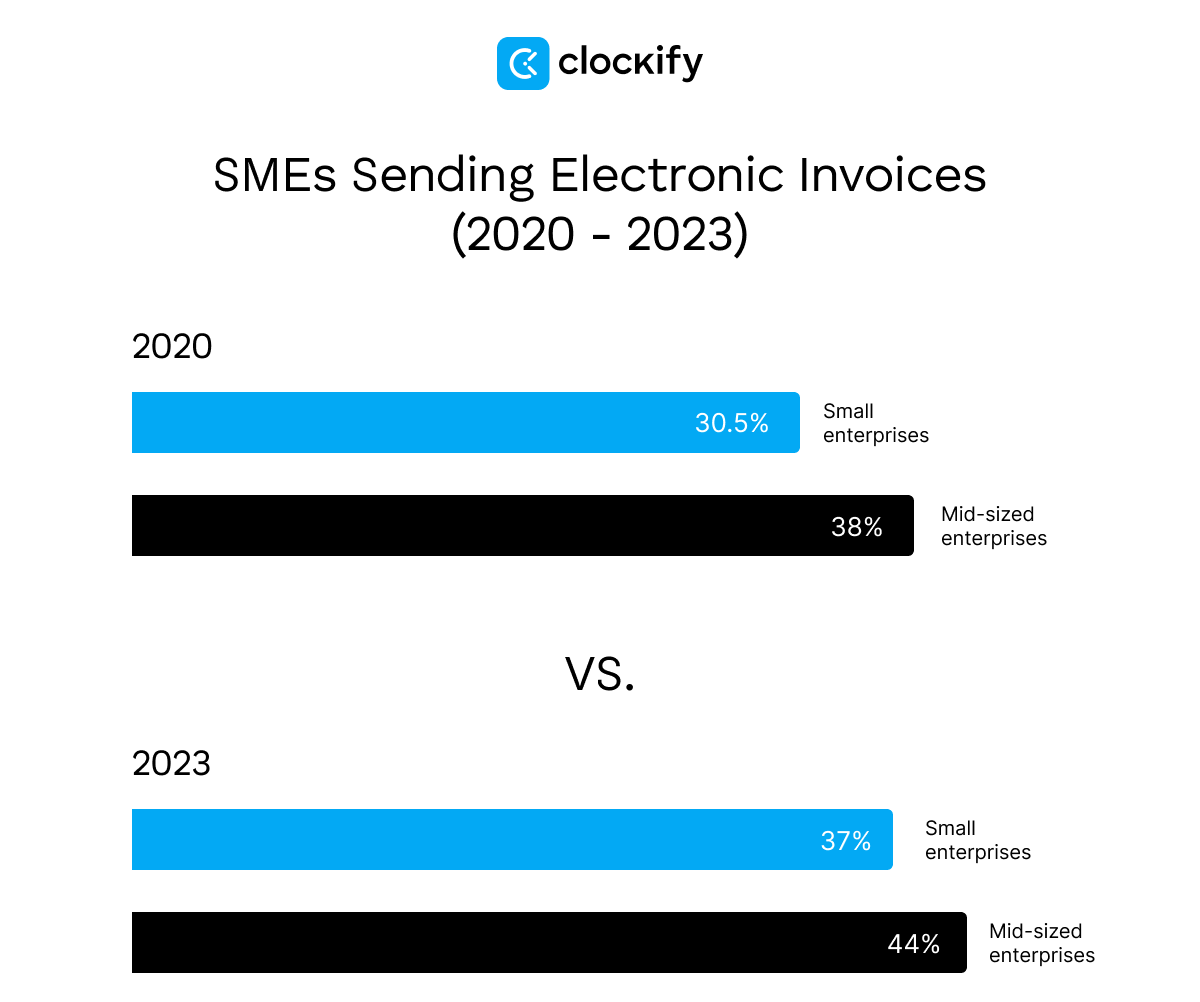
E-invoicing adoption lags, especially among small and mid-sized enterprises (SMEs). The European Commission’s report on e-invoicing found that 41% of SMEs experience technical issues when using electronic invoices — such as incompatibility with partner software and data security concerns. Another contributing factor is high setup costs.
Ultimately, you’ll encounter various customer invoicing solutions. By offering flexible options, you can grow your client base.
How does e-invoicing work?
CEO of a software development company, Taras Tymoshchuk, explains how e-invoicing looks from the supplier-buyer perspective:

“The supplier creates a digital account, sends it through a secure channel to the buyer, and the buyer automatically processes it in their system.”
Taras says this ensures a faster payment cycle and more accurate reporting, a benefit especially valuable for companies with many supplies. In other words, digital document exchange promotes faster payments, improving your company’s cash flow.
If you want to speed up inflows with e-invoicing, here’s how to get started — step-by-step.
Organize your invoices in Clockify
5 steps to successful e-invoicing adoption
Find out how to implement electronic invoicing into your business operation — and do it right the first time. All you need to do is follow these 5 steps.
Step #1: Evaluate your business needs
Before adopting e-invoicing, you’ll need to consider 5 questions:
- Will it help solve your biggest invoicing hurdles, like client disputes?
- If you have international clients, can you meet their country’s billing requirements?
- How many invoices do you manage monthly?
- What are your competitors doing to meet client and legal demands?
- Is embracing e-invoicing within your budget, and is it worthwhile in the long run?
Ultimately, understanding your company needs will help you choose the best e-invoicing option.
Step #2: Pick the right digital invoicing solution
The next step in implementing e-invoicing is choosing the ideal app that:
- Integrates seamlessly with other accounting/ERP software,
- Adheres to state and worldwide regulations, and
- Minimizes hands-on work.
These systems include the likes of QuickBooks, but Clockify by CAKE.com stands out as a worthy, compliant alternative, with:
- One-click time tracking,
- Automated billing, and
- Simple integration with QuickBooks and other accounting apps.
With accounting systems, you and your clients participate in a direct system-to-system document exchange — which improves security.
Alternatively, integrate your software with a supplier portal such as SAP Ariba or Coupa to exchange invoices. However, uploading documents onto supplier portals introduces an extra step, increasing the risk of cyberattacks.
💡 CLOCKIFY PRO TIP
Discover how to link Clockify with invoicing apps to perfect your billing process:
Step #3: Inform your employees and clients
Let your team and business partners know that you’re switching to electronic invoicing software. If some clients aren’t willing to accept e-invoices, reassure them that you’ll respect the current arrangement.
To help your staff stay informed, use safe communication apps for quick updates. CEO of an e-commerce solutions firm, Daniel Dulić, recommends Pumble for coordinating project teams:

“All project-related discussions happen in Pumble. That way, communication stays structured and centralized, which is especially important when multiple people are working on the same project.”

Step #4: Test and tweak your system
Before launching your e-invoicing service, test it out to prevent common e-invoicing mistakes — like compatibility issues or duplicate invoices.
To practice with electronic invoices, you’ll need to simulate exchanging documents between systems. That’s where supplier portals come in handy. So, we suggest you trial e-invoicing like this:
- Create an e-invoice template with billing sections,
- Send test invoices from your accounting software to a supplier portal,
- Receive them back from the supplier portal,
- Record any process issues, and
- Open invoices to consider any adjustments.
Complete the steps above for your e-invoicing needs with Clockify as your chosen billing software. It includes additional flexibility, such as marking invoices as sent, unsent, paid, or void (cancelled) to prevent duplicate sends.
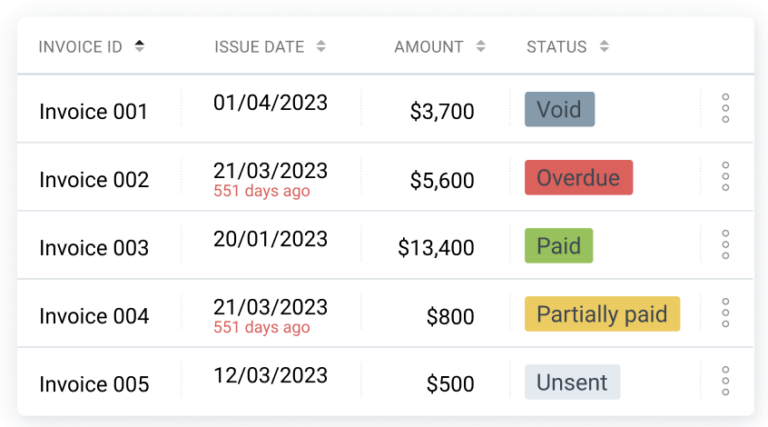
Aside from testing, you’ll need to verify your clients’ information and add them to your new billing system.
Step #5: Create guidelines for e-invoicing
In your invoicing policy, lay out specific rules for managing electronic invoices. This way, you’ll ensure staff efficiency and understanding. Your rulebook can consist of:
- E-invoice meaning with examples,
- E-invoice template and instructions for use,
- Summary of the full e-invoicing process,
- Most common errors and solutions, and
- People to contact for any concerns.
Ultimately, our step-by-step guide ensures effective invoice lifecycle management — this helps you stay compliant and deliver efficient yet reliable billing services.
FAQ about electronic invoices
Check out the most-searched questions about e-invoicing below.
Is e-invoicing mandatory?
Whether e-invoicing is mandatory varies by country. A recent US e-invoicing study by the Council On State Taxation revealed that:
- 19+ countries enforce e-invoicing for VAT (value-added tax) transactions, and
- 49 countries require it for certain transactions.
According to the report above, VAT countries mandate e-invoicing to combat credit-related fraud — a common compliance issue in VAT systems. The US tax system doesn’t have this problem, which is why e-invoicing is yet to be regulated there.
What happens if you don’t generate an e-invoice?
If you don’t generate an e-invoice, you would typically get fined for not issuing an electronic invoice — depending on the transaction laws of both your and your client’s country.
In the US, there’s no federal mandate for e-invoicing, so no nationwide penalty rules apply. However, keep in mind that state laws may outline specific contexts and consequences.
In Europe, each EU country handles e-invoicing adoption differently while complying with the European e-invoicing standard. Progress varies by member state; Romania has already set up monitoring mechanisms and penalties, while others haven’t.
With the slow yet inevitable shift to electronic invoicing, you’re best off staying informed about worldwide billing trends.
💡 CLOCKIFY PRO TIP
Keep tabs on your expenses for correct billing and ensure global compliance:
Use Clockify by CAKE.com — the ultimate e-invoicing alternative
Timekeeping and invoicing go hand in hand. Streamline your managerial tasks by syncing your accounting software with an easily integrated time-tracking and billing tool — like Clockify by CAKE.com.
Our budget-friendly time tracker offers a simple e-invoicing workaround while supporting conventional billing practices. Its flexible features are ideal for industry-wide use — see for yourself below.
#1: Manage invoices seamlessly
With Clockify’s invoicing, you can create and send traditional invoices:
- Add tracked time, expenses, and the client to your invoice,
- Send the invoice to your client’s email, and
- Download it as a PDF for printing.
For more comprehensive bookkeeping, including invoice receipt, integrate your accounting software with Clockify. Then, you can create flawless invoices with our time tracker and feed them into your accounting app — as well as receive invoices.
#2: Send reminders for unpaid invoices
Clockify lets you send invoice reminders via email to discourage overdue payments. Instead of combing through unpaid invoices, get Clockify notifications about late invoices once they’re past due.
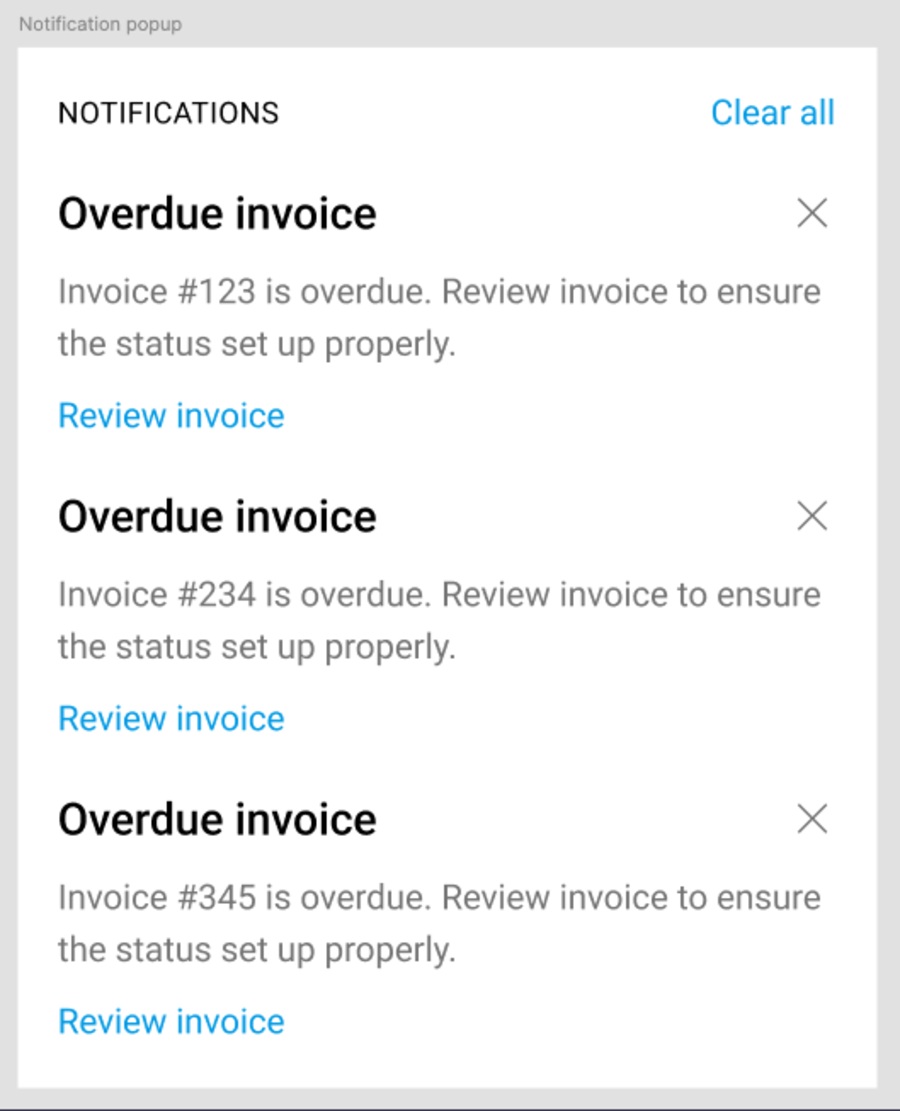
#3: Run audits for exceptional compliance
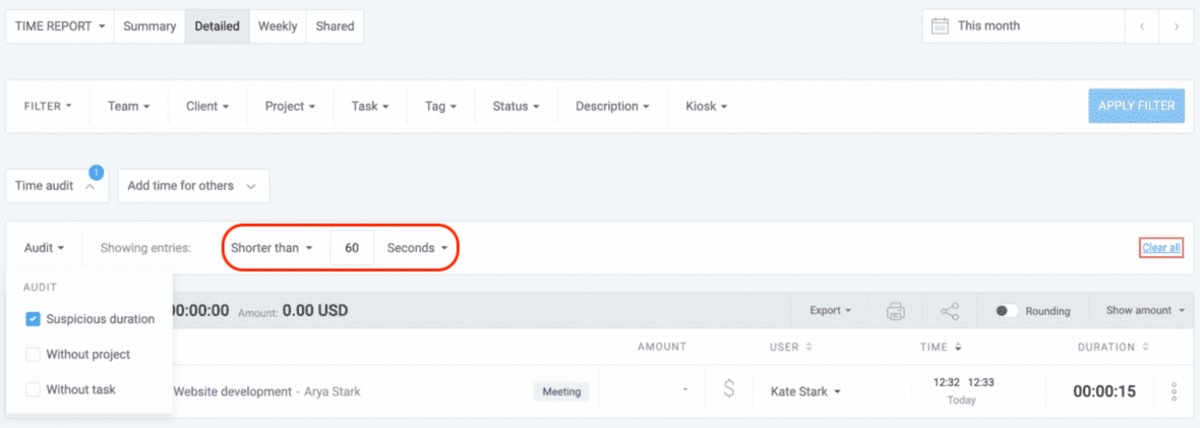
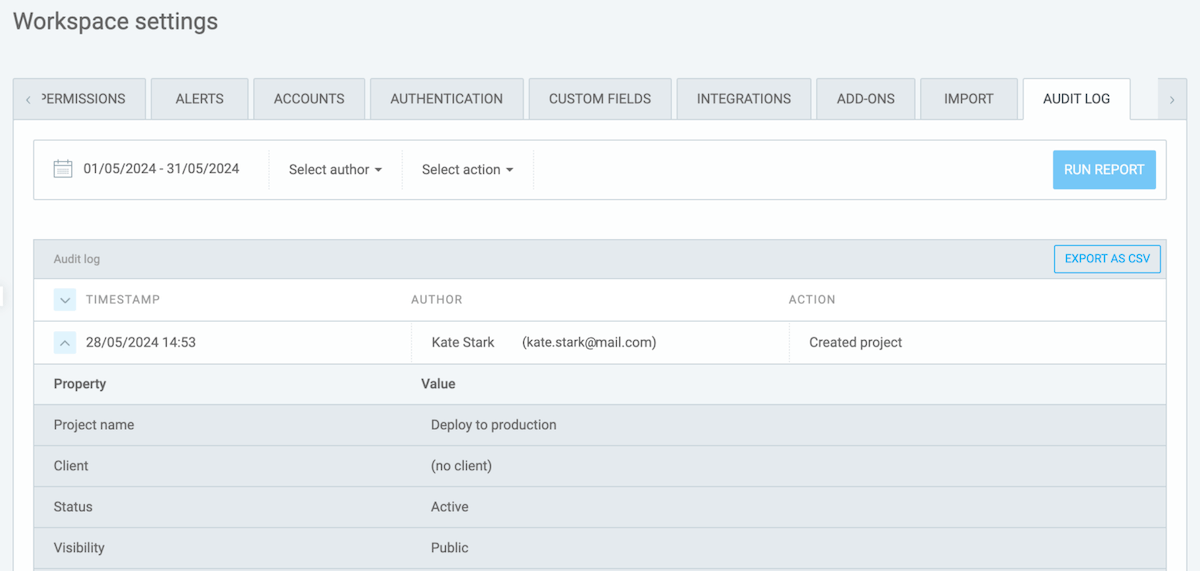
Stay compliant with Clockify, no matter your market or location, with time audits and audit logs.
Before billing clients, run time audits to fix uncategorized or suspicious time entries. Our time tracker’s detailed reporting lets you sort them based on the following filters:
- Suspicious duration,
- Without project, and
- Without task.
Also, you can open audit logs and filter your team activities by:
- Date,
- Client,
- Project,
- Expenses, etc.
For further information, feel free to consult our round-the-clock full human support and our insightful Help Center (with FAQs, tips, and tutorials).
Enjoy an error-free digital invoicing process with minimal hands-on work — powered by Clockify.