

Alex Beadon
Founder of Together We Launch
"We use Clockify to see where our time is going and how to solve any problems. It’s just so beneficial."
More stories

Find new apps that fit you team's needs
Calculate actual productivity or the ideal end time based on target productivity.

Staying organized as a therapist is hard, but managing other therapists can be a tall order.
As a therapy manager, you create productive staff schedules to protect your company’s health. But to streamline operations, you’ll need clear, auto-generated productivity metrics.
Learn how to use our therapy productivity calculator for peak staff efficiency and profitability.
A therapy productivity calculator is a free online tool that helps you figure out:
This dual-function tool helps you calculate productivity for time-based employees, giving you a clear idea of their billable work.
For a more granular view, Clockify is perfect for small businesses offering therapy services — like occupational therapy and physical therapy.

Let’s review the steps for using our therapy productivity calculator to enhance efficiency and gain valuable revenue insights.
To use your preferred time format, click either:
Add the start and end time manually.
If you previously selected the 12-hour clock, you’ll need to choose AM or PM for the start and end time.
Also, skip the end time if that’s the value you wish to calculate.
For easy shift tracking, have your employees punch into Clockify’s Kiosk — and get insights into their activity and breaks.
To calculate the overall time spent in therapy, you’ll have to:
60 (minutes per session) x 7 (sessions) = 420 (daily therapy minutes)
420 (daily therapy minutes) / 60 (minutes) = 7 (daily therapy hours)
To determine the ideal end time, therapy managers should fill in their employee’s:
After you input these metrics, our physical therapy productivity calculator will instantly generate the required end time.
Below is a sample calculation of a therapist’s shift end:
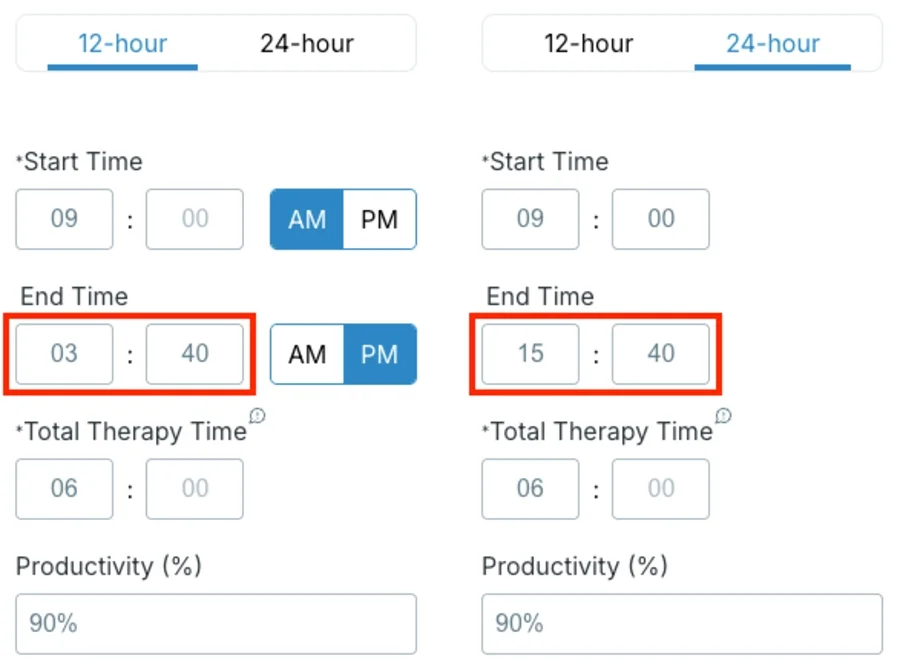
Here’s the formula behind these numbers:
Total time at work = Total therapy time (in minutes) / (Productivity % / 100)
Perfect end time = Start time + Total time at work (in hours)
So, in our example, we have:
Start time: 9:00 AM
Total therapy time: 6 hours = 360 minutes
Productivity target: 90%
To calculate total time at work, we’ll use the above formula:
360 therapy minutes / (90 / 100) = 400 minutes = 6.67 hours = 6 hours and 40 minutes
This is how we get to the perfect end time then:
9:00 AM + 6 hours and 40 minutes = 3:40 PM
That means your therapist would spend 6 hours on billable work and about 40 minutes on administration to meet the productivity goal.
To calculate productivity for each therapist, you’ll need to enter your employee’s:
The calculator will then automatically figure out and display the productivity percentage.
Below is a sample calculation of a therapist’s productivity rate:
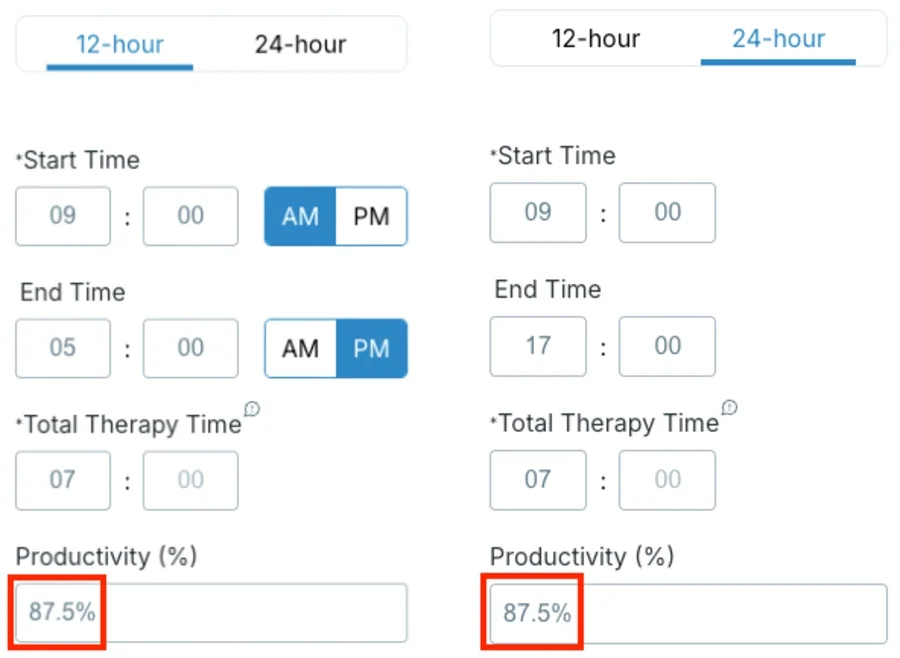
Now, let’s break down the formula for productivity rate.
Productivity % = Total therapy time / Total time at work x 100
Considering our example above, the calculation goes like this:
7 hours of therapy / 8 hours at work x 100 = 0.875 x 100 = 87.5%
This gives operations managers at clinics a clear metric showing an employee’s utilization rate (or billable work hours). The remaining percentage represents the non-billable time spent on administrative tasks.
🎓 Set KPIs That Drive Results — Strategy, Examples, and Tips
Our tool also lets you easily restart, record, or share your calculations with options like:
Accurate activity metrics let you confidently track billable hours for each client, making invoicing easier. Moreover, these numbers help healthcare agency owners pinpoint inefficient workflows.
To build optimized schedules and control client costs, try an intuitive time tracker like Clockify.
🎓 How to Bill a Client Accurately | How to Calculate Payroll Hours
Find our answers to common questions about therapy productivity — from what it means to how to calculate productivity percentage.
Therapy productivity is the amount of time therapists spend on billable activities — especially direct patient care. This usually excludes non-billable work, like breaks and administrative tasks, unless otherwise stated in your company policy.
Several factors can impact a therapist’s productivity, including:
If overlooked, unmanageable schedules can strain your clinical team, which hurts your business through:
Executive director at a treatment center, Melissa Gallagher, tackles common obstacles that stifle productivity and profitability:

“I work to solve secondary trauma from hard cases, paperwork burdens that take away from clinical work, and ‘case complexity creep,’ where therapists are regularly carrying multiple high-risk clients at once.”
To conquer these challenges, use our productivity calculator for therapy. Beyond calculating efficiency, it shows you if schedules benefit employees’ performance and company’s interests.
More importantly, it helps you uncover profit leaks — like underbooked sessions or excessive time spent on paperwork.
The ideal productivity percentage aligns with your workers’ capabilities and revenue goals.
Psychotherapist Dana Colthart outlines the average therapist’s workday, stressing that working beyond these limits can lead to overwork:

“Full-time in the tri-state area or major cities is considered anywhere from 15-25 clients per week at sessions 45-60min. You have to do notes, documentation, clinical consultation and research in between sessions.”
Now, let’s calculate the productivity rate for clinicians using Colhart’s maximum values.
Our example therapist works a standard 8-hour workday, Monday through Friday, from 9-5. They see 25 clients per week, each receiving 60 minutes of therapy. That would be 5 patients a day with a total therapy time of 300 minutes (5 hours) on average.
Enter the start time, end time, and daily therapy hours into our therapy productivity calculator.
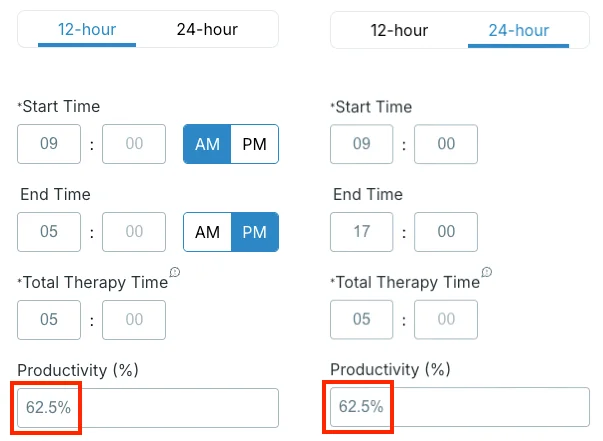
Based on the results, a therapist working an 8-hour, 5-day workweek can ideally fit:
This yields the highest recommended productivity rate of 62.5%.
To increase your team’s billable work, consider ways to cut down on administration time.
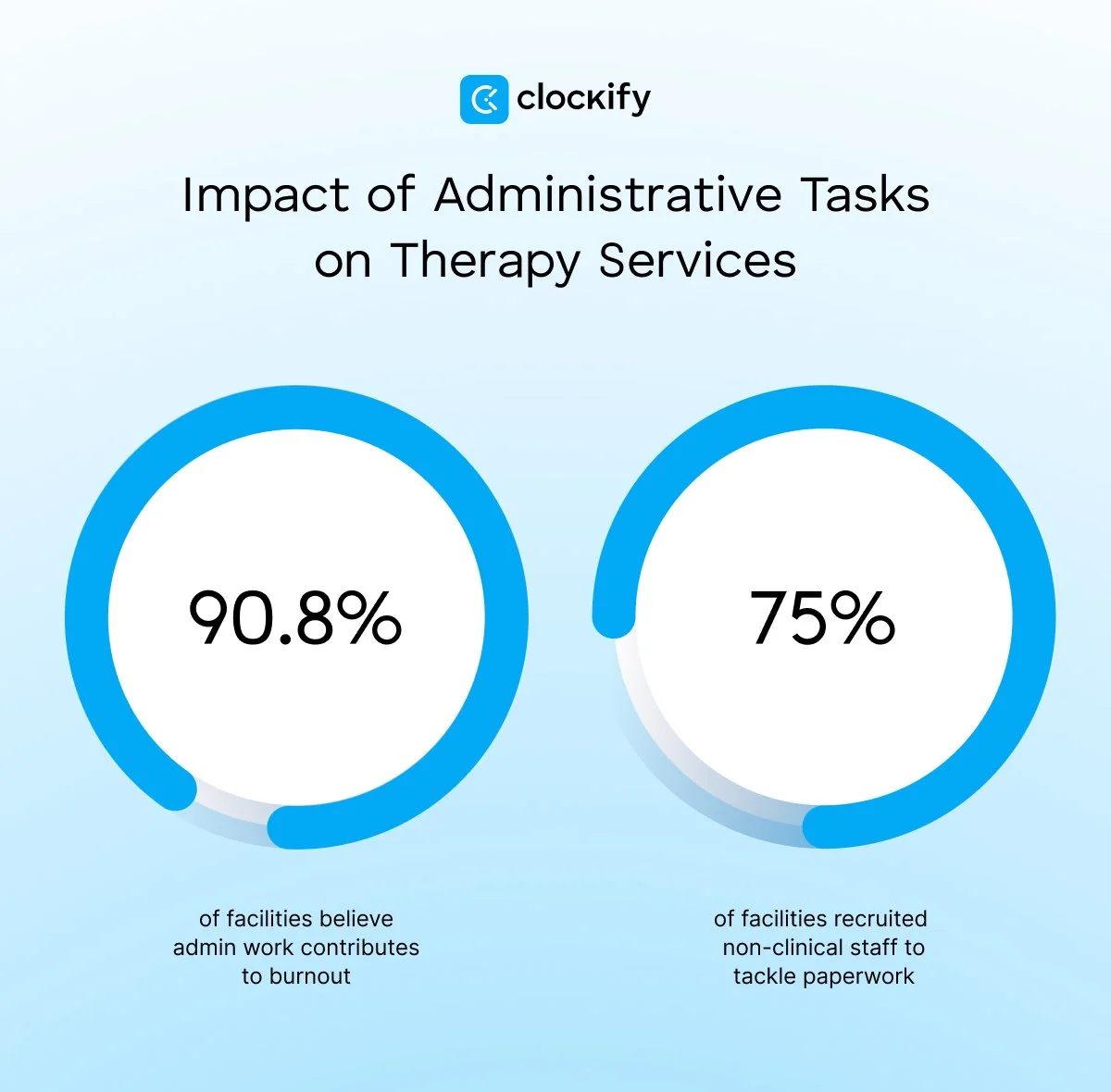
In 2025, the American Physical Therapy Association explored how administrative tasks affect therapy services and found that:
Owner of a health center, Nick Angelis, shares how he manages workloads for better productivity:

“We get rid of patients who are draining therapists' capacity to care for patients (with cause, like no-shows). Also, flexible schedules help the therapists show the same grace to patients they’re being shown by their employer.”
If you’re aiming for superior therapy productivity, use Clockify by CAKE.com to track direct vs indirect care hours — see the image below.
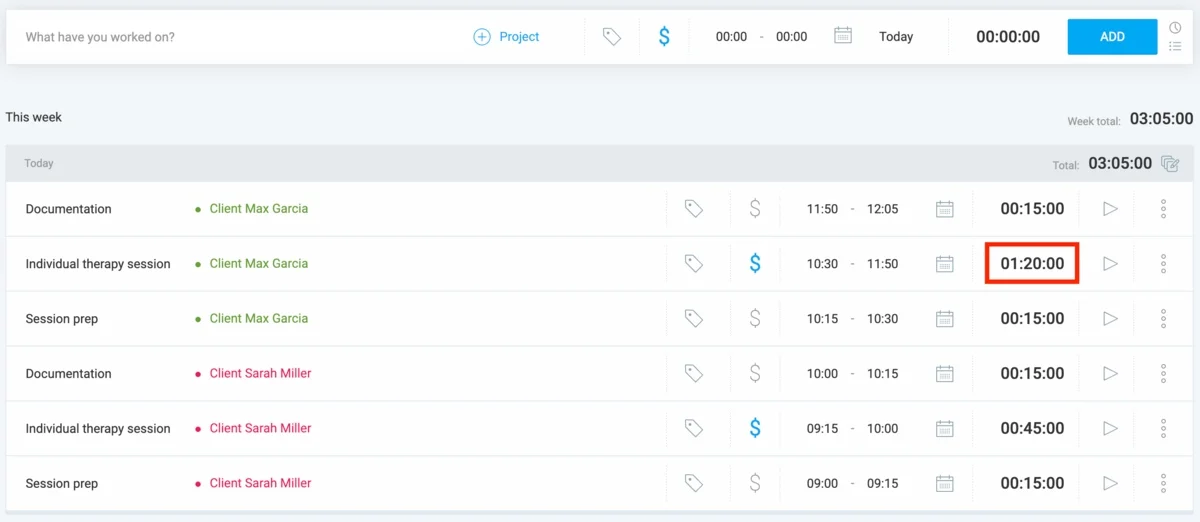
Clockify offers exact metrics for billable and non-billable tasks, helping you pinpoint inefficiencies — like overly long sessions or elusive clients.
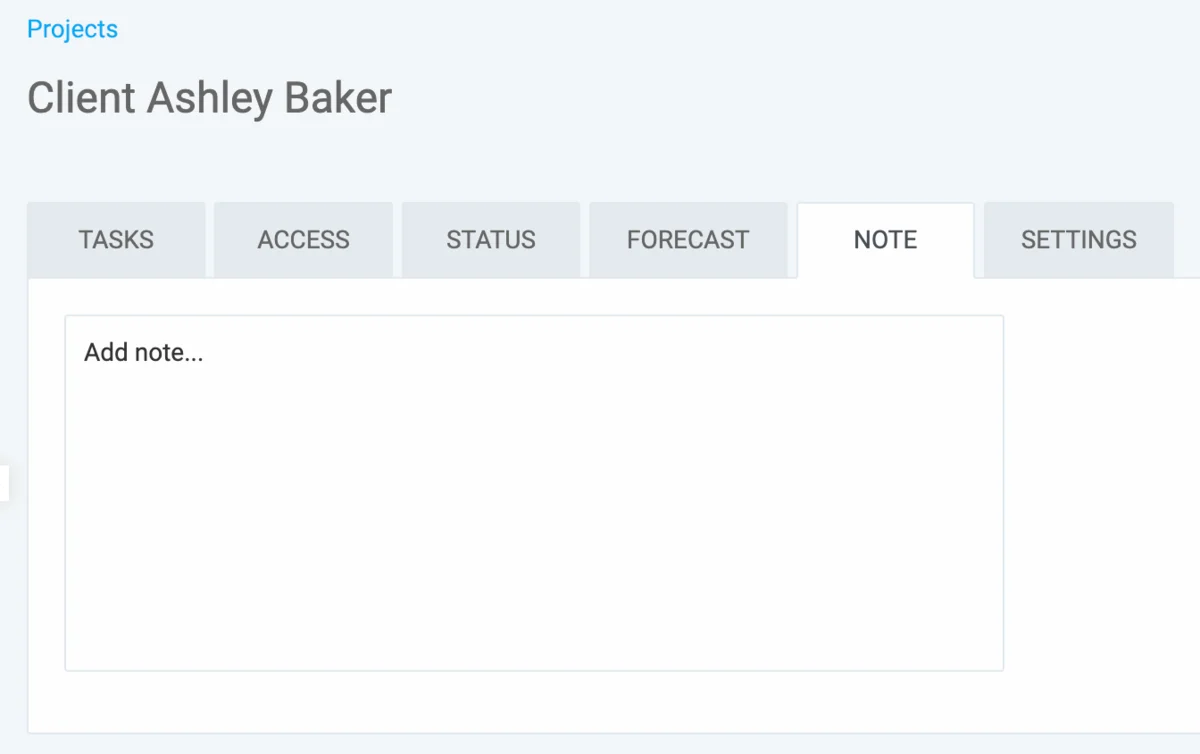
To automate documentation, your staff can add notes on clients’ progress directly in Clockify. They can enter up to 16,384 characters — that’s about 8 pages of content.
🎓 2025 Workplace Productivity Statistics
Our Therapy Productivity Calculator auto-generates chargeable hours and productivity metrics per worker. However, Clockify can whip up more actionable analytics on billable work — for a small fee.
Our user-friendly time tracker helps all agency owners manage costs and revenue with accuracy — using 3 features.
Feature #1: Projects
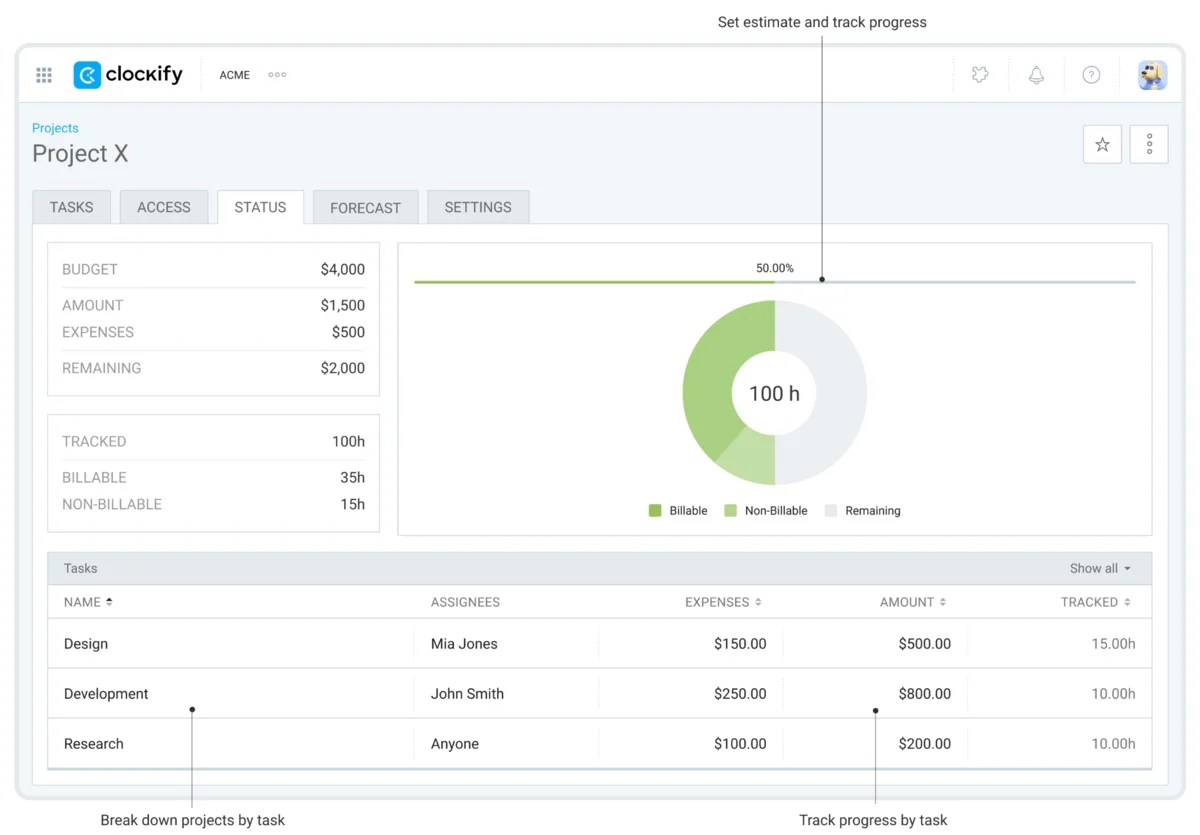
You can set up projects and tasks per client, as follows:
Within each project, you can oversee real-time costs vs profits based on powerful time tracking data.
Feature #2: Scheduling
The Scheduling feature in Clockify allows you to assign tasks directly to team members on their individual timetables. With a clear picture of everyone’s capacity, you can prevent overbooked schedules and costly time gaps.
Feature #3: Reports
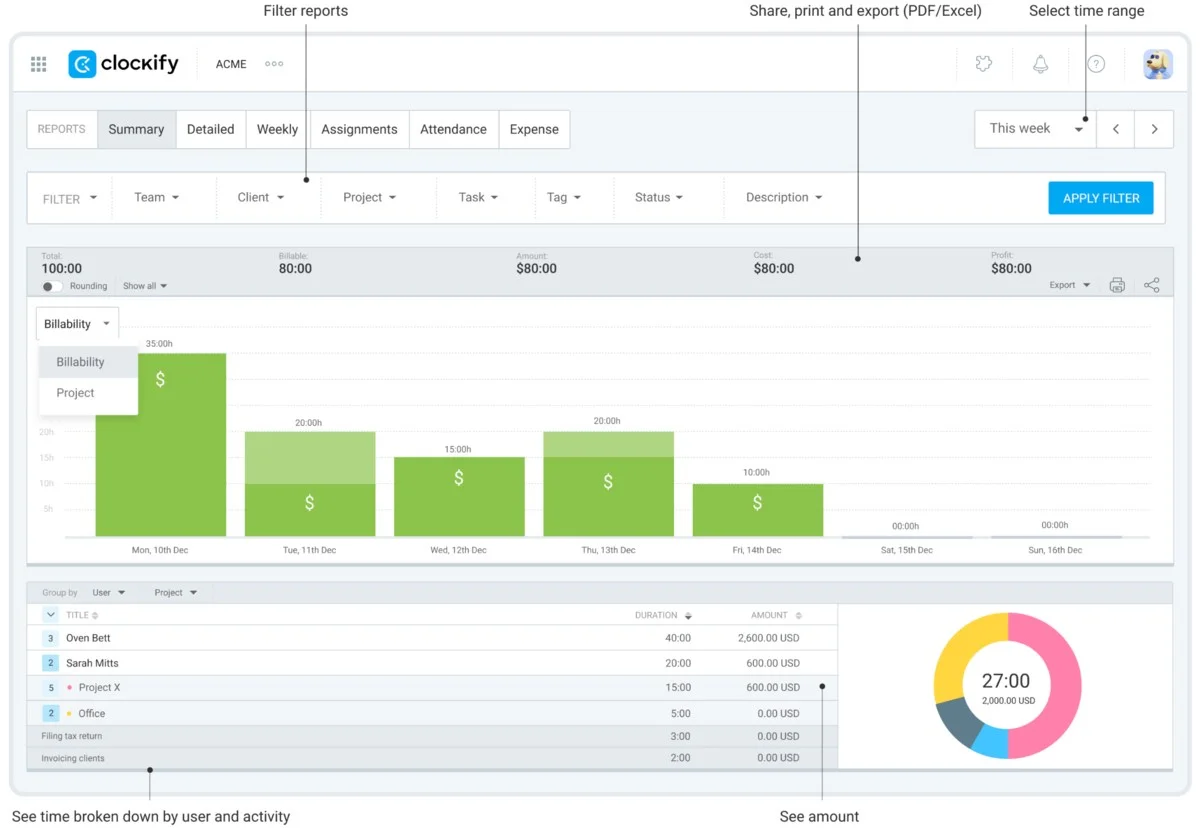
Review extensive reports to compare your therapist’s activity and billable hours. To illustrate, Summary reports offer quick insights into employee behaviors and high-value clients. Simply filter data by:
To further customize your data, browse the CAKE.com Marketplace for add-ons in the field of:
If anything is unclear, contact our friendly full-human support team available 24/7 and expect insightful answers in a few moments.
With Clockify, you can optimize resources and billing hassle-free — keeping everyone happy (primarily yourself).
