Chasing contractors for timesheets is a nightmare.
You’ve probably spent hours piecing together data from random emails and half-filled spreadsheets just to approve one invoice.
And even then, you’re not entirely sure if those hours are accurate.
Luckily, this article shows you how to track contractor hours without the headache — so you can:
- Verify invoices quickly,
- Control project costs, and
- Keep accurate records.
Why tracking contractor hours matters
Tracking contractor hours ensures accurate billing and payment, protecting both parties from disputes over time worked and money owed. It also provides clear documentation for:
- Tax purposes,
- Project budgeting, and
- Compliance with state labor laws.
Track contractor hours in Clockify
Here’s what happens when you don’t track contractor hours.
Challenge #1: Manual time collection is a mess
You’re gathering contractor hours from everywhere — email, chat, sheets, and so on. This scattered approach means that:
- You waste hours each week collecting and organizing data,
- Contractors forget to submit hours on time, and/or
- Time entries are incomplete or inconsistent.
On the other hand, an automated timesheet approval and submission process can save you both time and money.
Challenge #2: You can’t verify invoice accuracy
When a contractor sends you an invoice for 40 hours, can you verify that number? Chances are you’re left with choices to:
- Trust the contractor blindly and hope the hours are correct,
- Cross-reference emails and project updates manually, which takes forever, or
- Pay the invoice, knowing you might be overpaying.
One QuickBooks statistic suggests that US employers typically have to correct about 80% of submitted timesheets, mostly because the workers misremember their hours.
💡 CLOCKIFY PRO TIP
What’s the real difference between contractors, freelancers, and employees? Find out more here:
Challenge #3: No real-time visibility into project costs
You only find out a project went over budget after you’ve already paid the invoices. By then, it’s too late to correct or adjust anything.
The so-called cost overrun is caused mainly by unmanaged scope creep. This is why it’s necessary to have a clear, well-defined plan for project changes that both you and your team can follow.
Challenge #4: Poor record-keeping creates problems
When tax season arrives or a client disputes an invoice, you’re digging through months of emails and sheets, trying to reconstruct what happened. It’s messy, time-consuming, and unprofessional.
To fix this, you need contractor time-tracking software that centralizes everything — time entries, approvals, and invoices — in one place.

How contractor time tracking works
Here’s a simple flow of how to track contractor hours with software.
#1: Contractors track their time — they start a timer when they begin work (or add time manually later). They should also select which project and task they’re working on.
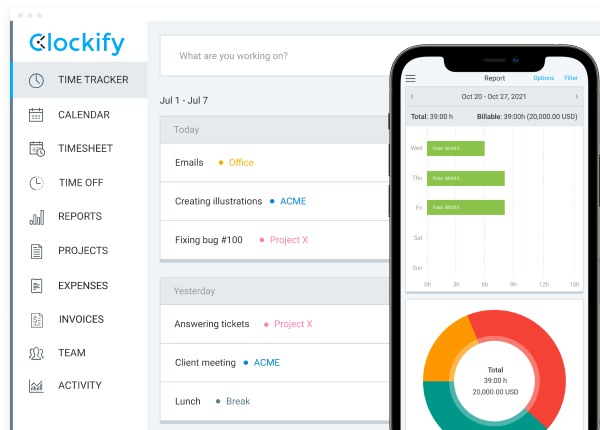
#2: You review submitted hours — all tracked time appears in your dashboard. You can see who worked on what, for how long, and when.
#3: You approve the hours — if the time looks accurate, you approve it. If something seems off, you request changes before approval.
#4: You pay based on approved time — the approved hours become the single source of truth for invoicing and payment.
And that’s it. No more chasing spreadsheets or guessing if invoices are accurate.
CEO of a management consulting company, Shawn Jahromi, says that verification problems start with a vague scope. To avoid that, each work block needs to have a clear deliverable, an owner, and an acceptance rule:

“When an invoice arrives, we check alignment between story, tickets, and calendar, not minutes. A time-tracking app only helps if it reinforces governance. It must show who did what, for which asset, under which work order.”
That way, Shawn adds, hours form an audit trail, “not just numbers.”
💡 CLOCKIFY PRO TIP
Not sure how to pay your contractors? Check out this article for more information on the matter:
How to choose the right time-tracking tool
Here’s what to consider when picking an app to track contractor hours.
Does it solve your biggest pain point?
If your main problem is verifying invoices, you need robust approval features. Or, if it’s budget control, focus on real-time cost tracking.
Will contractors actually use it?
Pick a tool that’s truly simple. If contractors complain about the interface, they won’t track their time consistently.
Does it fit your workflow?
Some businesses need GPS tracking for field contractors, while others want detailed task breakdowns. Choose a tool that matches how your contractors work.
What’s the cost?
Most contractor time-tracking software solutions charge per user per month. So, factor in:
- How many contractors you’re tracking,
- Whether you need premium features, and
- If free plans offer enough functionalities.
One powerful app, Clockify by CAKE.com, has several different pricing plans (including a free one), starting from $3.99 per seat a month when billed annually. For users who want their contractors to track time only via kiosk, seat pricing starts at $0.79.
Can you try it first?
Always test the tool before committing. Invite a few contractors to track time for about a week and see if the workflow actually works for your team.
Conveniently, Clockify offers an automatic 7-day free trial with all Pro features — no credit card required.
How to track contractor hours with Clockify by CAKE.com
Clockify is a simple contractor time-tracking software designed to help you deal with the mentioned challenges efficiently. Setting up Clockify takes only a few minutes:
- Create your workspace and add your projects,
- Invite contractors with a simple email link,
- Set hourly rates for accurate cost tracking, and
- Enable time approval so you can review hours before payment.
💡 CLOCKIFY PRO TIP
For a step-by-step guide on how to set up your Clockify account and create a workspace, check out this article:
Contractors can track their time (on a computer or mobile device) in 3 ways:
- Start a timer when they begin work and stop it when they’re done,
- Add time manually if they forget to track in real time, or
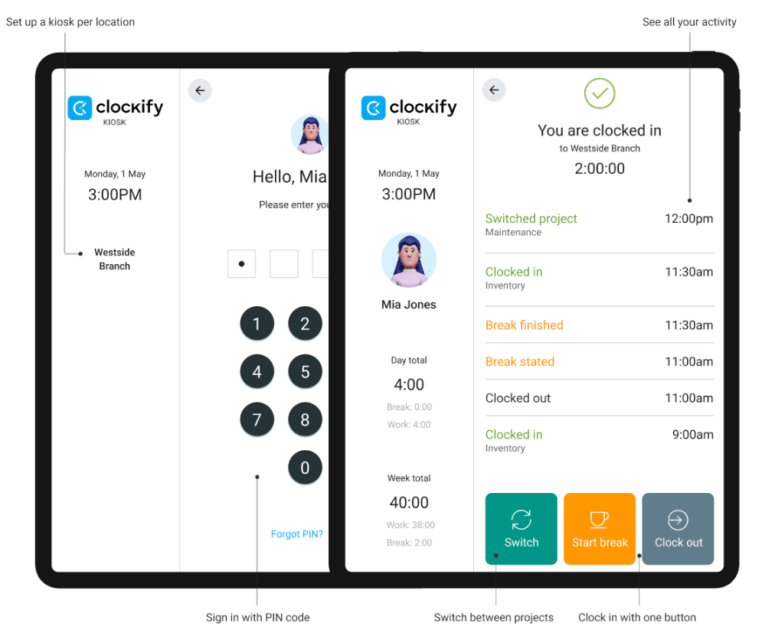
- Clock in via kiosk with a simple PIN code.
Clockify’s kiosk is especially useful for on-site contractors. Not only does it simplify time tracking, but it also provides GPS location with clock-ins. Here’s how to set it up:
- Enable kiosk mode in your Clockify workspace settings,
- Create your kiosk, give it a name, assign contractors to it, and choose a default project,
- Set up PIN codes that the contractors will use to clock in and out, and
- Launch the kiosk using a link on tablets, phones, or computers.
Regardless of the method used, all submitted contractor hours appear in your dashboard. So, you can easily:
- See exactly who worked on what and for how long,
- Compare tracked time against project budgets,
- Approve accurate entries with 1 click, and
- Request changes if something looks off.
Track contractor hours in Clockify
Additionally, you can count on Clockify by CAKE.com to:
- Get real-time budget tracking — set project budgets in hours or dollars, and the app will show you how much of that budget has been used as contractors track time.
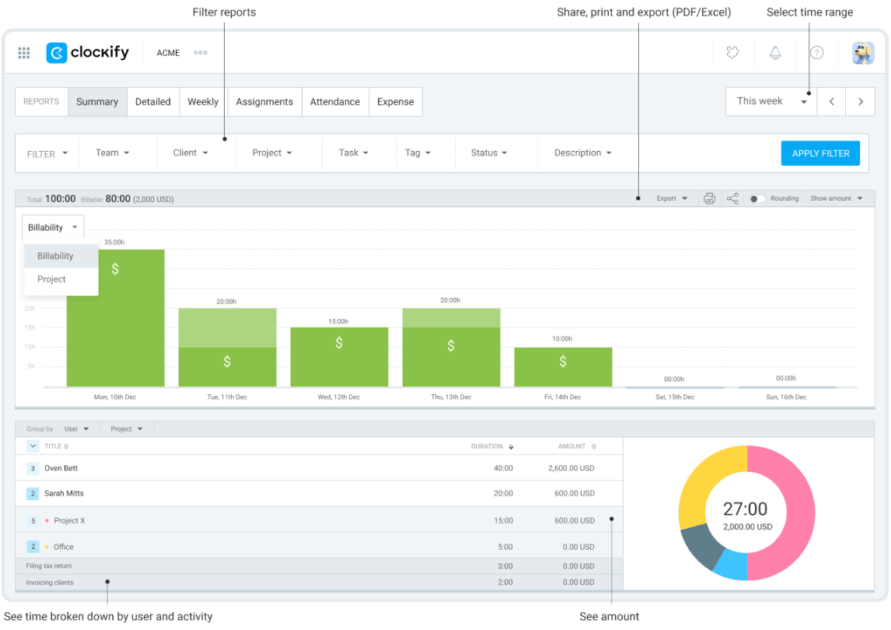
- Generate reports to verify invoices — pull project summaries to see total costs and export client-ready reports to justify your billing.
Benefits of tracking contractor hours
Once you start tracking contractor hours properly, here’s what changes:
- You stop overpaying — you only pay for verified, approved hours.
- You catch budget issues early — when you see a project hitting, let’s say, 80% of its hourly budget, you can adjust scope or rates before things spiral.
- Invoicing becomes simpler — instead of manually calculating hours and rates, you use Clockify’s invoicing to send invoices automatically (or pull a report with exact hours and rates).
- Record keeping turns automatic — every hour is logged, categorized, and stored.
- Contractors get paid faster — when the approval process is simple and clear, you can process payments faster, as well.
Founder of a digital marketing agency, Jeff Romero, told us that his company uses Clockify to keep track of contractor hours. Everyone logs time by client as they go, thanks to Clockify’s Asana integration.
Namely, when a contractor tracks time in Asana, it shows up in the right place in Clockify without anyone having to move things around — as Jeff put it:

“It gives us a clear picture of how long updates or ongoing work actually take, and it keeps billing straightforward since we can charge clients for the exact time spent on their projects. It also keeps payments clean on the contractor side because we’re pulling from real hours rather than estimates.”
Jeff says they don’t have to verify anything — and it removes guesswork.
💡 CLOCKIFY PRO TIP
If you want to learn more about the benefits of time tracking, check out the following article:
FAQs about tracking contractor hours
Have more questions about contractor time tracking? Keep reading to get your answers.
What’s the best way to track billable hours?
The best way to track billable hours is to use time-tracking software that lets contractors log hours for specific projects and tasks. This creates a clear record you can use for billing and verification.
CEO of a professional employer organization company, Guillermo Triana, shares that the more detailed and specific task descriptions are, the better:

“Hours alone mean nothing. I recently halved the review time for creative contractors simply by getting them to replace the vague ‘marketing’ with annotations like ‘2.3 hrs → wrote 800-word email series → launch 12/4’.”
How to track hours worked as a consultant?
As a consultant, you can track hours worked with neat apps like Clockify by CAKE.com that make this process simple. All you have to do is:
- Start a timer when you begin work,
- Categorize your time by project and task (or client), and
- Submit your hours for approval.
What’s the best way to track employees’ hours?
Ideally, track employees’ hours worked using the same time-tracking app contractors use. After all, the same tools that work for contractors should work for employees. The key is choosing the right software with features that accommodate all work engagements.
Track work hours with Clockify
How to track hours on a project?
To track hours on a project, assign all project work to a specific project/client in your time-tracking tool. Everyone working on that project should log their time, giving you a complete view of total hours and costs.
What’s a reasonable number of billable hours?
The reasonable number of billable hours depends on your industry and project scope. Clockify’s time-tracking data helps you establish realistic benchmarks based on actual performance, not guesses.
How to count and document billable hours?
To count and document billable hours, track time with detailed descriptions of what work was done. This creates a clear audit trail you can reference when clients question invoices.
With Clockify by CAKE.com, you can easily separate billable from non-billable work.
💡 CLOCKIFY PRO TIP
Complete your entire administrative workflow within one tool and learn how to make invoicing easy with Clockify:
How to calculate billable hours in Excel?
If you want to calculate billable hours in Excel, we’ve prepared a template for you — get it for free below. Just remember to use HH:MM:SS AM/PM or military time format for start and end times.
⬇️ Download the Billable Hours Template (Google Sheets)
However, aside from a powerful time-tracking tool, Clockify is also a billable hours calculator — so, you don’t have to calculate billable hours in Excel.
How to maintain billable hours?
In order to maintain billable hours, track time consistently, review and approve hours regularly, and use reports to monitor trends and spot issues before they impact budgets.
The best app to track contractor hours — Clockify by CAKE.com
Tracking contractor hours doesn’t have to be messy or nerve-wracking. All you need is a system where contractors can easily log their time, so you can quickly review and approve it.
That’s just the tip of the iceberg of what good contractor time-tracking software does — and that’s why switching from spreadsheets to Clockify is worth it.
You can also use our tool to:
- Create projects with time or budget estimates, set billable rates, and predict project performance,
- Schedule shifts, allocate resources, and track team capacity and utilization rates,
- Generate invoices directly from tracked time entries with custom branding,
- Get and export detailed reports showing who worked on what, labor costs, and profitability,
- Analyze expense data alongside tracked time for complete project cost visibility, and more.
As a no-nonsense app to track contractor hours, Clockify offers fully human 24/7 customer support. And the already bargain price gets even better when you pick it up as part of the CAKE.com Productivity Bundle.