

Alex Beadon
Founder of Together We Launch
"We use Clockify to see where our time is going and how to solve any problems. It’s just so beneficial."
More stories

Find new apps that fit you team's needs
Employee monitoring means using specific tools to track the tasks and activities employees perform during their work hours. The goal is to better understand employee productivity and performance.
Whether your team works remotely or in-office, you should learn about employee monitoring laws — federal and state ones — before introducing monitoring to workers.
Although this article cites several lawyers, we’re not giving you specific legal advice. We’re just helping you understand what employee monitoring laws you have to follow.

Yes, employee monitoring in the US is lawful if the conditions are clearly defined.
US employers also need to have “a reasonable basis for reviewing the employees’ data,” according to Robert Tsigler, the founder and lead attorney of the Law Offices of Robert Tsigler, PLLC:

“The Electronic Communications Privacy Act of 1986 contains several relevant points for employers who wish to review any information about their employees. Other states’ privacy laws might also contain some limitations, and I recommend consulting with an attorney experienced in the field.”
Robert also talks about federal laws that regulate employee monitoring:
“For example, the Electronic Communications Privacy Act and the Stored Communications Act cover any potential employer’s concern about the employees’ emails. The National Labor Relations Act often contains a relevant section when an employer monitors the employees’ communication.”
Our interlocutor concludes that, if you want to implement employee monitoring, you should “make a thorough analysis of what information may be collected, by whom, and for how long.”
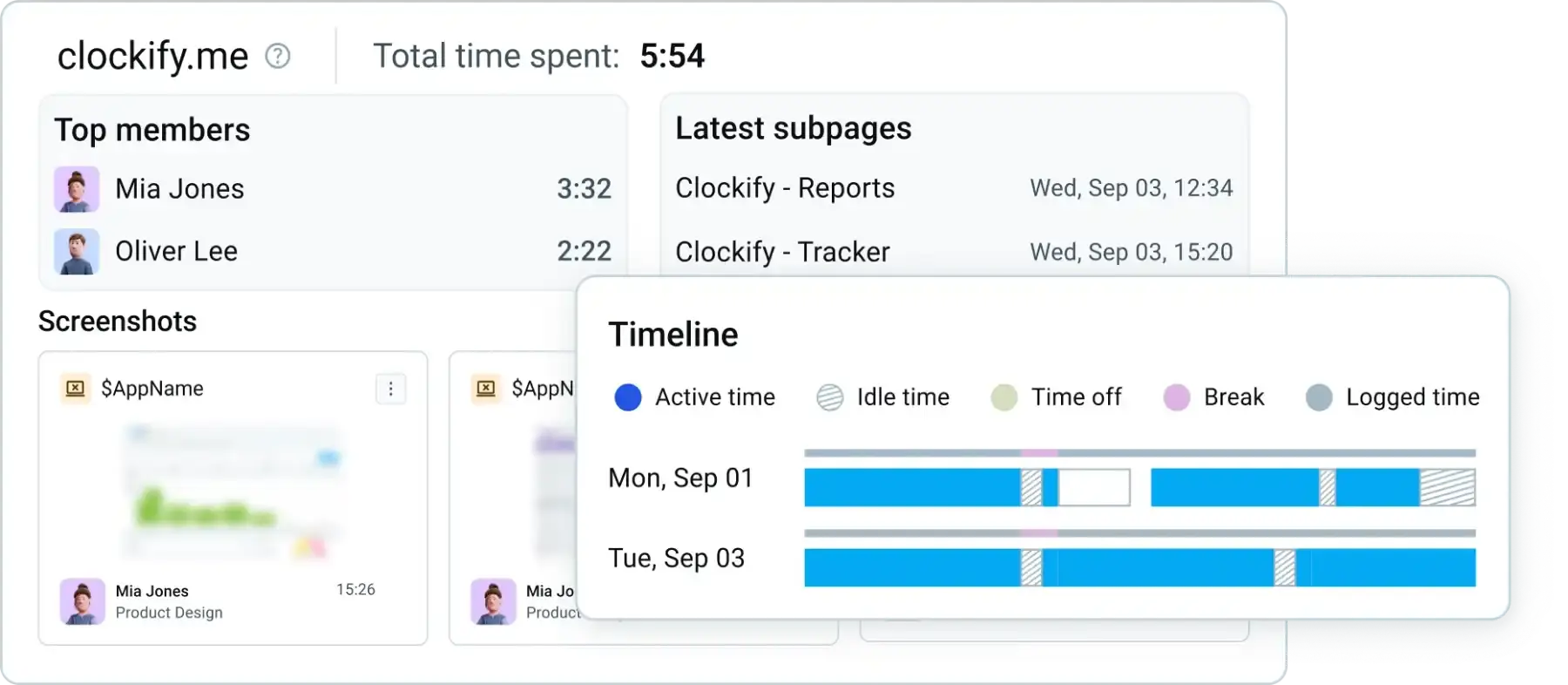
Tools like Clockify by CAKE.com let you implement compliant employee monitoring. For example, you could take blurred screenshots of employee screens, calculate utilization rate per employee, and compare productive versus unproductive work hours.
🎓 Employee Monitoring: What It Is, Types & How To Do It Right
Let’s see some federal laws in the US that can apply to employee monitoring.
The Electronic Communications Privacy Act (ECPA) of 1986 is a US federal law that prohibits intercepting different types of electronic communications, such as:
The ECPA also protects these different kinds of communication by regulating access to them. According to the ECPA, no one can install a pen register or a trap-and-trace device without a court order. However, the ECPA includes several exceptions for operators and service providers.
What does this mean for you as an employer?
As an employer, the ECPA has exceptions that allow you to monitor work emails (only with employees’ consent) and company-owned equipment. However, you must not track employees’ personal devices used for personal communications.
Staying compliant with this and other federal laws, like FLSA, is much easier with a reliable time and attendance tracker, like Clockify by CAKE.com. This way, you’ll record work hours properly and avoid monitoring errors.
Another federal law is the Stored Communications Act (SCA), which protects how wire and electronic communications (emails and online messages) are stored and who can access them.
The SCA states that employers can access employees’ emails (only if it’s a company-provided email service), if such tracking serves a business purpose. Employers also must have clear policies covering email monitoring.
On the other hand, employers can’t access employees’ private email accounts, even if they’re logged in on the company-provided computer. The only exception is if the company policy includes private emails and if employees use such on a work computer or company network. But, in that case, there has to be written consent in the employer’s policy.
What does this mean for you as an employer?
To comply with the SCA, create a policy with clear rules on how workers must communicate electronically and what employees can expect when using work and private email while working in-office or remotely.
US federal law, the National Labor Relations Act (NLRA), protects employees and their union activities. According to this act, employers are forbidden from taking photographs or tracking employees in similar ways during employees’ strikes.
In 2022, the National Labor Relations Board’s (NLRB) General Counsel published a memorandum that prevents NLRA violations. The NLRB states that employers should:
What does this mean for you as an employer?
As an employer, you should create a written employee monitoring policy that notifies workers about tracking methods, explains the reasons for monitoring, and includes arguments that the practices won’t interfere with the NLRA.

Another law worth mentioning is the Health Insurance Portability and Accountability Act (HIPAA), which regulates individuals’ rights to their health information — how that data is used.
In industries where workers handle medical information, employers must respect the privacy of health-related information and avoid HIPAA violations.
Let’s see specific US states and their laws on employee monitoring.
| State law | Prior notice | Details | Exceptions | Penalties | ||
|---|---|---|---|---|---|---|
| Connecticut | ||||||
|
Chapter 557, Sections 31-48 of 2025 Connecticut General Statutes |
Written notice to all Connecticut employees |
Connecticut employers have to inform employees about the type of monitoring that the company will start using by posting a notice in an easily visible place.
|
Employers are allowed to use electronic monitoring without a written notice if they suspect:
|
Civil penalties can go as high as:
|
||
| Delaware | ||||||
|
2025 Delaware Code
|
Electronic notice at least once a day
|
Delaware employers are obligated to give an electronic notice of employee monitoring (monitoring telephone conversations or transmissions, emails or transmissions, internet access or usage):
|
Law-enforcement officers are exceptions, so these rules don’t apply to their activities. |
Civil penalties are $100 for each violation. |
||
| New York | ||||||
|
Senate Bill S2628 |
Written notice that has to be acknowledged by workers in New York State |
Under Section 52-a of the Civil Rights Law, New York employers must give written notice during onboarding to all workers subject to employee monitoring.
|
N/A |
Civil penalties can go as high as:
|
||
| Texas | ||||||
|
A law on monitoring company computers and Internet |
Texas employees have to sign a policy |
Texas employers must have a policy about how employees use company computers, email, and Internet. Such policies need to contain sections like:
|
N/A |
Not specifically included by this law. |
||
Another state worth mentioning here is Illinois and its Biometric Information Privacy Act (BIPA). Under this law, when Illinois employers demand employees’ biometric data (retina/iris scans, fingerprints, facial geometry, and similar data), they must inform employees and obtain consent. Illinois employers must also provide policies that include rules on how long they keep the data and how they can delete it.

There are several types of employee monitoring:
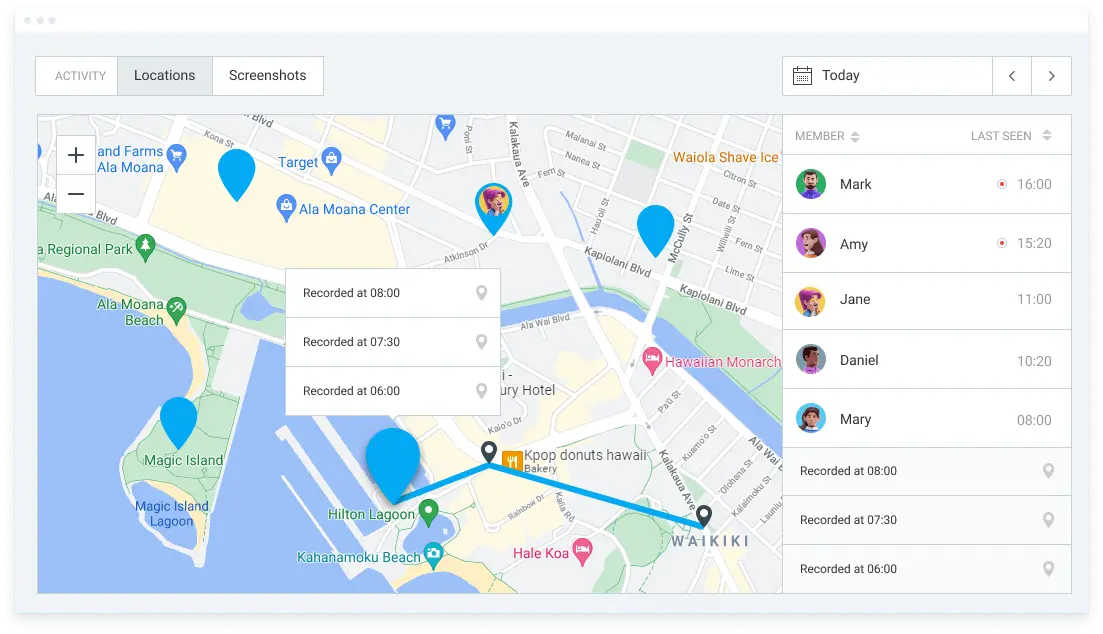
For example, Clockify’s GPS time clock helps you analyze whether some work locations need fewer or more employees and distribute tasks more effectively. It’s perfect for industries like construction, moving companies, pest control, and others.
If you’re a business owner or project manager in the IT or software industry and you’re looking for ways to introduce employee monitoring, here are some international laws you should follow:
In the United Kingdom, according to the law on employee monitoring and workers’ rights, employers are mandated to inform employees about monitoring in their contracts or handbooks, and state:
The same law disallows employers from monitoring employees in private spaces, like restrooms.
In Canada, workers in federal government institutions are protected by the Privacy Act. PIPEDA covers employees in private-sector businesses like banks, telecommunications, and transportation companies.
Under Canadian employee privacy laws, employers must be transparent about their monitoring. Employers have to inform employees about:
In the European Union, Article 5 of the GDPR states that personal data must be collected only for legitimate purposes. Article 14 of the same law indicates that gathering information has to be transparent. For example:
🎓 How To Monitor Employee Productivity in 6 Steps (+ Metrics) | 10 Best Remote Employee Monitoring Software of 2026
The first step in monitoring employees legally is to create a policy with an employee's consent.
Our expert contributor Robert Tsigler says that an employee monitoring policy should have written consent from employees:
“Employees should have a reasonable idea of the work conditions they are willing to accept, and the document will protect both employer and employee. Having a written agreement can also provide the parties with some general knowledge of what information can be collected by an employer.”
Here’s what a monitoring policy should include:
| Monitoring policy sections | Description |
| Monitoring purpose | Explain why you’re introducing employee monitoring (security reasons, productivity monitoring, or anything else). Explain that the policy includes all employees, both in-office and remote. |
| Devices being monitored | Explain what devices will be monitored and what locations are included. |
| Monitoring tools and metrics used | Explain the monitoring tools that are used (cameras at the workplace or monitoring software) and metrics (keystrokes or keylogging, mouse activity, screenshots, or anything else). |
| Data storage | Explain how long the monitoring data will be stored, who will have access, and in which circumstances the information can be deleted. |
| Employee consent | Leave a space for an employee’s signature as proof of their consent. |
In addition, you can include links to vital federal or state laws applicable to your location.
To develop a transparent monitoring program, first start by creating a policy that contains employee consent.
Next, choose an employee monitoring tool. Opt for the one that allows you full visibility across your team and company — that’s non-invasive.
Clockify by CAKE.com is an employee time clock app that you can use to track work hours and then analyze team productivity with Clockify’s Activity monitoring. You get to:
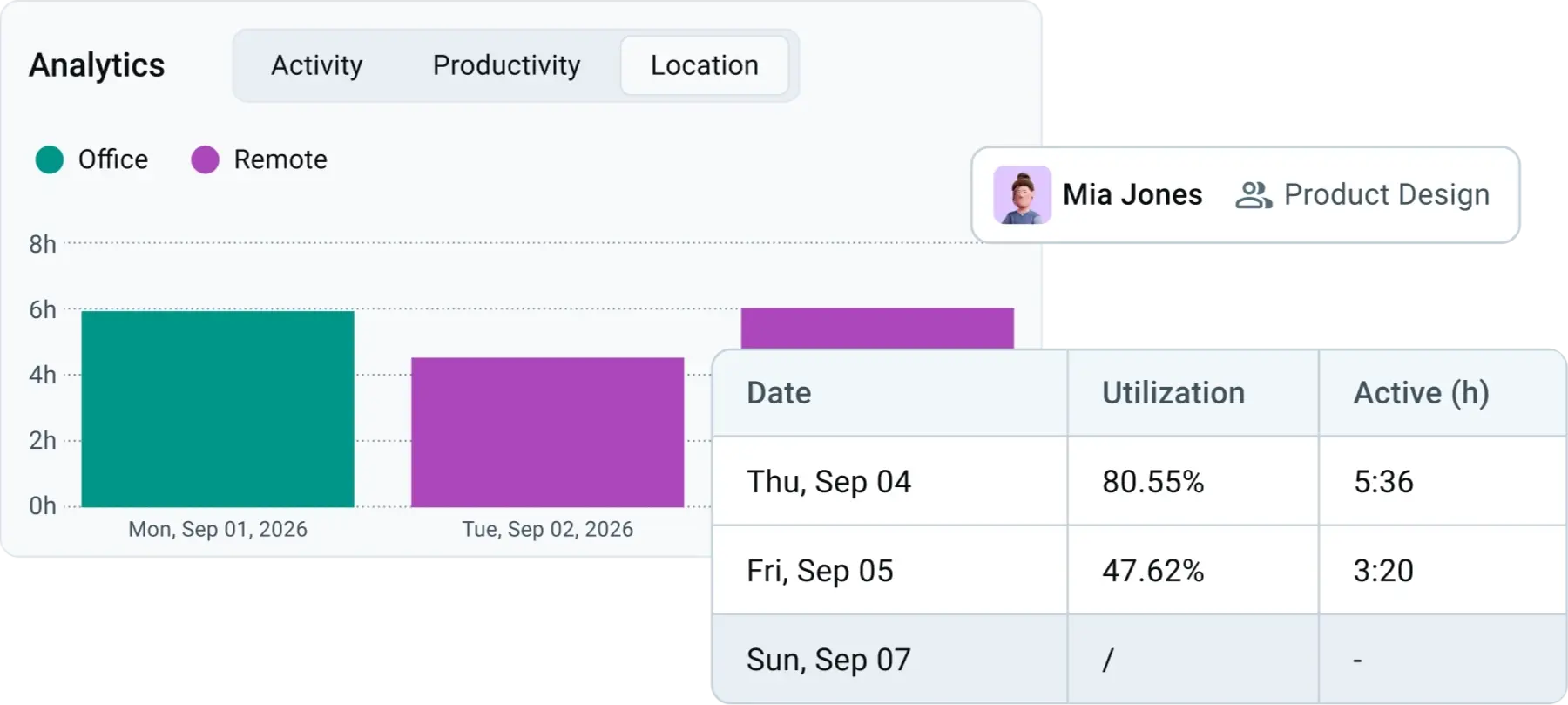
Activity monitoring also gives you an overview of each employee. You can see their:
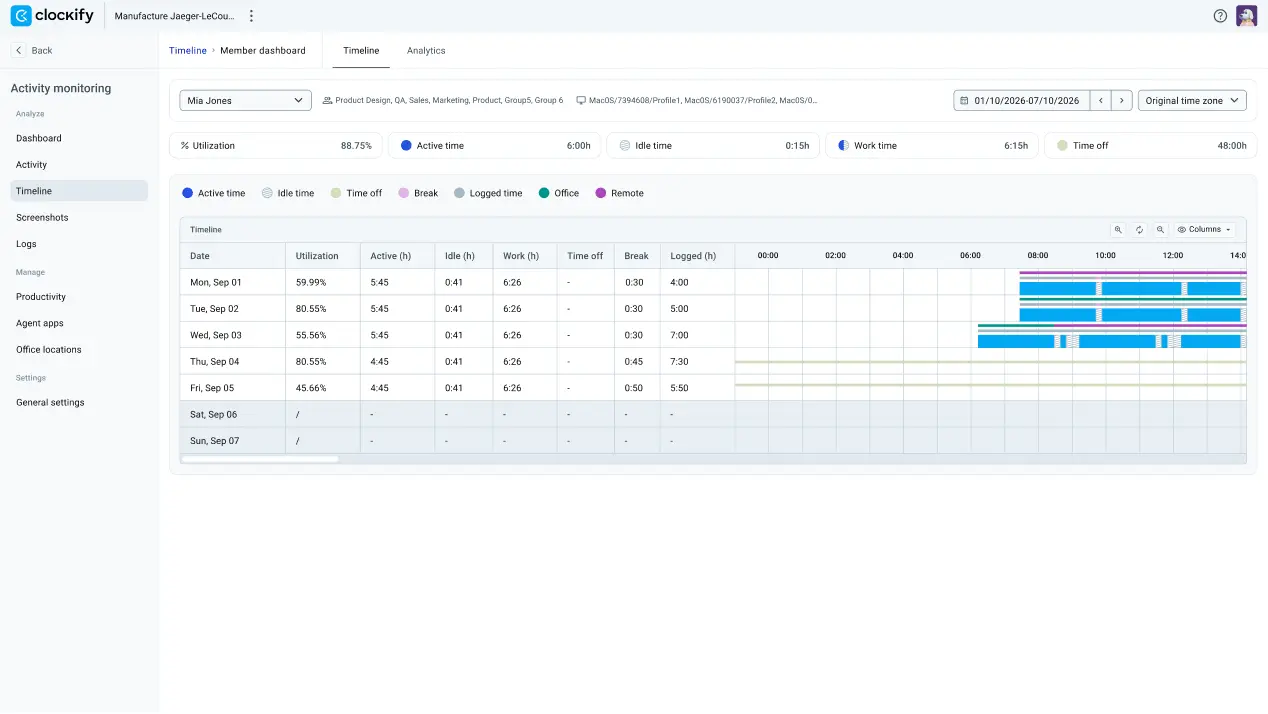
You’ll also see a utilization percentage for each employee, which shows their productivity levels. This employee visibility helps you adjust team (or individual) KPIs, plan work better, and track project progress.
Even if you’re managing a remote team, Activity monitoring lets you review employees’ tracked hours, the websites they’ve visited, and potential overtime hours. This ensures accurate payroll no matter where the team is located.
Clockify is part of the CAKE.com Productivity Bundle, alongside Pumble for internal communication and Plaky for project management.
