

Alex Beadon
Founder of Together We Launch
"We use Clockify to see where our time is going and how to solve any problems. It’s just so beneficial."
More stories

Find new apps that fit you team's needs
Use our time duration calculator to determine the time difference between two dates or times. Calculate the elapsed time with ease and accuracy.
A time duration calculator (or a time span calculator) is a tool that computes the elapsed time between two dates or times. Time duration is typically expressed in units like:
For longer periods, the elapsed time can also be expressed in years, months, and weeks.
A time span calculator eliminates the need for manual counting, ensuring that time calculations are done with complete accuracy.
With our elapsed time calculator, you can compute:
To calculate the number of hours and minutes between two specific times, select the Between two times tab and choose the time format for your start and end times. Start and end times are shown in the AM/PM format (e.g., 04:00 PM) by default. To use a 24-hour format (e.g., 16:00), turn the 24-hour format switch on.
After selecting your desired time format, enter your start time (e.g., 08:30 AM) and end time (e.g., 04:00 PM) in the appropriate fields and click Calculate. As soon as you do that, the result (in this case, 7 hours and 30 minutes) will appear under HH:MM.
Once you click Calculate, our time duration calculator converts your result into decimal hours (in this case, 7.50 hours). The decimal hours are displayed under Decimal.
To start a new calculation, click the Reset button.
To compute the number of days, hours, and minutes between two dates, select the Between two dates tab located beside the Between two times tab. Then, choose the time format for your start and end times. To use a 24-hour format, turn the 24-hour format switch on.
After selecting your preferred time format, put your start date, start time, end date, and end time in the right fields.
When entering your start and end dates, you’ll have an option to select a date from the dropdown calendar. To open the calendar, click the calendar icon inside the date field. Alternatively, you can enter your start and end dates manually.
After inputting your start and end times and dates, click Calculate, and the calculator will display the result in days, hours, and minutes (e.g., 35 days 7 hours 30 minutes) under DD:HH:MM.
Click Reset to start a new calculation.
You can use the calculator below to add or subtract time from a starting time and date.
Calculate a future or past date by adding or subtracting specific time values.
This calculator offers the option to add or subtract days, hours, minutes, or seconds. You can also add or subtract:
To add time to a start time and date, enter your start time (e.g., 09:30:00 AM) and start date (e.g., 07/17/2025) in the right fields. You can either select a date from the dropdown calendar or add it manually. To open the calendar, click the calendar icon inside the date field.
Next, choose the Add option located below the time and date fields. Finally, enter the time you want to add (e.g., 1 day and 2 hours) in the appropriate fields and click Calculate. The result (in this case, 07/18/2025, 11:30:00 AM) will appear in the Result section.
To start a new calculation, click Reset.
The process is similar when subtracting time. The only difference is that instead of the Add option, you’ll choose the Subtract option (located beside the adding option).
To calculate a time span with a break, you’ll need to deduct the length of the break from your time interval.
Say your time duration is 7 hours and 30 minutes, and your rest period lasts for 30 minutes. In this case, you’ll compute your time duration with a break by following the formula below:
Total time duration of 7 hours and 30 minutes - break of 30 minutes = A time duration of 7 hours (plus a break)
So, your time duration with a break equals 7 hours.
If you want to calculate a time duration that includes several breaks, simply add all the breaks and deduct your total break time from your elapsed time.
Again, we’ll say your time duration equals 7 hours and 30 minutes. We’ll also say you had 2 breaks — one 30 minutes and the other 5 minutes long. This means your total break time amounts to 35 minutes (30 minutes + 5 minutes). For the final calculation, refer to the formula below:
Total time duration of 7 hours and 30 minutes - total break time of 35 minutes = A time duration of 6 hours and 55 minutes (with breaks)
To manually calculate your time interval, follow the steps below.
For illustration, we’ll specify 08:30 a.m. as your start time and 04:00 p.m. as your end time. Since your start and end times are in the a.m./p.m. format, you’ll need to convert them to a 24-hour format. For more details, move on to the next step.
For a.m. times, the conversion is simple — just remove the a.m. part. So, in this case, 08:30 a.m. (your start time) becomes 0830.
For p.m. times, add 12 to the hours. Since your end time is 04:00 p.m., when you add 12 to that time, you get 1600 (12 + 4 = 16).
To determine the time difference, subtract the start hours from the end hours. The calculation goes like this:
1600 end hours - 800 start hours = 800 hours
Then, do the same with minutes. Here’s the calculation:
0 (from 1600) end minutes - 30 (from 0830) start minutes = -30 minutes
Since subtracting the minute value of the start time from the minute value of the end time results in a negative number (-30), you’ll need to ‘borrow’ 60 minutes from the hours. The next step shows how.
To complete your time interval calculation, subtract 1 hour from the hours and add 60 to the minutes. This way, instead of -30 minutes, we’ll have 30 minutes (-30 + 60), and instead of 800 hours, we’ll have 700 hours (800-100).
The calculation goes as follows:
800 - 100 = 700 (subtracting 1 hour from the hours)
-30 + 60 = 30 (adding 60 to the minutes)
Therefore, your time interval equals 0730 or 7 hours and 30 minutes.
A time duration calculator is essential for a variety of applications, from professional timekeeping to personal time management.
In the following section, we’ll mention some of the most common uses of a time span calculator and explain them in more detail.
A time duration calculator can be used to determine employee work time, ensuring accurate pay and reducing administrative burden.
Employers and managers use time duration calculators to track:
By knowing the exact number of employee hours worked, managers can minimize payroll errors and compensate their employees fairly.
The elapsed time calculator helps managers better plan and manage their team’s projects. Specifically, using this tool allows them to:
When managers know how much time each task takes, they can distribute the workload more evenly among team members. This helps prevent employee burnout and improves overall productivity.
A time span calculator helps businesses comply with state labor laws, which is vital for effective workforce management.
By tracking employee work hours, breaks, and overtime, employers can meet legal requirements regarding employee timekeeping. This helps them avoid legal penalties.
Moreover, compliance with timekeeping laws ensures a fair treatment of all employees. This way, employers can increase employee engagement and improve workforce management.
A time duration calculator is a valuable tool in event planning, enabling organizers to:
Also, calculating the duration of each event segment (from presentations and workshops to breaks and meals) helps ensure a smooth and well-paced event.
A time duration calculator helps you improve your time management by allowing you to calculate how long it takes you to complete your tasks. This way, you’ll know if you spend too much time on certain tasks, so you can better organize your time and be more efficient.
Additionally, you can use a time and date duration calculator to plan trip durations or track exercise durations for enhanced workout planning.
Let’s see some of the biggest benefits of using a time and date duration calculator.
With a time duration calculator, you don’t have to worry about miscalculations that may emerge when manually computing time spans. This tool determines the elapsed time with utmost precision, whether you’re calculating the duration of a meeting or an event.
Manually calculating time duration can be time-consuming. Using a time span calculator enables you to compute the number of hours and minutes between two given times in a few clicks. This saves you time.
The elapsed time calculators provide valuable insights into how much time you spend on your work tasks. These insights can help you determine whether you’re spending your time wisely or if you could improve your time management.
As per workforce performance research, analyzing time tracking data is crucial for identifying productivity barriers in the workplace. Knowing how much time is spent on different tasks helps managers assess their team’s efficiency. This makes tracking and improving employee performance much easier.
Many time duration calculators offer both 12-hour and 24-hour time formats, allowing for flexibility in terms of how start and end times are presented.
What’s more, certain regions and industries have standardized time and date formats. For example, the 12-hour clock is prevalent in the US and Canada, while most of Europe and Asia prefer the 24-hour format.
Similarly, date formats can vary, with some regions using the MM/DD/YYYY format (the US) and others favoring the DD/MM/YYYY format (most of Europe).
Our calculator will automatically switch to the format you’ve set in your browser or computer settings.
In the next section, we’ll provide answers to some of the frequently asked questions about time span calculators — so read on.
Yes, you can use a time duration calculator to determine decimal hours. After you enter your start and end times in our calculator (the Between two times tab) and click Calculate, the tool automatically converts your result into decimal hours.
For instance, if your time duration is 7 hours and 15 minutes, that will be 7.25 hours in decimal format.
Yes, you can use a time span calculator to compute work hours. Once you enter the times you started and finished working in our calculator (the Between two times tab) and click Calculate, you’ll get the precise calculation of your work time presented in hours and minutes.
Yes, you can get time calculations across different periods when using a time and date duration calculator.
Generally, time and date duration calculators handle calculations for both shorter and longer time spans.
For instance, you can calculate the time duration within the same day (e.g., from 09:00 AM to 05:30 PM), which is a shorter period. You can also compute a longer time interval that includes weeks (e.g., from June 1st, 2025, 08:00 AM to July 10th, 2025, 04:00 PM).
Yes, many advanced time duration calculators can handle different time zones, and some even account for Daylight Saving Time (DST) changes. This is crucial for companies with global teams as it ensures accurate meeting scheduling and clear communication, even when employees are working in different locations.
🎓 How Time Zone Affects Your Productivity
Although the elapsed time calculator can help determine employee work time, it lacks certain features that are necessary for consistent and effective team time tracking.
Compared to the time span calculator, using a powerful time tracker like Clockify as your time tracking solution allows you to:
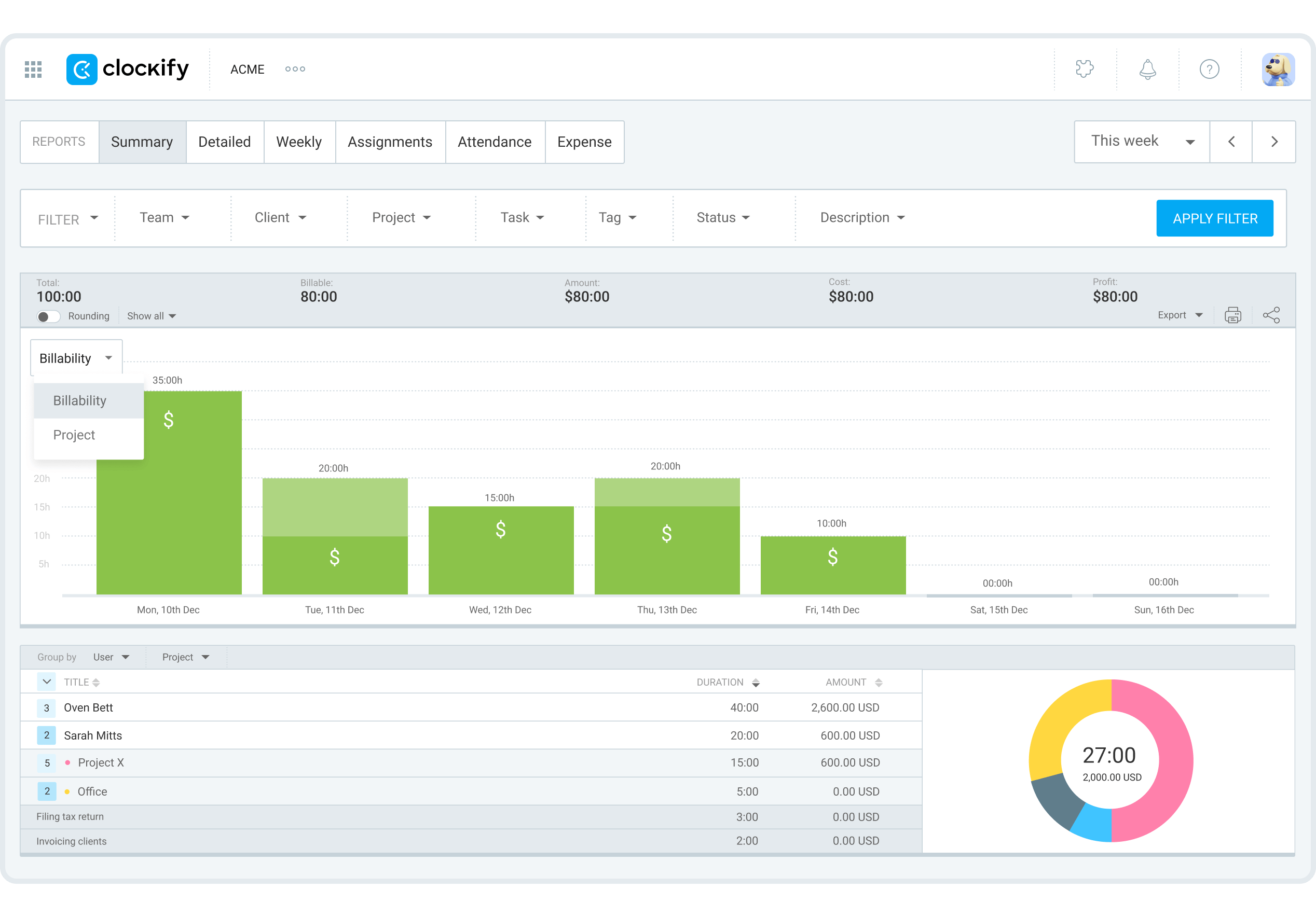
In fact, you can specify the time period and use filters such as:
This allows you to get the exact information you need, like who worked on what, when, and for how long.
Moreover, you can export the reports in PDF, CSV, or Excel, and then send them to your accountant or clients to provide transparency.
To get a real-time overview of team activity, use Clockify’s team dashboard. It shows you what each team member is currently working on, their total tracked time, and their last activity.
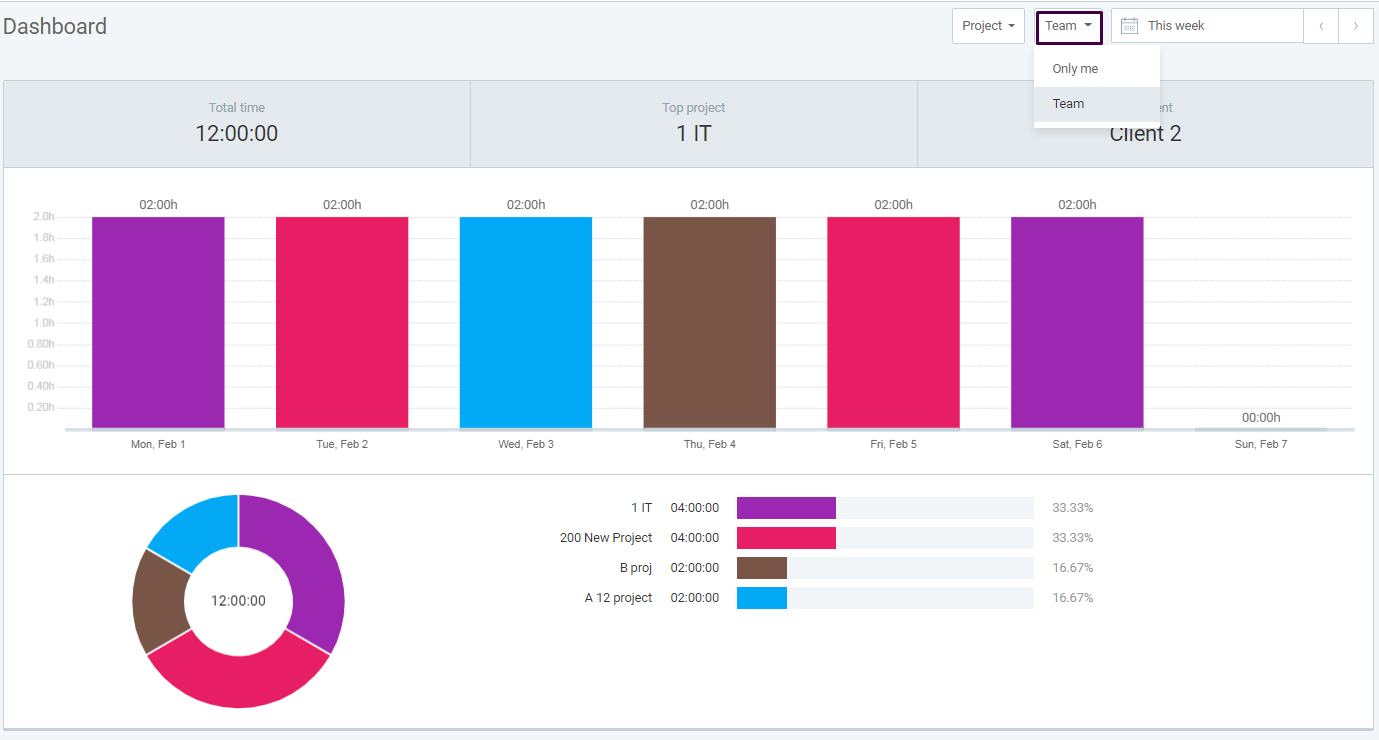
By checking who has tracked the most time, you can identify top performers and reward them for their efforts. This can boost employee morale and encourage continued high performance.
Use Clockify to track and analyze where your employees’ time goes and lead your business to success.
And, if you want to elevate your team’s productivity further, check out CAKE.com’s Bundle!
It includes the Clockify time tracker, plus 2 other fully upgraded tools from CAKE.com — Plaky for project management and Pumble for team communication — at 53% off.

Disclaimer: We hope this calculator/guide has been helpful. We strongly advise you to consult with relevant institutions or certified representatives before taking action on legal matters. Clockify is not responsible for any losses or risks incurred.
