

Alex Beadon
Founder of Together We Launch
"We use Clockify to see where our time is going and how to solve any problems. It’s just so beneficial."
More stories

Find new apps that fit you team's needs
Employee monitoring has moved from a niche IT policy to a mainstream workplace practice. Most employees now work under some form of digital oversight, whether they know it or not.
This article pulls together the latest employee monitoring statistics, so you can walk into a monitoring decision, policy, or conversation with your team armed with real numbers instead of guesswork.

Employee monitoring is now the norm, not the exception, in most workplaces with a digital or hybrid component.
An ExpressVPN survey of 1,500 employers found that 74% use some form of online activity monitoring. Among these employers, 75% also monitor employees physically inside the office.
Additionally, Forbes Advisor’s survey of remote and hybrid US workers found that 43% report their employer monitors their online activity. Monitoring rates differ by work arrangement — 48% of hybrid employees report being monitored compared to 37% of fully remote employees.
Only 32% of monitored employees say their employer gave them formal guidelines or policies about what is being tracked, according to the same Forbes Advisor survey.
🎓 Employee Monitoring: What It Is, Types & How To Do It Right
In its 2026 State of Hybrid Work report, Owl Labs found that 63% of employees believe their employer monitors their work activities. Adoption is also a stated part of company culture change, with 44% of employers adding or increasing employee activity tracking software as a workplace change in 2026 (according to workers).
Workplace monitoring concerns rank near the top of employee worry lists. In Owl Labs’ 2026 report, 41% cite having their work and activities monitored as a top workplace concern. This also varies by generation — 45% of Millennials cite monitoring as a top concern, compared to 35% of Gen X and 29% of Baby Boomers.
The employee monitoring software market itself is projected to keep growing. In that sense, The Business Research Company projects the global employee monitoring software market will reach $8.29 billion by 2030, driven largely by the adoption of remote and hybrid work.
🎓 10 Best Remote Employee Monitoring Software of 2026
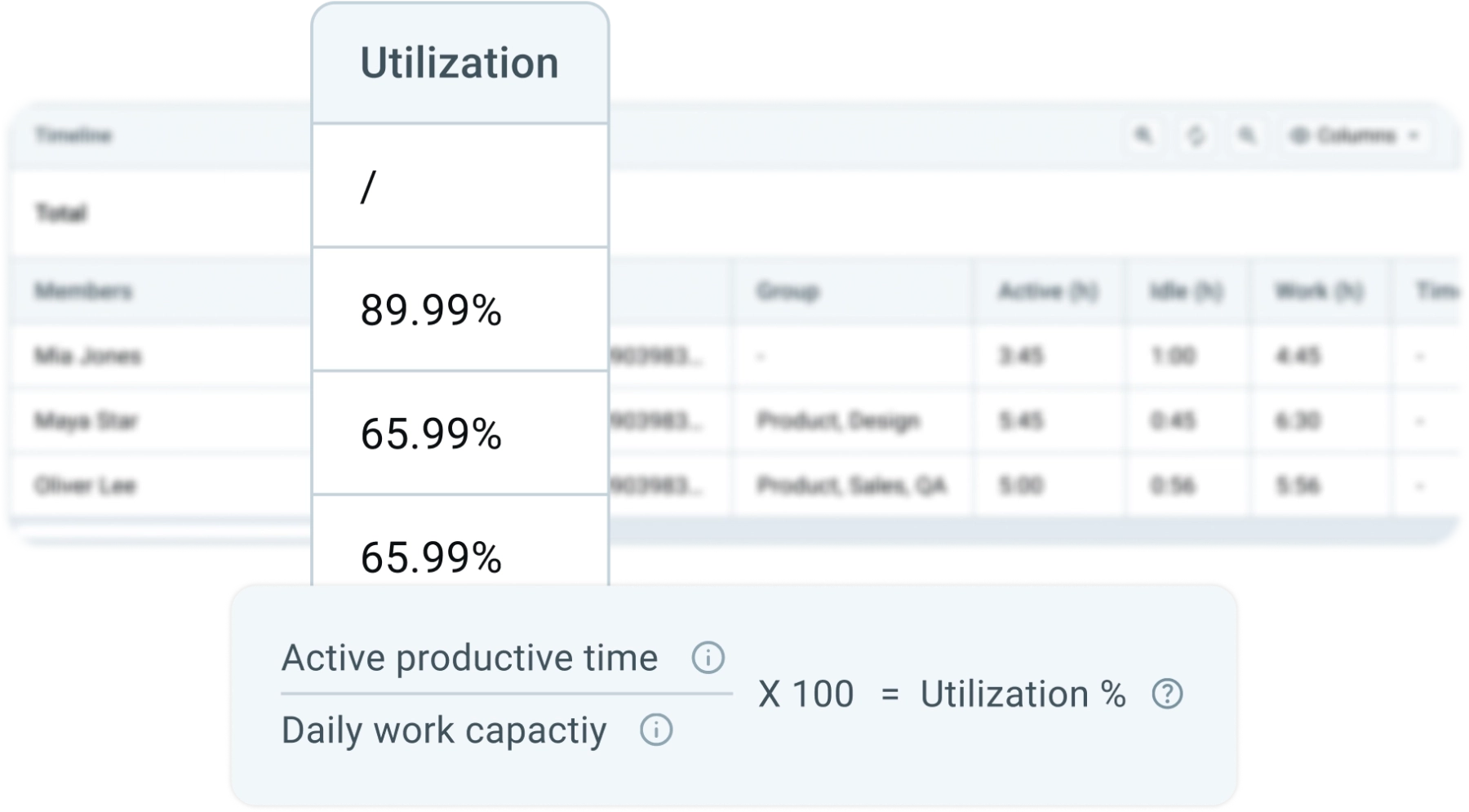
Well-established time tracking and invoicing software like Clockify by CAKE.com also includes an Activity monitoring feature. It tracks visited websites and apps, keyboard and mouse activity, and optional screenshots, then sorts everything into active or idle time, productivity type, and utilization.
Employers track a wide range of digital and physical activity, and the specific methods vary by industry and work arrangement.
According to Forbes Advisor, this is the breakdown of what’s monitored among tracked employees:

ExpressVPN’s employer-side survey found similar patterns: 62% of employers log web browsing activity, and 59% track screens in real time. On the physical side, 69% of employers with in-office staff use video surveillance and 58% use biometric access control systems.
Biometric tracking is a growing category on its own. Namely, 67% of employers surveyed by ExpressVPN use some form of biometric tracking, while 61% use AI tools to employee performance.
On the other hand, Owl Labs asked employees what they believe is being tracked specifically, rather than employers. The top guesses were:
A perception gap exists between what employers disclose about monitoring and what employees believe or know.
ExpressVPN’s survey found that 86% of employers say they disclose their surveillance practices to staff. Yet 50% of employees suspect they’re being monitored without confirmation, while 44% are unaware whether employers use biometric surveillance at all.
The perception gap extends to expectations around transparency. Thus, 84% of employees believe employers should be legally required to disclose monitoring practices, per Owl Lab’s 2026 report. More broadly, 80% of surveyed workers in the ExpressVPN study support stricter federal or state regulation of workplace surveillance.
Generational differences shape how the perception gap plays out. According to a Cisco Privacy Awareness survey, 49% of employees aged 25–34 qualify as “Privacy Actives,” meaning they actively manage their data exposure, compared to just 33% of employees aged 45–64.
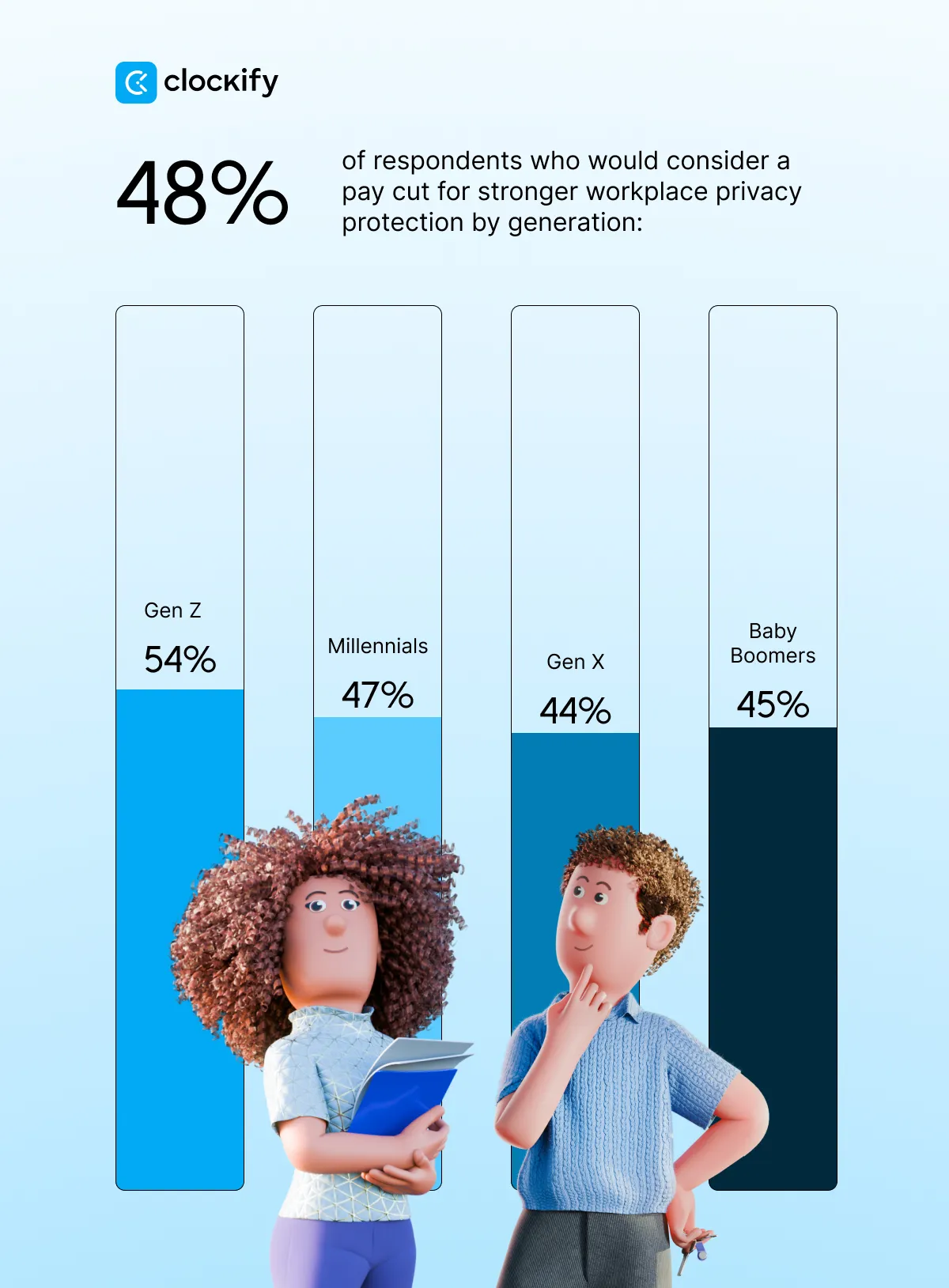
Additionally, a Checkr survey about Americans’ concerns for online safety found that 65% of employees view employer monitoring of online activity as an invasion of privacy or are on the fence about it. That figure breaks down by generation as:
What’s more, 48% of respondents said they would consider a pay cut in exchange for stronger workplace privacy protections.
As Mirna Huhoja-Dóczy, a PR and marketing consultant and founder of Bits of Brand, puts it, it’s important for employees to know how their tracked data will be used:

“I’d want any employer introducing monitoring to explain what’s being recorded, who can see it, and what they’ll do with it.”
Remote and hybrid work arrangements are the biggest driver of the current monitoring surge, since employers can no longer rely on physical presence as a proxy for productivity.
That said, the US Career Institute remote work statistics noted that by the end of 2025, an estimated 36.2 million Americans (or 14% of the US adult population) were expected to work from home — up from 22.5 million in 2023.
As remote work has grown, so has employer reliance on monitoring technology to track out-of-sight employees. Forbes Advisor’s data shows hybrid employees are monitored at a higher rate (48%) than fully remote employees (37%), which likely reflects the mix of in-office and remote monitoring tools hybrid employers deploy across both settings.
Not all monitoring approaches to remote teams produce the same results. Harvard Business Review’s research on remote workforce distinguished between:
The research found that observational monitoring makes employees less likely to speak up and share ideas, an effect that’s 3 times stronger among employees in complex roles such as software engineering, product design, and strategy consulting.
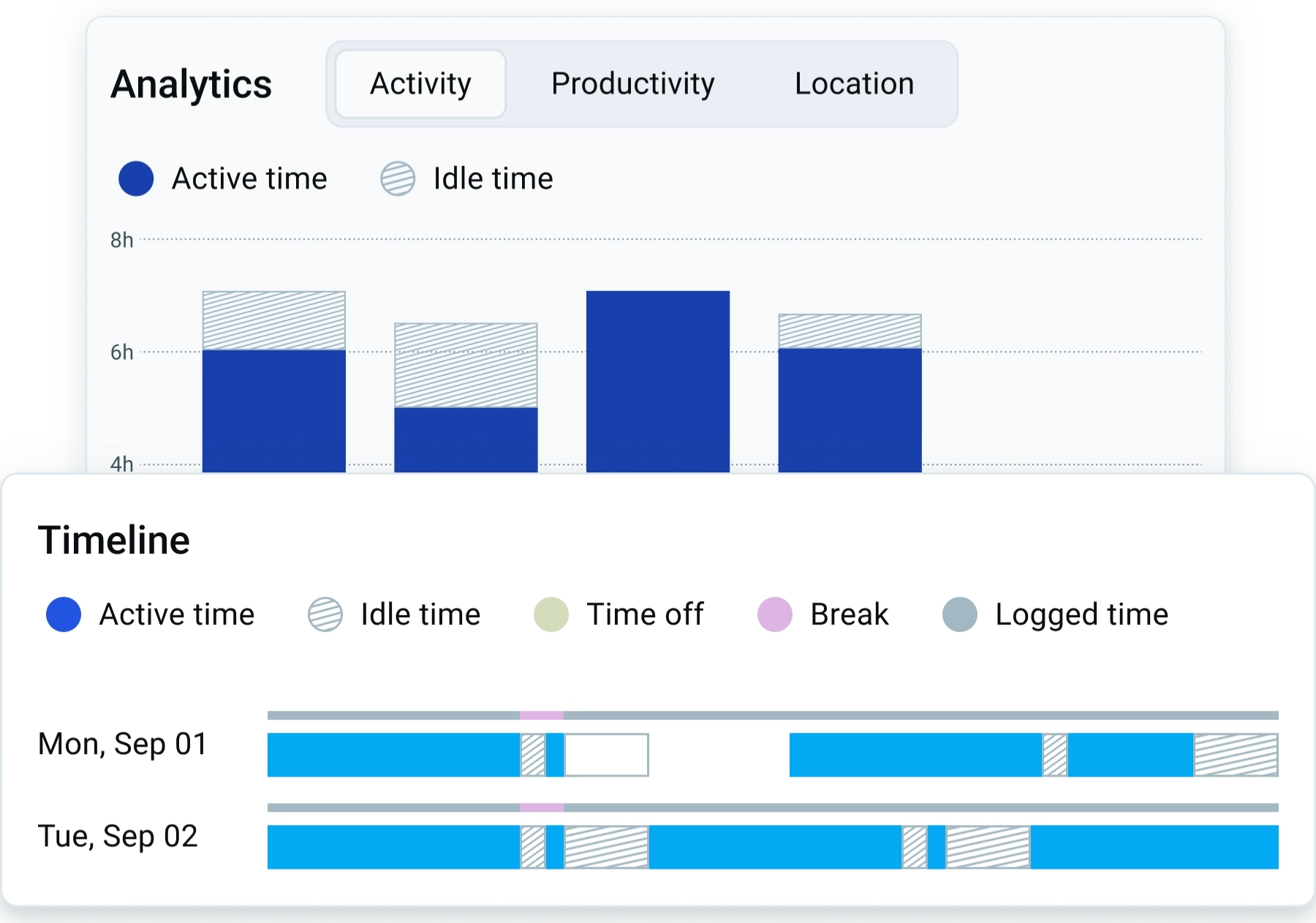
Not all monitoring has to be invasive, however. For instance, Clockify’s Timeline shows managers a chronological view of tracked activity, split into active and idle time, utilization, breaks, and logged time, so they can see how a workday actually unfolded. Instead of watching someone’s screen, managers look for patterns, like long stretches of idle time, a task that keeps running over, or a team member carrying too much work.
🎓 Remote Team Monitoring: How To Track Activity Without Losing Trust
Product Manager at CAKE.com, Bojana Lazarević, explains what proper activity monitoring means for both employers and employees:

“Successful activity monitoring should never be about just watching people. It’s really about replacing guesswork with operational clarity, giving leadership realistic insights and corporate security, while freeing employees from the burden of constant self-reporting.”
Monitoring has measurable effects on employee stress, morale, and behavior — not just on productivity metrics.
Forbes Advisor’s survey found that 68% of monitored employees feel embarrassed about at least one thing they know their employer has seen. Most commonly, these are personal messages (37%) or job-searching activity (27%). The psychological toll shows up in several ways:Coping behaviors are also common, so 25% of monitored workers admit to appearing online while doing non-work activities, 11% use anti-surveillance software, and 9% actively try to trick monitoring tools.
🎓 How To Monitor Employee Computer Activity the Right Way
An ExpressVPN survey on quitting over surveillance found comparable avoidance behavior:
The trust cost is high for retention. The same ExpressVPN study found that 49% of surveyed employees say they would consider leaving their job if workplace surveillance increased. Similarly, 27% of Forbes Advisor’s respondents say they’d be at least somewhat likely to quit over monitoring.
And according to Zety's Workplace Monitoring Report, 1 in 9 employees have already quit a job specifically because of intrusive monitoring, with another 1 in 6 workers having seriously considered it. About 90% of respondents believe strict activity-reporting policies negatively affect the workplace, citing:
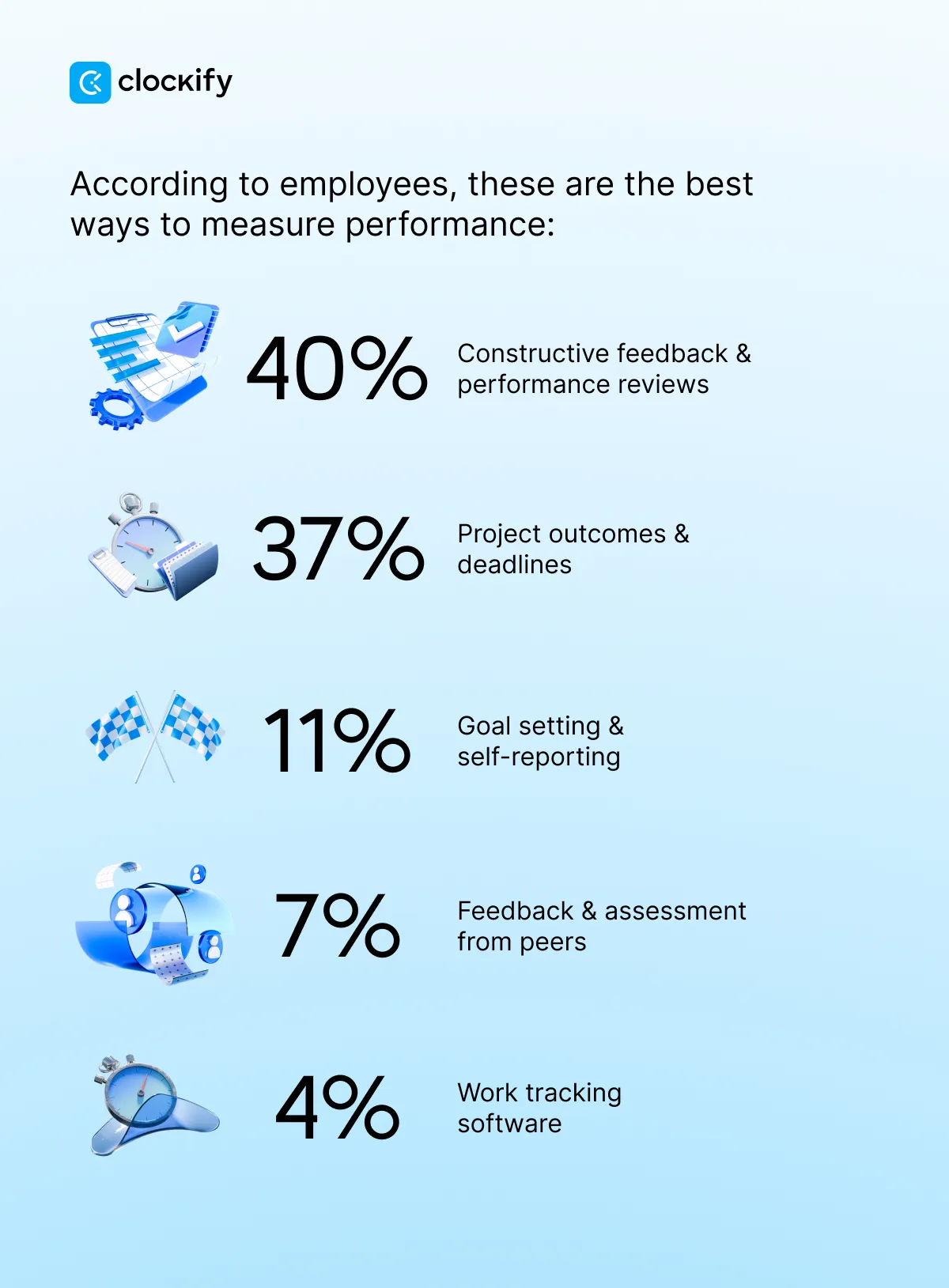
Monitoring can still respect privacy though. In Clockify, screenshots are blurred by default and they stop automatically when someone’s idle. Only admins can view the tracked data. Managers can then use that data to make performance reviews more concrete. Utilization percentages and Monitoring Dashboard give specific examples to discuss, while screenshots work as a second check when the numbers look off.

Regulation of workplace monitoring remains inconsistent across jurisdictions. At the state level in the US, several states now require employers to disclose electronic monitoring practices to employees, and momentum toward broader disclosure requirements continues.
Federal law is thinner than most people assume. The main statute, the Wiretap Act, only bans intercepting phone calls, emails, or messages without one party’s consent, according to a September 2025 US Government Accountability Office (GAO) report on digital surveillance. It doesn’t cover most tracking software, screen monitoring, or location devices. State laws fill some of the gap with consent and disclosure rules.
🎓 Employee Monitoring Laws: 2026 Compliance Guide for Employers
The same GAO report found that monitoring’s effects depend on how it’s used. Safety-focused monitoring tends to help, while productivity-focused monitoring tends to backfire.
Federal guidance has been rolling back, not expanding. Since January 2025, the National Labor Relations Board, Department of Labor, Equal Employment Opportunity Commission, and Consumer Financial Protection Bureau have rescinded (or have been reviewing) prior guidance addressing surveillance, algorithmic management, or AI-based worker scoring, per the same GAO report.
Recent court activity illustrates the legal exposure employers face when monitoring crosses into overreach. For instance, in Falsch v. Fitch Solutions, an employee successfully argued constructive discharge tied to algorithmic monitoring pressure.
Also, Pew Research data on AI-specific monitoring shows why public opinion continues to pressure regulators:
🎓 The State of AI in the Workplace Statistics 2026
Employee monitoring today spans several distinct categories of tools, often used in combination rather than in isolation:
Since monitoring software adoption often ties back to broader workforce management needs, many organizations rely on tools that track average work hours and working days per year to set realistic monitoring baselines, and reference average hourly rates when evaluating monitoring costs against productivity gains.
🎓 Free Hourly Rate Calculator | Performance Rating Calculator & How To Use It
Monitoring works when it’s disclosed, scoped to what actually matters, and built around fair benchmarks. It backfires when it’s covert, measures everything indiscriminately, or is applied without accounting for how people work.
This is where Clockify's Activity monitoring can help employers and employees meet halfway:
That said, the gap between employer disclosure and employee awareness, which shows up in the stats above, seems like a design choice, not an unavoidable cost of monitoring software.
According to Clockify data, only 18% of US businesses tracked PTO and leave with a dedicated time-off feature, while only 17% tracked their holidays separately in 2025.
Let’s go over some of the commonly asked questions about employee monitoring.
Employees can’t always tell whether they’re being monitored. After all, 50% of employees in the ExpressVPN survey say they suspect monitoring without confirmation, and 44% are unaware whether biometric surveillance is used on them. Employers are legally required to disclose some forms of monitoring in several US states, but disclosure practices vary widely.
Yes, your boss can watch you on camera at work — as long as cameras are placed in common work areas rather than private spaces like restrooms, and as long as any state-specific consent or disclosure requirements are met. In fact, 69% of employers with in-office staff use video surveillance, per ExpressVPN.
Common examples of employee monitoring include:
🎓 How To Monitor Employee Productivity in 6 Steps (+ Metrics)
Opinions on how ethical employee monitoring is are split. Forbes Advisor found that 59% of employees believe workplace monitoring raises ethical concerns, while Zety found that 36% believe employers have a right to monitor and 43% say it depends on the role or industry.
To learn whether you’re being monitored at work, you can:
Only 32% of monitored employees in Forbes Advisor’s survey received formal guidelines about what’s tracked, so asking directly is often the most reliable method.
